Turn MySQL Tables into Visual Schema Fast
30sShows a quick, satisfying transformation from plain data to a visual diagram, appealing to developers who dread manual diagramming.
▶ Play Clip"Title promises a visual schema and delivers exactly that—a straightforward, no-frills tutorial."
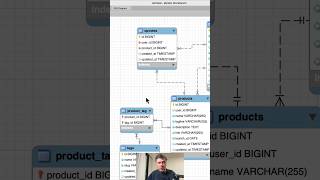
This video demonstrates how to create a visual database schema from an existing MySQL database using MySQL Workbench's reverse engineering feature. The process involves connecting to the database, selecting it, and generating a diagram that can be customized and exported.
The video aims to show how to generate a visual representation (schema) of a MySQL database using MySQL Workbench, using a local Laravel project database as an example.
In MySQL Workbench, choose 'Database' > 'Reverse Engineer', fill in connection credentials, select the target database from the list, and the tool detects the MySQL tables.
After clicking execute, the schema appears on screen. Users can drag and drop tables, adjust relationships, and export the diagram as an image or other formats.
MySQL Workbench's reverse engineering feature provides a quick and easy way to visualize an existing MySQL database schema, which can then be customized and exported for documentation or analysis.
What feature in MySQL Workbench is used to create a visual schema from an existing database?
Reverse Engineer
00:16
What are the steps to reverse engineer a database in MySQL Workbench?
Choose Database > Reverse Engineer, fill in credentials, select the database, click execute.
00:16
What can you do with the generated schema in MySQL Workbench?
Drag and drop tables, adjust relationships, and export the diagram as an image or other formats.
00:32
Reverse Engineering is Key
This is the core technique that enables automatic schema generation, saving time compared to manual diagramming.
00:16Customization and Export
The ability to modify and export the schema makes it practical for documentation and sharing.
00:32[00:00] You have a MySQL database and you want to create such visual representation schema, it's easy to do with MySQL Workbench. So here I have a local MySQL database for my Laravel project, and I will try to generate this visual schema. In MySQL Workbench you choose database reverse
[00:16] engineer, then you fill in the credentials to connect to your database, then you choose your database from the list, it detects MySQL tables, and then you click execute, and you get the result on the screen, and from there you can drag and drop tables, relationships, and make changes,
[00:32] and then export that diagram into image or whatever other format.




⚡ Saved you 0h 00m reading this? Transcribe any YouTube video for free — no signup needed.