
No Frontend API Starter Kit?
44sHigh curiosity about a new Laravel starter kit that breaks the norm by focusing only on APIs, appealing to developers who dislike frontend bloat.
▶ Play Clip"The title promises a new API starter kit and the video delivers exactly that, with a clear demo and honest discussion of limitations."
This video presents an unofficial Laravel API Starter Kit, created with the help of Claude AI, for developers who want to build APIs without a frontend layer. The kit includes authentication via Laravel Sanctum, API versioning, and built-in documentation, offering a streamlined alternative to the official starter kits.
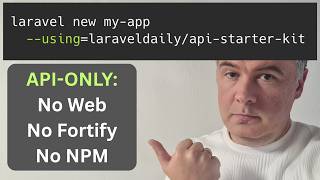
The video introduces a new project: an unofficial Laravel API Starter Kit, designed for developers who want to release an API without a web layer. The official starter kits (React, Livewire, Svelte) don't include an API-only option, and the core team is working on one for 2026, but this kit is available now.
The kit was built using the Fable 5 Cloud model (Claude) for implementation and a heavy planning session with Claude Opus. The creator spent several hours planning and discovered that building a starter kit involves many decisions.
The goal was to create a project with no frontend, no NPM deployment, and no Fortify dependency, giving the developer full control over authentication. The result is a project focused solely on API functionality without unnecessary files or terminal commands.
You can run 'Laravel new' using this starter kit. During installation, you'll be asked to choose a starter kit and whether to use NPM. Currently, you must manually select 'no' for NPM, but a commit in the Laravel installer's main branch will eventually remove this prompt.
Running 'route:list' (excluding vendor) shows the project's routes. There's an API v1 prefix for all routes, including auth routes using Laravel Sanctum. There's also a web route for a homepage that returns JSON with a link to the documentation.
The starter kit includes documentation via Scramble. The homepage returns JSON with a link to this documentation, which is a key feature for API developers.
Public routes include register, login, forgot password, and reset password, each with throttling. Non-public routes (protected by auth:sanctum) include getting the user, logout, and token management (e.g., logging out other devices).
The kit uses API v1 by default, with a route prefix 'v1' and corresponding controller namespaces. This makes it easy to create a v2 in the future by adding a new routes file and adjusting the bootstrap configuration.
The video demonstrates the full auth cycle: register a new user to get a bearer token, then use that token for subsequent requests (e.g., get user). You can also login to get a new token, and manage your account (update, change password, delete).
Most auth features are ported from Laravel Fortify, but the creator chose to keep them outside of any package dependency. Fortify is seen as a convenience for the core team to manage multiple starter kits, but for a single custom kit, it's an unnecessary burden.
The kit is unofficial, created by the video author and Claude. The creator kept Claude's contribution username. A premium 14-minute video covers more topics like rate limiting, documentation with Scramble, and token management.
The creator asks viewers for their opinion on the kit, whether they would use it, and what features they'd add or remove. He's also looking forward to the official API starter kit in 2026.
The video presents a practical, community-driven solution for Laravel developers who need an API-only starter kit. It's a solid, functional kit that fills a gap in the official offerings, and the creator encourages feedback and forking to adapt it to individual needs.
What is the main purpose of the Laravel API Starter Kit presented in the video?
To provide a starter kit for building APIs without a frontend layer, with full control over authentication.
01:10
Which AI model was used to build the starter kit?
Fable 5 Cloud model (Claude) for implementation and Claude Opus for planning.
00:27
What is the default API version prefix used in the starter kit?
v1
04:04
Which Laravel package is used for API authentication in the starter kit?
Laravel Sanctum
03:01
Why did the creator choose not to use Laravel Fortify?
Because Fortify is a convenience for the core team to manage multiple starter kits, but for a single custom kit, it's an unnecessary burden.
06:01
What is the current workaround for the NPM prompt during installation?
Manually choose 'no' when asked about NPM, until the Laravel installer releases a commit that removes the prompt.
02:08
What documentation tool is included in the starter kit?
Scramble
03:15
What are the public authentication routes in the starter kit?
Register, login, forgot password, and reset password, each with throttling.
03:30
What is the purpose of the token management feature?
To log out other devices by managing tokens.
03:45
When is the official Laravel API starter kit expected to be released?
Sometime later in 2026.
00:15
API-only starter kit concept
Fills a gap in the official Laravel starter kits, which lack an API-only option.
01:10NPM prompt workaround
Highlights a current limitation in the Laravel installer and a planned fix.
02:08API versioning strategy
Shows a practical approach to versioning APIs in Laravel, which is a common need.
04:04Why avoid Fortify
Provides a clear rationale for avoiding a package dependency in a custom starter kit.
06:01[00:00] Hello guys, in this video I want to present to you my new project released, it's Liable API Starter Kit, which is not available in the official starter kits, there are only ReactView, LiveLayer and recent Svelte version,
[00:15] but nothing for people who want to release just API without the web layer at all. And I know the core team is working on API starter kit version to be released sometime later in 2026,
[00:27] but I decided not to wait and asked Fable 5 Cloud model, which was still available at the time last week, to build me a StarDraket. So in this video I will show you how it works, what are the features inside, it's already released and you can use it.
[00:44] And also in addition to this video on this channel I'm publishing at the same time another video on my Native PHP Daily channel about the client native PHP app that would use the API built with this starter kit.
[00:58] And also I'm publishing both videos at the same time. I should be on stage of Laravel Lite UK talking about starter kits in general. So this is where that whole idea comes together.
[01:10] Now, API starter kit. The idea was basically this. No frontend, no NPM deployment, no Fortify, because I prefer to be in full control of the auth. basically the project that is only for API without unnecessary files or terminal commands.
[01:27] And it was almost successful. So I spent a few hours planning that, so that Cloud Table 5 model was used for implementation, but for planning mode, it was quite a heavy session with Cloud Opus.
[01:40] And along the way, I discovered that it's not that simple to build a starter kit. A lot of decisions along the way. But let me show you what I ended up with. So, you can run Laravel new using this starter kit,
[01:52] and this is what you will get Let me demonstrate You choose past you choose Laravel Boost let choose no at the moment for a shorter video and then it doing almost the same thing as a general regular starter kit and this thing was a problem
[02:08] Along the way, I discovered, or Claude discovered, that it's not possible currently to work around this question. So I wanted to totally ignore that, but manually you need to choose no.
[02:21] Interestingly, in the official Laravel installer there is a commit in the main branch for no node options, so I would need to adapt that in the starter kit as well to totally avoid
[02:33] node and npm things, but at the moment it's not released in the official version, it's on the branch of main, but the latest release of Laravel installer was before that. But at some point this will be released, I hope pretty soon.
[02:48] But for now you will still get asked for NPM and you choose no. OK, we have our API. What's inside? And the best way to understand what's inside is to run route list, accept vendor and these
[03:01] are the routes in the whole project. API v1 and then everything related to auth of API using Laravel Sanctum. Here there is routes web with homepage which also returns JSON with the link to the documentation.
[03:15] So, if you launch that in the browser, you will see something like this. And documentation with scramble is the part of that starter kit. But I will get to that a bit later. But the main thing in the routes API is this.
[03:30] So public routes to register, login and forgot and reset password with throttling. And throttling may be different for each of them. And then the non-public routes for getting the user, logout and getting the tokens.
[03:45] managing the tokens to log out other devices. So, for example, in postman if we launch that get user while being not logged in we get message unauthenticated 401 as expected And as you can see along the way this was one of the decisions i had to make with planning session with cloud
[04:04] code v1 by default so there's route prefix v1 for all of the routes in the current starter kit but it's pretty easy to change and it's pretty easy to create v2 in the future potentially
[04:18] creating API v2 routes file. So as usual Laravel makes it pretty configurable either here directly or in the bootstrap app you can also customize global stuff. But for this starter kit I made a decision to go with v1 including
[04:33] the namespaces of controllers in this case and if you go for example inside of auth controller you have register request which is form request also with d1 namespace. Now let me show you the full kind of cycle of authentication, because a lot of those
[04:49] starter kits are about authentication. So here's how it works in Postman. So you register with new user, and you get the bearer token. So this is the result. You have the token, and then you use that
[05:02] token for all the other requests to the endpoints of API. So I will copy that one, and then, for example you can get the user now the same endpoint as we used previously without the data but with
[05:18] authorization bear token this is how it works in postman i've pasted that token and then i send and i get the data for my logged in user and then on top you can add your own routes in the routes
[05:32] api here for actually features of your app and this is protected by auth sanctum middleware Also, we can then login with the same user and password we sent and we get a new bearer token to work with.
[05:47] Also with a logged in user you may perform more operations for these other ones And if we go to that user controller we have update with the user resource returned also update password or destroy your own account
[06:01] Most of those things are actually ported from Laravel Fortify, I just personally wish to have it outside of any package dependency. Fortify is basically, in my opinion, is a glue between all the possible Laravel starter kit flavors,
[06:17] so this is kind of convenience for the core team to manage it all. But if I have my own one starter kit, then Fortify is kind of unnecessary burden, in my opinion. Again, there's nothing specifically wrong with Fortify.
[06:30] It was actually created from what I remember when Jetstream and Breeze starter kits were released, and then Taylor had a problem how to make that auth work in both. So that's how Fortify was born in the first place.
[06:44] So yeah, these are the main auth functions of API starter kit, unofficial by myself and Claude, I didn't remove that contribution username of Claude, and you can read the full documentation, I will link that in the description below, and also I've shot a premium longer
[07:00] video discussing more topics of that API starter kit, so 14 minutes video is for premium members of Laravel Daily, where I discuss weight limiting, documentation with scramble, features like
[07:13] reset password and forgot password and also token management to log out other devices. So the link to that premium longer video will be in the description below. But what do you think about that API starter kit?
[07:25] Is it good? Would you use it? And you can of course fork it and do your own changes or what other features more or maybe less features you envision in a typical API starter kit.
[07:38] I'm looking forward to the official Starter Kit 4 API as well later in 2026, and I'm curious to from the visions and the features. As usual, we can discuss all of that in the comments below.
[07:50] That's it for this time, and see you guys in other videos.
⚡ Saved you 0h 07m reading this? Transcribe any YouTube video for free — no signup needed.