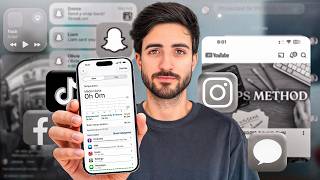

6 Hours Screen Time = 91 Days a Year
40sThe shocking statistic that 6 hours daily screen time equals 91 days per year creates an immediate, relatable urgency for viewers.
▶ Play Clip"Title accurately reflects the content: a personal story of overcoming phone addiction with actionable steps."
Gabriel Ferreira shares his journey of reducing screen time from 6 hours to 2.5 hours per day, recovering 53 days per year. He provides practical strategies to overcome phone addiction, including using a physical alarm clock, a wake-up light, and app-blocking tools like Brick and Roots.
Gabriel realized he spent 6 hours daily on his phone, equating to 91 days per year. This motivated him to change.
He now averages 2 hours of screen time, recovering 53 days annually for business and loved ones.
Phone and social media addiction is engineered by companies to exploit dopamine spikes.
He applied changes gradually, trying different methods and keeping what worked.
He used to spend 30 minutes scrolling in bed. He tried putting phone in another room, then a physical alarm clock, and finally a vibrating wristband.
A wake-up light simulates sunrise, allowing natural waking without phone. Combined with emergency contacts bypass, it solved the issue.
Brick is a device that blocks distracting apps during set times. He keeps it in his office and only unlocks when ready to work.
He avoids touching his phone until starting work. He washes face, brushes teeth, has breakfast first.
Having phone in sight reduces cognitive capacity. He keeps it outside the office in airplane mode.
He uses a work app on computer for urgent calls, and schedules calls for end of day.
He suggests using phone for educational content like free courses from XTB on investing.
He uses Roots app to block leisure apps during work, with options for short unlocks. OneSec app adds a delay before opening distracting apps.
He replaced phone timer with a physical timer, and uses notebook for notes.
He turned off all social media notifications to reduce temptation.
By gradually implementing these strategies, Gabriel transformed his relationship with his phone, gaining back time for meaningful activities. The key is to find replacements and use blockers to break the addiction cycle.
How many days per year did Gabriel spend on his phone at 6 hours daily?
91 days
00:02
What is the Brick device used for?
To block distracting apps during set times.
07:04
What does the wake-up light simulate?
Sunrise to wake naturally.
05:45
What app does Gabriel use to add a delay before opening distracting apps?
OneSec
14:53
What is the rule of habit replacement?
Replace bad habits with good ones, e.g., replace phone timer with physical timer.
13:37
How does Gabriel handle work emergencies without his phone?
He uses a work app on his computer that rings for urgent calls.
10:05
What is the cognitive effect of having a phone in sight?
It reduces cognitive capacity because part of brain energy is used to avoid picking it up.
09:20
91 Days Lost
Shocking statistic that motivates change.
00:02Addiction Engineered
Reveals how companies design apps to exploit dopamine.
01:10Phone in Sight Reduces Cognition
Scientific backing for keeping phone away.
09:20Replace Boredom with Learning
Practical tip to use phone for education instead of mindless scrolling.
11:12Remove Triggers
Simple but effective: turn off notifications.
16:00[00:02] phone, but I didn't realize how serious it was. that six hours a day equals 91 whole days a year that I was insane. And I knew this had to change. So I set to work
[00:15] naturally drawn-out person like myself, who spent a lot of time procrastinating, I head against the wall many times before I found what works for me. And no, I didn't delete the social media apps from my phone; they're still there, and
[00:28] go to extremes. Today my average screen time is 2 hours a day, and I 've recovered 53 whole days in my year to do whatever I want, instead of remember what I was watching tomorrow. And now I can use this
[00:42] more, to invest in my business, and to have more time for the people I love. true. And that's exactly how it is. So today I decided to show you everything I screen time from 6 hours to 2 and a half hours. When I say that my life has
[00:56] difference. Thank you for taking this step, and I hope yours Hello, my name is Gabriel Ferreira, I study ways to make money online, have a better life. I'd like to take this opportunity to thank XTV for
[01:10] about them later. So the addiction to mobile phones and social media is real. this exercise. Convert your average daily screen time into days per year, and you'll see how many days you 're spending looking at a screen. And it's
[01:24] like, it's shocking, it's usually shocking. And it's amazing how addictive this wait 30 seconds for something to happen on my computer, for with me, I would instantly pick it up , start scrolling, and only realize what was happening
[01:36] And even when I realized I was wasting time, sometimes it was "Dude, just five more scrolls and it's over. After these five, there are no more." Yes, it really is sick and this doesn't happen by chance. These companies study your
[01:49] dopamine spikes, so that you want to stay glued and
[02:39] our time. And maybe you should start thinking about what you would do with a few more Now, before we get down to business, to give you some insight, I'm going to in my life. But I applied it gradually; don't try to do everything at
[02:53] very confusing. Try a few, if it works, keep doing it. If it didn't work, step by step. First step, waking up. Who grabs their if necessary, I would cling to him for half an hour instead of starting my
[03:08] I don't think you've ever seen it. This is our temporary room because we finish some renovations at home. But for now, this is where I sleep every I woke up, I'd pick up my phone and spend at least 30 minutes of my day
[03:21] scrolling and looking at things. This made my day begin with my energy already depleted. So this was a long process. I've everything I've tried and what currently works for me. And
[03:34] I'll start by saying, well, I don't want to be in the middle of the night or waking up and feeling like, well, there might be a call or a message coming in. So, first of all sleep mode. Therefore, I always choose this sleeping mode here, and I
[03:47] 'm sure, at least, that nobody will disturb me while I sleep. But even so, this didn't stop me from waking up and checking my phone. They which was already a good first step. So, what did I try doing
[03:59] n't vibrate anymore, so I'm going to put my phone far away from me, I don't know, in another room or somewhere to get it, and then it rings, so I have to get up, pick it up I start my day. But even so, it kept wandering around, fiddling with my phone,
[04:13] managing to distract me for a few days, so I replaced the phone with tried was replacing it with a physical alarm clock; that is, it would ring, I had to get up, turn it off, and, for example, leave my cell phone on the
[04:27] desk where I went to work. So, I already had to move around, man, it was different. The problem is that I have Paulinha next to me, and this wakes me up and wakes her up, and once she wakes up she can't fall back
[04:39] get up earlier, which was the case when I was using this, I nowadays, even Paulinha usually wakes up earlier than wasn't this one at the time, but I have this here that's kind of like a [ __ ], it's not a [ __ ], but it's kind of like
[04:51] a [ __ ] that basically measures heart rate, sleep, all that stuff. And I didn't have this one, but it was a similar one that vibrated on my start vibrating and that was it. I could leave my phone
[05:05] wake anyone up, it only vibrated on my body, so everything was fine. still use this body vibration, for example, I have to wake up earlier tomorrow than my body is used to, and well, I leave this alarm clock as an emergency one, and
[05:19] I realized that, well, if Paulinha sees even a little bit of light in the room, she wakes up . No, I'm used to sleeping with the light on, it's peaceful. So she always needed to have everything closed. The problem is that with everything closed off, if I don't
[05:31] wake up as relaxed, or as peacefully, or as naturally, at a solution that would work. So this solution had to allow me to phone, while also allowing us to select the time when I
[05:45] we bought this scene, which is going to be a little strange. I'll show you how it Wake Up Light. Basically, what happens is that at a certain time, which we can pre-set, it simulates sunrise and the whole room is
[05:58] lit up. So instead of saying " wake up at 9:30" or "8:30," this lets you select a range, for example, 8:30-9, which will sunrise. We've managed to combine the best of both worlds here, or rather, several
[06:12] worlds: I can be away from my phone and I can have natural light coming into the room, and there's no need to worry about sound, right? So, this is wasn't perfect because there was a scenario where there could be some kind of
[06:25] an emergency call and I would have to act on that emergency, and so, well, cell phone to the room more often. So I started to regress a little in this whole thing I have emergency contacts that, if they call me,
[06:39] So, if I receive a call at 4 it won't ring. But if I receive a call from the emergency number, it an emergency, I can act on it. So, ideally, you'd have
[06:52] had to have it inside the bedroom. So how did I solve this? So, this is my lifeline that will allow me to do this. This little piece here is called a brick. This allows me to block any type of
[07:04] I can only unlock these applications by clicking here. And what don't want to fall into the temptation of going into apps that are unfamiliar to me, like social media, even though it's for work. Then there comes a time of night when the car
[07:17] distracting apps running, and I realized that by deleting some, new ones would appear managed this in such a way that I wake up with all applications blocked the photo app because I would wake up on my phone and just randomly
[07:31] everything that distracted me is blocked, and it's in my office. office and call here on my mobile phone. Only then will the applications be I have the Brick application here. I'm going to pretend it's nighttime. Imagine that
[07:46] my nighttime period, during which I have things blocked, has just begun. realize I can't access apps like email. I can't use them; in fact, everything here is work-related. But I also can't use
[07:59] lots of apps that I know distract me. So I don't distracted. So, I have all of this blocked. So, what do I do? when I'm ready to work, I click here on [music] brick, it
[08:13] appears like this, and I tap here and it unlocks. So, I can now my whole plan work. I can wake up early to take care of Paulinha when necessary, and I can intervene in her case if there's an emergency
[08:28] . One of the hardest things I have to do to start my morning without screens is that I only touch my phone when I begin my workday. Or else I'll get up, wash my face, brush my teeth, have breakfast, all that stuff, zero
[08:40] cell phone. Imagine there's a problem at work and suddenly I see, I don't know, wash my face and then I eat, I would already be mobile phone will enter my head, and the problems at work too. And
[08:55] speaking of work, let's now talk about the work period and how mobile phone use during that time. So, welcome to my makeshift office. This will be my room in the future . For now, it is the
[09:07] office, and that's how it is. And this is where my brick is. He's actually right up there whenever I come to work, I bring my phone, ring it up there, and everything gets unlocked. Now, my most in-depth
[09:20] So, it means that if I have my cell phone right here, next to me, higher. And there are even studies that prove that just having our cell phones in sight cognitive capacity, because we are also using part of our brain energy
[09:36] avoid picking it up. When I'm focused on my work, my cell phone isn't even in the office; it's outside, so I don't even see it, I don't even notice look at the case of people who need their mobile phone for work, because there are
[09:49] he is, out of the office and also in airplane mode. So I don't have that case and that's it, hear it. And now the question arises: for example, if I'm working, how do ? So, at our company we have an application that we use to manage
[10:05] 's really urgent and people truly need to talk to me, ring on my computer or in my workspaces. So, I don't have my mobile phone, but it rings in case of work emergencies. And I
[10:18] that would distract me. Yeah, man, I left the day-to-day calls to talk to the gang, of the day. So I get to choose the time of day when I'm going to invest that time in Okay, so now I can work knowing that at the end of the
[10:33] whoever wants to talk to me or whoever wanted to talk to me during the day. And if don't necessarily need your mobile phone for all your tasks, try leaving it away from you, whether in a jacket, I don't know , on a coat rack, in a locker, whatever, or
[10:46] inside your backpack, locked away, in silence, there's a problem. What if you need your mobile phone for your workday, where you have to manage calls want to be distracted by anything else? And here we're going to learn the tricks that I've already
[10:58] currently using so that I can intentionally use my cell phone me, based on my habits, when I'm going to use it. I've for me. Now, before I explain, there's something you
[11:12] 'll feel: a boredom that was previously filled by your cell phone. So now we're going to have to fill this boredom, in quotes, or since we're on a finance channel, and one of my favorite things is
[11:24] learn more about what we have in our wallets, so we can reducing our cell phone use, but also improve our money and our finances. And one of the places where you can at least use your phone
[11:36] for something good and to learn, because imagine screen time on something that's because I'm learning about screen time, which we're talking about in this video, and those distractions and those things that we shouldn't, you know, let
[11:48] you can do this on both your mobile phone and your computer. Through our partner XTB, you can access complete courses and learn 100% free of charge through 'll be here on my mobile, we're on the account we use here on the channel.
[12:01] So, if I come up here and click where it says "education," I can see videos here, but let's take the course here. And I want to take a course on stocks that has seven lessons. I'll start here with the first one, beginning lesson one, and
[12:14] I'll begin studying the subject through the platform itself. This was created and written by professionals in the field, in this case, regulated by the CMVM, which is the Portuguese regulator, has to meet
[12:28] higher quality standards than those that are not regulated by a CMVM. In addition to learning, you have the questions and also the video section, which are also taught by professionals. Look here, I can see that I have
[12:44] learn from a professional how to invest in stocks, uh, what stock market is, price action, and so on. And I also have trading and investing. Learn how to invest directly on the
[12:58] on websites, although we also have a complete tutorial on this. So, here are a number of free courses that you can use to replace your time spent on talking about Instagram, TikTok, and all that stuff—with something useful. And if you
[13:12] risks, you can do it through your computer. If you want to create an account and scan this code. If you want to register, my link in the description if you want to see all this for yourself. And while I'm at it, I'd also like to
[13:25] thank XTB for providing comprehensive training on Atlas Finance platform. Every month we have a new training session, but thanks to XTB, this month we had two, so thank you very much. So, let's go back
[13:37] during the workday and don't want to be distracted. First, the rule of habit. We want to get rid of all the bad habits and replace them with good ones this gymnastics. So, if I scroll down on my phone, I
[13:49] like TikTok or Instagram, for example. I can see YouTube, but it to Instagram, even when it's not blocked during those hours, I have to is blocked at that moment. I click here but I can't open it because I'm using
[14:02] Secondly, until the end of my workday, I have these leisure applications blocked by an application called Roots. You also have an Opal app, which I also used before, that does the same thing, but
[14:14] want to, like, I want to use the phone for a little bit, I can unlock it for 5, 10 or 15 minutes. Of course, in emergencies there are annoying ways to unlock all the applications, for example, imagine,
[14:26] make some posts or publish something. Sure, I can get it out of here, although it's a unlock your spring for 15 minutes to make sure I can you can see what your average screen usage is. For applications, for
[14:40] example, I use Waze, and for me, Waze doesn't count as screen time because can tell the application to exclude Waze, for example. And yet, let's assume that I'm outside of blocked hours or that I even have this
[14:53] block something. Let's say I search for TikTok here. I am now will click here. And one thing I have is this OneSC application that's now just sitting here breathing all this time, and if I'm going to log in out of
[15:06] in the meantime this reminded me that I'm going to log in and if I really want to log in. Ultimately, it cured me of that vice. So, this app is responsible for my good behavior. Sometimes I go a week or two without logging into TikTok,
[15:19] posts or something, but anyway, look, yesterday I went, I tried to go twice and I used it once 12 hours ago. Okay, the weekend is the time on my phone, I don't mind too much. And one of the biggest tips I
[15:32] find some replacements for your mobile phone. For example, I use, I don't know, a notepad or a calculator and all that stuff a lot. Well, tools that come in handy. I replaced it.
[15:44] timers that go with my mobile phone, now I have this timer that I set a up. If I want to take notes, I have a notebook handy; if I want to do calculations, I either use here. So, I started finding replacements. Not to mention that one of the big
[16:00] significantly reducing my screen time is removing the triggers from my phone. So, as for most important ones; I don't have social media notifications, I don't have those kinds of things. So, my cell phone doesn't remind me that I have an addiction that I can
[16:13] that simply saving time on your mobile phone isn't enough for you. You really wanted Whether it's learning how to achieve your goals, gaining more motivation, doing to get a job they love. If this is something
[16:28] , click on this video here, which is the perfect complement to this video, to but your life in general. As always, I hope you enjoyed this I hope you enjoyed this different kind of video. Thanks for watching.



⚡ Saved you 0h 16m reading this? Transcribe any YouTube video for free — no signup needed.