
Fix Low Suction: Check Tank & Filter
40sViewers love quick fixes for common cleaning issues; this step targets the most frequent problem.
▶ Play Clip"Title is a generic video ID, so no clickbait, but also no promise; content is a straightforward troubleshooting guide matching the implied purpose."
This video provides a step-by-step troubleshooting guide for a Bissell Power Scrub or similar carpet cleaner, covering three common issues: loss of suction, brushes not turning, and solution not dispensing. Each problem is addressed with clear, actionable steps such as cleaning tanks, removing clogs, and priming the pump.
If suction is low, remove the dirty water tank, empty it, rinse all parts, and clean the filter screen on the lid. Also remove and rinse the nozzle and brush assembly, then clean the underside with a cloth. Reassemble and ensure the hose port is closed.
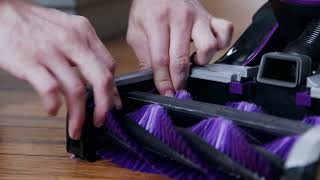
Remove both clean and dirty water tanks. Lay the cleaner down, pull firmly on the brush assembly to remove it. Rinse brushes to clear debris, clean the underside with a cloth. Reinsert by aligning the post with the hole and pushing firmly until it snaps.
Ensure clean water tank is filled and both tanks are seated. Turn on the machine and hold the trigger for 30-60 seconds to prime the pump. If solution does not come from the hose, check that the hose connector is firmly attached and hold the trigger for up to one minute to remove air.
Most common issues with the Power Scrub can be resolved by simple cleaning and priming steps. Regular maintenance prevents clogs and ensures consistent performance.
What is the first step to fix reduced suction on a Power Scrub?
Remove the dirty water tank, empty it, and rinse all parts.
How do you remove the brush assembly?
Pull firmly on the brush assembly to detach it.
What should you do before reinserting the brushes?
Rinse and clear debris from the brushes and clean the underside with a cloth.
How long should you hold the trigger to prime the pump?
30 to 60 seconds.
What is the likely cause if solution is not dispensing from the hose?
Air trapped in the hose; hold the trigger for up to one minute to prime.
Priming the pump clears airlocks
Explains a key technique to restore solution flow by holding the trigger, which is easy to overlook.
Debris buildup halts brush rotation
Highlights that simple cleaning of brushes and underside resolves a common mechanical issue.
Filter screen maintenance
Emphasizes checking and rinsing the filter screen on the dirty tank lid to maintain suction.
if you're experiencing reduced or no suction the dirty water tank may be full or there may be a clog in your system first lift up on the tank release latch and remove the dirty water tank take off the lid empty the tank and rinse all parts under running water check the filter screen on the lid for debris and rinse it as well next with the handle in the upright position lay the cleaner down remove the nozzle
and rinse it to clear off any debris to remove the brushes pull firmly on the brush assembly then rinse and clear out any debris then use a cloth to clean and remove any excess debris from the underside reinsert the brushes by aligning this post with the hole underneath push firmly until it snaps into place attach the nozzle cover and check that the hose connection Port is fully shut and lastly secure the dirty water tank in place
and that's it if you have any questions please feel free to reach out to us if your power scrubs brushes are not turning first remove both the clean and the dirty water tanks next with the handle in the upright position lay the cleaner down to remove the brushes pull firmly on the brush assembly then rinse and clear out any debris then use a cloth to clean and remove any excess debris from the underside reinsert the brushes
by aligning this post with the hole underneath push firmly until it snaps into place and that's it if you have any questions please feel free to reach out to us if solution is not dispensing from your Power Scrub first make sure that the clean water tank is filled and both tanks are firmly seated in place with your Power Scrub turned on prime the pump by holding down the trigger for 30 to 60 seconds if solution is
not dispensing from the hose first ensure that the hose connector is firmly attached to the hose section port and that the solution connector is firmly secured hold the trigger down for up to one minute this will prime the pump and get rid of any air trapped in the hose and that's it if you have any questions please feel free to reach out to us
⚡ Saved you time reading this? Transcribe any YouTube video for free — no signup needed.