
Privacy Display: Game-Changer or Gimmick?
60sThe privacy display is a unique, highly debated feature that sparks curiosity and discussion.
▶ Play Clip"Delivers a thorough, honest review with real pros and cons, though the title's 'problems' are somewhat downplayed."
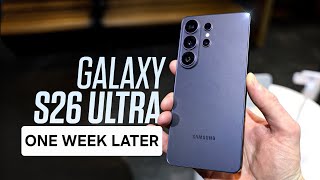
The video is a hands-on review of the Samsung Galaxy S26 Ultra after one week of daily use, focusing on real-world experience rather than specs. The reviewer highlights the privacy display, camera improvements, battery life, and design changes, while also addressing common complaints and potential drawbacks.
The reviewer has used the Galaxy S26 Ultra as their everyday phone for a week and wants to discuss real-world usage, pros and cons, and whether problems discussed online are real.
The privacy display allows selective privacy for specific apps or notifications, unlike a screen protector. It can be toggled on/off, but it reduces color saturation and makes blacks gray, so it's not ideal for all-day video watching.
The video is not sponsored by Samsung, Apple, or Google. Samsung lent the phone for review, and Mous is a case sponsor. All opinions are the reviewer's own.
The reviewer finds text clarity and resolution to be excellent, contrary to some complaints. They do not experience headaches or noticeable lower resolution compared to previous generations.
The anti-reflective coating is not as effective as the S25 Ultra but is still better than an iPhone. The display is very usable in bright daylight with 2,600 nits of brightness.
The reviewer notes that the S26 Ultra does not exhibit the grainy low-brightness issue seen in the past two generations, a welcome improvement.
There are reports that the display is 8-bit simulating 10-bit, but the reviewer thinks this is a power-user concern and most people won't notice a difference.
The design looks better than last year's, but the phone now uses aluminum rails instead of titanium and lacks Qi2 wireless charging, which is why the reviewer uses a case.
The reviewer uses Mous Limitless cases for drop protection and to cover the aluminum frame. They offer various designs and have magnets for MagSafe (except the clarity case).
The horizon lock stabilization is a major upgrade, allowing 360-degree flips while keeping the video level, even in low light. It defaults to ultra-wide but works on 1X as well.
The larger aperture on the main sensor provides a shallower depth of field, giving photos a DSLR-like look with natural bokeh, as seen in selfies and close-ups.
The 50MP 5x telephoto lens offers sharp 10x shots, and the 10MP 3x lens bridges the gap. The 100x zoom is usable for identifying distant objects, though AI enhancement may be noticeable.
When zooming from ultra-wide to 100x, the phone switches between four lenses, causing slight jumps in color and clarity, which is a minor annoyance.
The reviewer compares the speakers side-by-side with the S25 Ultra, but the transcript does not include the outcome.
The S Pen has been moved to the edge, which is rounder, so it can be inserted upside down without a physical key. This is a minor design flaw.
The phone supports 60W wired and 25W wireless charging. Despite not using a silicon carbon battery, the 5,000mAh battery lasts long due to chip efficiency; the reviewer uses ~55-60% per day.
Contrary to spec sheets, the phone cannot charge the Galaxy Watch Ultra or Watch 8 series due to the large biosensor. A MagSafe-style charger is available.
The phone comes in six colors: cobalt violet, white, black, sky blue, plus Samsung.com exclusives pink gold and silver shadow. The reviewer wishes for more vibrant options.
The phone has satellite SOS, 12GB RAM (256/512GB storage) or 16GB RAM (1TB), and uses the Snapdragon Elite Gen 5 chip with 19% faster CPU, 39% faster NPU, and 24% faster GPU.
The chip is very snappy, apps open quickly, and 360 video export is fast. The reviewer is impressed with the processor.
The phone has Bluetooth 6.0, 7 years of software updates, IP68 water resistance, and new AI features like enhanced circle to search, now nudge, and call screening.
The reviewer considers the S26 Ultra a significant industry breakthrough with phenomenal cameras, great battery life, and overall recommendable, though pricey.
The Galaxy S26 Ultra is a highly recommendable flagship with standout camera stabilization, excellent battery life, and a useful privacy display, despite minor design quirks and a high price.
What is the main benefit of the privacy display on the Galaxy S26 Ultra?
It allows selective privacy for specific apps or notifications, unlike a screen protector that is always on.
00:41
What material is the frame of the S26 Ultra made of?
Aluminum rails, not titanium as in previous models.
04:20
What is the maximum zoom capability of the S26 Ultra's telephoto lens?
100x zoom.
08:08
What is the battery capacity of the S26 Ultra?
5,000 mAh.
15:54
What are the CPU, NPU, and GPU performance improvements of the Snapdragon Elite Gen 5 chip?
19% faster CPU, 39% faster NPU, and 24% faster GPU.
16:34
What is the issue with the S Pen insertion on the S26 Ultra?
It can be inserted upside down because there is no physical key to prevent it, causing a bump.
13:13
What is the maximum wired and wireless charging speed of the S26 Ultra?
60W wired and 25W wireless.
13:54
Which Galaxy Watch models cannot be charged on the back of the S26 Ultra?
The Galaxy Watch Ultra and Watch 8 series.
14:09
What is the resolution of the front-facing camera?
12 megapixels.
08:49
Privacy Display Innovation
This is a unique feature that allows selective privacy, a significant differentiator from competitors.
00:41Horizon Lock Stabilization
This camera feature enables gimbal-like stabilization without extra hardware, a major upgrade for mobile videography.
05:42DSLR-like Depth of Field
The larger aperture produces natural bokeh, making photos look like they come from a professional camera.
07:17Efficient Battery Despite No Silicon Carbon
The phone achieves excellent battery life without the latest battery tech, highlighting chip efficiency.
15:54Overall Verdict
The reviewer calls it an industry breakthrough, summarizing the phone's strengths and recommendability.
18:29[00:01] Galaxy S26 Ultra as my everyday phone for the past week. And it's been a while phone. Like, it feels like there's actually a lot of innovation here. So, in this video, I want to get away from the specs, away from the promises, and
[00:14] instead talk about what it's actually been like using this phone. What is the good? What are the downsides? Are there are the problems people are talking about on X actually real? What's the camera like? That stabilization you
[00:26] I've been trying all of it and really putting this phone through its paces for talk about in this video. Some good things, some bad things, but I think we the biggest feature everyone's been talking about, the privacy display. So,
[00:41] this phone, in case you haven't seen it, basically you can turn your phone to the side and nobody's able to see it over there. It's really similar to what you'd see on a screen protector. And a lot of people would say, "How is this different
[00:53] than just using a screen protector?" And the real benefit is that you don't have to have this on all the time. You can have it set for certain apps, only when notifications. It's selective. And from that, I think that is really, really
[01:06] were going to use it all the time, as you can see, when you toggle it on, you kind of lose the black pixels. It kind of turns gray, a little more washed out, more muted colors, especially when you go to maximum privacy mode. And some
[01:20] people say it's lower resolution. I don't feel like that's the main the main difference, which is why I probably wouldn't want to be watching videos all day with this on non-stop. But, I don't leave it on all the time.
[01:33] That's kind of the main benefit of this. If you really wanted a privacy display on all the time, you could just get a screen protector and an S25 Ultra. But, this works for specific things. I think it is so useful to block notifications,
[01:47] to block pins and passwords, to block specific apps, maybe your banking app. I think all of that is the biggest benefit of this. And I mean, we can't forget, game-changer in my opinion, but it's also like everyone's being really
[02:00] technology and it's already really impressive in my opinion. So, I can only this, where this is going to be in a couple years. Oh, by the way, full this video is not sponsored by Samsung, not Apple, not Google, nobody like that.
[02:15] I do have a case sponsor I'll talk about later on in the video, but all opinions are my own. These are my real thoughts about this phone. We'll be talking about both pros and cons. Samsung did lend me the phone so I could try it out before
[02:27] opinion. Like I said, we'll talk about pros and cons. So, the next thing that talking about text clarity. Is the resolution lower on this phone compared to the previous generation? Honestly, looking at it really close, this is I I
[02:43] like a super telephoto shot here and maybe you guys can see a difference, but normally, I don't get a headache. I don't know what people are talking about that. The resolution looks really good to me. Now, the anti-reflective display,
[02:57] that's something Samsung has really been kind of leading the industry in for a admittedly, is not quite as anti-reflective as the S25 Ultra. Instead, it's still more than say an iPhone, for example, but not as much as
[03:12] resolved though that I really like about the display, switching back to a generations for me, when I went all the way down to the lowest low brightness in extra dim mode, they looked really grainy. I haven't experienced that on
[03:26] model-specific one. Every unit might be different, but for me, the past two generations had it, and this one seems to not have it. Oh, and kind of getting really interesting things I'm going to talk about later, but I saw people
[03:40] talking about the display being 10-bit. And then I saw some reports that it's actually an 8-bit display that is meant to simulate 10-bit. So, I didn't read into that too much. Realistically, I think that is like the most power user
[03:53] about that, but I would say the vast majority of people probably would never difference. And again, the color on this, I think looks pretty good. 2,600 nits of brightness, that anti-reflective display, it's very usable out in bright
[04:07] daylight as well. Now, getting into the design, the physical part of this phone, think this looks significantly better than last year where they had like the kind of honestly cheap-looking blacked-out camera circles. This much
[04:20] longer have titanium around the outside though. It's now made with aluminum rails as it was several years ago. And it also lacks Qi2 wireless charging. So, that combo is exactly why I will be putting a case on this phone. I've
[04:33] tested a lot of good cases, but the ones I keep coming back to agreed to sponsor this video. So, thanks to Mous for sending these over. These cases give you you extreme drop protection. And of course, it covers that aluminum frame.
[04:47] could get scratched, you don't have to worry about that. That way, if you want to sell your phone in two, three, five years, it's going to be in perfect money for it. So, I use the Mous Limitless cases on all of my phones, my
[05:01] Pixel, my iPhone, literally everything. I used to be a non-case person. Mous using cases. Like I just I like these cases. They add functionality. They Limitless ones come in seven different designs. They've got ridges on the
[05:15] outside for better grip. They've got reinforced corners. Like but Mous also offers clarity cases if you want to like have a photo on the back, for example, something that feels like you don't even have a case. And one more note on them,
[05:28] uh they all have magnets in them for MagSafe except the clarity one that Like if you want to put a photo back there, you don't want magnets in the sending them over. Definitely using it on this phone. Now, let's get into
[05:42] exciting upgrade besides the privacy screen, and that's going to be the cameras on this phone. So, the big thing is the horizon lock. I've been using gimbals for a long time, Osmo Pocket, but I've never really liked using a
[05:55] just annoying to have all this extra hardware. At that point, I would just use my actual like DSLR, but Samsung sensor on here, a stabilization mode that lets you rotate the phone like all
[06:09] level. Like you can literally do 360° flips on this and it's going to be staying perfectly level. Now, if you're in low light and it's really fast, you you some examples here of what it looks like when I'm walking around.
[06:46] It defaults to ultra wide, but you can also do it on the 1X lens, no problem.
[07:17] changer. This is huge. I love this aspect of the phone and it's probably going to make it my go-to mobile phone for filming for probably the rest of with something similar. We also have a
[07:30] sensor. So, going through some photos, starting off, I just held the phone backwards and took a photo of myself and you can see this looks like an actual DSLR. This is not portrait mode, but you can see the bridge in the background is
[07:42] because of the larger aperture. A bigger aperture basically means you let more shallower depth of field, which means out in a very aesthetically pleasing way. I think the color was really well
[07:55] captured here. I think the contrast is good. Overall, this is just a really nice photo that doesn't really look like it's from a phone. Like, I I was just I was there, of course, I had to take some zoomed-in telephoto shots of the
[08:08] the back, obviously. You have a 50-megapixel 5x telephoto lens that can zoom up to 100x, but I think right here you can see 10x looks really, really sharp. I love the way this came out. Good detail on everything. And like,
[08:22] cameras because you have all those lines that. We also have a 10-megapixel 3x telephoto lens, which kind of bridges the gap between that 5x and the primary. Even though the primary is 200
[08:35] megapixels, and if we go back to uh you can see right here a 2x shot, it's using the primary one, just cropping it on that sensor. Like, again, the 3x is have an ultrawide that is 50 megapixels, and that combo really gives you a ton of
[08:49] phone. Going through some other shots, the front-facing camera is 12 megapixels. You don't get nearly as much blur in the background as you can see compared to um that primary rear sensor on the back. But I zoomed in I zoomed in
[09:01] really far on Alcatraz right here. I think that was, again, a very usable here's a good example. Look at the seagull right here. This is not portrait mode again, but you can see a really nice, like, definitive blur in the
[09:14] makes it much more aesthetically pleasing. It nailed the white balance just looks right on this photo. The water is not oversaturated, but not undersaturated, either. It looks exactly like the bay did that day. I think like
[09:29] of these photos. Looking at some basic indoor, like I took a picture of this kombucha here. The sky in the background is a little bit blown out, but you're indoors, so I would expect that. I think most cameras would do something similar,
[09:42] even see like the little water drops on the side of the bottle. If you take a even macro mode, just the rear main extreme bokeh, the really strong blur
[09:54] mode if you just use the ultra-wide lens and get really close to something. It does have autofocus, so you'll be getting macro shots there. Here's a shot at 100x of the bridge. It looks like really kind of artificially straightened
[10:07] lines. Um looks a little bit I don't know if it's AI-enhanced, but it it looks like it kind of would be a little bit. But otherwise, I mean, definitely a but if you're like, "What is that thing way over there?" you'd zoom in 100x and
[10:21] Couple other shots with this phone, as you can see, just capturing the city of again, the larger aperture should also give us better nightography video and photos. One kind of little complaint, not complaint, but a thing with having
[10:34] zooming, check out this video right here.
[11:10] buildings from the Golden Gate Bridge, uh it switches between lenses three times. Like you're using four different lenses from ultra-wide to 100x. And every time it switches, it's kind of close, like the color science is
[11:22] in clarity, so it suddenly gets way sharper, but it also like moves a little guess is what I'm saying. I'm glad it's there, but when you have that many going to deal with. Now, let's get into another improvement with this phone,
[11:37] into a little speaker test and I'll show you side by side with the 25, and let me difference there. All right, so I have the S26 Ultra here, full volume, playing
[11:49] some slop AI music, just, you know, no copyright stuff, so I don't get a copyright strike on YouTube. But, let me know if you can hear a same song for 30 seconds on the S26 Ultra, and then on the S25 Ultra, and
[12:03] Ultra, and then on the S25 Ultra, and then one more time on the 26 Ultra.
[12:40] >> All right, now for the S25 Ultra. >> [music]
[13:13] should have mentioned this earlier with the design. The S Pen has been moved on the edge. And the edge is a little rounder now, so the S Pen is no longer able to go in either direction. But, Samsung weirdly didn't like poke a yoke
[13:27] the design. So, if you're not looking and you slide the S Pen in, you won't know that it's in wrong until it's all the way in and then you feel it like obviously sticking out on the high side there. And it's fine, you can do it.
[13:39] just has like a really weird bump. And if you have a case, you probably will matter ever again. But, it feels like Samsung probably could have made this only fit in one way. I don't know. It's what they did. Um small complaint there,
[13:54] but again, not not really a big deal. Also, this has faster charging. So, this now has 60 W wired charging or it has wireless charging uh up to 25 W. But, even though originally on the spec sheets, I was seeing like it said
[14:09] a bunch of products and some of them were the Galaxy Watch Ultra, the Watch 7, the Watch 8 series, all of which were not able to be charged on the back of the 25. I was really hopeful about this. I tried it. That must have been a typo.
[14:22] It can't charge the new Galaxy Watch Ultra or the Watch 8 series. Like, that's because the biosensor is just too large on those phone. But, Samsung does have this little MagSafe style charger that snaps on Well, not this, but now
[14:35] of that and I definitely like using that. This also comes in six different and kind of subtle colors. You've got cobalt violet, which is what I have, which is mostly what you've been seeing in this video. There's white, black, sky
[14:48] blue alongside some samsung.com exclusives, which I'll have linked down below. You've got pink gold and silver shadow. I really wish there was like a more vibrant crazy looking one, maybe like all red or something like that. Um
[15:00] these are all pretty safe, pretty mild colors. Also, if you want to order down below, if you're pre-ordering or later if you're ordering, uh I do have the there. So, uh it's an exclusive link. They've got like an extra couple dollars
[15:13] things. Uh I'll have it described in the description down below. So, if you guys links. It helps us support the channel and also saves you more money. Like I said, they're exclusive discount links down there in the pin comment and in the
[15:27] description. Also, this phone sort of has satellite SOS. Samsung didn't really out last year, I think with Verizon on the 25. Now, they're rolling it out a where you are. Under the hood in this phone, you're getting 12 gigs of RAM
[15:41] phone, you're getting 12 gigs of RAM with 256 or 512 gigs of storage, unless you go to the like supreme mode, basically, 16 gigs of RAM with 1 TB in the highest option. Interestingly, Samsung didn't go with a silicon carbon
[15:54] battery. This is still 5,000 mA hours, but realistically, after using it, it is such an efficient chip. Samsung did such a good job with the display efficiency that like you're still getting a really, really long battery life on here. Like
[16:07] on average, I've been using maybe 55, 60% of my battery per day, and I feel like I feel like I'm never charging it. Like I was using the Pixel 10 Pro XL before, and compared to that, this battery is so much better. I'm never on
[16:21] low battery. It charges quickly. Battery, two thumbs up for this one, even though they didn't go with a silicon carbon battery. And speaking of coming from the Pixel 10 Pro XL, this also has a way faster chip. The
[16:34] Snapdragon Elite Gen 5 for Galaxy, such a snappy chip. This thing, I mean, they a snappy chip. This thing, I mean, they say 19% faster CPU, 39% faster NPU, and 24% faster GPU. So, all those numbers, like there's content out there that that
[16:47] does benchmarks, but anecdotally, using this phone, super snappy. Apps open really quickly. I can, you know, export 360 video from my cameras really quickly on this phone. It just It's a really solid processor. I'm impressed with it.
[17:00] This has Bluetooth 6.0, so very future-proof there. 7 years of software updates, so even if you want to sell this phone in 3 or 4 years, you'll have a better resale value on it. Of course, IP68 water resistance. Um and oh yeah,
[17:13] there's some new features on here. So, the gallery app now has basically like already do that in the Gemini app, but now it's just kind of integrated a little more easily. You can add things, change colors, just you know, add like a
[17:27] moon behind you. Things that are really impressive, very AI focused, of course. Samsung added the now nudge, so that's kind of the same as what Google called magic queue where it has relevant things that it pulls from your calendar and
[17:39] your map and all that stuff into messages. I haven't really seen or used that much at all yet. They have enhanced circle to search which can identify more than just one thing at a time. They kind of demonstrate with somebody's outfit.
[17:51] Maybe could be useful. And alongside Bixby talking about Gemini there, you also have Gemini and you have perplexity on here if you wanted to use that as your voice assistant. Call screening on this is actually pretty awesome. I was
[18:03] we're seeing a lot of the features that were on Pixel phones come over to this That's one of the big reasons I've been using a Pixel is call screening is one of them where it's able to answer calls
[18:16] for you, basically screen out scams. Allegedly can also detect scam calls trying to get you to like buy Target over the phone. I haven't tried that, but I mean, I could see maybe some
[18:29] susceptible to that might really appreciate that feature. Honestly though, like the Galaxy S26 Ultra across the board feels like a pretty big like an industry breakthrough. The cameras are phenomenal. The battery life
[18:43] is great. The S26 Ultra is just a very recommendable phone. Although it is very find the right trade-in credits and deals, maybe you can get that price down let me know what I should compare this to. I'm thinking maybe the Pixel, maybe
[18:58] the OnePlus, maybe the iPhone. Let me know what I should compare this to and Thanks for watching and I'll see you in those videos.
⚡ Saved you 0h 19m reading this? Transcribe any YouTube video for free — no signup needed.