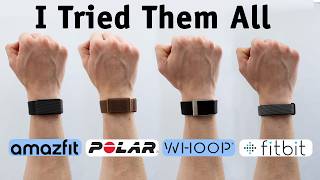

I Wore 4 Fitness Trackers for 2 Weeks
45sThe challenge of wearing multiple devices and the promise of surprising results hooks viewers.
▶ Play Clip"Delivers a thorough, data-driven comparison that matches the title's promise, though some sections feel padded."
This video presents a comprehensive comparison of four screenless fitness trackers: the Fitbit Air, Whoop MG, Amazfit Helio, and Polar Loop 2. The creator wore all devices simultaneously for two weeks, testing them across various conditions including sleep, travel, and workouts, to evaluate accuracy, comfort, and app quality. The results reveal surprising performance differences, with the Amazfit Helio emerging as the top overall recommendation for most users.
The creator wore four fitness trackers (Fitbit Air, Whoop MG, Amazfit Helio, Polar Loop 2) for two weeks, testing them in real-world scenarios including sleep, international travel, drinking, and workouts. The goal was to push them to limits and compare performance.
Polar Loop 2, Amazfit Helio, and Fitbit Air cost $99 with no subscription required (Fitbit has optional $99/year). Whoop MG requires mandatory subscription starting at $199/year, with the top-tier at $359/year. If subscription lapses, the Whoop becomes a non-functional bracelet.
All trackers are comfortable for sleep, but Fitbit Air is the thinnest and lightest, making it the most comfortable. Whoop offers flexible wearing options (bicep band, clothing). Polar looks premium but its strap frayed after two weeks. Amazfit feels cheapest but has interchangeable bands.
Whoop uses a battery backpack that charges while worn, so no data loss. Amazfit uses a magnetic puck. Fitbit and Polar use magnetic snap-on chargers, but Fitbit's is more distinct and less likely to be lost.
In interval testing, Amazfit Helio was the most accurate with R value of .939 and R squared of 88, outperforming others. Whoop was second, Fitbit had issues detecting lows, and Polar was the most inaccurate, missing highs and lows.
In a 1000-step walk, Fitbit was most accurate (994 steps), followed by Whoop (984), Amazfit (976), and Polar (942). However, Fitbit overcounted steps when not walking (e.g., 80 steps on waking), while Whoop was most accurate at rest (14 steps).
Fitbit automatically detected a walk and basketball session, learning from habits. Whoop has a large workout library but sometimes misdetects activities (e.g., guitar as weightlifting). Polar requires manual sensitivity adjustments.
Amazfit was the most accurate for sleep tracking, especially during travel and time zone changes. Whoop also performed well. Polar took two days to calibrate and missed sleep during travel. Fitbit's sleep score prioritized duration over quality, sometimes giving high scores when the user felt unwell.
Whoop's recovery score was very accurate with how the user felt. Amazfit's bio charge was less relevant, often starting at 75 regardless of conditions. Fitbit's readiness score was relevant but got stuck at 15 during illness. Polar's nightly recharge was less intuitive.
Whoop and Amazfit (Zepp) apps have clean, intuitive layouts with rings and easy data access. Fitbit app is wordy with AI-generated summaries. Polar app is the least favorite, with confusing charts and unmarked axes.
Whoop offers advanced health features like ECG and blood pressure insights, justifying its cost for longevity-focused users. Amazfit allows easy data export. Fitbit integrates with Google Health, aggregating data from multiple sources.
Whoop has the longest battery life (rated 14 days, actual ~12). Amazfit rated 10 days but got ~7-8. Fitbit and Polar both around 7 days.
For most users, the Amazfit Helio is the winner due to accurate heart rate and sleep tracking, comfort, and solid app. Whoop remains best for advanced athletes with deeper insights and ECG. Fitbit Air is recommendable for its thinness and app. Polar is not recommended due to inaccuracies and app issues.
The Amazfit Helio emerges as the best overall fitness tracker for the everyday user, offering accurate tracking and a solid app at a budget price. The Whoop remains the premium choice for advanced athletes, while the Fitbit Air is a strong contender for those prioritizing comfort. The Polar Loop 2 falls short due to accuracy and app design issues.
What is the price of the Amazfit Helio?
$99 with no subscription required.
01:07
Which tracker requires a mandatory subscription?
Whoop MG, starting at $199 per year.
01:22
In interval heart rate testing, which tracker had the highest R value?
Amazfit Helio with an R value of .939.
09:02
Which tracker was the most accurate in step counting during a 1000-step walk?
Fitbit Air, tracking 994 steps.
10:27
Which tracker overcounted steps the most when not walking?
Fitbit Air, showing 80 steps on waking.
10:42
Which tracker had the best sleep tracking during travel?
Amazfit Helio, accurately detecting sleep during time zone changes.
15:14
What is a unique feature of the Whoop MG?
It has an ECG and blood pressure insights.
23:19
Which tracker has the longest battery life?
Whoop MG, rated for 14 days.
31:34
Which tracker's app was described as the least favorite?
Polar Loop 2's app, with confusing charts and unmarked axes.
21:31
Amazfit's Surprising Heart Rate Accuracy
The Amazfit Helio outperformed all others in interval heart rate tracking, which was unexpected given its budget price.
09:02Amazfit's Superior Sleep Tracking During Travel
Amazfit was the only tracker to accurately detect sleep during a long flight, highlighting its robustness in real-world conditions.
15:14Whoop's Advanced Health Features
The ECG and blood pressure insights are unique to Whoop, justifying its higher cost for health-focused users.
23:19Amazfit as the Overall Winner
The creator recommends Amazfit Helio for most users, citing its accuracy, comfort, and app quality at a budget price.
33:20[00:01] new Fitbit Air alongside the top-of-the-line Whoop MG, but I also wore two other devices, the Amazfit Helio and the Polar Loop, which I heard of. And I did everything you could
[00:14] out, sleeping, traveling internationally, drinking alcohol, staying out late, shifting time zones, literally anything that you would be track, I pushed them to the absolute limits. And in this video, we're going
[00:27] best. And to be honest, I think the results are really going to be surprising to a lot of people. I did not expect these results. I always assumed, put a lot of effort in this. I thought they would just be better across the
[00:40] board. And truthfully, you're going to see quite a big discrepancy between all these different devices, depending on what it is you're trying to do and what you prioritize. This is not going to be some half-assed spec sheet comparison. I
[00:53] heavily for the past 2 weeks, walking around like an absolute psychopath wearing multiple devices on each wrist off introducing the products and talking about the price. The Polar Loop 2, $99,
[01:07] no subscription required. The Amazfit Helio, $99, no subscription required. The Fitbit Air, $99, no subscription required, optional $99 per year subscription. I think most people don't need that though. And then the Whoop MG,
[01:22] mandatory subscription starting at $199 per year for the Whoop 5, and then it top-of-the-line which I'm using right here, $359 per year. If you stop paying that, you just have a bracelet, it doesn't do
[01:37] anything. Now, this is very expensive, which is why the market has started that's why the Fitbit Air even launched, and honestly, why it's going really viral. People are excited to see these alternatives that are $99 and you get
[01:49] all of your data without having to pay a subscription. Now, before we get into heart rate testing, uh I have some awesome charts to share, but let's start these. I wore all of these, like I said, for 2 weeks straight, and I learned a
[02:03] And of course, the whole point of a screenless fitness tracker is that comfortable to sleep in. You really forget they're even there. You can wear wrist and style it a little differently, and these all do that just well.
[02:17] them on is quite different. I appreciate the Whoop set up here, where you kind of clamp it down. You can wear this tight, you can wear it loose, it doesn't move excellent design, but you can also wear it in a number of other ways. This is
[02:31] the most flexible of all of these, where you can wear it on a bicep band, and Whoop even has clothing that you can embed this in. Underwear, sports bras, things for different ways you can wear the Whoop. Then we have the Fitbit Air,
[02:45] which if you're only wearing it on your wrist, I It's not It's my favorite way tricky to put this on, and then slide it down, and then you kind of feed the different strap options. This is my favorite strap, though. But once you get
[02:59] It's the thinnest, it's the lightest, it's easy to forget it's there. I tend bit looser than most people. I just don't want to clamp down on my wrist, always very accurate. But the Fitbit Air, because it's smaller and thinner,
[03:13] because it could have a tendency to kind of twist around and move a little bit definitely the most comfortable, in my opinion. The Amazfit does feel the cheapest. I appreciate the combination of stretch and non-stretch in the band,
[03:26] strap. You can also wear this on a bicep band if you go and buy that. And looking at the back, you can actually swap out this band uh with a number of other just mm connector, which is very common. You can buy those on Amazon for a couple
[03:40] dollars. And then Polar, I would argue, looks and feels the most premium and the several different colors you can buy. I really like this kind of copper tone on there, a nice accent that isn't overdone, and I think a lot of people
[03:53] would enjoy this. But, after 2 weeks, the strap did fray. You'll see in the different sizes, small medium and medium large, but the strap, I mean, I wasn't doing anything too intense. This just kind of wore down on the edges. So, I
[04:06] months or even a year, you're going to really have to replace this fairly often. Now, the Fitbit Air does not have the option to wear on a bicep band. I I never bought and tested one for the Polar. And as far as how these charge,
[04:20] Whoop, in my opinion, where you can charge it using this little backpack thing. So, this is a battery, you charge this up by USB type-C, you slide it onto charges while you're wearing it. That way, you never have to take it off, you
[04:32] don't lose data, uh and this is I mean, some people might say, "Whatever, you with this." That's fine, but you just have a little bit more flexibility. this little puck that magnetically snaps on the back, and you plug in with USB
[04:44] type-C. The same general idea as most other Amazfit watches, although this is be the exact same charger. Nonetheless, this is a really solid option, and I don't need extra cables with you. You just need this little puck adapter. The
[04:58] Fitbit and the Polar both have a similar charging style, but I prefer Fitbits little bit larger, a little bit more distinct, so it magnetically snaps on the back. It's a fairly long USB type-C cable. And the reason I like this better
[05:11] than the Polar charger is because the Polar charger just basically has like four little magnetic nodes at the end of a black cable, so it's a lot easier to cables, and honestly, it's easier to lose it. That's a very small complaint,
[05:25] straps, the Whoop absolutely takes the longest to dry. Swimming with all of these, I found is really annoying how long it took. Like, it was orders of actually dry. Oh, by the way, should I mention this earlier? Full disclaimer
[05:39] here, this video is not sponsored. No brands have any input on this video. Nobody sees this video before it goes live, and I don't owe anything to any of purchased and which ones were given to me. Starting off, the Whoop was given to
[05:52] me a fairly long time ago. So, I've been testing and wearing it for quite a few me on loan from Google so I could test it ahead of launch, but I will have to send this back. The Amazfit Helio, I purchased this with my own money for
[06:05] $99. And the Polar Loop 2, I also purchased this with my own money for $99. Now, getting into probably my favorite chart out of all of this video, this is the heart rate tracking. Now, for most of the testing, aside from
[06:18] these at the same time. Step tracking, things like that, they're not influenced wearing two devices on the same wrist, because they're using little LEDs that heart rate, wearing two of them on the same wrist could influence each one and
[06:33] make them less accurate. So, I did two tests with one on each wrist. So, I did the same workout twice essentially. I had a known accurate ECG heart rate strap on, and we're going to see how these performed. Now, in my original
[06:46] did an excellent job. It was incredibly accurate on a steady state run. And I quite good on that, but I wanted to see how these reacted in a much tougher environment, doing intervals. Think about if you're playing basketball or or
[07:00] you're not going at a constant pace the entire time. That's really difficult for fitness trackers to track. So, I did progressively longer intervals to see rounds, like I said. So, the first round, I had the Fitbit Air and the
[07:14] Whoop strap. Looking at these side by side, the red is the known accurate. this little jump right here. I can explain it if you guys want. That's not Um but, you can see in the beginning, they kind of were taking a second to
[07:26] figure it out. The first bump, they both got it relatively right. The Whoop was that. Whoop got the bottom right, but Fitbit didn't get the bottom right. The second one was fairly accurate for both of them, but it's fairly common for
[07:39] to be lagging a little bit and miss the tops and bottoms on these faster concerning to me to be honest. That's fairly common. It's not until we get pretty significant problems with the Fitbit Air. I don't know what was
[07:54] happening here, but it just wasn't able to really detect the low on this. I was walking between these two intervals. The Whoop did a much better job of that. And kind of lagged and struggled that where the Whoop got that very accurate. And to
[08:07] squared values to essentially match how similar they are to the reference line. going to be to get 1.00. That's a perfect match. And the Fitbit Air was .732 for the R value and 53 for the R
[08:22] squared. And then 87 and 76 showing that the Whoop was more accurate in heart rate tracking in this one. Now, looking at the next two straps, the Polar Loop 2 and the Amazfit Helio, this is wildly interesting to me. So, in the beginning,
[08:35] lockstep. In fact, not just the beginning, the entire time. You can see the blue line, not the teal one, the more blue line was very accurate. It did miss this low right here, but otherwise it hit every high and every low almost
[08:48] Helio nailed this bottom right here. You can ignore this little blip right here, then it came down with only a slight lag right there, otherwise matching nearly perfectly. This was by far the most impressive of all four of these straps,
[09:02] which I did not expect and I was very impressed by with an R value of .939 and an R squared of 88. that is very, very impressive for intervals like this. Now, unfortunately, the same cannot be said for the Polar Loop 2, which
[09:16] actually I believe was the most inaccurate. It was the most inaccurate just struggled. It missed the high, it missed the low. It was kind of offset a little bit. It really held the high for too long here. Like it was just missing
[09:28] really lagging. And then here is probably the biggest offender where it heart rate. So, I'm not sure what was going on there. It's very unfortunate. I potential because Polar makes a lot of
[09:42] heart rate sensor in the back looks like a very impressive array. So, I'm not sure exactly what was going on there. But, based on that testing, in first Helio. Now, this is not a perfect comparison because they weren't worn on
[09:56] duration, the same distance, and the same time for each interval, but I think in second place we have to say the Whoop did a very good job here. Fitbit was and there, but I would suspect, like I said, on a steady-state run, they probably all
[10:11] into step tracking. I wore all four of these and walked 1,000 steps, and in last place, the Polar was 6% off tracking 942 steps. Then we have a 2 and 1/2% error with the Amazfit tracking 976 steps. The Whoop tracked 984, so fairly
[10:27] first place here was actually the Fitbit tracking 994, which is unsurprising. The Pixel watches and the Fitbits have always been very good at tracking steps, whole story as far as step tracking. So, every morning I would check when I woke
[10:42] up, you know, how many steps I had. I don't walk in my sleep. I don't get up like yesterday morning, for example, I woke up with 80 steps. The Amazfit I woke up with 20 steps. The Whoop, very accurately, I woke up with 14 steps.
[10:54] That's definitely the closest. And Polar gave me 24 steps to start with. So, all indicating that throughout the day, uh the Fitbit, in my opinion, is most likely to miscount the most steps when you're not actually walking. And then,
[11:07] looking at a full day of walking yesterday, the Polar had 10,292 steps, which is the most out of all of these. The fewest was Amazfit at 6,090 steps. It's a huge discrepancy there. And the Whoop was almost tied with the highest
[11:19] at 10,017 steps. And then, almost exactly in the middle of that was the Fitbit at 8,173. Across multiple days, Whoop consistently had the most or near the most. Fitbit was consistently in the middle, and
[11:32] Amazfit did seem to undercount my steps fairly consistently. Now, as far as workout detection, all of these allow you to start workouts manually in the workouts and it'll just track it automatically. Fitbit I found did
[11:45] probably the best job of this. It detected a walk while nobody else did. minutes. It wasn't a really long walk, but Fitbit tracked it and showed me it in the app. You can adjust the sensitivity on Polar for how how many
[11:59] runs, for example, uh in more intense workouts, or every single little walk maybe I could have made it more sensitive and the Polar would have picked that up. But, Fitbit does claim to work to learn from your habits. So,
[12:12] yesterday I played basketball, for example, and uh I didn't start it manually, but it tracked it. It tracked it as some session, and then when I it that you did?" And it suggested like five or six different things. One of
[12:24] them was basketball, so it did have an idea that I was doing that, unless it supposed to learn from your habits, and then in the future, if I play basketball at a similar time, it's much more likely to just automatically identify that as
[12:37] basketball. As I've worn Whoop for about a year now, uh usually it does a very good job at detecting things like golf, or different workouts, or walks. Although, sometimes it does detect things uh like a little erroneously. So,
[12:49] I I play guitar, and sometimes it would record a whole session of playing guitar weightlifting, or something. And it's kind of funny, it shows up on Strava, and then you have to go back and change it to like well, musical performance is
[13:01] actually a workout on on Whoop. Whoop has a very, very large library. We'll different workouts available. But, let's get into sleep tracking. Most people are wearing these, in my opinion, probably to track your sleep, and this is so
[13:14] interesting. Sleep Starting off with the sleep scores on these. Now, this graph, One, we're going to look at on the left side here, and on the right side, I was at home, it was tracking my sleep scores very normally. I think most people most
[13:28] of the time that's the situation that matters. The middle though, on this day right here and on this day this day right here, I was traveling. So, international travel is very interesting with these different devices. Starting
[13:41] you can see on the bottom I don't know if you guys can read that. Green is Whoop, light blue is Fitbit Air, dark blue is Amazfit Helio, and orange is Polar Loop. So, Polar took two days to actually start showing me a sleep score.
[13:53] They really like to calibrate you'll see that later as well. Um but otherwise fairly consistent. Whoop was a little bit more generous in the beginning but was really consistent. A better night was higher score, worse night was lower
[14:06] was quite impressive. The difference is over here once I got back. I think pretty good job showing that I was getting better. I actually got sick when I was traveling. I mean time zones, no surprise. I came down with a cold and I
[14:20] was recovering for these like three days right here. And so, I think Whoop did the best job of showing that I was getting better and it was improving every day. Amazfit was somewhat level so I don't totally agree with that. Polar
[14:32] was a little bit more harsh with the scores for sure but also getting it correct. And the Fitbit, I think their sleep score prioritizes sleep duration much more than your heart rate variability and how well you actually
[14:44] feel. So, I'm a little skeptical of the sleep score on Fitbit to be honest cuz did not feel good that day. I just slept a lot longer than I probably should have So, that's normal sleep scores. Traveling then, this is really
[14:59] interesting. So, this was a big travel day and I was flying from Ohio to Japan. said you didn't sleep at all which is not true. I slept for probably four for something. And Amazfit is the only one that accurately really detected this
[15:14] and recorded it and gave me a sleep score of like 45 which I think was very perfect sense. And that's a big plus for Amazfit. The Fitbit kind of got confused because when you fly west like that, you cross the international date line, so
[15:27] they didn't really know when to allocate the sleep. And I think Fitbit mixed up the 18th with the 19th and gave my sleep to the wrong day. I think this should be sleep score the next day when I was actually in Japan. So, if we kind of
[15:41] there, these are all showing a very similar sleep score once I'm in Japan. Same thing over here, fairly similar, a little bit higher on the a Fitbit and a huge discrepancy there. But this was another travel day right here, which
[15:54] again, I think Whoop and Polar gave me a better sleep score than I deserved. I was really tired. This was a red eye flight coming back to Texas, and Amazfit think overall sleep scores, Amazfit has to be the winner in this category. As
[16:08] you're going to have a really similar story here when I was at home, when I was at home, the left and right. The middle was a lot of travel. So, at home, again, Polar took 2 days to really calibrate on sleep, but they were all
[16:20] with when I went to bed and when I woke up. The difference is when I was traveling, again, Amazfit got this perfect and the others really didn't. days for sleep. They all got it right here if you slide this dot over.
[16:34] when I was flying, and I definitely slept for about 4 hours there. And then hibernation when I got to Texas. I was sick. I think I slept for like 11 hours. It was the longest I've probably ever slept in my life, and Polar just didn't
[16:48] So, that's definitely a little bit of a drawback with Polar, and once again, I think Amazfit absolutely nailed it. This was a travel day, so I had like 2 days zones are weird. Amazfit did a good job
[17:03] I'm going to ignore the middle here because I think you guys know the story of traveling and stuff like that. But over here you can see consistently and lowest heart rate variability. And that really matters a lot in detecting how
[17:15] kind of your recovery score as many of them call it or readiness score as Fitbit calls it. And then Amazfit and Whoop, we're pretty much lockstep everywhere else. I think that they are very They seem to be very good.
[17:28] this is something that could potentially be affected. I was wearing multiple little bit worried about this, but looking at the actual data, they almost of Fitbit, which was consistently a little bit higher for resting heart rate
[17:43] different way of calculating it as opposed to just the lowest heart rate. average heart rate over an hour. I'm not sure exactly how they're doing it, but it makes sense that it is consistently offset. I'm okay with that as long as we
[17:56] have consistency among these, which we pretty much do. Also, nap detection I think is fairly important. Amazfit does a really good job at detecting naps. It plane or whatever. Whoop also did a really good job at this. I'd say equally
[18:09] a little bit longer than Amazfit did, so maybe even more accurate here. Uh but they didn't really show up in the app sometimes for several hours later. Fitbit also did track some naps and perhaps in a month or two of it actually
[18:22] learning me, it may get better, but I would say on normal nights, Fitbit, Amazfit, and Whoop all did a really consistent job. Polar did seem to you're traveling, without a doubt Amazfit I think did the best and Whoop
[18:35] excellent job as well. It just got really confused with those time zones like I said. Also, Polar and Whoop both ask when you wake up. It'll say, "Hey, yes. That way it's not going to like if you get up in the middle of the night,
[18:48] uh you know, go to the bathroom or get water, whatever you're doing, it's not different nights as sometimes Fitbit has done. It hasn't happened to me, but I've seen reports of it happening. Um and it's sort of happened to me, but it
[19:00] later. Moving on from sleep to recovery, score. I find it's very accurate with how I feel in the morning. Amazfit has bio charge, which seems a little bit less relevant in my experience. It's not
[19:12] of is, but it's a lot more like Garmin's body battery where it it shows you what throughout the day how much energy you're actually losing. I like this a because it feels like it almost always had me starting the day with like 75
[19:27] regardless of like the absolute worst travel days versus the best days. So, not my favorite. Fitbit has the readiness score which I felt was overall very relevant. Although, when I was really sick for like 4 days I was
[19:39] just had me stuck at like 15. So, I don't know if it's just less granular or maybe I just got used to bad sleep when I was sick. Um but otherwise, I think doing there. It makes a lot of sense to me. Polar has nightly recharge and ANS
[19:53] charge. To be honest, it's not really as intuitive as the other ones. I think a lot more sense to me. Okay, so let's take a look at the app. Starting off with the overview page, each of them has like a home page here. Fitbit shows you
[20:06] your weekly cardio, your steps and this is going to be based on what you value three different screens here you can swipe between them. Overall, I really at the top. Then you have the ability to log things like your weight for example
[20:21] this is the part I don't really like about this is there's just like a lot of AI paragraphs to be honest. Like you really have to read a lot here. So, you scroll down and it's like a sometimes very insightful summary of your workout,
[20:34] summary of your sleep and then a summary of a different workout and you just keep wordy in my opinion. And occasionally they have like a random graph here and um that feels a little bit it just feels too AI generated in my opinion. I wish
[20:50] maybe the summaries were just a little bit more small or collapsible. Looking three rings across the top sleep, recovery, and strain. Easy to see. It's my day which you can tap into everything. So, you'll see your sleep,
[21:05] different things that are recorded down there. You can see if you have a training plan, and then going down, you just have all numbers down here, um, and how your strain and recovery look. You can see the discover more stuff at the
[21:18] it's fine. It's already at the bottom. I think that this is a really phenomenal setup for just a layout on a home screen. You're kind of an overview of your health, makes a lot of sense. Polar is definitely the weirdest of all of
[21:31] them where it's like a diary as they call it. Um, and the more you wear it, They're only relevant like one day at a time, so you can swipe between different days, show you different things. Um, but it'll show you like a workout there that
[21:44] was tracked. You can see your nightly recharge, your heart rate, all the data like that makes sense. Um, but you can tap into all of these as well. No like definitely my least favorite of all these apps. It just seems just so weird.
[21:58] this. And then we have the Zepp app. It's not called Amazfit cuz a company named Zepp, I think, owns Amazfit. app exertion instead of rings like this other setup here. I think rings make
[22:11] you've got some AI insights. I appreciate how small these are, but I also really never read these. You can like tap through all of them, and insights. Going down then, again, very similar to the Whoop app. You can see
[22:24] metrics, uh, and then you've got some little charts and sliders down here to this layout a lot. It's very similar to Whoop, and I think that's actually okay. So, that's overview on all of them. Now, let's talk about the data accessibility.
[22:38] into different things. You've got three other tabs here. Bio charge, you can dig history and things. I think this is actually a really good setup on the Zepp into your charts very well, and exertion is the same way here. The Zepp app,
[22:53] think this is pretty ideal. The Whoop want to dig into your data, there is a health tab, which, first of all, I phenomenal. I think people who are wearing this for longevity purposes,
[23:07] race, maybe you are, but if your main goal is like, all right, I just want to make sure I'm healthy and I live long, then this kind of shows you the health need to do more lifting. You should do more like zone two cardio. Different
[23:19] things will affect this. And you also have a health monitor there, so you can do This actually has an ECG on the Whoop, so that's a big benefit that the other ones just do not have. It has blood pressure insights. Again, nothing
[23:32] else in this table has that. Those are huge step ups that could potentially really justify the extra cost of the Whoop. There's also a community tab if family that you want to connect with. And if you go to more, uh just some
[23:44] digging into the data deeper, you can tap on any one of those three rings. For example, if I tap into sleep, it brings me into all the sleep insights. And you and see your history and your trends. Same thing with the recovery score here.
[23:58] You can go down and see trends on that. I really like the layout. These charts number, nice little shading on the bottom, very aesthetic in my opinion as well. And again, strain, unsurprisingly, does the same thing there. This is
[24:11] these. Going back to the Fitbit app, the tides change a little bit here. Too much if we go over to health, for example, they've got a lot of charts. They've got this is set up. Same thing with sleep, you have a lot of data for that. And
[24:25] start a workout. They've got a workout library, so uh things things that like follow some different programs and workouts. And you can dig into your down there. I think this is really solid. And for Polar, if I dig into, for
[24:40] that. They actually show you some really deep insights into individual nights as at what my heart rate did throughout the night. And it does have uh honestly, it looks like it was kind of coded more like in MATLAB with the the chart style,
[24:55] but uh I again, I don't like the Polar app. I really wanted to love the Polar the Loop 2. I think it looks so nice, but there's just so many weird parts to this. Maybe some die-hard Polar fans could explain
[25:07] guys really do like this, but generally Oh, but you could tap into, for example, here. This is kind of cool set up. They show you when different things happen
[25:20] like your lowest heart rate, your highest heart rate, any activities, when quite a bit. I think that's pretty smart to show it in that set up. But then, go into sleep, this is just like the worst app design in my opinion. So, the
[25:33] go down, you get this weird little star chart that doesn't have like an axis data. For example, I go down to solidity, moderate solidity, and you can
[25:45] quarter of the way through. Like, what is that What is zero and what is 100 on here and some less than usual. Is that a lot less than usual? Is that a little bit less than usual? I have absolutely no idea what the axis is here. It's
[25:59] completely unmarked. And the same thing goes for continuity, actual sleep. It shows me 92% is my average, 90% what I have. But going to Like, that doesn't look like 92% to me. That looks like 50%. So, I
[26:13] just think that the charts like these little bar graphs here, unfortunately, Now, on Polar, if we tap on the top left, you have a number of other things accessible from the diary, but you can go into activity and see all of your
[26:28] we want to talk about manually tracking workouts, if I tap on start, I could tap running there, and you'll see Polar actually has a huge list of different workouts. It's got to be well over 100 here, different workouts you can do. And
[26:43] so, if I'm going to do, for example, water skiing, I can tap on that. I say done, and and then I can simply tap start. And then on this tracker, it see your heart rate. You've got these five little colors here. I actually do
[26:55] rate zones. You've got your speed, calories. Again, this is going to change you've got duration. And you can swipe between three different pages. Uh and I setup. I don't I I think this is pretty good. I can pause this then and it'll
[27:08] show me a little summary right now and I can either continue or I can stop it. If hold stop for that to happen. And I can choose if I want to save it or delete it. I really appreciate that. Most of these do this, but you'll see Fitbit,
[27:21] start a workout on Fitbit, I can tap on start. We've got a lot of workouts to choose from, not quite quite as many as Polar. And I think this is really online. They did like a big like, you know, Steph Curry collab with this. And
[27:35] yet when you go to start a workout, there's no basketball workout. So, kind I don't know. May- maybe maybe Steph Curry does wear this and just auto you know, does auto tracking, which it can track basketball. Maybe he doesn't
[27:47] maybe Well, yeah. He wears it, right? Anyway, for this, can tap on hike. It just starts the workout right away. I don't appreciate that. Uh it doesn't like let me, you know, pick my music and get ready. And
[28:00] then the workout screen is very basic. You see distance, steps, heart rate, and that's not just hike. If you go to really any type of workout, it shows you very, very little. I like how big the numbers are, which is nice, but another
[28:14] Fitbit has really dropped the ball with the workout screens, is if you pause the workout and I stop the workout, I can either end the workout now or it's like, "Hey, just kidding. I don't want to. Go back and I want to continue." But you
[28:27] accidentally start the wrong workout, it's automatically saving. It's going to go sync to Strava and you have to go and manually delete it in both locations later if you have Strava set up with this. So, I'll say end workout. You can
[28:39] choose how difficult it was, whatever. I'll say it's an easy workout. And then it gives me a summary, which again doesn't really show me that much. I think Fitbit definitely needs to work on this. On Zepp, I can tap on workout. I
[28:51] can then go down to start a workout. It's kind of inaccessible, to be honest, have a pretty large selection of workouts. So, I like how these are indoor workouts, favorite workouts, running and walking,
[29:05] um ball workouts. So, um otherwise, you can start let's say badminton. We're ready and start and shows me the heart and change you know, do I want alerts for this? Do I want text to speech? And
[29:18] it, it does a little countdown, 3-2-1, and it shows a fairly similar page to Polar. You've got the time, you've got swipe through this and see anything else. You could lock and unlock your
[29:30] little bit right here, but otherwise, you can pause it. Again, you have to hold to start you hold stop button to end it. And uh it doesn't let you choose That's a little bit of a downside. I wish I was able to just automatically
[29:44] good job here. If you tap on the three bars of exporting data, so if you wanted to export this uh and make a chart like I did, much, much easier to do on Zepp the Fitbit, you can do that quite easily, as well. Also, on Fitbit, small
[29:59] tangent here, on any workout or anything you're doing, you can tap on the three dots on the top right and say view sources, and Google Health now takes sources from everything, and they combine it into one. Uh they're going to
[30:11] whatever your preference are preferences are, but you can say, "Hey, I only want Fitbit Air." I could do that, and it Now, in Whoop, if we wanted to start a workout, all we do is tap on the plus,
[30:26] You can record your weight and stuff like that. But, let's say we're going to start an activity. I can then tap on the drop-down, choose from a pretty long list, and they they kind of split them between strain, recovery, and sleep. So,
[30:38] that. I could start uh I'll like a recovery thing like acupuncture or breath work or light therapy. So a lot of those like Brian Johnson style things into that, this seems to have tracking for all of that. And if you just go to
[30:53] the biggest list out of all of them here. And maybe I want to track walking for example. I can set a strain target on here. Remember Whoop is using the strain system. And then you say start 3 2 1, it's going to start this. And it
[31:07] bottom. Your average heart rate, your max, and your calories. And you can swipe over and see a heart rate graph as well. I guess my heart rate's kind of high talking and making this video. But if I tap on pause, I can finish it. And
[31:20] here I can either discard it or save it. That's a big feature. More need to have for these, all of them have decent batteries. Fitbit and Polar had similar battery life, around 7 days. Amazfit was rated for 10, but I was getting closer
[31:34] Whoop is definitely the longest, especially the Whoop MG here, rated for the 14 days. And I'm usually getting fairly close to that, maybe 12 days or so. Now let's talk about how these communicate with you. So the Fitbit and
[31:47] that if you tap them, it'll blink and show you the battery level. They all have haptic motors. So these are all going to be used at least for alarms. Polar can vibrate for calls, calendar notification, text messages, only if you
[32:00] enable that in settings. Fitbit also has a low battery alert. Amazfit does as lot they're going to be doing. Fitbit say wake me up at 6:00, but actually wake me up up to 30 minutes before that
[32:14] based on, you know, when I'm in the optimal part of my sleep stages. Now, better on some of them? Well, Whoop has the age estimate which I find very fun. want to be younger and move that down. None of these track GPS unsurprisingly,
[32:29] but they all can track they can all include GPS data in your workouts by connecting to your phone and using your phone's GPS. But Whoop, like I said, has labs, so they include blood test results. They have an ECG. They have
[32:42] daily blood pressure insights. A lot of the much more advanced things. But, a big downside that I thought it was really weird is that both Whoop and Google Health cannot sync with your device when you are offline. So, on a
[32:54] 12-hour flight, I just wanted to like check these things. You couldn't do it the connected apps. Google Health does a really good job of aggregating the data could see myself really using it as a hub, even if I didn't wear the Fitbit
[33:08] Air. I think that's a big positive. But, overall, which of these should you get? Well, as much as I really like the way the Polar looks, for me personally, based on my testing, I just can't recommend it over the other options on
[33:20] thinnest and the lightest, and you really like that Fitbit app, you want were really useful. It told me, you know, on a casual walk, "Hey, we noticed you're walking faster than usual. Your hamstring injury must be recovering."
[33:34] Then, the Fitbit Air is actually a very recommendable device at $99. Uh the Whoop does have a free trial, and I have a link for that down below if you guys want to try it out and just see like, is it actually worth it for you? You can
[33:47] you a free plan for a month. And I still think for the most advanced athletes and Whoop is still probably the best just giving you some deeper insights uh for sleep and health tracking. Um and of course, like I said, ECG and things like
[34:01] recommendation just for the everyday person who wants to track their sleep, do everything very accurately, have a good battery life, not have a, you know, a big bulky smartwatch on your wrist, I actually have to say the winner of this
[34:14] comparison is probably the Amazfit Helio. The heart rate tracking was the most accurate. The sleep tracking was really good despite my traveling. It's very light and comfortable, and the app is really solid as well. It was great
[34:26] for workouts. You could get a bicep band as well if you wanted to wear it and not even have it on your wrist. Overall, I was very, very impressed with the Amazfit Helio. I just did not expect it to outperform the others in the way that
[34:38] helpful. Leave a comment down below. Obviously, everyone's priorities will be different band, or there may be a different one that I didn't even include guys. I'm Michael Bryan, and next I recommend you watch this video right
[34:52] recommend you watch this video right here, my review of the Fitbit Air.
⚡ Saved you 0h 34m reading this? Transcribe any YouTube video for free — no signup needed.