
How I Use AI to Make Luxury Product Images
30sViewers are hooked by the instant transformation of dropshipping product photos using AI prompts.
▶ Play Clip"Delivers exactly what the title promises: a fast demo of AI image generation for dropshipping, though light on technical depth."
The video demonstrates a quick AI-powered workflow for generating product images for a dropshipping fashion store. The creator uses LuVar to create and download a range of visuals—from luxury close-ups to casual influencer-style shots—and then uploads them to a Shopify product page, emphasizing that fashion shoppers buy based on visuals rather than text.
All the AI-generated images are available for download. The creator downloads multiple versions of the product images to use on the store.
A follow-up prompt is used to generate ultra-realistic luxury images, which are intended for the product page as close-ups so customers know exactly what they're getting.
The close-up images are downloaded to showcase product details and reinforce the quality of the item.
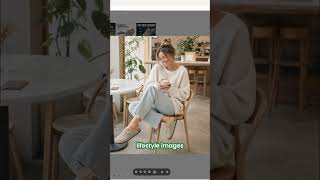
A second set of images is generated in a casual, influencer-style format. These are meant to be relaxed lifestyle shots rather than serious product photos.
LuVar is used to handle all design-related image creation for landing pages. The creator stresses that fashion requires strong visuals to be successful.
People base their buying decisions on what they see, not what they read. Unlike standard dropshipping, fashion shoppers look at the product and decide instantly.
After generating the images, the creator returns to Shopify and deletes all the pre-made content that was imported automatically from the supplier.
All the new AI-generated images are uploaded to the Shopify product page to replace the supplier's default media.
The video shows a clean, repeatable workflow: generate on-brand images with an AI tool like LuVar, download the variations, and replace Shopify's default supplier media with visuals that match how fashion shoppers actually decide—by looking.
What tool does the creator use to generate product images?
LuVar
00:57
Why is visual presentation especially important in fashion dropshipping?
People base their buying decisions on what they see, not what they read.
01:09
What type of images did the creator request after the initial infographic?
Ultra-realistic luxury close-up images for the product page.
00:14
What are influencer-style images meant to be?
Casual lifestyle images that are not too serious.
00:43
What must be done on the Shopify product page after generating new images?
Delete the pre-made imported content from the supplier and upload all the new AI-generated images.
01:22
Immediate download of AI assets
Shows that AI-generated images are production-ready and can be downloaded directly for store use.
00:01LuVar as an all-in-one design tool
Highlights the versatility of using a single AI platform for everything from product shots to landing page images.
00:57Visual buying decisions in fashion
Explains a key principle of fashion e-commerce: imagery drives conversions more than product descriptions.
01:09Replacing supplier content on Shopify
Demonstrates the final practical step of swapping generic supplier media for custom AI-generated visuals.
01:22[00:01] can do now, guys, is I can download these. So, I'm going to download this one, download this one, download this one. All of these images can be downloaded. And then I gave it a follow-up prompt after the initial
[00:14] infographic saying, "Can you make me some ultra-realistic luxury images?" So, going to add on the product page. They look really, really good. Close-ups of so that people know what they're getting. So, I'm going to download these
[00:28] close-ups now. So, download, download, and download. And then I said to it as a influencer-style images?" So, these are the ones where they're not too serious. They're casual images of people wearing them. So, you
[00:43] Now, these are not meant to be too serious. These are just meant to be casual lifestyle images. And basically, you can do all of your design ideas here. So, I'm using LuVar to do all of the designs for the landing pages when
[00:57] it comes to images. And like I said to you guys before, fashion is important for this, so you have to get it right. People base their buying decision on what they see, not what they read. So, instead of like normal drop shipping,
[01:09] people have to read and then buy, or maybe watch a video, people are just decision. You don't pick up an item of clothing from the rack and say, "Oh, let's read the description." You look at it, if you like it, you buy it. So, once
[01:22] you're going to want to go back to your Shopify store. You're going to want to going to want to come back to the product. Now, you're going to want to delete all this stuff that it pre-makes based on the import from the supplier.
[01:34] is you're going to want to upload all of the new images.




⚡ Saved you 0h 01m reading this? Transcribe any YouTube video for free — no signup needed.