
Why PvP and PvE Pros Have Totally Different UIs
50sHighlights a common curiosity about pro player setups and sparks debate about PvP vs PvE UI philosophy.
▶ Play Clip"A 15-minute infomercial that does showcase the product, but spends most of the time hype and only a few minutes on actual 'setup' details."
This video is a promotional walkthrough of the Skill Capped UI, a World of Warcraft add-on package that lets players instantly hot-swap between fully optimized PvP and PvE interfaces. It covers installation steps, included add-ons, customization options, and premium subscription benefits.
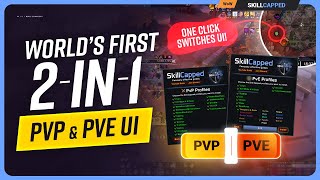
PvE and PvP players use completely different UIs; Skill Capped introduces a package that lets you hot-swap between both with one click.
Click a button to switch between the world's #1 PvP UI and a fully optimized PvE UI, complete with all necessary add-ons.
Download WoWUp, grab the free import string from the pinned comment, import it, and install — no manual add-on juggling.
Skill Cap members get one-click loading of exact builds from top PvP players, world-first raiders, and elite Mythic+ pushers.
Right-click the minimap button to transform your interface from competitive arena to casual battlegrounds or raid to high keys.
Built alongside Echo (Europe's #1 guild), the PvE package enhances Blizzard's default UI rather than replacing it, keeping it lightweight.
Custom spell queue window based on latency, refined camera options, enhanced status text, and other under-the-hood optimizations.
Pre-installed Luxos class packs, raid packages, and the War Within dungeon package with timers, alerts, and proc tracking.
Cell add-on automatically adjusts frame position, size, and tracked info based on group size and role — healers get centered frames, DPS get left-side.
Plater profiles show pink (kill first), blue (interrupt), and purple (high health) targets; enhanced cast bars and pandemic refresh borders.
Type /slsc to enable dark mode, class-colored health bars, hide/fade action bars, improved character panel, and better bags.
Access to PvP/PvE courses, exclusive Discord (ASAP section), free monthly VOD review, and a 500-rating rank-up guarantee.
Skill Capped's dual-purpose UI is a one-click solution for players who want a professional, add-on-rich interface for both PvP and PvE without the usual setup hassle.
How can you instantly switch between PvP and PvE UI modes in Skill Capped UI?
Right-click the minimap button.
02:05
Which add-on is the centerpiece of the PvE interface?
WeakAuras, specifically the Luxos class packs for rotation tracking.
05:18
What does the pink color on Plater nameplates indicate in PvE?
Mobs that need to die first (priority targets).
11:17
Which guild helped develop the PvE package?
Echo, Europe's #1 guild.
03:30
What command opens the Look and Feel panel?
/slsc
13:34
How does the Cell add-on adapt unit frames?
It automatically adjusts frame position, size, and tracked information based on group size and role.
08:31
What is Skill Capped's rank-up guarantee?
Climb at least 500 rating while actively using the service or get a full refund.
15:10
Which add-ons are included in the PvP package for cooldown tracking?
OmniCD and OmniBar premium profiles, plus Gladius arena frames.
10:05
Hot-Swap UI Technique
Demonstrates a practical one-click method to switch between completely different UI layouts, saving players time and improving versatility.
02:05Enhance Instead of Replace
The PvE package improves Blizzard's default UI rather than replacing it, keeping the setup lightweight and accessible.
03:46Color-Coded Targeting
Plater profiles use color coding (pink, blue, purple) to instantly communicate kill order and interrupt priority.
11:00500-Rating Guarantee
The rank-up guarantee offers a full refund if players don't climb 500 rating, showing confidence in the product's effectiveness.
15:10[00:02] isn't just skill it's their UI take a look at the UI of any world first Raider or MDI competitor and now look at a rank one pvpers UI two completely different
[00:14] approaches two different ways to master the game and until now you had to choose the game and until now you had to choose just one but what if you didn't have to introducing the skillcapped UI the world's first UI package that enables
[00:27] you to hot swap your entire interface with the click of a button craving some PVP we've got you covered with the world's number one PVP UI equipped with every add-on you would ever need completely set up and fully optimized
[00:40] for you time for some Mythic Plus or raids after we'll hit this button here and just like that you have the complete PVE package which might just be the most PVE package which might just be the most powerful UI ever created for PVE every
[00:54] crucial add-on every week Ora all expertly set up for you in seconds allow you to take on any challenge no more switching add-ons no more juggling profiles no more tedious setup and most importantly no more compromising just
[01:09] the perfect UI for every aspect of the game you enjoy and best of all it couldn't be easier to set up click on the pinned comment below download wow up and then click here to grab your completely free import string open up
[01:24] wow up click the three dots in the top right select import/export options from theop drop down paste your string and then hit install skill cap members can even Elevate their experience with our premium import code providing access to
[01:38] an exclusive Suite of PVP and PVE features take our revolutionary Talent system with just one click you can load the exact builds from The Game's absolute best fully integrated into your game providing you with the exact same
[01:52] builds as the PVP players dominating the arena and Battleground ladders the world first Raiders crushing parses and even the El Mythic plus players pushing the highest Keys possible switch your talents just as quick as your UI
[02:05] transforms from competitive Arena matches to Casual Battlegrounds intense raid progression to highkey pushes any class any spec any content with skillcapped you're always armed with every Advantage you'd ever need right at
[02:19] your fingertips to generate your premium code and benefit from our onetime in the pin comment below enter your battle net and hit confirm when you next help guide you through the setup start by clicking continue and then you'll
[02:34] have the option to pick between installing either our PVP or PVE add-on packages or better yet we highly recommend just installing both of them can paste their premium import code next you'll discover our profile panels the
[02:48] control center for personalizing your UI experience here you can fine-tuned to look in the feel of your interface while accessing essential quality of life improvements and must-have features and whether you're focusing on PVE PVP or
[03:02] want The Best of Both Worlds you're in complete control as next up you can choose exactly which components you want us to install and configure automatically for you once done hit finish and just like that you and your
[03:16] brand new skillcapped UI are ready to go and if at any moment you want to switch between modes it's as simple as right clicking the mini map button and your interface transforms instantly now let's dive into what makes this UI so egg
[03:30] special developed alongside players from Echo Europe's number one Guild our PVE package represents the combined wisdom of world first Raiders and MDI Champions draining UI replacement we've taken a smarter approach our package works by
[03:46] enhancing and improving Blizzard's default interface helping to keep it not only lightweight and easy to set up but far more accessible while still providing you with everything you would ever need first through our custom Sears
[03:59] here we've automatically configured many essential gameplay and configuration settings that many new or even experienced players neglect including a customized spell Q window based on your in-game latency refined camera options
[04:12] to improve control and optimize your visibility enhanced status text and many other under the hood settings that help make your gaml smoother and feel more responsive next up is our precision tuned edit mode and UI scale perfected
[04:27] using proven principles from some of the best best players every critical element is positioned exactly where you need it keeping all your Vital Information centered and instantly visible which Works hand inand with our optimized UI
[04:40] scale resulting in a layout that is scientifically designed to enhance your awareness by maximizing your field of view while eliminating distractions now on the flip side clicking our one button hot Swap and entering PVP mode we can
[04:53] see that our edit mode takes a completely different approach here we position Vital Information around your peripherals keeping the center of your screen mostly clear so you can focus more on the action while still providing
[05:05] you space to track enemy cooldowns monitor important procs and catch every crucial ability being used all while remaining focused on the action itself the first add-on included is one that needs absolutely no introduction week
[05:18] oras we've handpicked the most essential and highest performing week Ora packages for your chosen class and content type pre-installed positioned and ready to go including luxos class packs for every class in Spec the ultimate weak AA to
[05:32] track your entire rotation at a glance from abilities cooldowns resources procs and utilities everything you need displayed in a highly optimized layout already positioned and scaled to serve as the centerpiece to your PVE interface
[05:47] as well as trinket and potion tracking directly above your player frame the KY raid package complete with custom icons sounds and timers to supercharge your raid awareness ensuring every important ability is impossible to miss we've also
[06:02] included the essential War within dungeon package a must-have tool that every top Mythic plus player couldn't live without providing you with precise timers critical alerts for crucial abilities and on thefly notifications
[06:14] for important Buffs and debuffs whether you're pushing High keys or venturing in a dungeon for the very first time you're always going to know exactly what's coming and what to do next both of which are again perfectly
[06:28] scaled and position IED above your target frame ensuring clear visibility without any information overlapping also for Mythic plus we packed in a few other enhanced timer that helps track your key progress in real time showing exactly
[06:43] when you'll hit chest timings and how you're pacing against your personal best on every boss a Smart Auto marker which instantly identifies and assigns raid markers to high priority and kick targets making mob management and
[06:55] callouts in absolute Breeze a convenient Keystone Linker that shares your key in party chat when prompted and for safety we've included an automatic frontal warning aura that announces tank targeted frontals in say chat helping
[07:09] your whole group position accordingly weak oras are also the backbone of our PVP package as well we're through our Custom Design skillcapped we orus you can quickly track and identify must C offensive cooldowns being popped right
[07:21] at the top of your screen monitor crucial Buffs debuffs and defensives the uptime of high value damage jams and progs to the side of your character to maximize your damage and never miss prep again with clear reminders for Buffs
[07:36] poisons pet summons and many many more positioned directly in the center of integrates directly into your pre-installed Gladius Arena frames keeping you perfectly informed on your damage overtime effects throughout the
[07:50] game helping to ensure you have every vital piece of information exactly where you need it when you need it next up we have the gold standard for PVE Players Big Wigs we've enhanced its outof thebox experience with a carefully designed
[08:04] layout incoming boss timers appear right above your target frame making them impossible to miss longer timers stay visible but tucked away for if you ever need to prepare in advance we've even refined crucial text notifications
[08:17] taking up less screen space in the center while of course ensuring nothing overlaps for party and raid frames we've integrated cell which provides some frame to start our smart configuration is
[08:31] going to automatically adjust everything based on your group size and your role frame position size and track information all update dynamically to match your needs in Mythic plus your party frames sit clearly visible to the
[08:45] players are going to find their frames anchored to the left side keeping your screen clean while maintaining visibility but if you're a Healer your frames shift more towards Center screen allowing for quicker Target switching to
[08:58] features included here high priority debuffs appear and grow from the right of the party frames making them impossible to miss whereas for raid you can instead track them in the bottom left corner the gradient of the frame
[09:12] itself changes color based on the dispellable effects you can remove giving you instant visual cues for quick dispels active defensives and mitigation show clearly on the top left allowing you to see when they're active and when
[09:25] dangerous abilities Target yourself or party members the frames light up with a glow as well as displaying an icon of the ability instantly alerting you to potential threats we've even went ahead and added tracking for active tank
[09:38] mitigation like demon spikes iron fur Shield of the righteous bone shield and shield block displayed by this bar right here in the center and healers your Hots and shields are tracked in the top right corner allowing for up to six Buffs at
[09:51] any one time every feature working together to create the most advanced and comprehensive unit frames available and when combin alongside our exclusive skillcapped omnic CD profile available only for skillcap subscribers your
[10:05] awareness reaches absolutely New Heights custom designed to carefully filter and display only your team's most relevant cooldowns in the perfect order displaying racials crucial utility spells personal defensives and then
[10:18] offensive cooldowns with interrupts neatly displayed above unit frames and any crowd control or stops clearly visible to the right lastly party wide conveni conveniently at the bottom of your frames carefully crafted to make
[10:32] cooldown tracking become second nature it's really easy to see why Omni CD has become essential for solo play rightfully earning its spot as a top favorite among our PVP subscribers helping to not only keep players alive
[10:44] and predict enemy swaps even before they happen but also maximize kill potential control tracking offering perfect coordination without even saying a word head to the pin comment below to sign up and get your premium import code today
[11:00] anyway the next feature of our PVE UI package is another essential pler featuring the legendary jundy profile top players be it PVP or PVE consider name plates the Cornerstone of any UI and these are Simply the Best in PVE has
[11:17] to offer but what makes them so special first of all they're colorcoded pink which instantly show what needs to die first blue is for mobs that need to be interrupted so you know where to Focus your kicks and your crowd control and
[11:31] purple indicates High Health targets that need extra attention in big pulls the cast bars have then been enhanced for maximum visibility glowing on high priority abilities that need immediate stops or interrupts crowd control
[11:44] the name plates while your debuffs appear clearly above equipped with smart glowing borders that show you the perfect timing for pandemic refreshes switching to PVP mode is where skill cap subscribers really gain their true Edge
[11:58] see here's here's the problem with standard name plates you find in PvP cluttering your screen when you're trying to track crucial maintenance abilities like rupture and garro finding them really shouldn't be a miname in and
[12:11] of itself that's why through our highly optimized better blizz plates profile exclusively for skillcap subscribers we've dedicated countless hours perfecting your name plates transforming them to look like this essential
[12:25] maintenance debuffs are now enlarged and clearly visible with all un necessary information just filtered out enemy defensive cooldowns appear right above your target giving you perfect Insight on when to commit or swap targets and
[12:37] even keep track of important damage amplifiers to the right of your maintenance debuffs and the advantages do not stop there our premium omnibar profile perfected through years of experience displays only the cooldowns
[12:51] you truly need to pay attention to expertly organized across multiple bars ensuring critical information is always right you expect it no information overload just clean intuitive PVP tracking all available with your premium
[13:06] import code exclusively for skillcap subscribers whether you're using it to look or compare your damage and your healing see why and how you died or just know people don't use their interrupt details is the final add-on we've
[13:20] included in our package tucked away neatly in the right corner set up specifically with Mythic Plus in Mind by displaying five players one last crucial feature that we absolutely have to mention is our look and feel panel which
[13:34] alongside all your other settings is accessible Anytime by typing slsc in game this is your hub for visual and quality of life improvements giving you the ability to fine-tune your UI package to match your exact preferences for
[13:49] example want a cleaner look when using the PVE UI try enabling the hide or fade settings to hide your action bars for a more minimalist approach then there's options like dark mode which transforms your UI from the outdated classic look
[14:02] into something more Sleek modern and clean class colored health bars to help quickly distinguish between certain classes Elite frames to uh uh make you feel Elite I guess and an improved character panel to display stats and
[14:17] information you can't otherwise see without add-ons oh and you can't forget the massively improved bags and there you have it your first look at the world's first true dual full purpose UI hope you're just as excited about this
[14:31] one as we are want to explore our PVP features in more detail though then be sure to check out our video on how to set up your UI for PVP in the war within and remember these exclusive UI features
[14:44] are just one part of your skill cap subscription you also unlock full access to our comprehensive catalog of mustsee courses including PVP class guides created with the world's highest rated players in-depth dungeon walkthroughs
[14:57] packed with every bit of information you'd ever need including some hidden tips and tricks connect directly with the elite players in our exclusive Discord ASAP proo section where you can get your PVP and PVE questions answered
[15:10] by the best in the game plus you can even request a free VOD review every month to accelerate your improvement best of all everything we offer comes with our rankup guarantee climb at least 500 rating while actively using our
[15:23] service or you get a full refund anytime no questions asked so what are you waiting for there's never been a better time to join skillcap click the link in today thanks for watching everyone and we'll see you in the next one



⚡ Saved you 0h 15m reading this? Transcribe any YouTube video for free — no signup needed.