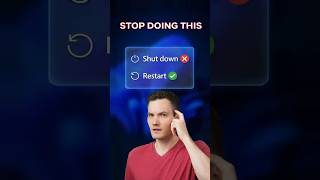
Why Shutting Down Your Laptop Doesn't Fix It
45sReveals a common misconception that most users have, making it highly relatable and shareable.
▶ Play Clip"Delivers a useful, quick tip that matches the title's promise, though the title could be more specific about Windows."
The video explains why simply shutting down a Windows computer doesn't fully reset it, due to the Fast Startup feature, and provides a simple method to force a true full reset.
Using Task Manager (Ctrl+Shift+Escape) and checking the Performance tab's uptime reveals that even after nightly shutdowns, the system hasn't had a fresh start in days.
Windows uses Fast Startup to boot faster by hibernating the kernel session, which preserves glitches instead of clearing them.
The only way to fully clear the slate is to use the Restart option, not Shut Down.
Holding Shift while clicking Shut Down forces a full reset, bypassing Fast Startup.
To truly fix persistent glitches, use Restart or hold Shift while shutting down to bypass Fast Startup and get a clean system state.
What keyboard shortcut opens Task Manager?
Ctrl+Shift+Escape
What feature causes Windows to hibernate glitches instead of clearing them on shutdown?
Fast Startup
00:14
What is the only button that actually clears the slate in Windows?
Restart
00:26
How can you force a full reset when using Shut Down?
Hold Shift while clicking Shut Down
00:26
Uptime reveals hidden resets
Shows a practical way to check if your system is actually fresh, which many users overlook.
Fast Startup preserves glitches
Explains a common misconception about shutdown behavior, helping users understand why issues persist.
00:14Shift+Shut Down trick
Provides a quick, actionable fix that can save users time and frustration.
00:26[00:00] Stop shutting down your laptop to fix glitches. It's not actually a full reset. Hit Control-Shift-Escape to open Task Manager. Go to Performance and check your uptime. If that number says 10 days, but you shut down every night,
[00:14] you haven't had a fresh start in over a week. Windows uses Fast Startup, which just hibernates your glitches so it can boot faster. If your tech is acting weird, restarting is the only button
[00:26] that actually clears the slate. Pro tip, hold shift while you click shut down to force a real full reset.




⚡ Saved you 0h 00m reading this? Transcribe any YouTube video for free — no signup needed.