
33% off this pro mic!
42sSpecific high discount percentages create urgency and FOMO for viewers.
▶ Play Clip"A straightforward sponsored tour with actual discount details—delivers on the title but is essentially a long ad."
This video is a sponsored tour of the creator's streaming setup, showcasing numerous Elgato products including microphones, Stream Decks, a teleprompter, cameras, lights, and capture cards. The creator highlights current Black Friday discounts on many items and promotes an affiliate link, as well as a giveaway for a Stream Deck M2.
The Elgato Wave DX microphone is 33% off, attached to the Elgato Wave Arm Pro which is 28% off.
Showcases Stream Deck M2, XL, Plus (26% off), and Mark II (29% off) with custom face plates.
Uses an Elgato teleprompter (27% off) to look at the camera while reading scripts.
Mirrorless camera connected via Elgato CamLink 4K (20% off) or CamLink Pro for multiple cameras.
Key lights (28% off) used for front and back lighting, plus wave panels and light strip.
Uses Elgato 4KX capture card (16% off) to connect Nintendo Switch to OBS.
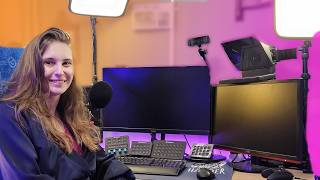
Elgato Facecam Pro available for desk shots, and a ceiling-mounted green screen.
Uses a keyboard with G-keys that function as Stream Deck buttons.
Uses a foot pedal to switch cameras; cable management is messy but acknowledged.
Giveaway for a Stream Deck M2: comment with Twitch name and why you want to win. Use code 'zzy-truy' for 5% off non-sale items.
The video provides a comprehensive look at a fully Elgato-equipped streaming setup with current discounts, encouraging viewers to purchase via affiliate links and enter a giveaway.
Elgato Wave DX Microphone
tool
Elgato Wave Arm Pro
tool
Stream Deck M2
tool
Stream Deck XL
tool
Stream Deck Plus
tool
Stream Deck Mark II
tool
Elgato Teleprompter
tool
Elgato CamLink 4K
tool
Elgato CamLink Pro
tool
Elgato Key Light
tool
Elgato 4KX Capture Card
tool
Elgato Facecam Pro
tool
Elgato Green Screen
tool
Foot pedal (generic)
tool
Keyboard with G-keys
tool
What is the discount on the Elgato Wave DX microphone?
33% off.
00:42
Which Elgato product has a 28% discount for Black Friday?
The Elgato Wave Arm Pro (and key lights).
00:58
How many cameras can the Elgato CamLink Pro support?
Up to four cameras.
02:25
What discount code is provided for non-sale items?
zzy-truy for 5% off.
05:05
What is required to enter the Stream Deck M2 giveaway?
Comment with your Twitch name and why you want to win.
05:32
Microphone Discount
Provides specific discount percentage, making it actionable for viewers interested in purchasing.
00:42Stream Deck Plus Features
Highlights the unique knobs on the Stream Deck Plus, differentiating it from other models.
01:29Camera Connection Options
Explains how to connect mirrorless cameras via CamLink for high-quality video.
02:10Nintendo Switch Capture
Shows how to integrate console gaming into a streaming setup using a capture card.
03:08Keyboard with Stream Deck Integration
Demonstrates a keyboard with built-in Stream Deck buttons, offering an alternative to standalone Stream Decks.
04:05[00:02] your setup like? What are you using to stream, record YouTube videos, and well, chill. [laughter] What is your streaming setup like? And in this video, I'm going to show you a lot of things that I use in my care. And
[00:15] you know what the cool thing about it is? A lot of it is on sale. Yeah, this so much for that. And if you see anything you like in this video, make sure to go to the description and click on my affiliate link. By the way, I'm
[00:28] giving away a Stream Deck M2. If you want to win that, make sure to watch till the end of the video. So, let's start off with my microphone. My microphone is the Elgato Wave DX. And yes, it's discounted. You can get it for
[00:42] 33% off right now. Really cool. It's a really good microphone. So, go get it if you don't have it yet. Then my microphone is attached to this lovely [laughter] And that is the Elgato Wave Arm Pro. And
[00:58] And that is the Elgato Wave Arm Pro. And the Wave Mic Arm Pro now is 28% off. And for some other equipment, let's grab my other camera and go vlogging style. Yay, we're vlogging. All right, here on my desk, as you might
[01:13] see, I have some Stream Decks. This is the Stream Deck M2. I have it with my [laughter] Then we have the Stream Deck XL, the old Stream Deck, the first one. And that is the Stream Deck Plus. Cool thing about
[01:29] the Stream Deck Plus is that you have knobs here to turn and you do have the buttons. And you might guess it, but the Stream Deck Plus is also on discount. 26% off. The Stream Deck Mark II is also discounted at 29% off, but yours won't
[01:43] look as cool as mine because I have my own face plate. Yay. [laughter] You can still get some cool face plates. Don't worry. And what I use to talk to Chad is worry. And what I use to talk to Chad is this a teleprompter. Hello. I can see my
[01:55] videos, I see myself in here. So, I know that I'm like looking at a camera. And you might guess it. But the teleprompter is also on sale. The prompter is 27% off. And behind the prompter, I have my mirror's camera. And this mirror's
[02:10] camera is connected in my PC with another Elgato product. And this camera used to be connected with the Elgaso CamLink 4K, but I got a second camera up there. So now instead of the CamLink 4K, I do use the CamLink Pro because I can
[02:25] attach up to four cameras on there. But the Chem 4K is 20% off. So if you want to attach a mirrorless camera or a DSLR camera to your setup, you can do that "Tree, but how do you look so gorgeous on the camera? Thank you so much." No,
[02:40] right there next to the teleprompter there is a light. Then woo, we go that way. There's a light there. Then behind me, there's a light up there. And not messing with you because this still is real. They're also discounted. 28%
[02:55] off. I often play on my Nintendo Switch. And to get my Nintendo Switch to go into OBS, I use a capture card. Yeah, you might guess who that capture card is from. It's an Elgato capture card. Yeah, you you get the guess by now. I've got a
[03:08] lot of products. Okay, right now I need you to not judge my cable management. Okay, this is where I leave my switch. And this is a capture card
[03:23] because I show you. But like, yeah, the cable management is pretty horrible down there. So, [laughter] the capture card I use for it is the 4KX. Yes, it's 16% off. You wanted to know that, right? I do also have the Facecam Pro right here
[03:39] just in case I need another camera. So if I like film my desk or something, I usually do that with that one. And back here you see an Elgato wave panels and the light strip from Elgato. They also gave me that cool light there for
[03:51] Christmas ones. And this blanket as you look up there is the Elcato green screen. It's the one that you hang on the roof. That's why it's on the roof. Green screen. And for my keyboard, I
[04:05] actually use a quarter keyboard. I wouldn't say that's a gate, but the cool thing about this one, it does have these buttons right here. They're called G1, G2, G3, 4, 5, and six. And they're basically Stream Deck buttons. So,
[04:20] that's pretty cool, too. Like I said, I have a ton of things in my setup that little bit excessive, but I just love their products. They make good quality, and I think they're really easy to use. So, I just love Elgato stuff. I know
[04:34] this video is sponsored by Elgato and everything, but like seriously, I would have had this much Elgato stuff if it wasn't for the sponsored video either There's actually a lot more in sale, not just everything I use for my setup, but
[04:48] there's there's even more. It's the the sale is pretty big. So, go to the link sale. It's an affiliate link, so make sure to accept the cookies because buying stuff. And for everything that is not in sale, use code zzy-truy
[05:05] and you will actually get 5% off. Anyway, I'll give you a little discount. about my setup, please leave them down below in the comments cuz I am happy to answer any questions about the setup. Oh, you know what I forgot to show? This
[05:18] is my foot pedal where I switch cameras with. Uh, and my very, very, very ugly cable management. Yeah, please don't judge my cable management. It is really bad. I know. I just don't know how to fix it. Okay,
[05:32] waiting for. How to win the Stream Deck Mark II. Make sure to tell me why you want to win in the comments and leave your Twitch name. If you don't leave anywhere. So, leave your Twitch name and say why you want to win. Again, thank
[05:46] you so much Elgato for sponsoring this video and having an awesome Black Friday. So, if you want to see some more Elgato gear, make sure to check out the Elgato playlist right here. Make sure to subscribe and I hope to see you in one
[05:59] subscribe and I hope to see you in one of my other
⚡ Saved you 0h 06m reading this? Transcribe any YouTube video for free — no signup needed.