
AI Summary
This video provides a comprehensive overview of the system design behind YouTube, focusing on the core components of video upload and streaming. It explains how to handle large file uploads, transcoding, and adaptive streaming using principles like pre-signed URLs, DAG-based processing, and CDN distribution. The video is educational, aimed at those preparing for technical interviews or wanting to understand scalable system architecture.
Chapters
YouTube processes 500 hours of video every minute, which is 30,000 hours per hour. This sets the context for the need for a scalable system design.
The video focuses on the core components of video upload and streaming, leaving out search, recommendations, comments, and monetization for future deep dives.
Users upload massive videos (e.g., 10-minute 4K video ranges from 1.5GB to 30GB). Uploads must be resumable, and playback must adapt to network conditions in real-time.
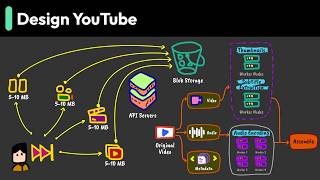
Routing large videos through API servers is possible but inefficient. Instead, use pre-signed URLs to allow direct upload to blob storage, freeing API servers for other work.
Blob storage supports multipart uploads. The client splits videos into 5-10MB chunks, each with a SHA-256 fingerprint, and uploads them in parallel (e.g., 6 at a time). This pattern is used by Dropbox, Google Drive, etc.
Videos are transcoded into multiple resolutions (2160p to 240p) and codecs (H264, VP9, AV1) to support various devices and network conditions. One upload becomes 15-20 files.
The processing pipeline is modeled as a Directed Acyclic Graph (DAG). Each step is a node, dependencies are edges. This allows parallel processing: video segments are split at key frames and processed independently across a worker farm.
The player downloads small segments (a few seconds each) and switches quality based on bandwidth. Manifest files list available formats and segment URLs. HTTP range requests enable seeking.
Popular videos are cached on CDN edge servers worldwide, so viewers fetch from geographically close servers, reducing latency.
Other areas include handling hot videos (viral spikes), cost optimization (transcoding strategies), pipeline optimization (streaming processing), and more.
Direct uploads keep servers free, DAG transforms sequential bottlenecks into parallel workflows, and adaptive streaming ensures smooth playback. These principles apply to large file sharing, ML pipelines, and live streaming.
The video effectively explains the core system design of YouTube, emphasizing scalable patterns like pre-signed URLs, DAG-based processing, and adaptive streaming. It provides a solid foundation for understanding large-scale video platforms and encourages further exploration of advanced topics.
Mentioned in this Video
Study Flashcards (7)
How many hours of video does YouTube process every minute?
easy
Click to reveal answer
How many hours of video does YouTube process every minute?
500 hours per minute.
00:02
What is the purpose of pre-signed URLs in the upload process?
medium
Click to reveal answer
What is the purpose of pre-signed URLs in the upload process?
They allow clients to upload directly to blob storage, freeing API servers to handle other requests.
01:15
What is the typical chunk size for multipart uploads?
easy
Click to reveal answer
What is the typical chunk size for multipart uploads?
5 to 10 megabytes.
01:41
Why is the DAG model used for the transcoding pipeline?
medium
Click to reveal answer
Why is the DAG model used for the transcoding pipeline?
It allows parallel processing of video segments, reducing processing time from hours to minutes.
03:25
What are the three codecs mentioned for video encoding?
medium
Click to reveal answer
What are the three codecs mentioned for video encoding?
H264, VP9, and AV1.
02:55
How does adaptive streaming work?
medium
Click to reveal answer
How does adaptive streaming work?
The player downloads small segments and switches quality based on current bandwidth, using manifest files to know available formats.
04:36
What is the role of CDNs in video streaming?
easy
Click to reveal answer
What is the role of CDNs in video streaming?
They cache popular videos on edge servers worldwide, reducing latency by serving from geographically close locations.
05:33
💡 Key Takeaways
Pre-signed URLs
This is a key design pattern that offloads large file uploads from API servers, improving scalability.
01:15DAG-based processing
Modeling the transcoding pipeline as a DAG enables massive parallelism, turning hours of processing into minutes.
03:25Adaptive streaming
This is the core mechanism that ensures smooth playback across varying network conditions.
04:36Fundamental principles
The video summarizes the key principles that apply to many large-scale systems, making it broadly educational.
06:29Full Transcript
[00:02] simple. YouTube processes 500 hours of video every minute. That's 30,000 hours of content uploaded every hour. The engineering behind this interface is complex. Let's design YouTube. Not the billion user version, but a smaller
[00:17] system that we can learn from. This video covers the core components. We'll focus on video upload and streaming. There's much more to YouTube. search, recommendations, comments, monetization. Each could be its own deep dive. Today,
[00:31] we'll build a foundation you can extend. Here are the requirements we'll focus on. People upload massive videos. A 10-minute 4K video ranges from 1.5 GB highly compressed to 30 GB in ProRes. When uploading huge videos, users expect
[00:48] resumable uploads. For viewing, playback must adapt to network condition in real time. When your connection drops from 25 megabit per second to 2 megabit per second, playback shouldn't stop. The upload challenge reveals the first
[01:01] design decision. We could route large videos through our API servers, configure streaming instead of buffering, increase time out from 30 seconds to 30 minutes, handle partial uploads is all solvable. But why make
[01:15] through traffic when they could be serving actual API requests? There's a better pattern. use pre-signed URLs. Our API server generates a temporary signed
[01:27] URL that grants direct upload permission to blob storage. The client uploads straight to storage. Our server stay free to handle other work. Blob storage gives us another benefit. We get multiport uploads built in. The client
[01:41] splits the videos into chunks. Each chunk is 5 to 10 megabyte. It's small enough to upload quickly on slower connections. Large enough to minimize overhead. Each chunk get a SH 256 fingerprint. The client uploads chunks
[01:55] in parallel. Six chunks uploading simultaneously is common. This pattern appears in Dropbox, Google Drive, and backup services. Any system handling large files uses similar approaches. The processing pipeline presents a
[02:10] different challenge. Video transcoding burns massive compute cycles. User uploads videos in many different formats. iPhone record in HGVC. Android phones uses H.264. Someone uploads a 4K Pro file from Final
[02:26] Cut Pro. We need these videos playable on every device. Old Android phones run ancient Android. Smart TVs from 2018, web browsers that haven't updated in years. The solution is a processing pipeline that converts one video into
[02:41] many versions. We generate multiple resolutions from 2160p down to 240p. We need so many because network conditions and device speeds vary widely. Someone and device speeds vary widely. Someone on fiber with a fast device needs 4K.
[02:55] Someone on 3G with an ancient phone needs 240p. Then consider codecs. H264 works everywhere but uses more bandwidth. VP9 saves bandwidth but older devices can decode it. AV1 saves even more bandwidth but needs powerful
[03:10] more bandwidth but needs powerful hardware. We encode in all three. Next, we package these in containers. MP4 for maximum compatibility. Webb for web optimization. Now one upload becomes 15 to 20 files. How do we process
[03:25] efficiently? Model the workflow as a DAG. DAG stands for the directed as cyclic graph. Each processing step is a note. Dependencies are edges. The asyclic part matters. It ensures task can complete without circular
[03:39] dependencies. First split the video into segments. Videos have key frames every two to 10 seconds. These frames send alone without referencing others. Split a key frames now use segment processes independently. The workflow splits into
[03:55] multiple streams. Video, audio, and metadata each take their own path through the system. Video segments fan out to hundreds of workers while one machine transcodes segment one to 1080p.
[04:08] Another handles segment 2 to 720p. Audio processing runs in parallel on different hardware. Thumbnail generation and subtitle extraction happen on their own dedicated workers. This is the power of modeling work as a DAG. One video
[04:22] becomes hundreds of parallel tasks across a worker farm. As each task completes, results flows to the next stage. Sequential processing would take hours. Parallel processing completes in minutes. Now streaming. Modern video
[04:36] streaming. The video player doesn't download one file. It downloads segments, small chunks of videos, each a few seconds long. When network bandwidth is high, the player fetches 1080p segment. When bandwidth drops, it
[04:50] switches to 480p segments. The transition is usually seamless. This work through manifest files. The primary manifest lists all available formats. Each format then has its own media manifest with URLs for every segment.
[05:04] The player reads manifests, monitors bandwidth using the download speed of the recent segments, and fetches the probate segments. All this happened invisibly. The player makes HTTP range requests. Give me 1,000 to 2,000 of
[05:18] segment five of the 720p version. This enables instance seeking to jump to minute 47. The player calculates which segments to fetch. These segments are stores in CDN's, content delivery networks. Popular videos cache across
[05:33] edge servers worldwide. A viewer in Tokyo get segments from Tokyo, not California. Geographic proximity means lower latency, better streaming. We've just scratched the surface. Several areas deserve deeper exploration. The
[05:47] hot video problems challenges every video platform. When one video goes viral, millions request it simultaneously. We need metadata caching and database hotspot prevention. Cost optimization requires trade-offs. Do we
[06:01] transcode everything immediately or popular formats first? Should rare formats use ondemand transcoding? When do we migrate to code storage? Pipeline optimization can improve latency. Stop processing segments as they arrive
[06:15] instead of waiting for complete upload. Pipeline to upload and processing for faster availability. We could explore geographic CDN placement, readwrite ratios or lazy transcoding strategies. Each topic could be its own deep dive,
[06:29] but the fundamentals remain the same. What makes this design work at scale? Direct uploads keep servers free for actual logic. DAX transforms sequential bottlenecks into parallel workflow. Adaptive streaming ensures smooth
[06:42] conditions. Once we understand these principles, we see them everywhere. Large file sharing, machine learning pipelines, and live streaming all build on these same foundations. Ready to ace your next technical
[06:56] interview? Join our community where we offer comprehensive courses on system design, coding, behavioral questions, machine learning, and object-oriented machine learning, and object-oriented design. Learn more at bitebico.com.