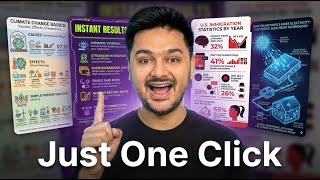

Create Infographics with ONE Prompt in Nano Banana Pro
55sInstantly shows a groundbreaking AI capability that saves hours of design work, appealing to creators and designers.
▶ Play Clip"Delivers on the core promise of creating infographics with Nano Banana Pro, but the 'absolute best' claim is subjective and the video includes promotional content."
This video demonstrates how to create polished, professional infographics using Google's Nano Banana Pro image generation tool with a single detailed prompt. The creator walks through several examples, showing how the tool handles text, layout, and styling, and offers a prompt pack for viewers.
Nano Banana Pro can generate complete infographics from one detailed prompt, handling long text properly and producing clean layouts.
The creator uses ChatGPT to generate infographic topic ideas, then pastes the chosen prompt into Nano Banana Pro for faster iteration.
Enabling a specific setting in Nano Banana Pro produces more detailed output, improving the quality of the generated infographic.
The generated infographics feature crisp icons and no visible spelling errors, with adherence to requested color directions like pastel themes.
Nano Banana Pro pulls real information from Google to populate the infographic content, making it feel professionally designed without manual work.
The creator offers a pack of 30+ infographic prompts specifically designed for Nano Banana Pro, which can also be used with other AI tools.
The tool uses key information from the web and respects exact dimensions requested, ensuring neat placement of elements.
Examples include a balanced diet infographic with uppercase titles and a futuristic neon theme for battery-saving tips, showing style adaptability.
Nano Banana Pro adds a small watermark that can be removed in Canva or Photoshop in a few seconds.
Nano Banana Pro enables instant creation of high-quality infographics with minimal effort, making it a powerful tool for designers and content creators.
What tool is used to brainstorm infographic prompts?
ChatGPT
00:15
What setting in Nano Banana Pro improves output detail?
A specific setting that produces more detailed output
00:40
How many infographic prompts are included in the creator's pack?
More than 30
02:04
What does Nano Banana Pro use to populate infographic content?
Real information from Google
01:38
How can the watermark be removed?
In Canva or Photoshop in a few seconds
03:33
Single Prompt Infographic Generation
Shows that a full infographic can be created with one prompt, saving significant time.
00:01Real Data Integration
The tool pulls real information from Google, adding credibility and reducing manual research.
01:38Prompt Pack Availability
Offers a practical resource for viewers to replicate the results immediately.
02:04Watermark Removal
Provides a simple solution to a common limitation, making the tool more usable.
03:33[00:01] infographics using Nano Banana Pro with basically one single prompt. And in this exactly how I'm doing it step by step [music] because the new update inside Google finally handles long text properly. And it gives you super clean
[00:15] anything yourself. [music] I'm going to go over to Chat GPT and ask it for some use to test this feature. Now, you can totally start the idea generation inside
[00:27] Nano Banana Pro as well, but I usually prefer brainstorming inside Chat GPT because it's fast. [music] So, I'll just type something like give me simple infographic prompts with topics, style, and size. And it gives me a handful of
[00:40] ideas to work with. Let's grab one of them and paste the [music] entire thing them and paste the [music] entire thing inside Nano Banana Pro. [music] switched on. That setting helps it produce a more detailed output. After
[00:56] a moment or two, it starts building the graphic. infographic in the exact [music] size I asked for. The icons look super crisp.
[01:09] really see any spelling errors. [music] And something I really like is that it followed the pastel color direction we asked for. This looks polished enough to or honestly [music] anything you're designing. And it even added a relevant
[01:25] hashtag at the bottom. All right, let's switch to another example. I'm going to try the second prompt. And this time, the layout is square.
[01:38] square infographic, and it actually pulled real information from Google to theme. The type looks [music] professional and honestly it feels like something you might create manually in Canva except here you didn't actually
[01:51] design anything yourself. Now let's move to the third topic which is how email works. And this [music] time I want to try a horizontal layout. Even with the generate because [music] it's doing a
[02:04] while that loads, I want to show you [music] something I put together for you. I've actually cured more than 30 styles of infographic prompts that are specifically created for Nano Banana Pro. These are written in a way that
[02:17] forces Nano Banana to create perfectly structured layouts with clean spacing And yes, you can copy and paste these into other AI tools, too. But Nano accurate in terms of following layout rules and giving you something that's
[02:32] All you need to do is replace the words inside the brackets and paste the prompt. It's literally plugandplay and it [music] works every single time. I'll want to download the entire prompt pack. All right, so Nano Banana has finished
[02:46] the email example and again, if you look closely, it pulled key information from the web and used the exact dimensions I requested. [music] Everything is placed really neatly. Now, I'm going to move to the next
[03:01] Now, I'm going to move to the next prompt about a balanced diet. uppercase title exactly like I asked [music] and the size is perfect.
[03:20] And finally, let's try the last one which is seven battery saving tips. I asked it for a futuristic neon theme and it really leaned into that look. The
[03:33] icons are glowing. The [music] layout feels super tech inspired and the typography matches the style. There is a little watermark that Nano Banana adds, but you can remove that in Canva or Photoshop in just a few [music] seconds.
[03:46] And that's basically how I'm creating full infographics instantly with one advanced tricks, please watch this video. Thanks for watching and I'll talk video. Thanks for watching and I'll talk to you
⚡ Saved you 0h 03m reading this? Transcribe any YouTube video for free — no signup needed.