
Made $10K in 19 Days with Boring Gas Prices
45sShocking money-making claim with specific numbers and a counterintuitive niche sparks curiosity and envy.
▶ Play Clip"Delivers a solid, actionable guide to the ghost niche strategy, but the title's promise of $31,364 is heavily padded with community promotion and a missing thumbnail tutorial."
This video presents a YouTube automation strategy focused on 'ghost niches'—under-served topics like gas prices, real estate, and farming—that the creator claims generated over $30,000 in 90 days across four channels. The tutorial outlines a complete workflow using AI for research, scriptwriting, voiceover, and editing, with a strong emphasis on using Claude for writing and Eleven Labs for voice generation. The creator also heavily promotes his paid community, 'Use For Income,' as a resource for templates, tutorials, and editing services.
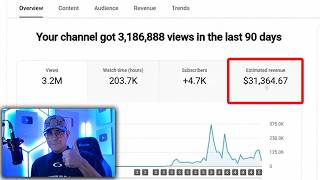
The creator reports earning $10,131 in 19 days from a gas prices channel, with 3.2 million views, 203 hours of watch time, and over 4,700 subscribers. The highest-viewed video on the channel got 745,000 views and paid $2,726 with an RPM of $3.66.
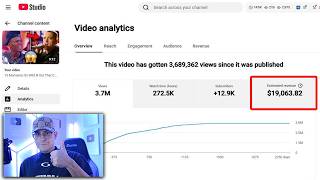
The creator explains his approach of targeting 'ghost niches'—topics with low competition and no established creators—rather than popular niches like celebrity news. He cites examples: a gas prices channel made $2,439 in 8 days, a real estate channel made $14,687 in 90 days, and a farming channel made $4,107 in ad revenue.
The creator openly admits to using AI to create videos, arguing that since no real creators were making content in these ghost niches, there was no one to displace. He dismisses criticism of AI use as 'bitching about AI'.
The first step is to find reliable news about the niche. The creator uses a Google Doc with a structured prompt to gather news from specific dates (e.g., March 1st to March 22nd) to limit irrelevant information.
The creator recommends using Claude (specifically Opus 4.6) over ChatGPT or Gemini for scriptwriting and research. He emphasizes a four-step prompt process: research, topic selection, script writing, and humanization. He warns that AI-generated scripts often contain 'AI fingerprints' that can lead to demonetization or termination.
The final step in scriptwriting is to humanize the AI-generated script to remove AI fingerprints. The creator claims this process takes about 5 minutes and results in a professional, journalistic-style script.
The creator uses Eleven Labs for voiceover. He recommends choosing a 'high-quality' voice (marked with a black checkmark) because he believes YouTube is more likely to demonetize channels using cheaper voices. He suggests generating speech in small chunks (e.g., three paragraphs at a time) to avoid issues.
The creator dislikes editing and offers three options: hiring freelancers on Fiverr (recommending a price of no more than $25 per 10-minute video for editing only), doing it yourself with tools like CapCut or Adobe Premiere Pro, or using his personal editing team through his community (20 videos per month for $350).
The creator briefly mentions thumbnails as the last step, noting that there are many AI tools available. He does not provide a detailed tutorial in this video, promising to cover it in a future video.
The video provides a step-by-step guide to creating faceless YouTube channels in 'ghost niches' using AI, with a focus on monetization. While the strategy is clearly outlined, the heavy promotion of the creator's paid community and the lack of a thumbnail tutorial suggest that the full process is reserved for paying members.
What is a 'ghost niche'?
A niche with low competition and no established creators, where AI-generated content can thrive.
00:42
What RPM did the creator's highest-viewed video achieve?
$3.66
00:16
Which AI model does the creator recommend for scriptwriting?
Claude Opus 4.6
03:29
What are 'AI fingerprints'?
Phrases and wording patterns that indicate AI-generated content, which can lead to demonetization or termination.
05:15
What is the recommended price for editing a 10-minute video on Fiverr?
No more than $25
15:27
What is the cost of the creator's personal editing team for 20 videos per month?
$350
16:07
Monetization Results
Provides concrete, verifiable numbers that demonstrate the potential of the ghost niche strategy.
00:01Ghost Niche Strategy
Introduces a counter-intuitive approach to YouTube content creation that avoids saturated markets.
00:42AI Fingerprints
Highlights a critical risk of AI-generated content and a method to mitigate it, which is valuable for any AI content creator.
05:15Voice Quality Theory
Presents an unconfirmed but logical theory about YouTube's treatment of cheaper AI voices, which could influence creator decisions.
10:37[00:01] $10,131 in just 19 days. And all I did was post videos about gas prices, which you know, sounds stupid. But that stupid idea got 3.2 million views, 203 hours of watch time, and over
[00:16] 4,700 subscribers. And the highest viewed video on this channel got 745,000 viewed video on this channel got 745,000 views, and that paid me $2,726 with an RPM of $3.66. So, in this video, I'm going to teach
[00:30] you how to do this yourself. If you don't know who I am, my name is Romero. I've been doing YouTube automation since 2018. Across all of my YouTube channels, I've made over $2 million in just YouTube ad revenue. But anyways, before
[00:42] we start, I need to explain to you how this works, okay? Cuz I do YouTube everyone else. And that's because I approach ghost niches. I don't do what everyone else is doing, right? I used to. I used to be in celebrity news, top
[00:55] 10 TV shows, and don't get me wrong, those niches do work, yes. But, let me YouTube channel about gas prices, I said, "Cool. Now let's do it about YouTube channel, and in 8 days, the
[01:08] channel made $2,439. Anyway, since that worked, we were like, real estate channel." In 90 days, that channel made $14,687. get weirder. Let's do farming and agriculture." That
[01:23] Let's do farming and agriculture." That channel ended up making $4,107 in ad revenue. So, in total, with this strategy, in 90 days and four different YouTube channels, I made over $30,000. And this is going to piss off a lot of
[01:36] people, but yes, I I used AI to make these videos. Sue me. people that just like bitching about AI, which by the way, nobody was making content in these niches, right? It was a ghost niche. You know, these AI videos
[01:50] are taking from real creators that show their face. [ __ ] you. No real creators were making videos in these niches, okay? So, go go cry somewhere else. let me show you guys exactly how to do this, and we're going to use the gas
[02:03] YouTube channel as an example. The first step is we need to find real reliable news about gas and gas prices. And for that, I'm going to do something super prompt, the one that I used for the channel. And in return, all I ask is
[02:16] channel. I feel like that's a fair trade-off. Anyways, this is the prompt right here. Yes, you're going to have access to this for free, but first, let not just copy-paste and hope for the best. There is a structure to this.
[02:30] Because for scriptwriting, it is a four-step process. This is also something a lot of beginners [ __ ] up on. Their prompts to write scripts are super basic, and that ends up getting demonetized, terminated, or they just
[02:42] you're someone that doesn't take prompting seriously, pay attention, Anyways, what you're going to see on the doc is this right here. You're going to the first thing you're going to do is edit these two things here, which is the
[02:57] start date and the end date. Which is going to limit the amount of irrelevant news we're going to get. I want news from March 1st to March 22nd. Once I do that, I'm going to copy the entire thing.
[03:12] And then I'm going to open up Claude. Yes, you can use Gemini, you can use ChatGPT, but they suck, okay? Claude is 100% the best scriptwriting and research nothing better. And it's even better if you use the Opus 4.6 model, which yes,
[03:29] okay, it's the most expensive, but it's the smartest. Now, if you're cheap, you can also use Sonnet 4.6, or if you scroll down to models, you can use Opus 4.5. But if you want the best results, Opus 4.6 is what you want to use.
[03:44] Anyways, we're going to go ahead and paste the part one of the prompt, and then we're going to wait. And there we go. Claude is now providing me with 20 video topics based on news and current events that are happening in the gas
[03:57] world. For example, state watchdog investigating stations for price gouging, which is kind of crazy. So, once you find whatever video idea it is that you want to do, go back to the prompt, go to step two, and then right
[04:09] topic here. Well, you're just going to erase that and put in that video topic or title that you got from Claude. And then you're just going to copy the entire thing and go back to Claude and just paste it.
[04:22] And what this prompt is going to do is research on the actual topic of, you know, whatever the investigation is with these gas stations. Now, this is where everyone messes up. No one does research about a topic. People assume that AI
[04:35] knows everything, which yes, I mean it does, but it has to be told to search for specific information. So, this prompt right here, which is step two, is instructing Claude to collect all of the information about the topic. Cool? And
[04:47] there we go. Looks like Claude just collected a [ __ ] ton of information here want. I don't really care. I'm just going to go back to the doc. I'm going to click on step three, which is script writing. I'm going to copy and paste the
[04:59] entire thing and just give it to Claude. Super complicated [ __ ] here, boys. As cooking trash, because there is still one more step in humanizing. Here's another thing a lot of people [ __ ] up on. Claude, ChatGPT,
[05:15] Gemini, doesn't matter what you use, it automatically uses phrases and wording that have clear AI fingerprints. Now, what AI fingerprints are are essentially breadcrumbs, right? Or like evidence that you're using AI to write your
[05:28] scripts, which is fine, but YouTube also has their own AI system that reviews and scans scripts, and if it finds too many AI fingerprints or it can predict what you're going to say next, then you run the risk of getting demonetized or
[05:42] terminated for inauthentic content. Claude did write the entire script for me. It's for at least a 10-minute script, but without looking at it, I'm which is humanize, and I'm going to copy paste the entire thing into Claude. Now,
[05:56] we just wait. And there we go. Just like that, took me about 5 minutes. This should be a 10-minute script that is very well researched, very well written, and it's kind of like a journalist hit piece, you know, it's very professional.
[06:08] It's not a typical YouTube script, okay? So, from here, we would click copy on the top right. Then we would open up a clean Google Doc. We're going to paste that here, and we can just review it now. We read it, switch some things,
[06:21] four-step prompt, you can click the link in the description or in the pinned comment. You're going to see the Google Doc link somewhere in the about page here, which coincidentally
[06:33] out my school community, where you can learn exactly how I've made over $2 and find a more prompts exactly like the one I just gave you. Do you guys like But in all seriousness, though, I am the owner of Use For Income, which is one of
[06:48] world. And the reason for that is because when you join, you get a [ __ ] ton of things. Number one, a blueprint step-by-step. And this is for someone watching videos, they just want to see everything from A to Z as fast as
[07:02] you go into the tutorial vault, you're going to see over 80 plus video tutorials, where I teach you everything. For example, setting up your channel, ideas, writing scripts, audios and voiceover, editing tutorials, thumbnail
[07:18] tutorials, uploading and optimizing, pretty much my entire workflow. But list of handpicked niches. And these niches are not just a random list of like a thousand. Okay, there's at least like 25 in here, and the ones in this
[07:32] done them myself, or other members of the community have succeeded in them. You also get free thumbnail PNGs. You get to watch me launch these channels from scratch, and see exactly what I did. And as you can see by some of the
[07:45] thumbnails here, I look rough. Sometimes we struggled, okay? But I show I've had. And all the way at the bottom, you can also find a module where you can hire my personal editing team and download free background music. But the
[07:57] best part is that I go live every single week, and this is where I speak with you guys directly, answer any questions, review channels, and sometimes these calls can take 4 hours. It just depends how many people join, how many questions
[08:09] calls are recorded. You can actually find them here. Okay, it's a lot of live calls. So, yeah, it's you could see why it's one of [ __ ] around. Yeah, I mean, like for example, if we go
[08:24] to the wins post, we can see Ryan Dang here. Last 90 days, he's gotten 2.5 million views, and that's paid him $15,353. Riley Agramonte here, after failing with seven YouTube channels, he was finally
[08:36] seven YouTube channels, he was finally monetized 24 days ago, making $1,920 with 840,000 views. We have a very famous member in the community, his name is Marcos Vinicius. In the last 30 days, he created six YouTube channels, and
[08:50] four of them are already monetized. And he dropped the screenshots as proof made a few hundred bucks. But yeah, you get the point, right? If I scroll all the way down, you can see that there is 672
[09:03] wins in the community. In December of 2025, I sat down and I counted every single win/ testimonial uh in the community. It took me about 2 hours, but in the edited footage, it's 31 minutes, and it showed that members of the
[09:17] community generated over 184 million views and made a total of $556,452 more, but that's all I was able to see in the posts and verify myself. But
[09:31] description of this video or in the pinned comment. You You ahead and check it out if you want. Now, it's very important that I mention that results are not guaranteed. Yes, I do have a lot of members in my community that got
[09:43] members that got no results. At the end of the day, it's completely up to you creative you get. And I'm not going to [ __ ] you. If you do join my not guaranteed. I can only teach you the way I did it. But anyways, let's get
[09:58] back to the video. So, after you've reviewed the script, you made changes to it, and you're fully happy with it, the next step of video production is to create the voiceover. And for that, we're going to use AI, primarily Eleven
[10:10] Labs. Now, everyone should be familiar with Eleven Labs, but if you're not, the description. Go ahead and create an account. Once you create an account, you're going to see this. From here, what you're going to do is click on
[10:23] voices. From here, we can see a huge list of voices. Okay? All you have to do is hover over it, click play, and you'll be able to hear a little sample of the voice. Now, wait. Before you pick a voice, hear me out. There's this theory
[10:37] going around, and I actually believe it. So, Eleven Labs has tiers in their voices, meaning that these four audios here with the little black check mark are high-quality voices, which means that it costs more to use compared to
[10:51] others without the check mark. Now, the theory is that YouTube is more likely to demonetize or hit your channel with inauthentic content for using a cheaper voice. It's not confirmed, but from a business standpoint, it makes sense for
[11:05] YouTube to treat it this way. So, I recommend that you choose a high-quality voice. Now, the one I use for the Gas Station channel, I think it's So, anyways, let's listen to these voices and pick one. What? Sharing kindness is
[11:20] Darkness fe- Life on these the courage to Life on these streets ain't easy, mate. That voice is badass. I'm going to be going with Rob. Now, obviously, you something something that matches a niche. I'm just [ __ ] around. So, once
[11:36] going to go with Rob, you're going to go to the right side and click on the plus sign that says add to my voices. Once you do that, it's going to load for a second and then you're going to click on use voice.
[11:49] That's going to take you here. On the right side, you can see that you can adjust settings of of the voice, like make it faster, stability, similar, to leave that for now, go back to my script and copy the first three
[12:04] paragraphs. And I'm going to go back to 11 Labs and paste it right here in the center. Now, you can add more of your script, that's because depending on the voice you choose, it might start going a
[12:17] little bit crazy if you give it too much to read. So, once you put, you know, those few paragraphs, you're going to click on generate speech. Let's hear it. On March 20th, the Division of Petroleum Market Oversight, an independent agency
[12:31] within the California Energy Commission, issued an enforcement bulletin. Yeah, not bad. So, if you're happy with the voice over and you're happy with what it to the bottom right and you're just going to click on download. You're going
[12:44] in your Chrome downloads. Then, we delete the center, go back to our script and copy paste the next few paragraphs back into 11 Labs. And you do that over and over until the script is fully done. So, okay, you know the
[13:00] niche, you know exactly how to write the scripts and you know exactly how to create the voice over. The next step is editing. Now, this is my least favorite one. I hate editing. And in other videos on this channel, um
[13:13] when I reveal one of my niches, I always skip the editing tutorial because it's the worst. It takes a very long time. Now, I'm not saying editing takes a very long time, but explaining it and having you understand the concept, you're going
[13:26] to have to pay me 37 bucks, bro. You can either go go on YouTube and get a tutorial from someone else, but I'm not doing it. [ __ ] that. I've been doing this [ __ ] way too long to be sitting here and editing, bro. If you feel the
[13:40] solutions, okay? Solution number one is to go to fiverr.com. And this is where you can hire freelancers from all over the world to work for you. So, if you go here at the top, you're going to see this little search bar. Click on that
[13:55] and type in video editor. From here, you're going to see a bunch of different completely lost their minds. Like, I don't want to call any of them out, but there's some here that charge $80 per minute. If you like my videos and the
[14:09] style of editing of my videos, you are not going to pay $80, okay? That is insane. So, we need to refine the search, okay? Let's do search, okay? Let's do YouTube automation. There we go. Much
[14:22] YouTube automation. There we go. Much better. $25, $15. This guy's doing $5. Let's click this guy. 25 bucks. Look at this guy. I will do top 10 faceless video YouTube automation editing. Okay, cool. Now, you're going to have to reach
[14:36] out to these guys, right? You click on any of these profiles. Now, what a lot together. For example, this guy is charging $47.50 and he will do an 8-to-10-minute video with an engaging script, voiceover, and
[14:51] thumbnail. We already did the script and the voiceover, and that took us 10 minutes. And I don't know about you, but I don't know if I would trust these And I'm not talking [ __ ] about this guy, right? I'm I'm not at all. I'm just
[15:03] saying, personally, I think I got it. So, what you're going to do is click contact me here at the bottom right. And what you're going to say is, "Hey, bro. I have a 10-minute video that needs editing only. I do not
[15:15] need the script, the voiceover, and the thumbnail. What is the custom price you can give me?" So, of course, he should be giving you a pretty extensive discount because he's not going to be doing the script, voice-over, or
[15:27] 10-minute video, you should not pay more than $25. But also, you shouldn't expect Michael Bay-level quality of editing, okay? Just a normal video. Add some
[15:39] transitions, add some filters, whatever. Maybe one or two animations here and there, cool. 25 bucks a pop. Let's do it. Again, that's option one. But option two is doing it yourself. And for that, you can use CapCut, Adobe Premiere Pro,
[15:54] a lot of different things. And it's not that hard, okay? Editing sounds scary. depending on what you're making, but it's not really hard. And for this niche in specific, editing couldn't be easier. Now, option three is my school
[16:07] community, my actual personal editing team. If you join the group, you can reach out to them, and they will do 20 videos a month for $350, which if you do the math compared to the other guy on Fiverr saying that we can get him down
[16:21] to $25 per edit, you would be paying $500 for 20 videos. Here in the community, you have a fully trained team. They already know exactly what to do. They edit my videos, 350 bucks a month. Again, if you don't have a budget
[16:34] like that, fully understandable. Just do it yourself. It's not hard. But moving on to the last step of production, that is the thumbnail, which honestly it's Especially nowadays, there's a [ __ ] ton of AI tools you can use. I have my own
[16:48] options out there, okay? All right, I'm going to be honest. I was going to do a video's already going to be super long. It's really hot in my office, so I think Again, if you want to learn more about YouTube, you can click the link in the
[17:02] description or my pinned comment. Check out my school community. If you don't give a [ __ ] sounds good. I'll be posting probably next week. And you know, probably then I'll I'll have a thumbnail tutorial and editing.



⚡ Saved you 0h 17m reading this? Transcribe any YouTube video for free — no signup needed.