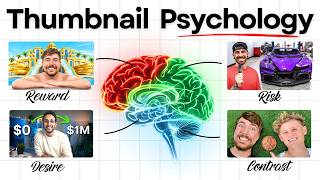

Why You Forget 99% of Thumbnails
44sExplains a relatable psychological phenomenon that instantly hooks viewers and makes them question their own behavior.
▶ Play Clip"Solid content on thumbnail psychology, but the title promises a 'new strategy' while the video delivers classic principles with a course pitch."
This video explains how to design YouTube thumbnails that leverage human psychology to capture attention and drive clicks. The creator breaks down the roles of the emotional and logical brain in the decision-making process and provides a five-step framework for creating effective thumbnails.
The brain is exposed to over 200 thumbnails but forgets 99% of them, filtering out anything that doesn't spark a strong emotional reaction.
The right side of the brain is emotional and instinctive, while the left side is logical and rational. The emotional brain reacts first, and the logical brain decides afterward.
Smelling freshly cooked food triggers an emotional reaction ('Wow, that smells amazing') before the logical brain considers whether you're hungry or have time.
The emotional brain stops the scroll, and the logical brain decides to click. A good thumbnail must create an emotional reaction and make logical sense.
Faces work well because humans are drawn to other humans. The face must match the emotion of the video to feel authentic.
Every good thumbnail should convey one dominant emotion (curiosity, surprise, desire, fear, excitement, empathy). Conveying two emotions cancels them out.
Contrast separates elements, telling the eye where to look. Examples include bright against dark, big against small, and before versus after.
A pattern interrupt breaks expectations, creating a visual question mark in the viewer's brain, making them stop and ask 'wait, what was that?'
Brains are hardwired to pay attention to danger or loss. Thumbnails built around mistakes, warnings, scams, or failure can be powerful.
The emotional brain reacts to simple, clear images. Strong thumbnails usually have up to two emotional triggers: one main and one supporting.
The logical brain evaluates clarity (understand in 1 second), credibility (believability of claims), expected payoff (will it reward time), and title alignment.
A big claim needs proof. A new channel claiming $5,000 per video is rejected, while a credible creator like Davie Fogarty can claim 'zero to a billion' and be clicked.
The creator shares a five-step framework used for every thumbnail: define the promise, pick one emotion, create a scroll stopper, use the two-thirds rule, and analyze with the logical brain.
Write down the purpose of the video and what the viewer will get. For this video, the promise is to teach viewers how to use psychology to create viral thumbnails.
Choose one emotion from curiosity, surprise, desire, fear, awe, empathy, danger, or risk. Never more than one.
The scroll stopper is the main element that grabs attention. Choose one or two elements like faces, pattern interrupts, risk, or reward. One is main, the other secondary.
The main element should take up two-thirds of the thumbnail, and the secondary element takes up the other third.
Put the title and thumbnail together and evaluate clarity, credibility, expected payoff, and title alignment. Ask if it would stop you scrolling and what questions it creates.
Effective thumbnails require a balance of emotional triggers to stop the scroll and logical elements to convince the viewer to click. By following the five-step framework, creators can design thumbnails that consistently perform.
What are the two sides of the brain and their roles in thumbnail viewing?
The right side is emotional and instinctive (reacts first), the left side is logical and rational (decides afterward).
00:59
What is the 'two-thirds rule' in thumbnail design?
The main element should take up two-thirds of the thumbnail, and the secondary element takes up the other third.
15:22
Name the four things the logical brain evaluates in a thumbnail.
Clarity, credibility, expected payoff, and title alignment.
09:21
Why should a thumbnail convey only one dominant emotion?
Because conveying two emotions at once cancels them out.
05:15
What is a 'pattern interrupt' in thumbnail design?
Anything that breaks the viewer's expectation, creating a visual question mark in the brain.
07:07
What is the first step in the five-step thumbnail framework?
Define the promise of the video.
13:05
Why do faces work well in thumbnails?
Humans are naturally drawn to other humans; faces are some of the first things the brain locks onto.
04:20
Emotional vs. Logical Brain
Explains the core psychological mechanism behind thumbnail clicks.
00:59One Dominant Emotion
A key principle for effective thumbnails, backed by examples.
05:15Credibility Backs Big Claims
Shows why proof is essential for large claims, using a real example.
10:05Two-Thirds Rule
A concrete, actionable design rule for thumbnail composition.
15:22[00:02] brain is exposed to over 200 different thumbnails. But by the time you leave the platform, you've already forgotten 99% of them. That's because your brain instantly filters out anything that doesn't spark a strong emotional
[00:16] reaction. Now, the only thumbnails you actually notice are the ones that hit your subconscious before your brain even has time to process them. So, in this video today, I'm going to show you exactly how to use human psychology to
[00:31] resist clicking on. Let's get into it. All right, then. So, what actually is it relate to thumbnails? Well, psychology is basically the study of how people think, feel, and make decisions. Like what goes on inside someone's
[00:46] brain. And thumbnails, well, good thumbnails anyway, are built around that because their whole job is to make someone stop and click, which is a psychological decision. Now, a really simple way to think about it is that
[00:59] your brain actually has two sides. The right side is associated with emotion and instinct, whereas the left side is more logical and rational. So, for this the emotional brain and the logical brain. And the best thumbnails in the
[01:13] important thing you need to understand is how they work because the emotional brain always reacts first. It's fast, it's instinctive, and driven purely by feelings. Then the logical brain comes
[01:26] in afterwards. It tends to think things through doing or not. Now, a real-world example of this is kind of like walking past a bakery or a McDonald's and suddenly smelling that freshly cooked food. Now,
[01:40] not you're hungry, your emotional brain has already reacted and gone, >> "Wow, like that smells amazing." Then a second or two later, your logical brain kicks in and starts thinking, "Do I actually want one? Do I have the time?
[01:54] Like am I even hungry?" That kind of thing. So, your emotional brain is the reactor and your logical brain is the decider. And on YouTube, that plays out every single time someone opens their home feed because they're not sat there
[02:07] studying each video. They're pretty much scanning really fast looking for anything that stands out and catches their eye. Now, the emotional brain is doing all the work at this point, reacting to colors, faces, contrast,
[02:19] curiosity, danger, anything that feels different. Then, when a thumbnail does second. Your emotional brain has basically said, "Wait, look at that." But, that doesn't mean you click yet because that's when the logical brain
[02:33] steps in. It quickly analyzes everything by looking at the title, the topic, the creator, and the promise of the video. And it then decides whether the video is actually worth clicking on and watching. So, in other words, the emotional brain
[02:46] stops the scroll and the logical brain decides to click. This is why understanding psychology is so important because a good thumbnail has to do two things. Firstly, it has to create an emotional reaction strong enough to stop
[03:00] someone scrolling and then it also has to make enough sense logically that the viewer believes the video is actually worth watching. Now, by the way, if you do actually have a titles and thumbnails mastery course covering everything
[03:13] across 29 different modules, the full system, every framework, every strategy, of students have already taken it and right now it's actually 50% off. Link is down there below. But, anyway, now that you understand the human psychology side
[03:26] of things, I'm now going to teach you exactly how to design thumbnails that actually tap into both of these things, emotion and logic. Now, when I'm designing my own thumbnails, I never just ask, "Does this look good? Does it
[03:39] look nice look at?" Instead, I actually ask, "What part of this thumbnail triggers the emotional brain and what part of it satisfies the logical brain?" Because if you only trigger emotion, people might notice the thumbnail but
[03:52] thing if you only trigger logic. The video might seem useful, but it probably won't capture enough attention on the home feed. So, you need both them working in tandem. So, let me now break down the triggers of both sides for you.
[04:06] We'll start with the emotional side first. Now, this part of the brain reacts to attention signals. These are things like faces, emotion, contrast, pattern interrupts, and risk. Now, let me explain each one of these just so you
[04:20] actually get a really good idea. Now, faces work exceptionally well because humans are naturally drawn to other humans. Faces are some of the first thing that your brain subconsciously locks onto when scanning the home feed.
[04:33] But, here's the important part. Your face has to match the emotion of the video. If your video is about a shocking mistake, your expression needs to communicate that shock. If it's about an amazing result, show excitement or
[04:46] disbelief. Slapping a generic shocked face on every thumbnail stops working the moment it stops feeling authentic. Now, creators who nail this are like Mr. Beast, Ryan Trahan, and Mash Tag Brady. Like, they always use
[05:00] faces, and their emotions always match the video. And that's where we have the emotion side of things. Now, every good thumbnail should have one dominant emotional flavor. It might be curiosity, it might be surprise or desire, fear, or
[05:15] excitement, empathy, anything. On every single viral video ever made, the thumbnail successfully conveyed one really strong emotion, whether you for example, take my video, "If Your Shorts Get Under 1,000 Views." 1.8
[05:30] thumbnail worked because it tapped into that specific feeling of opening up YouTube, checking your newly posted video, and realizing it flopped. Like, pure disappointment. That's the emotion. But, then look at this video, "I Finally
[05:44] Got a Brand New Lamborghini Urus." You instantly feel the excitement and happiness through his smile and his posture. And then we also have Dr. Eric Berg's Why You Are So Tired thumbnail. Now, you can feel the exhaustion just by
[05:57] looking at it. One emotion clearly communicated, which is exactly what he thinks his viewers will relate to, just like me and mine. But look guys, just never try to convey two emotions at once because they'll cancel each other out.
[06:10] Only ever use one emotion at a time. Then you have contrast. Now, contrast basically tells the eye where to look. It separates elements so that one thing stands out above the rest. Things like bright against dark, big against small,
[06:24] before versus after, that kind of stuff. And one of my videos is a great example of this. The contrast here is going from dark to bright green, showing that if boost your channel and make everything clearer. Also, Marques Brownlee does
[06:40] this at the highest level. That deep contrast between the bright orange and the dark blue makes the product pretty much impossible to ignore. And even the thumbnail is a masterclass in simplicity. Really dark background,
[06:55] bright red tones, instantly eye-catching. Simple but works every time. And then you have pattern interrupts. Now, a pattern interrupt is anything that breaks what the viewer expects to see. Something oversized,
[07:07] broken, blurred, a weird comparison, or a face reacting to something unusual. Now, the goal here is to create a visual question mark in the viewer's brain. You want the viewer's brain to go, wait, what was that? Now, Airrack does this so
[07:22] well. And so does this 5-Minute Crafts with that giant flip-flop. And also, 50 Ways to Use a Watermelon video. All of these videos have massive view counts, and they're all built around one thing, making the viewer's brain stop and ask a
[07:35] question. This is one of the most powerful things you can do, trust me. And then threat and risk also worked really well, because our brains are hardwired to pay attention to danger or loss and things that we want to avoid.
[07:48] That's why thumbnails are built around mistakes, warnings, scams, or even failure can be really powerful. Now, this video of mine is a great example of this, basically saying, "If you make these mistakes on YouTube, your channel
[08:01] could get banned." And the thumbnail really conveys that danger and risk. Now, another mega example of this is this video here, The World's Highest Security Prisoner. 174 million views, which is insane. Now, you
[08:14] can immediately see the risk of him being stood there, like stood in front of all of those prisoners. Or even this video, like the risk of buying a crashed Ferrari and trying to rebuild it. That's clearly very risky. Now, people love
[08:27] on these videos as soon as they see them. But, all of these emotional triggers only work if the thumbnail is simple and clear to understand. The emotional brain reacts purely on emotion. It doesn't do well with really
[08:40] complex images where things are a bit complicated to understand. It wants one clear thing to react to. That's it. And that's why most strong thumbnails usually only have up to two of these emotional triggers. One main one and
[08:53] then one supporting one. Maybe it's a face and a reward. Maybe it's a face in danger. Maybe it's a before and after with a shocked reaction. But, it should Now, if you look at any of my videos, I always use my face plus one of the
[09:07] thing. So, out of this list of all the emotional triggers I've sent you, pick one or two, never more than that. Anyway, that's the emotional side done. But, stopping the scroll, as I said, is only half the job. Once a thumbnail
[09:21] catches someone's eye, the logical brain then kicks in and starts evaluating it. Now, the logical brain evaluates four things: clarity, credibility, expected payoff, and title alignment. Now, let Let explain each one. Now, clarity means
[09:37] can I understand this in 1 second? If the viewer's brain has to work too hard to figure out what's going on, they'll just skip. Now, this first video here is clearly going to be about proposing. And this other one is so obviously going to
[09:50] be about a car review. And this one clearly screams like earning money on Instagram. You need to make sure your thumbnails are so clear that instantly "Yeah, I know exactly what's going on." And these are perfect examples of that.
[10:05] Then credibility means do I actually believe this? Now, a big claim needs to feel believable. If a brand new channel with like barely any views is claiming they make $5,000 per video, the logical brain instantly rejects it. Not because
[10:20] the claim isn't interesting, but because there's no proof. Now, here's a video claiming that one AI prompt will put you in the top 1% of marketers. Now, some people might see that and be curious until you click onto the channel and
[10:33] only see 5,000 subscribers and only 11 marketing-related videos. So, this guy's credibility instantly collapses. Now, Like, I'm sure he's a nice guy. I'm just showing you why a lack of credibility
[10:47] will always prevent people from clicking on videos with big claims. And the fact this video only got 200 views proves that. Now, compare that to Davie Fogarty claiming he went from zero to a billion. Now, that sounds insane. A claim so big
[11:02] you might be like, "No way." But, a quick click onto his profile and then a out immediately. Yeah, it's a huge claim, but his credibility backs it up. That's why this video is instantly clickable. And finally, expected payoff
[11:18] means will this video reward the viewer's time? Now, before someone clicks on your video, they will always quickly consider whether or not they deliver on the standards set by the title and thumbnail. They obviously
[11:31] don't want their time wasted. So, they need to be absolutely sure that when they click through, the rest of the video will deliver exactly on what the title and thumbnail promised. So, your title and thumbnail always have to align
[11:45] and work together. They need to support each other. And when you apply all of this correctly, this is what happens. You'll see results like some of my students. Jeremy recently got his first breakout video that got over 20,000
[11:58] views in 5 days. Kate, on the other hand, doubled her click-through rate going from 2.8% to 4.3%. And then we also have Ben, who's hitting new views and click-through rate milestones he'd never reached before. Now, these aren't
[12:11] lucky results. They're what happens when you stop guessing and actually start intentions. And now that you understand the psychology side of things, we next need to talk about how to actually apply it, like the design side of things.
[12:24] Because, yes, I know that was a lot of information at once. And for some people, it can get quite confusing. So, I'm now going to share with you the exact five-step framework that I use every single time I create a new
[12:37] thumbnail. And this framework breaks it down into really easy, manageable steps, so I can guarantee that every thumbnail I make always uses the right psychology. Mastery Course, this will be a downloadable worksheet you can use every
[12:52] time. But if you aren't in the course, I would recommend grabbing a pen and paper or even a Word document and just noting this down. So, step one is to define the promise. Now, before you even begin to create the thumbnail, you must first
[13:05] define the promise of the video. Like, write down what is the purpose of the video? Like, what is the viewer actually going to get if they click on it and watch it? Now, for me, on this video you're watching right now, my promise
[13:17] was to teach viewers how to understand human psychology and use it to create viral thumbnails. That's it. But yours could be anything. Some really simple examples could include like teach viewers how to grow on YouTube or it
[13:31] could be show viewers a crazy weight loss transformation or even something for productivity and better sleep. That kind of stuff. It could literally be in one sentence you write down the promise or the purpose of the video
[13:45] you're actually creating. And then once you've done that, step two is where you pick one dominant emotion that you want your thumbnail to convey. Every single thumbnail has to tap into one emotion. Now the best and most common emotions
[13:59] from the research I've done are curiosity, surprise, desire, fear, awe, empathy, and danger and risk, that kind of stuff. But it always needs to be one of those things. Never more than one, just one. Then once you've identified
[14:15] the right emotion for the video, step three is where you create your scroll stopper. Now the scroll stopper is going to be the main element of your thumbnail that grabs people's attention and activates the emotional side of the
[14:27] brain, the thing that happens first. Now you should choose one or two of these things. It could be faces, pattern interrupts, risk, reward, simplicity, Make sure you always pick one or two. I would always recommend never more than
[14:42] two cuz it gets a bit confusing. It can be just one. I personally like to use two, but it's completely up to you. Now if you do choose to use two, one of them needs to be your main one and the other will be your secondary one. Now for me,
[14:54] I always choose to include my face and either a reward or a desire or some sort of risk. Now the reward or the desire or the risk part is always used to be the bit because people are clicking on my video for the reward or the risk, not my
[15:09] face, but I like to include my face just as a bit more of a scroll stopper. Now it's really important you have a main element and then a secondary element because this then brings us on to step number four. Use the two-thirds rule.
[15:22] Now the main part or element of the thumbnail should take up two-thirds of the thumbnail size. And then the secondary part should always take up the other third. Now, all of these thumbnails you see here are using this
[15:34] actually realize it. Now, if you only use one element, obviously that takes up elements, it needs to be split into thirds. Main element, two-thirds. makes sense. Any questions, please do let me know down below. Then finally,
[15:50] step five is the logical brain analysis. So, if you have your title already, you need to put the title and the thumbnail together and evaluate the logical side of things. Ask yourself here, is there clarity? Is there credibility? Is there
[16:05] the expected payoff? Is that obvious? Is there good title alignment? And I've made notes on screen so you can see what each part of these means. But you just yourself in your viewer's shoes for a second. Ask yourself, would this
[16:19] thumbnail actually stop me scrolling? Is the story clear in one second? What emotion does this thumbnail trigger? What questions does it create? And why compared to everyone else's they can see on the home screen? Or you could even
[16:34] just send your thumbnail and title to a friend or a family member or one of your YouTube buddies and ask them those questions because you need people's opinions. It's not that good having AI do all the time. You need real people's
[16:46] opinions just so you can really gauge how it's all done. But luck. The best thumbnail in the world is useless unless you have a great title to pair it with. Now, like I said, as a thank you for watching this video until the end, my
[16:58] titles and thumbnails mastery course is 50% off today, and you can get it by clicking on the link below. Now, it's packed with real-world examples, proven frameworks, title formulas, emotional trigger breakdowns, thumbnail design
[17:11] principles, and so much more. Honestly, it's a really good little course. Oh, you could just watch this video that's popping up right here instead. It's all about how to master titles. I'll see you there.



⚡ Saved you 0h 17m reading this? Transcribe any YouTube video for free — no signup needed.