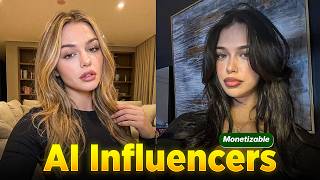

Create AI Influencers for Free
45sRevealing a free method to create realistic AI influencers taps into curiosity and the desire for easy, cost-effective content creation.
▶ Play Clip"The title accurately promises a free AI tool and realistic results, and the video delivers exactly that."
This video demonstrates a free, step-by-step method for creating realistic AI influencers using accessible tools. The process involves generating a unique model image from a reference photo, extracting a pose from a video, combining them, and animating the result to mimic the original video's motion.
Realistic AI influencers can be created without expensive software or advanced skills, using free tools and a step-by-step process.
Search Pinterest for 'fashion influencer portrait' to find a high-quality image with a clear face and body, which yields better AI results.
Upload the Pinterest image to Lowart AI, select the Nano Banana model for realistic humans, set resolution to 2K and aspect ratio to 3:4, and generate a new AI influencer image.
Search Pinterest for 'aesthetic dance reel' or 'model walking video', download the clip, and extract a single frame using Frame Extractor to capture the pose.
In Lowart AI, upload both the influencer image and the extracted frame, then prompt the AI to apply the pose from the frame to the influencer's face and identity.
Use Kling AI's Cling Motion Control to upload the influencer image and reference video, set resolution to 720p, and generate a video where the influencer copies the motion.
AI influencers eliminate the need for cameras, lighting, or models, allowing content generation anytime with realistic results.
By following these steps, anyone can create realistic AI influencer images and videos for free, enabling unique content creation without traditional production resources.
What is the first step to create an AI influencer?
Find a high-quality influencer portrait on Pinterest and download it.
00:39
Which AI model is recommended for generating realistic human images in Lowart AI?
Nano Banana.
01:22
What resolution and aspect ratio are suggested for influencer images in Lowart AI?
2K resolution and 3:4 aspect ratio.
01:22
How do you capture the pose from a reference video?
Use Frame Extractor to extract a single frame from the video.
02:42
What tool is used to animate the AI influencer to follow a reference video's motion?
Kling AI's Cling Motion Control.
03:45
What resolution is recommended for the final animated video?
720p.
04:11
Free AI Influencer Creation
Reveals that realistic AI influencers can be made without cost, democratizing content creation.
00:01Lowart AI for Model Generation
Introduces a free tool that generates unique influencer images from a reference photo.
00:53Kling AI for Motion Transfer
Demonstrates a powerful free tool that animates static images to mimic video motion.
03:45Advantages of AI Influencers
Highlights the elimination of traditional production costs and the ability to generate content anytime.
04:35[00:01] Instagram or Tik Tok accounts with AI influencers that look completely real and get thousands of views, you might think they require expensive software or advanced skills. But the truth is, you can actually create your own realistic
[00:13] AI influencer completely free. And in this video, I'm going to show you the exact step-by-step process using a few powerful tools. So, by the end, you'll know how to generate the influencer image, give it motion, and turn it into
[00:25] a realistic video that looks like a real person created it. The first thing we need is a source model image that our AI influencer will be based on. And for one of the easiest places to find influencer style images. Simply open
[00:39] Pinterest, search something like fashion influencer portrait, and you'll see high-quality photo that clearly shows the face and body because cleaner images usually produce better AI results. Download that image to your computer.
[00:53] And now we'll use that image to generate our own unique influencer using Lowart AI, which is the main tool for creating the model. When you open the Lowart AI website, you'll notice that it gives 30 free credits every day, which is more
[01:07] than enough for testing and generating multiple influencer images without in, click the plus icon, then choose image generator. And here you'll upload the Pinterest image you just downloaded. After that, select the model Nano Banana
[01:22] the platform for generating realistic human images. Then change the resolution to 2K so the final output looks sharp and professional. And set the aspect ratio to 3 to 4 because that format
[01:34] works best for influencer style portraits and social media posts. tells the AI how to recreate the model. The prompt usually describes the
[01:48] lighting, camera style, realism, and overall look, so the AI understands what everything is ready, simply click generate, wait a few seconds, and Lower AI will create a brand new AI influencer image based on your reference photo, but
[02:02] you now have a completely original influencer that you can use for content creation. But right now, it's just a static image. And the next step is where things get really interesting because we're going to give this influencer
[02:15] motion reference video. And again, Pinterest works perfectly for this because you can find short aesthetic clips or influencer reels very easily. So, search something like aesthetic dance reel or model walking video. Copy
[02:29] the video link and download the clip to your computer using any Pinterest video we need to extract a frame from it. And for that, we'll use a simple tool called Frame Extractor. Frame extractor, which allows us to take a single image frame
[02:42] from a video. So the AI understands the pose and body position. So open the frame extractor site, upload the video you downloaded, set the frame number to one, click extract, and download that frame image. This frame basically
[02:55] represents the body pose that our AI influencer will copy later. Now we go back again to Lowart AI because we'll use it one more time to combine the influencer face with the pose from the video frame. So once again, click image
[03:07] generator, but this time upload two images. the AI influencer image we generated earlier and the frame image extracted from the video and then write a prompt telling the AI that the person in image 2 should pose and dress like
[03:19] the person in image one meaning the body pose will come from the frame but the face and identity will remain our influencer model then keep the resolution at 2K the aspect ratio at 3:4 and click create and within a few
[03:31] seconds you'll get a new image that perfectly combines both references so now the influencer has the exact pose needed to recreate the video motion Once now we're going to animate it using one of the most interesting motion tools
[03:45] called K I AI which allows images to follow the movement of a reference video. And to start, you simply sign in with your Google account. Then go to API market. Scroll down until you find Cling Motion Control and open it. Here you'll
[03:57] see a default image and video already loaded, but you should delete those and upload your own files instead. So, first upload the AI influencer image we video we downloaded earlier from Pinterest. Remove the default prompt
[04:11] because we don't need extra instructions. Set the resolution to 720p which is usually enough for social media videos and then click run. The system will start processing the files and within a short time it will generate a
[04:23] video where your AI influencer copies the exact motion from the original video. Which means if the reference video shows dancing or walking, your influencer will perform the same action. And you'll see how realistic the result
[04:35] character looks like an actual influencer recording a real. The reason each tool is responsible for a different part of the process. The biggest advantage is that AI influencers don't require cameras, lighting setups, or
[04:49] models. You can generate content anytime. So, if you follow these steps carefully, you'll be able to generate your own AI influencer images, animate them using motion reference videos, and start creating unique content that looks
[05:03] surprisingly realistic, even though it's completely AI generated.
⚡ Saved you 0h 05m reading this? Transcribe any YouTube video for free — no signup needed.