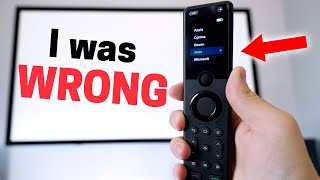

Family Finally Uses Home Theater!
48sRelatable struggle of family not using complex tech, solved by a smart remote—perfect for viral relatability.
▶ Play Clip"Delivers on the promise of a remote that simplifies life, with honest pros and cons."
The video reviews the SofaBaton X1S universal remote, highlighting its ease of use for controlling a home theater system. The creator demonstrates how the remote simplifies device control for family members, discusses its hardware, setup process, and smart home integration, and provides a balanced assessment of its pros and cons.
The creator's family found it nearly impossible to use the home theater system (projector, amplifier, Apple TV, Xbox, smart shades, lights).
At an Airbnb, the family liked the Harmony Elite remote, but Logitech stopped selling it, prompting a search for an alternative.
Bought the SofaBaton X1S on Amazon despite mixed reviews, hoping it would integrate with smart home.
The remote uses activities (e.g., 'Watch a Movie') that turn on the projector, amplifier, Apple TV, close shades, and turn on lights with one selection.
The remote can navigate the Xbox, so no need for the Xbox controller for movies.
It took 15 seconds to explain to his wife how to use it, and she now uses it without issues.
The screen is not a touchscreen; navigation is via a scroll wheel. The back button is hard to reach, but rarely needed.
Rechargeable via USB-C, lasts 2-3 months per charge. No charging dock included.
The remote uses a hub for IR control; included IR extenders help reach devices without line of sight.
Works with Amazon/Google voice assistants to start activities. Home Assistant integration via API endpoint.
Direct control only works with Philips Hue lights, but automations triggered by device power states can control other smart devices.
Supports IR, Bluetooth, Wi-Fi, RF; database of over 500,000 devices. Apple TV via Bluetooth, receiver/projector via IR.
Xbox required IR and searching for 'Microsoft'; arrow buttons needed a user-shared code. Combined two devices via activities.
Set devices to 'stay on unless off button pressed' (projector, amplifier) or 'turn off when not in use' (Apple TV, Xbox).
Activities have three parts: when turns on (devices and inputs), button mapping (which device each button controls), and when turns off (which devices turn off).
Recommended if you accept limitations (no IR on remote, few smart home integrations, no touchscreen). It made life easier and stopped wife's calls.
The SofaBaton X1S is a solid universal remote that excels at controlling home theater devices through activities, making it easy for the whole family. While it has limitations in smart home integration and hardware quirks, it delivers on its core promise of simplifying home theater control.
What is the main benefit of the SofaBaton X1S remote?
It simplifies controlling multiple home theater devices through activities, making it easy for the whole family.
01:09
How does the remote wake up?
It wakes up automatically when you pick it up (movement sensor).
00:56
What are the three parts of an activity setup?
1) When the activity turns on (devices and inputs), 2) Button mapping (which device each button controls), 3) When it turns off (which devices turn off).
09:03
How long does the battery last on a full charge?
About 2-3 months.
03:27
What is a limitation of the remote's screen?
It is not a touchscreen; you must use the scroll wheel to navigate.
02:18
How does the remote control IR devices?
It uses an included hub with IR blasters; IR extenders can be placed near devices for better coverage.
03:42
Which smart home devices can the remote directly control?
Only Philips Hue lights (via customizable buttons).
05:18
How can you integrate the remote with Home Assistant?
Use the SofaBaton API endpoint in a restful command to start or stop activities.
04:49
What power setting should be used for devices like a projector that should stay on?
Select 'stay on unless the off button is pressed'.
08:07
How many devices does SofaBaton claim are in its database?
Over 500,000 devices.
06:50
Activities simplify control
Shows the core value proposition: one button press triggers multiple devices and automations.
01:09Spouse approval factor
Demonstrates real-world usability and family adoption.
02:02Home Assistant API integration
Provides a technical method for advanced users to integrate the remote into smart home automations.
04:49Power settings strategy
Explains a key configuration step that makes activities work seamlessly.
07:55Honest recommendation
Gives a balanced verdict acknowledging limitations while affirming value.
10:13[00:03] made a video about a Smart Remote I made on my phone and there were a lot of comments saying they needed physical buttons you know what they're right buttons are nice to have I still use and like the remote I made on my phone but I
[00:16] our theater room since I have a projector amplifier Apple TV XBox Smart Shades and lights in here and getting my family to use this system has been family to use this system has been nearly an impossible task
[00:31] but then something unexpected happened we recently stayed at Airbnb and it had a Harmony Elite remote and Ali really liked it the problem is Logitech stopped
[00:43] selling them so I went on the hunt to find something similar after searching for a while on Amazon I ended up buying the sofa baton x1s I was nervous since it had mix reviews and I wasn't sure how well it would integrate with my smart
[00:56] home but after setting everything up check out how easy it is to use if I pick it up the movement automatically wakes up the remote then I can use this little scroll wheel to select watch a movie or play Xbox these are activities
[01:09] I set up and I'll show you how I did that in a second if I select watch a movie the projector amplifier and Apple TV all turn on not only that but my smart window shades close and the light strips turn on but say I actually want
[01:22] to watch a Blu-ray on the Xbox well all I have to do is Select that on the remote then the Xbox turns on and the amplifier input is switched over to display it on the projector I can even use the controls on the remote to
[01:35] navigate the Xbox so I don't have to use the Xbox controller for movies it's way more convenient and very intuitive to use Ali can go in there watch a Blu-ray with the kids and I even have to help out which is bad because now they're
[01:49] using it all the time you guys ready to watch a game oh oh sorry we're watching something but you can join us no I'll just watch it on the small TV by myself s it took me about 15 seconds to explain to Ally how
[02:02] to use this remote and now she has no problems using it so spouse approval factors off the chart but the sofa baton x1s isn't a complete home run there are probably want to know about before buying starting first with the hardware
[02:18] the screen on it is not a touchscreen which was a little surprising since I'm used to just everything being a touchscreen these days so to control anything on the screen you have to use the little scroll wheel right underneath
[02:31] the wheel can also be pressed down to select something the other super annoying thing about this screen is the back button it's way at the top and it's super difficult to reach you have to use two hands to use it and I can't believe
[02:44] sofa baton would make me do that don't they know how lazy I am expecting me to lift another finger I thought this back button placement would be a deal breaker but honestly I never even use the back button and I'll explain why in a second
[02:58] the off button at the top also requires a reach but that one doesn't bother me since I only need to press it once when I'm finished watching then there are the basic remote buttons and some customizable buttons at the bottom and
[03:11] all of the buttons can be reprogrammed to do whatever you want and they light for the battery it's rechargeable and it charges with USBC it doesn't come with a nice since I just wouldn't have to worry about charging but when I first got the
[03:27] remote I didn't charge it all the way up it was like 34 of the way and I used it for about a couple of months and then it finally got low on battery so if it lasts about 2 to 3 months on a charge H I don't think it's that big of a deal
[03:42] there's also no IR on the physical remote but instead it uses the included Hub to control IR devices I thought this would be a problem since I wouldn't have direct line of sight with a hub with some of the other devices but they
[03:54] and I placed one in front of the amplifier and the other in front of the Xbox and without the extender the IR from just the Hub didn't reach the devices well but with the extenders it works great so I get it if this is a
[04:08] on how you have your home theater positioned but for us it's a little more point it in a certain way it communicates with the hub no matter where I point it or have it positioned making it much easier to use what so I I
[04:24] can't point it at the TV when I want to watch the TV you you point at the receiver when it comes to integrating into the smart home the sofa baton x1s isn't great but it isn't terrible either you can use Amazon or Google's voice
[04:36] assistant to turn everything on so say you wanted to warm up the projector and movie well you could just say a voice command to do that or pretty much any activity with a set of commands you want to run if you use home assistant you can
[04:49] actually do this too since sofa vaton provides an API endpoint to start or stop an activity and it's not too difficult to trigger in home assistant you just add this in your yaml config file using your own unique URL and in an
[05:03] automation or script use this action to call the restful API command that's on my Smart Home dashboard to turn everything on in my theater room it calls that API which sends a command to the sofa baton Hub that takes care of
[05:18] the rest okay so that's using the API to start and stop activities as for using the remote to directly control Smart Home devices it's a lot more limited basically it only works with Philips Hue so I could program some of those
[05:32] customized buttons at the bottom of the remote to control the Hue Lights like the green one turns the lights on and the red one turns the lights off I was initially disappointed that Hue was my only smart home option with this remote
[05:45] but then I realized I don't even need it since I can use automations to control everything and it works extremely well remember how I said this controls my amplifier well since my Denon amplifier is already integrated into my smart home
[05:58] when my Den amplifier turns on from the remote that triggers an automation to turn on all the smart lights in the theater room close the shades and all of that that I showed earlier then when my Apple TV starts playing something that
[06:11] triggers an automation to dim the lights so I'm still only using the remote but it's still triggering automations in my smart home and I feel like I just beat the system I get why the lack of smart home controls on this remote might be a
[06:24] deal breaker for some but for me it helps me get a little more creative with my automation which is better in the long run since I'm just naturally using the remote and everything's working the way I want it
[06:36] to all right where this remote really shines is how well it can control the home theater devices in the room and programming this remote isn't too bad that you want to control and there are a lot of different types IR or infrared
[06:50] lot of different types IR or infrared Bluetooth Wi-Fi and RF sofa baton says it has over 500,000 devices in its database to connect to and it's mainly for the devices which makes setup so much easier since the learning of your
[07:03] existing remote probably has been done already to connect my Apple TV I chose Bluetooth and it walked me through the steps to pair it and for my receiver I already in their database so I just
[07:15] selected it and it was up and running same with my projector now for the Xbox it was a little more tricky I had to choose IR again and instead of searching for Xbox I searched for Microsoft the main configuration worked to turn the
[07:28] Xbox on and off but the arrow buttons didn't work for using the remote to watch a Blu-Ray so I added another device and this time I scroll down to the user shared codes and one of those was able to control the arrow buttons
[07:42] and all of that but the power buttons didn't work I was worried that this would be an issue but it wasn't a problem since I was able to combine the two using activities and that's where it all comes together and what makes this
[07:55] remote easy to use but before you can set up an activity the power settings for each device must be set it was a little confusing at first but then I realized it's not too bad the devices in my room fell into two categories the
[08:07] first category is for things like my projector and amplifier when I turn the system on those devices turn on and stay on no matter what I'm using like the Apple TV or the Xbox and then when I shut everything down those devices turn
[08:21] off as well so for those two devices I selected stay on unless the off button is pressed for the second category those are for things like my Apple TV and Xbox for those I selected turn off when not in use since I only use one of those at
[08:36] a time that way when I switch between the Apple TV and the Xbox it will I'm not using anymore and it's nice that it just automatically handles that for me so now the devices are added and I can use the remote to switch between
[08:49] each device and control it but this isn't an easy way to use the remote and I don't recommend doing this that's why what I need to do is set up activities creating activities is what makes everything super easy to use this is
[09:03] video where I just used the scroll wheel to turn everything on and the buttons on the remote control the correct device and the off button turns everything off here's how I got it working so when setting up the activity there are three
[09:16] parts one when the activity turns on this one is pretty self-explanatory it just turns on the devices that you want to turn on if it's the Apple TV turn on that the projector and amplifier for another activity the Xbox it would be
[09:30] the Xbox projector and amplifier and I select which input the amplifier should what's cool is I can set which buttons on the remote should control what device so I could have the volume buttons control the amplifier and everything
[09:45] else control the Apple TV or for the Xbox activity I can pick and choose between the two Xbox devices I added so all the buttons work to navigate and I like that it's extremely customizable to dial in exactly how you like it last ly
[09:59] the third part of the activity is when it turns off this is when the off button on the remote is pressed and you set which devices should turn off so that's I'm using and select that back button and do all that nonsense I just select
[10:13] remote control the right device that it's supposed to and it's really easy for my family to use all right would I recommend someone buy the sofa baton x1s well if you're fine with its limitations like lack of IR on the
[10:27] physical remote very few few smart home Integrations and no touchscreen then flawlessly for me for the last few months my family likes it and I think it's worth it if you need a remote for your home theater for me it's made life
[10:42] so much easier I don't get phone calls anymore from my wife about how to make that about does it if you have any questions let me know in the comments thanks for watching oh come
[10:56] watching oh come on better luck next time Dad on better luck next time Dad oh great of course you snooze you oh great of course you snooze you lose well you learned how to use
[11:08] lose well you learned how to use it game over


⚡ Saved you 0h 11m reading this? Transcribe any YouTube video for free — no signup needed.