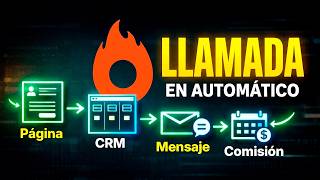

Sell This System for $500-$1000
40sOpens with a high-income promise that hooks viewers looking to make money online.
▶ Play Clip"Delivers a solid, actionable tutorial that matches the title's promise of an automated client system, though it includes some promotional fluff."
This video is a step-by-step tutorial on building an automated lead generation and sales system using the HighLevel platform. The creator demonstrates how to create a landing page with a form, set up a CRM pipeline, and configure automations to schedule calls and follow up with leads, ultimately showing how to sell this system to businesses for $500-$1,000.
The video introduces a system to sell digital products or services by automating lead capture, email, call scheduling, and sales closure. The creator claims to use this system for 30-minute sales calls.
HighLevel is presented as the best tool for building funnels, integrating social media, capturing leads, and tracking them. The video is sponsored by HighLevel, offering a 30-day free trial.
The tutorial starts by creating a website or sales funnel in HighLevel, using templates. The creator selects a popular template and edits it, including uploading a profile picture and using ChatGPT to generate copy.
A form is created to capture leads, with fields for name and email. The call-to-action button is set to 'Schedule my free call'. The form is saved and integrated into the funnel as a popup.
A thank you page is created with copy from ChatGPT, and its URL is set as the redirect after form submission.
A new pipeline is created in HighLevel's 'Opportunities' section with stages: contact, email sent, call scheduled, and sale closed. This CRM is named '30-minute free calls'.
A calendar is set up for scheduling 30-minute calls, with a booking link that will be used in emails.
An automation workflow is created triggered by form submission. Actions include updating the opportunity to move the lead into the CRM, sending an email with the calendar link, and waiting 2 hours before sending a reminder email.
The creator tests the system by filling out the form, receiving the email, scheduling a call, and confirming the lead appears in the CRM with the correct status.
The video mentions further automations like WhatsApp messages, reminders, and tagging sales as closed, with promises of future tutorials.
The video provides a complete, practical guide to setting up an automated client acquisition system using HighLevel, from landing page creation to CRM and automation, and suggests selling this service to businesses for $500-$1,000.
What is the primary tool used in the video to build the automated system?
HighLevel
00:40
What are the stages in the CRM pipeline created in the video?
Contact, email sent, call scheduled, sale closed.
08:05
What is the suggested price to charge businesses for implementing this system?
$500 to $1,000
00:01
What trigger is used to start the automation workflow?
Form submission
10:44
What is the wait time set before sending the reminder email?
2 hours
13:09
What tool is used to generate the copy for the landing page and emails?
ChatGPT
02:53
System Value Proposition
Establishes the core value of the system: automating lead capture and sales, and its market price.
00:01Using AI for Copy
Demonstrates a practical use of AI to generate marketing copy, saving time.
02:53Monetization Strategy
Shows how to turn the tutorial into a sellable service for entrepreneurs.
09:24End-to-End Testing
Validates the entire system by simulating a lead and confirming the automation works.
13:59[00:01] can sell your digital product, your services, or offer this service to different companies and start charging $500 to $1,000 for implementing this system. And look, basically it's a landing page
[00:14] that has a form. When people fill in the data, we move to this CRM of potential clients, where new clients are entered, an email is sent to them, a call is scheduled, and sales are closed. And this is done
[00:27] through automation. And he's going to teach you all of this completely free in this tutorial. Look, to give you an idea, this is the system I implement to make 30-minute calls and close sales of
[00:40] digital products or services. And today, many companies and many entrepreneurs all this we're going to use a tool that's the best on the market and it's called High Levels. They 're even sponsoring this video, and
[00:54] a link so you can register and get 30 days free going to tell you something. Take advantage of our 30-day free trial. Use it to funnel, run campaigns for 30 days, and you won't pay a thing. So, I hope you
[01:08] can register and follow this step-by-step tutorial. Look, high level is all you need to build absolutely all of your funnels. Here you can integrate your Facebook page, your
[01:20] Instagram page, capture leads, and track them. In other words, it's an a series of videos about this tool. This is the first video, so I recommend you subscribe to the channel and give it a like because
[01:32] can change your life and help you earn a lot of money online. I'm going to log in High Level app and show you how to log in because, honestly, it has way sales, tracking, CRM, automation, and so on. I hope you don't
[01:46] coming to the channel. I'm going to log into one of my accounts, in this case it's the Jnier Gómez account, and here we're basically going to use websites, opportunities, automation, and some email marketing. To create this
[02:00] type of page that has a form, the first thing we're going to do is create a website or a sales funnel. I'm going to click here where it says new artificial intelligence, or from templates. In this case, I'm going to do it
[02:13] very good templates. In fact, there's everything here. There are options for lawyers, for physical products, and for digital products. In this case, I'm going to click here where it says most popular and I'm going to select this template from here. In fact, I
[02:26] can click where it says view and I can view it here for different or for computer. So, I'm going to select this template and it 's very easy to edit it here in the template. For example, we simply click
[02:39] section here, I'm going to delete it. I'm also going to delete the welcome message I made. This profile picture. I'm going to click there and here where it says images, I'm going to upload a picture of myself. I had already uploaded it previously, it's this one
[02:53] multimedia content. And look, to do all the copy for this landing page, give me the copy for a landing page, but for a 30-minute digital products. I want it to be simple, truly the unique value proposition and
[03:09] call to action. Ready. And I also told him to give me the thank you page. unique value proposition. All I'm going to do is copy and Look, I've practically got everything ready here. I'm just going to adjust the
[03:23] big. So, I'm going to reduce it a little bit. I think 61 is fine. This one that's at 15, I'm going to raise it to about 20. And here on the change the call to action here where it says text and I'm going to put "
[03:38] schedule a free call". I'm even going to increase the font size continue with the copy. I'll lower it to that point. Let's see how it looks in mobile mode. And look, here in mobile mode I'm going to reduce
[03:52] the text a little bit. It seems to be a little big. And I'm going to center this button. So, I'm going to give it here in style and I'm going to go here to the part where it says centralize. If I switch back to desktop mode,
[04:04] everything remains exactly the same. In this case, we can publish it. If click here. If we had a domain, we would select the domain or the free domain. So, I'm going to click here
[04:17] people to click here and open a form, we have to create a form. So, let's go back and right here in sites we're going to come here to the part that says forms and we're going to click
[04:30] can start from scratch, from templates. I'm going to start from very simple form. My goal here is not to show you the design theme, the page colors, but to really show you the strategic part. It's
[04:43] going to delete this last name field. I'm also going to delete the phone number. It would be a name. I'm going to change it here. Instead of Gmail I'm going to put email and here in Gmail I'm also going to put email. These checkboxes are for people to accept
[04:56] the privacy policies. In this case, I'm going to delete them because I don't button I'm going to put the same call to action that we had previously placed, which is to schedule my free call. And I'm going to name the
[05:09] form and I'm going to call it " free calls form". I'm going to press enter. Here send, we're going to send to the URL, which would be the thank you page, later. So, we're going to click here where it says save.
[05:24] The form has already been saved. We're coming back . We're going to go to funnels. which is this one here. In fact, if change it, then let's put " free call funnel" here. We're going to
[05:38] go here where it says steps and here we're going to edit the page again to integrate our form. To place the form here on the button and here where it says layers, then go here where it says popup window. And
[05:51] here I'm going to add our form, which in this case we're going to to click here where it says you do n't have a form yet and I'm going to select the form, which is this free calls form. And look, it's
[06:04] where it says, in fact, look, here appears forum and the the form has. We'll leave it as is and click our funnel practically ready. The only thing missing is that when
[06:18] people enter our data here, it will take us to a thank you page. going to click here on back. And look, here's a thank you page. going to delete it, I'm not interested. Here it tells me that I have to copy, delete. We
[06:32] thank you page. I'm going to click here and then click on edit. And let's remember that the copy for the thank you page is also available here at CHGPT. 're almost in. So, the question here is how to replace these texts. I'll
[06:46] the page. It says, "Thank you, you're almost in. I just sent you an email with the link to schedule your call in 30 minutes. Don't worry, it's all going to click here where it says ' save.' I'm going to copy this URL. Look,
[06:59] I'm going to click here. Look, there's the thank you page. I'm going to copy that URL, and here I'm going to go back to the funnel, and I'm going to go back here to the form, and I'm going to look for the free call form . And here in settings,
[07:11] when the person enters their information, I'm going to press Ctrl+V to paste who entered their email and clicks 'I want to schedule a call' will go to a thank you page, and at the same time,
[07:23] . So, they'll click here on ' save,' and look, it's that simple. We have our free call funnel ready and configured. Now, what's next? Creating the automations and building the CRM for the
[07:37] leads. So, they're going to go here where it says 'clients.'" Potentials. I already have several here; in fact, look, I want to show you how I have it set up right now, different products. In this case, I have one for the DPL system, but then I
[07:50] could create a new one here. Basically, I click here where it says "create a new sequence." Here, I'll select " calls." I'm going to put " 30-minute free CRM calls." And here, we're going to add the different stages, and I'm
[08:05] contact, email sent, call scheduled, and sale closed. Okay, here I'm going to put "sale closed" and click where it says "create." Then, I'm going to go back here where it says " potentials" and select
[08:19] the 30-minute call CRM, and look, up to that point, we have our CRM configured. Now, the last step is to go here where it says "automation" and start automating absolutely everything. To schedule those calls,
[08:31] I said, everything is here in "high level ." So, I'm going where it says "calendar settings," because I have several calendars, and I'm going to click here where It says "new calendar." And here I have several things
[08:45] rotation, group booking, class booking. In this case, it's scheduling individual meetings with a person. to click there on " calendar name." Then, I'm going to put "
[08:57] 30-minute free calls" here. We're going to select a team member. In created here within the account. The meeting duration is 30 minutes. And we're going to click here where it says "confirm." Look, here's the
[09:11] schedule a 30-minute call. I'm going to click here where it says "copy." And in fact, I'm going to show you here what the appointment preview will look like. scheduled. This is a system that you can set up for an entrepreneur and
[09:24] easily charge them around $500 for it. I'm showing it to you here copy this, and all that's left is to automate everything. So, I'll click here where it says "back," and I'll... They're going to go here where it says automation. Look,
[09:37] and here in automation, I'm going to create a new folder, and I'm going to call that folder " 30-Minute Free Calls." Remember, these calls are for sales team, then they're going to close them. I 'm going to click there and create a
[09:51] new workflow. Then, I'm going to click here where it says "Start from Scratch." I'm going to click here where it says " Continue." And look, here we're going to first thing I'm going to do is name it here. So, in
[10:03] this case, we're going to do the first automation: sending the call link. We're going to click there, and we're going to add a new trigger. In do with high-level automation: add a form, an email event
[10:17] connect TikTok, we can connect Instagram, we can send text messages, we can make calls, we can do a number of things: delete contacts, send invoices, connect WhatsApp as well, and add the
[10:30] WhatsApp API. In short, this is an impressive thing. That's why I'm making a series so many things we can do. In this case, what I want is the form submission, that is, when a person has filled out the form.
[10:44] select "form submission" and add a filter. We're going to select the form, and in this case, we're going to select the " free calls" form and click where it says "save trigger." Look, and I want
[10:57] you to understand the logic here. With this type of automation, we're going basically, when the person fills out the form, what do I want to happen? What I want to happen is for the person to be taken to the CRM so
[11:10] that my sales team can follow up and, obviously, so that . So, I'm going to click here where it says "select action." Look, select WhatsApp, I can connect WhatsApp. If I want to send an email,
[11:23] this case, I'm going to click here where it says "update opportunity" because I want Update the opportunity. So, here I'm going to put "client enters the CRM" and I need to add the CRM here. I'm going to click here where it says "select
[11:38] option." In this case, it's "pipeline." And I'm going to select the CRM. Look at it here. CRM: 30-minute free calls. I'm going to click there and then click everyone who registers on that form will enter that
[11:51] CRM. Once they enter that CRM, you decide where you want the communication, email, text message, whatever you want. In traditional way, which is to send an email. And for the
[12:05] emails, I also used CHGPT to get the copy. I simply emails because we're going to send a reminder." The first one 30-minute call, and the second one is to generate a reminder. So here it sent me
[12:19] the first one, and it even sent me the subject line. So let's press Ctrl+C. Let's copy it. Let's put here, in this case, my name is Jnier Gómez, and my email address. I'm going to put my Gmail address, but be careful,
[12:31] integrate your own business email. I'll be doing some tutorials about this later. Here's the subject line. I'm going to put the subject line here, and here we're going to write our email. In this case, it's this one
[12:44] here. I'm going to press Ctrl+C. I'm going to go back here. I'm going to press Ctrl+V. And look, here I'm going to add some spaces. Look, and here goes the link to the calendar call that we copied earlier. So, I'm going to
[12:56] High Level gave us when we created the calendar, and I'm going to click where it says "save can also write it using artificial intelligence. After this, I want to add A wait. I'm going to put " wait" here and set a
[13:09] wait" here and set a wait time of approximately 2 hours. That is, if the person hasn't scheduled, then I want to send them absolutely nothing happens. And I'm going to send another email, and here
[13:22] send another email, and here I'm going to go back to CHGPT. I'm going to copy everything from the second email here, the subject line. I'm going to paste it. Then I'm going to copy the body of the email. I'm going to paste it here where it says "schedule your
[13:35] call." Here, we're going to put this same link again, the one that High Level gave us, and I'm going to click where it says "save action." Once all this is done, we have to come here to the upper
[13:47] right and click on "publish" and then click where it says "save." Look, there it is, we go back here, you'll see that it's
[13:59] test it. Let's come here to " free call funnel sites" and I'm going to visit the page. Look, while it's The page—I'm going to open it here in a new tab—is the one for potential clients. And look, I'm
[14:13] absolutely no one here in the new contacts. So, I'm going to fill in page. I'm going to click here where it says "Schedule my free call." Here I'm going to enter my information and click where it says "Schedule my
[14:26] free call." It immediately takes me to the thank you page. It tells me that they just fact, here's the email. I'm going to open it, and look, indeed, here's the whole email. I saw that you're interested in
[14:38] scaling your digital product. And I'm going to click here. But going to click here where it says " Update." And look, here in the free CRM, I already have the first contact. Here, for example,
[14:51] I can click and enter several things. For example, the value of the potential lead. Let's say this is going to be a product, for example, for $27. We'll our client here who hasn't scheduled a call. So, I'm going
[15:05] 's the email here. I'm going to click here. I'm going to schedule my call, for here. I'm going to schedule my call, for example, for the 9th from 10:00 to 10:30. I'm going . Here I'm going to enter my information again. If I want any
[15:19] additional information, I'll add it. I'm going to click the checkmark to accept the terms and conditions and I'm going to click where it says schedule the call. And look, the call is already scheduled, and in fact, I just refreshed the page,
[15:32] and look, it already shows that the call is for April 9th at 10:00 AM. Jnier Gómez, 30-minute free call. And with this, you would have an automated call generation system. Look,
[15:47] we can do many more things here. We could even create an email is sent, it goes here, so that when the person has already... The scheduled call will stay here in the "scheduled call" field, and when the person, for example, is
[16:00] available, or when our sales team or we ourselves close the sale, we can mark it here as "sale closed" to sell more products to the next tutorial here. The truth is, we can do many more things. Generate
[16:13] Instagram, even send a message via WhatsApp, generate a reminder 30 minutes before, a day before, and so on. So I'll be bringing more and if you want me to show step by step everything we can do
[16:27] automations, the websites, the subscriptions, the comment below with the word " automation," and I 'll gladly create a tutorial for it. And remember that below in the
[16:39] pinned comment, I've left a link for you to take advantage of your 30-day free trial use the tool professionally. I want you to click Below, you can create a free account and try it out for 30 days. Check out
[16:54] about the tool, which I'm sure will add a lot of value for you and help you get your first client to sell this system for at least $500. doubts, you can ask them below in the comments or on my
[17:07] Instagram @jniergiergómez. See you next time.




⚡ Saved you 0h 17m reading this? Transcribe any YouTube video for free — no signup needed.