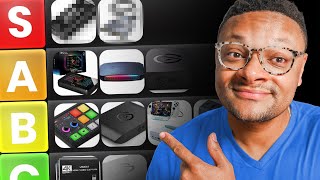

This $160 Elgato Capture Card is a DO NOT BUY
39sExposes a popular overpriced capture card as obsolete, triggering owners and buyers seeking budget advice.
▶ Play Clip"Delivers exactly what it promises: an extensive, honest tier list with pricing and real-world recommendations."
This video is a 2026 tier list ranking 18 external capture cards for gaming, streaming, and recording. The creator evaluates each card on passthrough quality, recording resolutions, price, and real-world usability, assigning tiers from S to 'do not buy.' It also covers budget alternatives, specialty devices, and the best overall value picks.
18 capture cards are ranked based on features, gameplay recording quality, and price point; built-in console recording is also considered and placed in C tier.
Captures 1080p60, but 2K/4K is capped at 30fps; at $140, the specs don't justify an upper-tier slot, so it lands in C tier.
Still sold for $160+, yet it lacks variable refresh rate support, can't do 120fps, and is capped at 1080p60 or 4K30 recording.
First HDMI 2.1 card used by the reviewer; supports 4K144, 2K240, or 1080p360 passthrough and matching high recording resolutions, priced at $210.
HDMI 2.0 card with 4K60, 2K144, or 1080p240 passthrough and 4K60/2K144 recording; at $141 it's a strong value.
Cheap cards suffer from heavy compression and latency, require an HDMI splitter for gameplay, and are best used as webcams for DSLRs/mirrorless cameras.
At $100, it's a do-not-buy for capturing gameplay; it's a good option only for using a camera as a 4K webcam feed.
Costs about $28, offers 4K60 passthrough and 1080p60 recording; the reviewer personally achieved 1080p120 passthrough, placing it in A tier.
At $30, it matches the Rivalen's passthrough and recording resolutions, has a USB-C attached cable, and earns A tier.
It matches the Rivalen and Worky specs but costs $130, making it a do-not-buy despite looking nice on a desk.
Priced at $147, it does 4K60/2K144 passthrough and 1440p60/4K30 recording; includes a physical audio dial and automatic audio switching via line-in.
Records gameplay without a PC and comes with a remote, but costs $290 while only recording 4K30, making it a do-not-buy.
Supports 4K60, 2K120, or 1080p240 passthrough and recording, includes ultra-wide support, and costs $160.
Merges an audio mixer into a capture card for $249, but hands-on testing revealed glitchy software and broken audio, so it's a do-not-buy.
AVerMedia Live Gamer Elite Go ($130, B tier) targets Steam Deck/Switch users with built-in charging; Live Gamer Extra Go ($160, C tier) offers PC-free SD recording.
HDMI 2.1, 4K144/2K240/1080p240 passthrough, and recording; at $245 it's a beast, but the Live Gamer Ultra 2.1 undercuts it at $210.
Best overall value: AVerMedia Live Gamer Ultra 2.1. Best budget: Rivalen 4K capture card.
Internal PCIe cards like the Elgato 4K Pro or AVerMedia Live Gamer 4K 2.1 offer the lowest latency but are limited to users with full PC builds.
The verdict: the AVerMedia Live Gamer Ultra 2.1 offers the best overall value, while the Rivalen 4K is the best budget entry point. Most streamers don't need the most expensive cards — matching the card to your console and use case matters more.
Elgato HD60X
tool
Elgato HD60S Plus
tool
AVerMedia Live Gamer Ultra 2.1
tool
AVerMedia Live Gamer Ultra S
tool
Generic 4K USB capture card
tool
Elgato Cam Link 4K
tool
Rivalen 4K capture card
tool
Worky 4K capture card
tool
Elgato Neo capture card
tool
EVGA XR1 Pro
tool
UG Green 2K30 capture card
tool
Cloner Alliance 4K Pro recording box
tool
Elgato 4K S
tool
Road Streamer X
tool
AVerMedia Live Gamer Elite Go
tool
AVerMedia Live Gamer Extra Go
tool
NZXT Signal HD60
tool
Elgato 4K X
tool
OBS Studio
tool
Streamlabs Desktop
tool
Elgato Studio app
tool
Elgato Chatlink cable
tool
Elgato Chatlink Pro cable
tool
Fifine gaming XLR mixer
tool
Roadcaster Pro Duo
tool
Elgato 4K Pro (internal)
tool
AVerMedia Live Gamer 4K 2.1 (internal)
tool
What is the maximum recording resolution of the Elgato HD60X at 2K/4K?
It's capped at 30 fps (1080p60 capture; 2K/4K at 30 fps).
01:08
Why is the Elgato HD60S Plus considered a 'do not buy' by the reviewer?
It lacks variable refresh rate support, can't do 120 fps, and still resells for $160+.
01:39
What are the passthrough capabilities of the AVerMedia Live Gamer Ultra 2.1?
Up to 4K 144 Hz, 2K 240 Hz, or 1080p 360 Hz.
02:18
What is the price of the AVerMedia Live Gamer Ultra S and what makes it S tier?
$141; HDMI 2.0 with 4K60/2K144/1080p240 passthrough and 4K60/2K144 recording.
03:00
What is the recommended use for generic $10 4K USB capture cards?
For cameras/DSLRs as webcams, not for gameplay due to compression and latency.
03:29
What are the specs and price of the Rivalen 4K capture card that land it in A tier?
~$28, 4K60 passthrough and 1080p60 recording; an excellent entry-level card.
05:03
Why is the Elgato Neo a 'do not buy' despite having good specs?
It matches the Rivalen and Worky resolutions but costs $130, far more than the $28/$30 alternatives.
06:48
What unique feature does the EVGA XR1 Pro offer?
A physical audio dial/knob on top for volume control and mute, plus automatic audio switching via line-in port.
07:32
What is the main advantage of the Cloner Alliance 4K Pro recording box?
It can record gameplay without a PC (standalone with built-in components), but it's $290 and only records 4K30.
08:35
Which capture card does the reviewer name as the best value overall and which as best budget pick?
Best overall value: AVerMedia Live Gamer Ultra 2.1; best budget: Rivalen 4K capture card.
14:46
What is the price and key spec of the Elgato 4K X?
$245, HDMI 2.1, passthrough up to 4K144/2K240/1080p240, and recording up to 4K144/2K144/1080p240.
13:40
What does the reviewer say about internal PCIe capture cards?
They offer the least latency (e.g., Elgato 4K Pro or AVerMedia Live Gamer 4K 2.1) but are limited to full PC builds.
15:29
HDMI 2.1 changes the game
The AVerMedia Live Gamer Ultra 2.1's 4K144/2K240/1080p360 passthrough made it the first HDMI 2.1 card to earn S tier.
02:05Budget cards can be genuine A-tier
The $28 Rivalen 4K provides enough quality to stream/record while costing a fraction of premium cards.
05:03Recording specs, not passthrough, should drive your decision
The Elgato 4K S matches most popular passthrough modes but records at the same high rates, making it a serious contender.
09:01Best value is not the flagship
The $210 Live Gamer Ultra 2.1 beats the $245 Elgato 4K X on price while delivering similar HDMI 2.1 performance.
14:46Internal cards still win on latency
PCIe capture cards offer the lowest latency, but external cards are the practical choice for most users.
15:29[00:01] test and use a multitude of different capture cards over the years, I'm going to be putting together a tier list ranking 18 capture cards and giving you they're worth it to pick up based on their features, gameplay, recording
[00:15] quality, and price point. All right, let's do this. We're going to first know a PlayStation 5 is not a capture card, but guess what? It has built-in capture recording features just like the Xbox Series S and X and the Nintendo
[00:29] Switch 1 and 2. Though the Xbox and Switch are much more limited in the recording, it's still something usable, but you can't customize it too much, which places it in C tier. Now, let's actually head over to our first capture
[00:42] actually head over to our first capture card here, which is the Elgato HD60X. came out as it was one of the first devices that would allow you to play devices that would allow you to play your games in 120 fps, that being in 2K
[00:55] or in 1080p quality. This capture card is still highly purchased as of today, but I don't really feel that it deserves a spot in the upper tiers just based on
[01:08] the specs that it has. It can capture in 1080p 60, which is good, but it falls short in 2K and 4K as it's capped at 30fps max. The other reason I'm putting the HD60X in the C tier is its price point. It comes in at $140,
[01:25] deal based on the resolutions it can capture. Next up, we have the Elgato capture. Next up, we have the Elgato HD60S Plus, and I still can't believe this thing is still in circulation, guys. This is a do not buy. I'm seeing
[01:39] this capture card still being resold for $160 or more, and that is totally not worth it. It doesn't support a variable refresh rate. You can't do 120 fps. You're capped at recording at 1080p 60
[01:53] or 4K 30. This is just not setting yourself up for the future if you are some of the Aver Media capture cards, we have the Live Gamer Ultra 2.1. This was
[02:05] have the Live Gamer Ultra 2.1. This was the first HDMI 2.1 capture card that I ever used. You can play your games up to a 4K 144 hertz resolution or 2K at 240
[02:18] Hz or you know what, let's do 1080p but at 360 hertz. Absolutely ridiculous. The recording resolutions also match up high with this. So, this thing is going to get S tier. As for the price point, it
[02:31] does come in at $210, which is a little bit steep certainly, but not too bad getting out of this thing. The next average media capture card here is the average media capture card here is the Live Gamer Ultra S. This is another very
[02:46] solid capture card. Not quite on the level as the Live Gamer Ultra 2.1. This is not an HDMI 2.1 capture card. This is HDMI 2.0. But with this card, you can HDMI 2.0. But with this card, you can play your games in 4K 60, 2K 144, or
[03:00] 1080p at 240 Hz. And for recording, you can do 4K 60 or 2K 144. I'm going to throw this thing at S tier as well. It's currently running $141, which is a pretty good price for this capture card. And one thing I forgot to mention
[03:15] between the Live Gamer Ultra S and the 2.1 is that they both support ultra wide these cards have explicitly called out that it can support it. The next capture card we're going to take a look at is the generic 4K USB capture card. You can
[03:29] typically find these for about $10 or less online and they claim to support pass through of 4K30 and you can record up to 1080p 30. Now I will say that they are useful to some extent but they are best for your camcorders or your DSLRs,
[03:46] mirrorless cameras, taking the clean HDMI signal from your camera into your computer to be used as a webcam or face cam. I do not recommend using these gameplay. For one, you're going to need an HDMI splitter in order to be able to
[04:00] see the gameplay on your screen or whatever monitor that you're playing on. quality that you'll get out of these cheap generic capture cards is going to be heavily compressed. Here's an example on screen now of the difference in
[04:12] quality between a standard capture card from a reputable brand compared to the generic one. You can see that it looks a little bit fuzzier, hazier. The image to be dealing with a higher amount of latency. So, really, it deserves to be
[04:24] in do not buy, but I'll cut it a little bit of a break as it is something nice to use for a camera, but stick to that only. The Elgato Cam Link 4K. Honestly,
[04:36] in a similar boat, I would not buy this if you're trying to capture gameplay. It's $100. So, just you wouldn't want to use this for that setup. you're going to need to use a splitter again. So truly, it's a do not buy. But if you're going
[04:49] to be using a camera to capture your webcam feed and you're going to be leveraging 4K from that HDMI signal, then hey, go for it. It's good. It's definitely better than the generic USB capture card. The next one here is the
[05:03] Rivalen 4K capture card. This, if you guys are familiar with my channel, is honestly one of my favorite capture cards based on its price point. coming in at $28. You can play your games up to 4K 60
[05:16] quality, but I've also experienced personally being able to play my games in 1080p 120. Now, that is not necessarily a guarantee. They don't call that out on the Amazon listing, but I was able to achieve it, but that doesn't
[05:28] to achieve it. So, proceed with caution trying to get 1080p 120. And as for its recording resolution, you can do up to 1080p 60, which is good for its standard. So, I'm actually going to put this in the A tier, which I know might
[05:41] be a little bit surprising based off of the specs that it offers, but I think this is an excellent entrylevel capture card that minimizes the price barrier to entry to capture gameplay and to stream. Also, if you're using something like an
[05:54] Elgato Chatlink cable and you plug that into the analog slot of this capture card, the audio will automatically switch. You don't need to use software in order to change it. One other cheap capture card that does have that line-in
[06:06] port is the Worky 4K capture card that we have here. This card actually matches the pass through and output resolutions that the Ribosen card has. These two are competitors. It's really hard to say which one is the best one because
[06:21] accomplish the same things. I do like that on the Warie capture card the connector to the computer is attached to the capture card itself and it comes USBC. So, you have a little bit of
[06:34] optionality there. Now, it does cost a little bit more at $30, but a $2 price Warkey is not too bad at all. It's going to get a tier for me. The next capture card we're ranking in our tier list is the Elgato Neo capture card. And believe
[06:48] it or not, it also matches the same resolutions and quality of the Rival Zen and the Warie 4K capture cards, which makes it a do not buy. That capture card
[07:00] comes in at $130, which is far more than the Worky and the Ribosen. This is just not worth it. It does look aesthetically pleasing on your desk. It's still a do not buy. The next capture card here is the EVGA XR1 Pro. This is priced at $147
[07:17] and you can play your games in 4K 60 or 2K at 144 hertz. As for the capture resolutions, you can record your games in 1440p 60 or 4K 30. It does have that audio linein port which will automatically switch your audio if
[07:32] Elgato Chatlink Pro cable. It also has an audio knob at the top. It's a physical dial that you can control the volume as well as mute it if you press the button down. As for where I'm going to rank this one, I think we got to put
[07:45] it in B tier. The reason being is since it's $147 and you measure it up to the Aver Media Live Gamer Ultra S which can record in 4K 60, the EVGA XR1 Pro maxes
[07:57] out at 4K 30. So based on that, I got to put it in the B tier, but it's still a very good capture card. The next capture card here is the UG Green 2K30 capture card, and it doesn't have a lot of functionality, which we'll put it in
[08:10] best for cameras. Actually, you know what? We'll put it as one of the best for cameras just because you can pull the image out of your camera in 4K 30 and then capture it in at least 2K 30. So, that's pretty good. It does come in
[08:22] at $22, but again, don't use this capture card for recording any gameplay. capture card we have here is the Cloner Alliance 4K Pro recording box. It does come with a remote, which does give it some added functionality. You also don't
[08:36] need a computer with it because it has all the components it needs within the device itself to record your gameplay files. So, no PC required. You can play files. So, no PC required. You can play your games in 4K 60 and record in 4K 30,
[08:49] but this thing does come at a hefty price point of $290. and I just don't think that's worth it based off of the resolutions that you
[09:01] can get out of this thing, which makes this a do not buy. The next capture card we have here is the Elgato 4KS. With this device, you can play your games in 4K 60, 2K120, or 1080p 240 while recording that gameplay in 4K 60, 2K120,
[09:18] or 1080p 240. It also supports ultra wide displays, so it has a really nice range of resolutions that you can play and record in. As for the price point, it comes in at $160. So, I think for this one, it's a little
[09:32] bit on the more expensive side, but I think that this is the best A tier capture card that we have looked at yet. It's very close to the Live Gamer Ultra S. It's like they're they're so close. They're so close. But since the Ultra S
[09:48] comes in at $140, I got to give the Ultra S a slight edge. For some of you, you may want to rank the 4KS over the Ultra S because the 4KS has an analog line port where the Ultra S does not. And that can be very important if you
[10:02] need that if you're using the Elgato Chatlink Pro cable to pull audio from your PlayStation 5 controller. Taking a look at the next one here. And this doesn't even look like a capture card, does it? It really doesn't. But this one
[10:14] is the Road Streamer X. And what Road tried to do with this one is merge an tried to do with this one is merge an audio mixer into a capture card device as well. You can play your games in 4K 60 and then record in 4K 30 or 1080p 60
[10:30] using this device. Now, just based off the price point here, coming in at $249, that is just too steep for my britches. So, we got to put this in do not buy.
[10:44] Plus, I have used this device hands-on and I didn't have a great experience with it. I I was looking to do a video on this channel about this device, but I their software. It was extremely glitchy. Audio wasn't working correctly
[11:00] the way that it was intended to do on that device. So, it it's just a no-go in mixer and you're on a budget, get the Fifine gaming XLR mixer. Or if you stick with Road, then go with the Roadcaster Pro Duo. That's an excellent
[11:16] beast of a mixer and it's not trying to mix in capture card audio and are standalone. Up next, we have this random charger. No, I'm just kidding. This is the Aver Media Elite Go capture card. I know it doesn't look it, but
[11:31] it's it's a capture card. And this mainly exists for the people that are using handheld consoles, your Steam Deck or Switch 2 gamers. Those kind of folks would use something like this as it does have charging capabilities built in on
[11:44] it. With this, you can play your games up to a 4K 60 resolution, which is solid for handheld consoles. And for capturing, you can do 1080p 60, which is honestly fair given the type of device that this is. And I have to give some
[11:57] points to its form factor. It needs very little cables in order to set up. Price point comes in at $130. So I think let's put this in the B tier. Another one of Aver Media's Go series capture cards is the extra go that you see here. With
[12:13] this one, you can play your games up to a 4K 60 or 1080p 120 resolution and then be able to capture in 4K 30 or 1080p 120. And the beauty of this device is that it is PC free. You can put an SD card in it and you can record to that. I
[12:27] handheld in the world, but it is designed to fit most of them. But looking at the price and the features, I feel like I got to put it at C tier. 160 bucks for the resolutions that you can get out of this device, I just don't
[12:42] definitely good for people who want to capture gameplay that don't have a computer and just have their their mobile gaming console, but for most people, I feel that you'd be far better off getting a capture card that has
[12:55] resolution qualities that will be sustainable for the future. The next capture card we have here is the NZXT Signal HD60. It does come from a very reputable brand that makes PC parts and components. Um, you can play your games
[13:10] up to 4K 60 and then be able to capture in 1080p 60, but this does come in at a pretty steep price point for what it is in my opinion. Coming in at $70, I don't find that to be too worth it, especially since you have the Warie and the Ribos
[13:25] and capture cards up here that can also play in 4K 60, capture in 1080p 60. So, this one in the C tier just based off upon that. The last and final capture card that we have here is the Elgato 4KX.
[13:40] This is an absolute beast of a capture card. You can play your games in 4K 144, card. You can play your games in 4K 144, 1440p 240, 1080p 240. You can record 1440p 240, 1080p 240. You can record your games in 4K 144, 2K 144, or 1080p
[13:54] at 240. So, a nice wide range of resolutions that you can choose from. It's an HDMI 2.1 capture card. It has variable refresh rate, and you have the backing of the Elgato brand. They have an excellent support system and can help
[14:06] you with any issues that do arise. The price for this capture card is at $245. So definitely a bit steep, but it is still one of the best in the business. So we got to put it at the S tier. And I think we're going to put it in the
[14:21] second place S tier just because if you guys remember the Live Gamer Ultra 2.1 is also an HDMI 2.1 capture card and it comes in at $210.
[14:33] comes in at $210. and also supports 1080p 360 Hz pass software between these two capture cards, definitely have to give the edge significantly to Elgato. They have the Elgato Studio app and it is really good.
[14:46] Works on Mac and Windows very smoothly. But most of you guys are using OBS Studio or Streamlabs Desktop to pull in your gameplay feed anyways. So, if we're looking at the highest value to quality output to price that you get here, it's
[15:01] definitely with the Aver Media Live Gamer Ultra 2.1. Woo, that is a second to you guys, and this is for my budget savvy users, I would go with the Ribosen 4K capture card right here. That's in the A tier. That card is
[15:16] definitely the best quality to price-wise thing you can get so that you can start streaming and recording gameplay if you haven't already. Also, as a point of clarification, I realize this list did not contain any internal
[15:29] PCIe capture cards, obviously, if you can get your hands on one of those, ideally the 4K Pro or the Ever Media Live Gamer 4K 2.1, I would say that you can get with the least amount of latency. But those cards are limited to
[15:43] people who have a full PC build. I have one myself. I love it. It's a beast. But I made this tier list focused towards the majority of people who are probably going to be looking for an external cash card. So, thank you guys so much for
[15:57] came to enjoy it, hit with a big thumbs up. Subscribe to the channel if you are new around here. I put links to all of the products that I discuss in this list because you shouldn't be buying them. Anything that you guys do pick up
[16:10] channel. Anyways, I'll catch you guys in the next one. Peace.
⚡ Saved you 0h 16m reading this? Transcribe any YouTube video for free — no signup needed.