
YouTube's Secret Update: Topic Stack Hashtags
59sReveals a little-known YouTube algorithm update and a three-layer hashtag strategy that promises to fix misdirected content, offering a clear, actionable hack for creators.
▶ Play Clip"Delivers on the core promise of new hashtag strategies, but padded with a lengthy sponsor segment and some repetition."
This video explains how YouTube's algorithm has changed in 2026, emphasizing the importance of a 'topic stack' of hashtags for Shorts distribution, correct hashtag placement, and the strategic use of video and channel tags. The creator also highlights the value of promoting YouTube content externally and provides a checklist for aligning metadata across all elements to maximize reach.
YouTube quietly rolled out an update affecting metadata, tags, and hashtags, changing how videos are distributed. Old methods may no longer work.
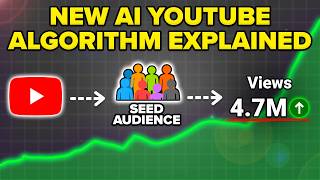
YouTube now uses hashtags as the primary signal for which feed to drop Shorts into, creating a 'topic stack' with three layers.
The anchor hashtag describes exactly what the video is about (e.g., #grocerysavings, #bicepworkout). It's used for the first test audience.
The bridge hashtag expands reach to a broader but related topic (e.g., #workout, #fishing). It's the 'level up' hashtag.
The audience hashtag targets who else might be interested (e.g., #shorts, #viral). It's the broadest level.
For long-form content, place hashtags only in the description. For Shorts, place hashtags only in the title.
Creators should drive traffic from other platforms (e.g., Instagram, Google) to YouTube. Examples show creators promoting their channels in Instagram posts.
Metricool helps schedule content across platforms, track competitors, and identify trending topics. Promo code 'robber' offers 30 days free.
Use exact match tags (keyword in title/description), semantic tags (broader related terms), and broad tags (channel name, competitors, general topics).
In YouTube settings, add channel keywords: your name, topics you post about, and at least three competitors. Keep them broad.
Ensure file name, title, description, tags, thumbnail, subtitles, and on-screen text all contain the same keyword. Example video with 3.8M views used this method.
To succeed on YouTube in 2026, creators must adapt to the new topic stack system, place hashtags correctly, use a mix of video and channel tags, and align all metadata elements around a single keyword. Promoting content externally and using tools like Metricool can further boost reach.
What is the 'topic stack' in YouTube's 2026 update?
It's a system where hashtags are used as the primary signal for which feed to drop Shorts into, consisting of three layers: anchor, bridge, and audience hashtags.
00:52
What is an anchor hashtag?
It describes exactly what the video is about and is used for the first test audience.
01:18
What is a bridge hashtag?
It expands reach to a broader but related topic, like using #workout for a bicep workout video.
01:45
What is an audience hashtag?
It targets who else might be interested, such as #shorts or #viral.
02:14
Where should hashtags be placed for long-form content?
Only in the description, not in the title.
02:41
Where should hashtags be placed for Shorts?
Only in the title, not in the description.
02:41
What are the three types of video tags?
Exact match tags, semantic tags, and broad tags.
07:36
What should be included in channel tags?
Your name, topics you post about, and at least three competitors.
09:36
What is the metadata checklist for a viral video?
Ensure file name, title, description, tags, thumbnail, subtitles, and on-screen text all contain the same keyword.
11:15
Topic Stack System
Explains a fundamental change in how YouTube distributes Shorts, moving beyond simple hashtag matching.
00:52Hashtag Placement Rules
Provides clear, actionable rules for where to place hashtags depending on content type.
02:41External Traffic Strategy
Highlights the importance of promoting YouTube content on other platforms to boost visibility.
04:11Metadata Consistency
Demonstrates how aligning all metadata elements around a single keyword can lead to millions of views.
11:15[00:01] consistently in 2026 and you're still not getting the views or subscribers content. In fact, you're probably messing up some part of your metadata or your tags or your hashtags and as a result, YouTube is actually showing your
[00:14] content to the wrong audience because YouTube quietly rolled out an update that affects all three of these and now it completely changes how videos actually get distributed. And even the hashtags, tags, or metadata that was
[00:27] working just a few months ago now isn't going to work and is actually going to in this video, I'm going to show you the that you're switching to right now in order to help you go viral. In fact, it
[00:39] with over a million views and it helped different shorts. And what's crazy is I basically haven't seen anybody else talking about this on YouTube. So, the first thing that you need to understand
[00:52] is now YouTube actually uses what I call a topic stack. So, they're not just looking at your hashtags in order to say, "Hey, this is some minor thing that instead, they're doing something different. And that different thing is
[01:05] that they're actually using these hashtags as the primary signal for what feed they're going to drop your YouTube shorts into. And there are three layers that you need to make sure are stacked correctly. Stack number one is going to
[01:18] be your anchor hashtag. This one needs to describe exactly what your video is For example, if you're uploading a video about how people could save money on their groceries, it needs to be something like hashtag grocery savings.
[01:31] Or if you were uploading about working out your biceps, it needs to be hashtag bicep workout. Don't overthink it. This anchor hashtag is what YouTube is going to use for the first test audience for your content. So, please don't mess it
[01:45] up. Layer two is going to be your bridge hashtag. This is what tells the in your content. So, basically what you want to do is you want to expand the reach on it. For example, let's say you were trying to help people work out, it
[01:58] would be #workout. Or let's say that you were teaching people how to catch more bass, it would be #fishing. Basically, it's the level up or the hashtag that in, but there's still going to be people interested in that exact topic. And then
[02:14] layer three is going to be your audience hashtag. This is who else is going to be you're uploading a YouTube short, this is going to be adding in #shorts. Or if it'll be something like #viral.
[02:29] level of hashtag that you could possibly use, and you want to make sure that you're layering all three of these to make sure that your content gets as much reach as possible. But using the right hashtags isn't the
[02:41] you're doing. You also need to make sure that you're actually placing your hashtags in the right placement. Whether you're uploading long form content or drastically going to change this. Okay, so let me show you the actual difference
[02:53] of where you should be placing these hashtags. So if you are uploading a long right here. This video isn't live yet, but this video is probably going to go live in the next few days on my AI channel. If we come down here, we see
[03:06] the hashtags right here. We have #flovaai, #aiads. And what you notice here is that I have no hashtags in the title of my long form video. I only have them at the end of my
[03:21] description. And if we actually come over here and check this video out quick, what you're going to notice is the hashtags actually show up up top here, even though I put them at the end of my description. And this is how
[03:33] hashtags should correctly be used on long form content. Now, if we come over to my shorts, you are going to notice something completely different. So if we actually come over to a short, for example, this one right here, and we
[03:45] click on the details, we could see I have #shorts right here. So I have hashtags at the end, and we can see YouTube is also suggesting different hashtags right here automatically based on my existing content. And again, this
[03:58] everything I've been sharing with you so far in this video. If we come over to this description, there are no hashtags. So, on short-form content, only hashtags in the title. On long-form content, only hashtags in the description. Now, before
[04:11] we dive into things like the video tags that you're using or the channel tags that you're not doing two other things wrong on YouTube. The first one is going to be solely relying on YouTube to push out your channel because you shouldn't
[04:24] time ever, you can now drive traffic from other places to YouTube and not get is I want to make sure that you're not struggling to find exactly what is trending in your niche on YouTube. And to give you an example of people that
[04:39] are driving traffic from outside of YouTube onto YouTube, check this out. how two different creators are doing this and they're absolutely crushing it. If we come over to this creator right here, we click on one of her posts, for
[04:51] see that she says here in the description of this viral video, "My YouTube channel is your number one source for 100% free education and courses. Nobody got you like I got you." So, she is passively promoting her
[05:05] YouTube channel in this Instagram post. If we come over to this one, it's a little bit more aggressive. She says something like start at the start here playlist on my YouTube channel or go to the 100% free courses playlist. Then we
[05:18] can see right here, courses on all these topics on my YouTube channel. Search guess what? If somebody actually grabs this right here and they come over to YouTube and actually do a search for her name, what they're going to find is a
[05:33] ton of YouTube content that's performed really well. Look at this. This video is from 11 days ago, 76,000 views. And if we scroll down, we're going to continue performing really well. And even her playlist shows up in the search results.
[05:47] is something Dr. Jones is doing. If we actually look at his description right here, it simply just says "YouTube Dr. Jones DC." So, basically, both of these creators are promoting their content outside of just YouTube. In addition to
[06:02] that, now, if we come over to something like Google and somebody does a search, for example, they search for how to grow an Instagram, what people are now going to see is short videos right here next to all results. And what this actually
[06:15] shows you are YouTube Shorts, TikTok posts, Instagram posts. So, you want to make sure that when you post a short-form video, you're posting it to increase the odds that your YouTube channel actually gets found. Now, the
[06:28] they're staying on top of what it is actually trending in their niche every Metricool. Because Metricool lets you schedule out content to all these different platforms all from one location. So, you don't have to log in
[06:42] YouTube channel. You could do it all at once with the click of one button. In addition to that, Metricool also lets you track all of your competitors from easily figure out what formats are working, what topics are working, what
[06:56] lengths are working, and you know every single morning exactly what to post. And you go to the pinned comment below, you could get 30 days free access to any of their premium plans with code robber. In addition, they just launched both Claude
[07:10] and chat connectors that let you hook this tool up to your favorite AI tools so that you could get way more done while spending less time creating If you want to get started with Metricool today so that you can promote
[07:23] your YouTube channel outside of YouTube and always stay on top of exactly what's below and get started with 30 days free access to any of their premium plans with code robber. Now, the next thing that we need to talk about are the video
[07:36] your content. There basically three different types of tags that you need to make sure that you're using. The first one are going to be exact match tags. These should be exactly what the keyword is that's in your title and in your
[07:49] description. You need to be including in your video tags and ideally, you want to have several of them. The second type of tag are going to be semantic tags. These are going to be ones that are a little bit more broad. It should still be
[08:02] example, let's say I was making a video about how to go viral on YouTube, a semantic tag would be how to get views on YouTube. It's basically the same And then that third type of tag is going
[08:15] these are going to be are your channel name, your competitor's channel name, or just broader things like YouTube growth or YouTube algorithm that don't keyword is on the video that you're uploading, but it makes sense to the
[08:30] YouTube algorithm. And if you don't know where to actually place these tags, let into this video right here, we could see it's gotten over 2 million views and I'm tags are. So, we can see right here, "Do
[08:43] this to get monetized on YouTube fast in 2025." We come under here under show more, this is where we are going to see our tags right here and you could see that all of my tags are exactly how I described them to you and this is why
[08:56] this video performed so well and ended up going viral. In addition to that, another thing that I do want to actually call out here is that these tags may see 2023 right here. I'm going to go through and update that to 2026 because
[09:11] it's now 2026. I'll probably do the same exact thing for the title. I'll be able literally took just a few seconds and you need to make sure that you are doing this from a computer because you actually won't be able to add your tags
[09:23] if you're uploading your YouTube shorts from your phone. So, please make sure these in because they are a little bit hidden. But, here's the thing, your video tags are only going to be doing half the job because you also need to
[09:36] filled out on YouTube. And here's where you could put them in exactly what you bit different than what I just showed you. Now, those channel tags are going over into settings right here, you are then going to be able to click on
[09:51] channel right here, and then we'll see these keywords under basic info. And you things in here. First and foremost, you want to make sure that you have your name. We could see that that's the first thing that I have here, Robert Benjamin.
[10:04] keywords about everything I post about. We have things related to TikTok, going viral on TikTok, getting TikTok followers, getting a TikTok famous, exact thing for Instagram. Then we have the same exact thing for YouTube and
[10:18] YouTube shorts because those are the three topics that I post about on this channel. And then the final thing that we have is VidIQ, Think Media, Marketing Showns. These are some of my biggest competitors on YouTube. And again, you
[10:31] that this covers everything that you're posting about. It covers your name or different from your actual name. And then also, at least three competitors. choosing the largest competitors, the largest topics, and the largest tags
[10:47] Don't drill down to things that are super specific, like how to do this or broad and things that are going to show up in multiple different searches, like just TikTok or just Instagram or just YouTube shorts or viral or grow on
[11:01] social media. These are all a lot more broad, which just increases the amount of people and the potential that I could actually get views on YouTube. Now, even shared with you, there's still one other thing that could be affecting your
[11:15] metadata, and it is going to be made up of several different things. Some of them we've already discussed, and then there are some brand new things. For that you choose on YouTube really matters? Or maybe you didn't realize
[11:28] that your tags, your description, your title, and your file name all need to actually match up to each other. Or maybe you didn't realize that the text actually saying in your voiceover also really matters. Well, let me give you a
[11:42] complete checklist and how you can know exactly if your metadata is correct by going through one of my viral videos and breaking down exactly how I did it. Okay, so this video right here got 3.8 million views. It has absolutely crushed
[11:56] it. And guess what? I actually made this video randomly before I was going around last year. So, what you want to do is the first thing is your YouTube file name. I named this YouTube file name the same exact thing as my title.
[12:09] YouTube settings that ruin small channels. We can see that I also have a settings is really going to be the keyword right here. So, if we do control find for this, we can see it shows up
[12:21] one in my file name on YouTube. That is the first place you need to put it. Secondly, it's showing in my title. Third, it is showing in my description right here and it actually shows twice. It shows one time with YouTube settings.
[12:35] The next one is just YouTube and then settings showing in the same sentence. here, the next thing that we're going to notice is that if we come over into these tags, that YouTube settings shows
[12:47] up multiple different times inside of my tags right here. We have YouTube settings. We have best YouTube settings. We have YouTube settings. We have YouTube video settings. And we also have all the other types of tags that I
[12:59] explained to you in this video. So, at this point, the file name is correct, the tags are correct, the description is correct, and the title is correct. The next thing that you are going to notice is that my thumbnail right here, if we
[13:12] zoom in, it says turn on these settings to grow faster. What do you notice? The same exact keyword in the settings. In addition to that, if we come over here or on the right hand side, scroll up a little bit, we click into the subtitles,
[13:25] you're going to notice turn on these settings if you want to grow faster on YouTube. Guess what? This all adds up. We have our keyword inside of our thumbnail, inside of our file name, inside of our subtitle, inside of our
[13:39] title, inside of the text on the screen, on the actual video itself. If I go going to see the same exact thing. So, literally, in like seven or eight different placements, it's all pointing to the same keyword, which gets the
[13:52] my content to the right people. That's why this video's gotten 3.8 million views, and honestly, in the next week, it'll probably hit 4 million. Now, if think that you're shadow banned on YouTube, I would strongly suggest that
[14:05] walks you through how you can actually tell whether or not you're shadow banned on YouTube, and what you could do about it. If that sounds interesting, I'll see it. If that sounds interesting, I'll see you over there.
⚡ Saved you 0h 14m reading this? Transcribe any YouTube video for free — no signup needed.