
AI Summary
This video is a beginner's guide to becoming a VTuber, covering the essential equipment, software, and optional upgrades needed to start streaming with a virtual avatar. The creator shares personal recommendations and emphasizes that a perfect setup is not required to begin.
Chapters
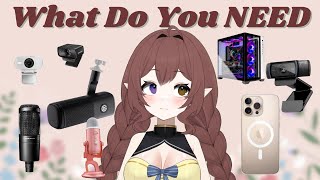
A PC or very good laptop is essential, capable of running OBS and the VTuber model simultaneously, plus a game if streaming gameplay. 2D/PNG models are easier on the computer.
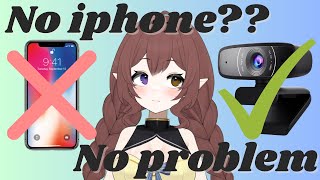
A webcam or phone is needed for face tracking. iPhone (iPhone 10/11 or above) works well; a Logitech C920 webcam is a good start, and a $50 camera was used by the creator initially.
A crisp voice is crucial for viewer retention. The creator recommends starting with a USB mic (e.g., AT2020, Elgato, Blue Yeti) and warns against using headset, laptop, or webcam mics.
A boom arm is recommended to get the microphone off the desk, preventing desk sounds from being picked up during streams.
VTube Studio is the standard for Live2D models; PRPR Live is an alternative for lower-end PCs.
VCFace is popular for 3D models; Vroid Studio is free and allows creating custom 3D models.
OBS Studio is recommended over Streamlabs; it's powerful, free, and the creator advises learning it from the start as most streamers eventually switch to it.
Headphones are nearly essential; a second monitor is highly recommended for managing OBS and the model while streaming.
Stream overlays, emotes, and transitions can be found cheaply on Etsy (around $1) or for free online.
A $2,000 model is not necessary; pre-made models are great (the creator uses one). A stream deck is also optional; a number pad works fine.
The most important takeaway is to start with what you have and upgrade over time. A basic setup that runs your software is sufficient; don't stress about having the perfect equipment.
Mentioned in this Video
Tutorial Checklist
Study Flashcards (7)
What is the most important piece of equipment for a VTuber?
easy
Click to reveal answer
What is the most important piece of equipment for a VTuber?
A PC or very good laptop that can run OBS and the model simultaneously.
00:16
What is the recommended starting microphone type?
easy
Click to reveal answer
What is the recommended starting microphone type?
A USB microphone (e.g., AT2020, Elgato, Blue Yeti).
02:15
Which software is recommended for Live2D model tracking?
easy
Click to reveal answer
Which software is recommended for Live2D model tracking?
VTube Studio.
02:50
What is an alternative to VTube Studio for lower-end PCs?
medium
Click to reveal answer
What is an alternative to VTube Studio for lower-end PCs?
PRPR Live.
03:03
Which software is free and allows creating custom 3D models?
medium
Click to reveal answer
Which software is free and allows creating custom 3D models?
Vroid Studio.
03:15
Why is a boom arm recommended?
easy
Click to reveal answer
Why is a boom arm recommended?
To get the mic off the desk and avoid picking up desk sounds.
02:30
What is the creator's stance on expensive models?
medium
Click to reveal answer
What is the creator's stance on expensive models?
You don't need a $2,000 model; pre-made models are great.
05:12
💡 Key Takeaways
Microphone is the best investment
Emphasizes that audio quality is key for viewer retention, guiding budget priorities.
01:15Learn OBS from the start
Advises skipping Streamlabs to avoid a later switch, saving time and effort.
03:40Pre-made models are sufficient
Challenges the assumption that expensive custom models are necessary for success.
05:12Start with what you have
Encourages beginners to avoid perfectionism and begin with a basic setup.
05:55Full Transcript
[00:00] So you want to be a VTuber, huh? Well, today we're going to be talking about everything that you need to be one. We're going to be talking about what you actually need and things that are just nice to have. I'll break down the basics, what's optional, and what you definitely do not need today.
[00:16] So we're going to be doing this teacher style today. So the first thing that you are going to need, it's probably the most important part, is the PC. So you're going to need a PC or a very, very good laptop. You're going to need something that can run OBS and your model at the exact same
[00:33] time. And also, if you are streaming games, you're going to want something that can run your game, OBS, and your model at the exact same time. If you're using a 2D or a PNG model, that is a lot easier on the computer. However, you are still going to want something that works really well.
[00:48] Number two is a webcam or a phone for tracking. I'm using an iPhone. You can use any iPhone. I think it's above I think it's above the iPhone 11 or the iPhone 10 that you are going to need if you
[01:00] want to use an iPhone however you can also use a webcam for tracking for face tracking for 3D and live 2D tracking you can use a webcam so kind of like the Logitech C920 that is a great start I
[01:15] also used a $50 camera that I will try to remember to have linked down below and that is what I used when I started but if you are on iPhone the tracking through an iPhone is just
[01:29] kiss so good number three is a microphone this is very very very important there are a bunch of different microphones on the market I am currently using a microphone The brand is Shure and it is such a good mic However it is on the pricier side
[01:47] I did start with an AT2020 and that mic was very good. There are also things like, I don't know how to pronounce it, but I think it's Fee Fine and also Elgato and Blue Yeti all make microphones.
[01:59] A crisp voice is definitely what viewers want. They want to keep coming for a very good voice. A microphone is probably the best place to throw your money because as a VTuber, that microphone, that sound is going to be, it needs to be crisp.
[02:15] But I do recommend starting with a USB mic. All the ones that are mentioned and that aren't next to me are USB mics. Please, I'm begging you, do not use your headset mic or your laptop mic or your webcam mic.
[02:30] Please don't. I beg you. Also, with your mic, you are going to need a boom arm. I will have the one that I currently use linked, but there are a bunch of different boom arms that you can use. I definitely recommend it so you can get that mic off of your desk so you're not hearing every little sound every time you hit your desk.
[02:50] You don't want those sounds going through. The next thing we're going to be talking about is the software that you will need. First, obviously, if you have a live 2D model, you are going to need VTube Studio. This is what tracks your face and moves your model around.
[03:03] Another option for lower end PCs is called PRPR Live. I have never used this, however, I have heard good things. For 3D models, we have a couple of different other options.
[03:15] So the first one is VCFace This is very popular for 3D models The next one is Vroid Studio which I have seen a couple of people use It is a free software and you get to make your own 3D model I am currently
[03:28] not using a 3D model. This is a 2D model. I like the way 2D models work, so this is kind of what I will be using for a while. I do want a 3D model eventually, but for now, this is it. The next thing
[03:40] you are going to need where you're in a stream. So you either need OBS or Streamlabs. OBS Studio is probably your best bet. Eventually you are going to switch to OBS. I promise you no matter
[03:52] what you start with, you are going to switch to OBS. So I'm going to tell you right now, just learn OBS. Watch videos, learn OBS. It is powerful. It is free. It has so much potential.
[04:04] You can do so many things in OBS. So I recommend just learning how to use it from the get-go. The next things are optional, but nice to have. The first thing is headphones. I honestly would put these more in an essential.
[04:18] I have my headphones. I currently use the Seal Series Artist P7, I think, and they are one of my favorites, but there are so many options for headphones on the market. I also have a second monitor.
[04:30] I even have a third monitor for a moment. I very much recommend having two monitors, one monitor for whatever you are doing, whether that is your script or your game, and then the other monitor for your OBS and your model and all of that stuff.
[04:44] The next thing that you need are stream overlays and assets and emotes and things like that. I honestly think that this is important. However, you can get these things for pretty cheap. Look on Etsy. I looked on Etsy.
[04:56] I found emotes that were pre Also I found my overlays and my transitions and stuff for really cheap I think about a dollar also There also if you can afford that there are so many free options online You just have to search for them What you don need yet and I serious
[05:12] listen to this, okay? You don't need that $2,000 model. You don't need it. If you have the money and you want it, sure. But if you don't have the money and you're stressed about that model price, You don't need it. You can get a pre-made. I swear to you, the pre-mades are great.
[05:28] I am currently using a pre-made, you guys. Yes, yes I am. It's great. You can do it. You don't need a stream deck. I have one, but you don't need it. I do use mine, but before I got it,
[05:40] I was just using my number pad and it worked phenomenal. It worked exactly the same. Stop stressing about having the perfect setup. As long as you have a setup that can run the things that you need it to run that is the most perfect setup that you could possibly have at this very moment
[05:55] I promise you don't stress over it you got this you can do it with what you have you can always upgrade later this is a journey that you're going to be on so whether you're a png youtuber or a 3d
[06:09] model or a 2d model just get started you can build as you go this is a journey you guys it's a journey we are all on it let me know below if you want more of a budget breakdown on exactly how much
[06:23] my setup costs i can definitely do a video on that also any software tutorials i can do what i know and even a full set up review i can totally show you everything i'd love to help you thank you guys
[06:37] so much for watching this video i appreciate you guys and i will see you guys in the next video bye