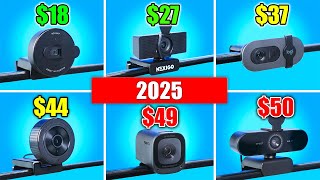

8 Webcams Under $50 - Shocking Results!
45sSurprising test results create curiosity and high engagement.
▶ Play Clip"Thoroughly tests 8 budget webcams and provides clear recommendations, fully delivering on the title's promise."
This video tests eight webcams priced under $50, comparing image quality, autofocus performance, and microphone sound. The host provides detailed insights on each model, from the budget-friendly Nexigo N60 to the high-value 4K ultra-wide webcams, and gives clear recommendations for different budgets.
Anker C200 costs around $50 (with promo code). It has a clean design with built-in privacy shutter, natural colors, and snappy autofocus. Resolution is 2K, not 4K, which is a downside at this price point.
Nexigo N60 costs about $25 and has sold over 10,000 units monthly. It is 1080p 30fps with fixed focus (no autofocus). Colors are decent but there is significant fisheye distortion, making edges of the room appear bulged.
Razer Kai X costs around $50. Image quality is decent when in focus, but autofocus is extremely slow and unresponsive, making it impractical for moving subjects. This appears to be a recurring issue with Razer webcams.
The remaining five webcams include round-shaped budget options, a Logitech 1080p model, and two 4K ultra-wide webcams (later revealed to be identical internally). Prices range from $18 to $50.
Logitech Brio 100 is a 1080p webcam costing around $37. Image quality is extremely poor compared to cheaper alternatives. The host recommends against buying it.
Emit C950 4K costs $34, making it the cheapest 4K webcam on Amazon. Image quality is decent for the price, with autofocus and a narrower field of view. It lacks premium build but offers good value.
Emit C960 4K costs about $18 for 1080p (fixed focus) and $34 for 4K (with autofocus). The 4K version has better background blur and sharper image. The 1080p version is a barebones option.
Two ultra-wide 4K webcams (including Emit Nova 4K) cost around $50. They are identical internally. Image quality is exceptional for the price, with sharp autofocus and wide field of view. Highly recommended.
Cheapest 1080p ($18) is acceptable. Cheapest 4K ($34) is good value. Best overall are the ultra-wide 4K webcams ($50) for superior quality. Razer Kai X and Logitech Brio 100 are not recommended.
For under $50, the ultra-wide 4K webcams (Emit Nova 4K and its twin) offer the best value with excellent autofocus and image quality. The budget-friendly Nexigo N60 or Emit 4K options are good alternatives for tighter budgets, while the Logitech Brio 100 and Razer Kai X should be avoided.
What is the price and resolution of the Nexigo N60?
Approximately $25, 1080p 30fps.
01:46
Does the Razer Kai X have reliable autofocus?
No, autofocus is extremely slow and unresponsive.
03:33
Which webcam is the cheapest 4K option on Amazon?
Emit C950 4K at $34.
06:23
What is the main issue with the Logitech Brio 100?
Very poor image quality compared to its price point.
05:51
Which webcams are recommended as the best value under $50?
The two ultra-wide 4K webcams (e.g., Emit Nova 4K) at $50.
10:41
How many webcams are tested in this video?
Eight webcams.
What is the price range of the tested webcams?
$18 to $50.
04:54
Does the Anker C200 have autofocus?
Yes, with good performance.
00:57
What is the resolution of the Nexigo N60?
1080p 30fps.
01:46
What is the main downside of the Razer Kai X?
Extremely slow autofocus makes it unusable for moving subjects.
04:07
Anker C200's Premium Feel
Demonstrates that build quality and autofocus can be excellent even in a $50 webcam.
Nexigo N60's Fisheye Distortion
Highlights a common issue with budget lenses: significant barrel distortion.
01:46Razer Kai X Autofocus Failure
Shows that even a known brand can have a critical flaw that ruins usability.
03:33Logitech Brio 100 Overpriced
Exposes a popular brand's 1080p webcam as inferior to cheaper alternatives.
05:51Ultra-Wide 4K Webcams Exceptional Value
Proves that $50 can buy near-DSLR quality video, challenging expectations.
08:49[00:00] I tested eight webcams below $50. You're going to be amazed at some of the results. And the first one I tested was the Anker C200. This webcam was bought 4,000 times on Amazon in the past month. It
[00:12] says 59 bucks, but there's a $10 promo code. And I assume that it will be like many other products where it's either discounted or they show a higher price, but then you can claim a discount. So, the Anker C200 came in a clean package. It felt like a quality product and it kind of made me
[00:27] think of these webcams they use in esports, which are these production blocks that are floating above the monitors. You probably know what I mean. There's a big difference between these usual webcams and then this one right here. The webcam also has a built-in privacy shutter. And
[00:42] I'm emphasizing built-in because some of the other webcams, more so the cheaper ones, they included a privacy shutter, but you had to stick it to the webcam yourself. For those it was a bit stressful because you can mess up the positioning for some of them. So I was very happy that with the Anker
[00:57] it was this clean. Now the colors of the Anker C200 looked very natural and also the autofocus test when moving closer to the camera. It looked very good and my test with a colored remote kind of combines these things. The autofocus was very snappy and accurate and the colors look
[01:13] very saturated. However, the webcam didn't look very high quality when it comes to resolution. Now, this is pretty normal because it's a 2K webcam. It's not a 4K one like some of the other webcams. This is a test of the microphone of the Ankor C200. My biggest problem with this
[01:30] one is that it's priced at 50 bucks, which is the highest tier in this video. And even though it has great autofocus, great colors, the resolution is just giving it a big downside. And so, you have to compare it to the other ones to decide if you really want to go for this. Then, next we have
[01:46] the Nexigo N60. And this beast was bought more than 10,000 times in the past month. The price is around $25, definitely in the budget range. So, I was very curious to see if it was going to be worth all the sales. So, the webcam is 1080p 30fps. And as you can see in the autofocus test,
[02:04] it does not have autofocus. There is a fixed focus distance between 19.6 in and 13 ft. And basically that should mean that you're always in focus. As long as you're sitting in front of a desk doing
[02:17] normal movements, not moving too far away. Also, not moving too close or showing an object right in front. It's not going to focus on it. This is a test of the microphone of the Nexigo N60. I also noticed there's a lot of artificial sharpening going on, which is expected with a cheaper webcam,
[02:34] and that part in itself is fine. However, if you look at the testing footage and you look at the edges, my room is literally bulged around me, vertical lines are anything but straight, and that's because of the fisheye lens that this webcam is probably using. So, if we're
[02:49] looking at the two webcams we've tested so far, the Anker C200 definitely looks better. It feels more premium. Well, not too much, but it looks more premium. The colors are better. The image is better, but it's double the price, or even more than double the price of this one. So, since they
[03:04] are both 1080p, I would definitely go for this one so far for around $25 instead of spending 50 bucks for a webcam that is still 1080p. Next, we have the Razer Kai X. This one also cost me
[03:17] around 50 bucks on Amazon, but I'm going to keep this segment pretty short. Not because it is also 50 bucks, just like this one for a 1080p webcam because if I remember correctly, it looked a bit better. My editor will show both of them next to each other as they are both 1080p 30fps and they
[03:33] are both around 50 bucks. But the biggest downside of the Razer Kaijo X was the autofocus. I mean, look at this footage. It is just horrendous. I can't emphasize how bad it was. And not for being inaccurate, but for being so extremely slow and unresponsive. I mean, look at the tests where I
[03:50] covered my face with my hands and then uncovered it so it would see my eyes and my face and then autofocus on it. When it does focus, it is very sharp and accurate. The only huge problem is that if you keep moving around and you're never sitting at exactly the same distance from your webcam,
[04:07] it's never going to be sharp because it waits so long to focus and then if it does decide to focus, you're not even at that distance anymore. And I guess it's just a universal thing with Razer webcams because I tested their Razer Kaijo Pro Ultra. That's a $300 4K highquality webcam. I was
[04:26] so incredibly impressed with the quality of the webcam in that video. It was pure DSLR quality, which is also expected for a $300 camera is what you can call it. However, the autofocus was the
[04:38] same thing right there. It was very accurate, but super unresponsive and slow, and I found no way to fix it. I'm having the same problem with this one right now. So, I think it's a universal razor thing. It's a big problem. I guess if you just use fixed focus and you never move, it's going to be
[04:54] fine. but otherwise it's pretty much unusable. This is a test of the microphone of the Razer Kaijo X. Okay, now very important before you watch the rest of the video, we need a little framing of how to watch the coming five webcams. The first thing to know is that these round looking webcams
[05:10] are the cheapest options on Amazon for a 1080p webcam and a 4K webcam. And then besides that, we have a Logitech 1080p webcam. And then two 4K webcams, of which at the time of buying,
[05:22] I had no idea that they were the exact same webcams. Apparently, in terms of price, C950 1080p absolute cheapest option. Then for around $30, you have a 1080p Logitech or a 4K emit. And then at
[05:36] $50, you have the two 4K ultra wide webcams. So this is the Logitech Brio 1080p option. I'll go quicker with the coming webcams compared to the previous ones because we've already kind of talked about the framing of them and especially this Logitech Brio 100. I won't say much about
[05:51] this because it's absolute garbage for the price compared to these other options. I mean, look at this image and how bad it looks. I even went to YouTube to search for reviews of this webcams and tests and unboxings because I couldn't believe how bad it looked. And turns out that other people who
[06:07] were testing it had the same kind of image. And I mean, again, look at this testing footage. It looks so bad compared to the other options. I'm not sure what's happening here, but I feel really bad for the 10,000 people that buy this every month. This is a test of the microphone of the
[06:23] Logitech Brio 100. Next, we have the Emit C950 4K. And this webcam is the same price as the previous Logitech webcam. It's 4K instead of 1080p, just from a lesserknown brand. And well, I have to
[06:37] be honest, you're not getting a premium unboxing experience. Just like all of these emit webcams, it comes stuffed in a decent looking box and you have to stick the privacy filter to the webcam yourself. I definitely did not like this because you even have to position it yourself. However,
[06:53] after doing this, you have the absolute cheapest 4K webcam that's available on Amazon. So during my testing, for example, this autofocus test, it was very clear that the sharpness of my eye was not really up to par with the coming 4K webcams, the Nova 4K and the C960 4K. It's also normal because
[07:10] they're $50 instead of 34. You're also not getting a very wide field of view. There's not much of the room visible behind me. It's also very zoomed in on my face. But at $34 for this 4K webcam,
[07:23] I was definitely pretty pleased. This is a test of the microphone of the Emit C960 4K. So, how does it compare to the 1080p version which costs around $18? There are two major differences between the
[07:37] 1080p and the 4K version of this webcam. First of all, well, 1080p versus 4K. And second of all, the 1080p version does not have autofocus. It has a fixed focus distance, while the 4K one does have
[07:50] autofocus. So, the 1080p version is definitely a barebones stripped down webcam that is made to be as cheap as possible. You can even read it on the listing. I think they call it ultimate budget 1080p webcam or something like that. There is also almost no background blur on the 1080p
[08:05] version because it's fixed focus and there's so much infocus that the background is barely out of focus. So, that is also something that looks prettier with the 4K variant. This is a test of the microphone of the Emit C950. I will also show you a side byside of the Logitech Brio 100,
[08:23] which is their 1080p webcam, compared to the Emit 1080p one, the C950. It's crazy to think that the Logitech costs $37 compared to $18 for the C950. And then, especially if you replace the 1080p
[08:36] C950 with a 4K one, which costs $34. That is still cheaper than the Logitech Brio 100. And it's just such a big difference. There is no comparison. No one should buy the Logitech Brio. And then
[08:49] finally, we have the two most expensive, but also most promising webcams of this video and probably in general on Amazon below $50. So, as you can see from both unboxings, the front looks different,
[09:01] but besides that, they are exactly the same webcams, not only on the outside, like the back of the webcams or the stands, but the internals should also be the same. I will show testing footage of both of them side by side. Maybe they still look a bit different because of
[09:15] the software settings. My editor could also try to make them look as similar as possible in terms of colors because then you will see they look pretty much identical. And I've been focusing so much on the fact that they are the same webcams. But if you look at either one of them, the quality is
[09:30] incredible for the price at $50. When I started making this video, when I was buying everything and comparing what to do, I had no idea that this was the quality we were going to be able to reach for 50 bucks. Look at how well it autofocuses and how sharp it is when I move closer to the webcam
[09:47] with my eye. This is the kind of quality I expect for $100, 120, but absolutely not for around 50. These are incredible webcams. This is a test of the microphone of the Emit Nova 4K autofocus. And
[10:01] I want to say it again, I'm not sponsored by Emit. There is no sponsor in this video. The only way I make money from this video is from either AdSense or if you buy one of these products. But you can compare everything for yourself, right? We had the $18 absolute cheapest 1080p webcam. And then
[10:17] now we have the upper range, which is $50 for the 4K ultra wide ones. I will show you split screen footage of the cheapest 4K webcam, the C950 4K, and then one of these two ultra wide 4K webcams.
[10:29] You can definitely see a difference. I mean, probably huge difference. The image looks way sharper. It is ultra wide, so they are definitely better quality. But of course, $34 for the C9504K
[10:41] is also a really good deal if you check how it looks. Definitely better than some of the other options we checked out. Okay, I think I did a good job at organizing them from cheap to expensive. Depending on your preferences, what should you choose? I mean, if you want the cheapest possible,
[10:55] it's self-explanatory. $18 for a 1080p webcam that looks very acceptable. Definitely a good option. Then this one right here. I was kind of afraid that I was going to be promoting too many emat webcams and that it was going to sound biased. So, I'm very happy that I can also propose this
[11:10] one. And this is a good option if you want the cheapest webcam possible that is ultra wide. So, I will show footage again, but this was the one that looked like a fisheye lens where the sides of my room were kind of bulged. So, I would say that if you just care about the cheapest, get
[11:23] this one. But, it is way more zoomed in and narrow than this ultra wide one, which is a few dollars more expensive than the Logitech. absolute trash. And what we have here then is very interesting. 4K
[11:36] absolute cheapest on Amazon, $34. You should check the footage for yourself of what you think is acceptable. If you think it is worth buying over one of these two. I think it kind of is. I mean, before talking more, let's move this one. That was a super bad autofocus. It's not worth it because
[11:50] of that. And then this one. It looked good. It looked premium. It had great colors. So, I feel bad about not recommending this, but it was just not up to par with these webcams. So, let's move these out of the way. Absolute cheapest 1080p, very narrow, ultra wide, a bit
[12:05] more expensive. Cheapest 4K option you can get. It is definitely worth it over these if you check the test footage. But if you're able to spend a bit more, I would go for these 4K ultra wide webcams.
[12:17] They are absolutely incredible for the price. I probably should have asked them money for this video, but here they are. Not sponsored. I will link everything in the description. These videos take a long time to make, so if you buy one of these, I would appreciate it if you use my link.
[12:32] Thank you so much for watching, and I hope that I will see you in my next video. Have a nice day.



⚡ Saved you 0h 12m reading this? Transcribe any YouTube video for free — no signup needed.