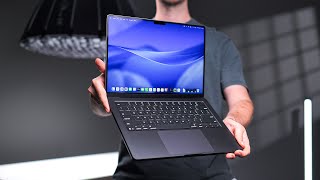

Is M5 MacBook Pro the Best Laptop?
45sStarts with a relatable question and sets up a controversial middle-ground choice, hooking viewers interested in Apple's lineup.
▶ Play Clip"Title accurately reflects the content: a detailed review of the M5 MacBook Pro's performance and comparison."
The video reviews the M5 MacBook Pro, positioned between the MacBook Air and the high-end MacBook Pro, highlighting its performance upgrades and comparing it to other models.
Apple Silicon MacBooks are well-regarded, with the MacBook Air offering value and the MacBook Pro offering power. The base MacBook Pro sits in the middle.
Starts at $1599, positioned between the Air and the higher-end Pro.
M5 chip has same core count as M4 but faster memory bandwidth. Multi-core outperforms all existing MacBooks except M4 Pro. Single-core beats all.
In Photoshop, M5 outperformed M4 Pro by 26%. In code compilation, comparable to M2 Pro and M3 Pro.
Apple claims 1.6x performance over M4; real-world 20-40% improvement, especially in ray tracing.
M5 MacBook Pro has one fan, starts within 60 seconds under load, louder than the two-fan higher-end Pro.
Similar to M4 Pro, 2-3 hours more than Air, about 1 hour more than higher-end Pro.
Twice as fast as M4, but real-world impact limited by external drive speeds.
Solid aluminum, sturdy, good keyboard and trackpad. Space black shows smudges.
14-inch mini LED, bright and vibrant. Ports include Thunderbolt 4, HDMI, SD card slot. No Thunderbolt 5.
M5 MacBook Pro is a strong option for those who want more than Air but don't need Pro chip. Good alternative to buying used M3 Pro.
The M5 MacBook Pro is an excellent all-around laptop, offering significant performance improvements and a premium experience, making it one of the best laptops available for its price point.
What is the starting price of the M5 MacBook Pro?
$1599
00:53
How does the M5 chip's multi-core performance compare to the M4 Pro?
The M4 Pro is about 20% more powerful.
02:32
What is the real-world GPU performance improvement of the M5 over the M4?
20% to 40% improvement.
03:42
How many fans does the M5 MacBook Pro have?
One fan.
06:17
What is the battery life difference between the M5 MacBook Pro and the MacBook Air?
2 to 3 hours more on the Pro.
07:33
What type of display does the M5 MacBook Pro have?
14-inch mini LED display.
09:34
Which Thunderbolt version does the M5 MacBook Pro use?
Thunderbolt 4.
10:36
How many external displays does the M5 MacBook Pro support?
Up to two displays at 6K 60Hz.
11:17
M5 beats M4 Pro in Photoshop
Surprising single-core performance advantage over a higher-tier chip.
02:46Fan noise comparison
Reveals the trade-off of a single fan design in the base Pro model.
05:49Second-hand market impact
Suggests M5 Pro as a better buy than used M3 Pro, shifting purchasing advice.
11:41[00:00] If I asked you right now, what is your opinion of Apple Silicon MacBooks? It would probably be pretty good, right? Like you have the MacBook Air on one end that is amazing value and doesn't really compromise too much on performance and features.
[00:13] And then you've got the super powerful MacBook Pro with the Pro Apple Silicon chips on the other end. But there's one other option right in the middle that Apple kind of forgot about for a few years. One that they've been quietly refining in the background.
[00:27] And that is the MacBook Pro. It's kind of like a hybrid embracing some of the best features of both. And it just got an internal upgrade with M5 Apple Silicon. So I was really interested to see not only if it improves the overall experience,
[00:41] but how it now compares to those other two options, and if this is maybe the best laptop that you can buy right now, period. So the M5 MacBook Pro starts at $1599,
[00:53] which is almost exactly in the middle between the Air and the more pro version of the MacBook Pro. I know, the naming kind of sucks. Now, bear in mind, there are some sales on currently, so these prices may differ.
[01:07] I'll put some links in the description to the best deals I could find. Now, traditionally, when it comes to selecting one of these MacBooks, there's a big decision to make, right? How many compromises are you prepared to make to pay less money?
[01:21] For example, if you choose the Air, it's $600 cheaper than the MacBook Pro, but it has worse speakers, port selection, screen performance, and half the storage space, for example.
[01:34] Now, since the only major change from the M4 MacBook Pro to the M5 MacBook Pro is the new M5 Apple Silicon chip, I think performance is probably a good place to start. Now, when I was comparing the new M5 chip to the previous M4, on paper, they look almost identical, right?
[01:51] Same number of CPU cores and GPU cores. All the improvements are relatively minor, with the exception of the faster memory bandwidth, which is essentially how fast the M5 chip is able to access the memory or the RAM.
[02:04] But I was pretty impressed once I started comparing it against all the other Apple Circuit MacBooks. Now, I'm not talking about everyday performance or how fast apps open or multitasking, stuff like that.
[02:17] All of that performs so well on Apple Silicon and has for years, and I just couldn't really tell a difference when I had them side by side. So I started with the M5 CPU's multi-core performance and found that it actually outperforms all other existing MacBooks,
[02:32] including the much more expensive, at the time, M3 Pro, with the exception of the M4 Pro, which was about 20% more powerful. Single-core performance was impressive with the M5 easily beating out the rest.
[02:46] And I genuinely noticed this performance improvement in the things I do on my MacBook day-to-day. For example, I use Photoshop frequently which benefits from faster single-core performance and the M5 outperformed the M4 Pro
[03:00] and was on average 26% better for my workflow compared to the M4. Now, in terms of other real-life things like compiling code for example, which is more of a multi-core task, I found the M5 was
[03:14] comparable to the M2 Pro and also the M3 Pro Even versus the M4 Pro it only took about 2 minutes longer For anything GPU related again the M5 does really well It essentially the same performance as the M3 Pro GPU
[03:30] Now Apple claims that the M5 MacBook Pro's GPU delivers 1.6 times the performance of the M4. And what I saw in real-life usage was anywhere from about 20% to 40%,
[03:42] which is actually an amazing increase, honestly. particularly in anything that takes advantage of ray tracing. Now it's important to note here that I don't expect the M5 to be some super powerful processor
[03:55] that's amazing and blows everything else away. It just has to be powerful enough to make it a viable option compared to say an M3 Pro or maybe even an M4 Pro MacBook Pro
[04:07] because maybe its performance is close enough to the Pro chip now that you can just save some money and get the base M5 instead. Now, obviously, when the N5 Pro chip comes out sometime in 2026, it will outperform the standard N5,
[04:24] but at the time of this video, it's just not available yet. Now, speaking of new releases, you may have seen this keyboard in some of the footage in this video. This is the Lowfree Flow 2, the newly released and upgraded version of Lowfree's super popular Flow keyboard.
[04:39] I thought this would be a good video to feature it in because the minimal design kind of blends in a lot with the MacBook products. And big thanks to Lofri for sponsoring this section of the video and supporting my work on this channel.
[04:52] Now the Flow 2's body is made from anodized aluminum, similar to the MacBook Pro. There's a built-in flip-out keyboard kickstand, and you can choose from 2.4 GHz Bluetooth or wired USB-C connectivity options.
[05:05] There's a nifty little touch bar on the right for quickly adjusting volume and brightness. The back of the keyboard is a clean and minimal design, and it's got PVT plus PC double-shot keycaps. and Low3's new low-profile mechanical cloud series switches.
[05:20] You can choose between Surfer, Pulse, or Void for different types of experiences. Here's a little example. So if you're trying to match your MacBook style and get an incredible typing experience,
[05:34] check out the Low3 Flow 2 using the link in the description down below. So going back to performance differences for a bit, one thing I noticed when using the M5 MacBook Pro is that the fan noise is more noticeable compared to the Air and the more expensive Pro version.
[05:49] Now, the Air obviously does not have a fan, right? It relies on passive tooling, so it never makes any noise. And even though the M4 Pro chip is more power-hungry, it's actually quieter.
[06:01] The M5 MacBook Pro fan starts up within about 60 seconds of beginning an intensive task, like compiling code or rendering something, versus the M4 Pro where the fan noise takes longer to become noticeable and is then quieter overall.
[06:17] Now the difference comes down to the internal design. The M5 MacBook Pro only has one fan and a correspondingly smaller heatsink compared to the more expensive versions that have two fans.
[06:29] These fans not only cool the Apple Silicon chip more efficiently, but because there are two of them, they can run at a lower RPM, which produces less noise than a single fan running at a much higher RPM Now due to the fact that the MacBook Pro has a fan versus the fanless MacBook Air even though they may have the exact same chip inside
[06:51] the MacBook Pro will slightly outperform the Air by anywhere from about 5% to 10%, simply because it can just keep itself cooler during those longer demanding tasks. But again, the only time any of this is relevant is when I was doing
[07:05] those more intense sustained tasks like gaming or exporting 3D renders, which probably isn't something most people regularly do on these more, I suppose, entry-level MacBooks. When I was just
[07:19] browsing the internet or multitasking, all of these MacBooks were dead silent, and that was the most important factor for me personally. Quick note on battery life, I didn't find any major differences between the N5 MacBook Pro and the N4 MacBook Pro.
[07:33] They're both about the same, noticeably more than the MacBook Air. I'd get about two or three hours more on the Pro on average and slightly more than the more expensive Pro version, about an hour or so more.
[07:46] Now, one significant improvement I noticed was the SSD speed. It's about twice as fast on the N5 MacBook Pro compared to the N4. Real-life performance is not quite as significant as it may seem, though.
[07:58] improvements if file transfers to external drives for example will only see improvement if the drive itself has a similar speed to the internal MacBook SSD. Moving on to build quality and features. Now
[08:12] you'll likely be familiar with them as this chassis has been around for four years at this point and really not much has changed from the previous M4 MacBook Pro. It's made from solid aluminum and feels really sturdy and premium to the touch. The keyboard is actually one of the nicer laptop
[08:27] keyboards I've used and feels really tactile with a surprising amount of key travel, making it feel like a larger desktop sized keyboard. Now the enlarged trackpad size makes pinching to zoom in and out really easy too. Unlike some
[08:41] other laptop brands, it's actually very easy to clean because it's not made of plastic. Now I think it's perfectly fine to critique Apple on some of their decisions and of course products, but the build quality of the current MacBook
[08:54] lineup is something I just count on false. Now I've tried many other different laptops from other brands and they all just feel really cheap and flimsy in comparison. These MacBooks just hold
[09:06] up so well throughout the years that they still feel almost brand new even after years of use. I have to say though I'm not the biggest fan of the space black color option. I think to pick up
[09:18] smudges and finger grease easier than the silver color but this is really just personal preference. Now the M5 MacBook Pro screen is the same 14-inch mini LED display as the previous M4 version, and also the more expensive Pro chip version.
[09:34] Now I find this to be one of the highlights of using these MacBook Pros. It gets really bright and the colours are vibrant, both noticeably more so than the MacBook Air. And there is actually an option to upgrade to the Nano Texture display, which is something you don't get on the MacBook Air.
[09:50] I go into way more detail about nanotexture here if you are interested. Port selection between the M4 and M5 MacBook Pro is also identical, but compared to the MacBook Air the MacBook Pro has an additional Thunderbolt 4 port on the right side HDMI and an SD card slot Now how important these extra ports are depends how frequently you use them
[10:11] right? For me personally, I use HDMI and the SD card all the time, and I don't really enjoy having to carry around a USB-C dongle everywhere I go. The trade-off on the MacBook Air, though, is,
[10:23] like the name suggests, it's thinner and noticeably lighter for portability. Now, at first glance, port selection seems identical to the more expensive MacBook Pro. The M5 MacBook Pro's Thunderbolt ports are only Thunderbolt 4
[10:36] versus Thunderbolt 5 on the more expensive Pro. But in my real life use, I'm not sure if I've benefited from this, or if I even will in the future. Sure, Thunderbolt 5 has improved bandwidth
[10:49] and speed over Thunderbolt 4, but the only way I can take advantage of Thunderbolt 5 currently is by, like I mentioned before, having a super fast Thunderbolt 5 SSD, and even if I did have one, I simply don't need speeds any faster
[11:03] than what Thunderbolt 3 or Thunderbolt 4 provides. External display support is also identical between the M5 and M4 Pro, up to two external displays with up to 6K resolution at 60Hz.
[11:17] Truly, the only major difference between the M5 MacBook Pro and more expensive MacBook Pro is the Apple Silicon inside and of course the BCR cooling system. And as I discussed before,
[11:29] most people either don't need the additional performance of the Pro chip or even if they did, maybe the M5 is now close enough to that. So we've now got the M5 MacBook Pro with some
[11:41] significant CPU and GPU upgrades over the previous version. So what effect does it have on the current MacBook lineup? Honestly, probably not much. I think the status quo between the Air,
[11:54] this base model Pro, and the Pro MacBook Pro is pretty much still the same. Like, the performance improvements aren't really relevant to those looking to buy a MacBook Air, not to mention that although the Pro is better in almost every way versus the Air, you know,
[12:09] speakers, screen, ports, SSD, etc., it's still over 50% more expensive. And for those people where performance is actually relevant, the M5 Pro, when it comes out, is going to be a good deal
[12:21] more powerful than the M5, similar to what we saw with the M4 versus the M4 Pro. I think where the M5 MacBook Pro really makes a difference is on the second-hand market. You know, its performance
[12:33] is very comparable to an M3 Pro, or in some situations, even the M4 Pro MacBook. So instead of having to buy one of those second-hand, maybe you can just buy a brand new M5 Pro for the same price and get all the nice warranty, AppleCare and peace of mind that comes with a brand new
[12:50] device. So I think if you're looking for an all-around amazing laptop and you're prepared to spend more than the MacleCare for those extra features, and of course, you don't need the extra performance of a Pro chip, I seriously think this is one of the best laptops you can buy right
[13:06] now. Even compared to all the Windows options out there, yes, they're cheaper and in some situations they might be better but that's a completely separate video. If you want to see some more Maxwell comparisons to help maybe make your decision, I have a video right here that you
[13:23] may want to watch as well.
⚡ Saved you 0h 13m reading this? Transcribe any YouTube video for free — no signup needed.