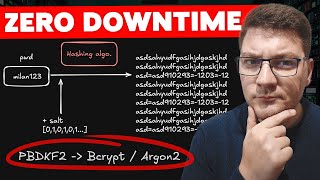

The Password Hash Migration Trap
45sStarts with a relatable problem that every developer faces, making viewers curious about the solution.
▶ Play Clip"The title promises a 'lazy upgrade pattern' and the video delivers a clear, actionable solution, though it could be more concise."
This video demonstrates how to migrate from one password hashing algorithm to another without breaking login functionality for existing users. It explains the importance of password hashing, the challenges of switching algorithms, and provides a step-by-step solution using a dual-hashing approach with a feature flag.
Replacing a hashing algorithm (e.g., PBKDF2 to bcrypt) without breaking login for existing users is non-trivial because simply swapping the algorithm invalidates all existing hashes.
Password hashing transforms plain text into an unrecognizable string, preventing storage of plain text passwords. Salting adds randomness so identical passwords produce different hashes.
Hashing is one-way; you cannot derive the password from the hash. Verification involves hashing the provided password with the stored salt and comparing.
Simply replacing the hashing algorithm breaks login for all existing users. A migration strategy is needed to keep functionality working while transitioning.
The example app uses PBKDF2 (Password-Based Key Derivation) with a salt stored alongside the hash. Verification extracts salt and hash, then compares.
Use fixed-time comparison to prevent timing attacks, where response time differences could reveal information about the hash.
Switching to bcrypt and testing shows new users can register and login, but existing users get 401 Unauthorized because their hashes are incompatible.
Register both legacy and new hashers using keyed services. New users use the new algorithm; login flow tries new first, then falls back to legacy and rehashes on success.
Use a feature flag to control the hashing approach. Keep the dual implementation for 3-6 months, then identify old hashes by format (e.g., bcrypt starts with '$2a$') and force password resets for remaining users.
The flow: convert old data to new format, let both coexist, verify migration, then remove old data. This pattern applies to many data migration scenarios.
The video provides a practical, multi-step solution for migrating password hashing algorithms without downtime, emphasizing the importance of a gradual transition and cleanup. It also suggests using ready-made solutions like Keycloak to avoid the complexity altogether.
Why is password hashing important?
It prevents storing plain text passwords, transforming them into unrecognizable strings.
00:15
What is a salt in password hashing?
An array of bytes that adds randomness to each hashing operation, so identical passwords produce different hashes.
00:45
What is the key property of a hashing algorithm?
It's a one-way operation; you cannot derive the password from the hash.
01:10
What happens if you simply replace the hashing algorithm?
It breaks login for all existing users because their stored hashes are incompatible with the new algorithm.
01:38
What is the purpose of fixed-time comparison in password verification?
To prevent timing attacks where response time differences could reveal information about the hash.
03:12
How does the dual-hashing solution handle existing users?
It tries the new hasher first, and if that fails, falls back to the legacy hasher. If legacy verification succeeds, it rehashes the password with the new algorithm and updates the stored hash.
07:05
What is the recommended duration to keep the dual implementation?
3 to 6 months, to allow most users to reauthenticate and switch to the new hash.
08:26
How can you identify old password hashes?
By their format; for example, bcrypt hashes start with '$2a$'.
08:41
Migration Challenge
Highlights the core problem: switching algorithms without breaking login is non-trivial.
01:38Dual-Hashing Solution
Provides a concrete, multi-step solution that allows both old and new hashes to coexist.
05:40Feature Flag & Cleanup
Emphasizes the importance of a gradual transition and cleanup strategy.
08:11General Data Migration Pattern
Extends the solution to a general pattern applicable to many data migration scenarios.
09:20[00:01] the authentication system on the project that you are working on. You get a new task to replace the current hashing algorithm with a better one. My question for you is how will you implement this without breaking the login functionality
[00:15] for all existing users? And let me explain why the answer to this isn't so simple. Why do we even need password hashing? It's there to improve security. And it takes a password in a plain text format. Let's say something like this
[00:30] and transforms it into something mostly unrecognizable like this. We don't want to store plain text passwords in our system and no serious of any system does this. Instead, it stores a hashed password. Now to further improve the
[00:45] hashing process, we also add a bit of randomness into the hashing operation. We call this assault and you can think of it as an array of bytes that adds an element of randomness to each hashing operation that we perform. The idea
[00:58] behind this is that if we hash two identical passwords from different users, we get a different output because of the salt adding the randomness. Now the key element here is the hashing algorithm. And what makes them
[01:10] interesting is that you can't derive the password from the password hash. It's only a one-way operation where we can take the password hash it again using with the password hash and we can validate that the user provided the
[01:25] correct password. Now switching the hashing algorithm from something like PBDKF2 into brypt or argon 2 which is the industry standard isn't such a trivial operation because if we just replace the
[01:38] hashing algorithm we're going to rate login for all existing users. So we need to think of a way to migrate our current system into this new hashing algorithm without breaking any existing functionality. And why I find this
[01:51] problem interesting is because it can teach you a couple of ideas that you can apply in many similar situations where you need to do some sort of data migration while keeping the current functionality working. And ideally,
[02:03] nobody should notice that you made a change in the system. Here's my simple application that exposes two endpoints, a register and a login endpoint. And my current implementation of the password hasher uses the PBDKF2 algorithm. PBDKF
[02:18] is short for passwordbased key derivation. And here's how you could itself is fairly straightforward. You call the existing hashing function that we have innet. You specify your hashing algorithm. You also provide the salt to
[02:33] add an element of randomness. And then you have to store the salt and the password hash inside of your database. Now, in my case, I'm going to store this in a text file that's currently empty, but it's going to contain the email and
[02:45] the password of my users. Verifying a password is the reverse process. We take the hash password and extract the salt and the password hash from it. And then we can hash the provided password with the salt that we extracted and compare
[02:59] the new hash with the one that we have persisted. Here, it's smart to use a these two arrays, which is used to improve security because based on the response time of the password hashing operation, an attacker could possibly
[03:12] gain an attack vector that they can exploit using a fixed time equals prevents this. Now, let's try to register a new user. I'm going to start this up. And I've got a scalar UI where I can send a simple test request. So,
[03:25] let's go ahead and send this. And I'm not even going to specify a valid email and password. I'm just going to say test and test. So let's send this and we're our endpoint where we check that this user doesn't already exist. And because
[03:39] this is the case, we're going to hash their password. So the hash is going to that this contains both the password hash and the salt which adds the this in our text file. And this completes our API call. And you can see
[03:55] that we get a 200 okay response in the scalar UI. Now we can also test this in the login endpoint where I'll specify the same email and password. This time we land on our second endpoint where we extract the stored hash from the
[04:09] persistent store in this case a text file typically a database and then we can verify this using our password hasher implementation. If these values are not equal then we return 401 unauthorized otherwise this is a
[04:22] what's inside of our text file. I'm persisting these values in a format that looks something like this. It's the simplest one I could think of to facilitate this example. And this represents our password hash. Now let's
[04:35] say I just go ahead and update my password hasher implementation from password hasher implementation from PBDKF2 to let's say brypt which has a popular net library that I'm using. And the implementation is very simple.
[04:48] There's a hash password method and a verify method which I can call to satisfy the constraints of my IP password hasher interface. So I've replaced my implementation of the password hasher. And if I start my API
[05:00] again and we try to register a new user. Let's say the email is test one. I can send this request. We get back a successful response. And if I try to log in as this same user, you will see that I'm both able to register and login.
[05:15] However, if I try to login using the credentials for the user from our previous example, you'll see that the behavior is not the same. We go ahead and fetch the stored hash value. But if we try to compare it with the current
[05:27] password, even though it's valid, we will get back a 401 unauthorized. And we have inadvertently introduced a serious bug in our system where no existing user is able to log to the system. So obviously the solution that we are
[05:40] trying to implement here is not going to work. Which begs the question, are we even able to solve this problem? Let me show you one possible solution which is actually a multi-step process and we're going to add multiple registrations for
[05:54] the I password hasher interface. Now inn net we have the concept of a key service where we can provide a key that we can use to resolve the respective implementation at runtime. And I want to register these using the legacy and the
[06:10] new keys. So I'm going to call add key singleton for both of my services. Now if I try to just resolve I password hasher, we're going to get an exception at runtime. So we have to resolve this using the from key services attribute.
[06:25] And in this case, I want to resolve the new implementation of the password hasher interface. So our register flow is just going to switch to the new implementation and all new users will be able to log in the same as before.
[06:37] However, our implementation for the login flow will have to change. So, we're going to need to inject the legacy and the new password hasher. So, let's and the new password hasher. So, let's call this the new password hasher. This
[06:51] will become the legacy password hasher. And then here's what we have to do inside of our login flow. So, we still fetch the hash from our password store. That part does not change. And then we can try to verify the password with the
[07:05] new password hashing algorithm. However, instead of immediately returning results unauthorized, we're going to add an extra step here and that is we want to compare if the legacy password hasher can verify this same password. I'm going
[07:19] to pass in request password and the stored hash and if this evaluates to true, I can use my user repository to update the user's credentials. So what I want to do is for this user which I'm going to identify by email, we want to
[07:33] store a new password hash using the existing password. So we can say new password hasher hash and I'm just going to provide the same password again. So to provide the same password again. So this part is key for any existing user.
[07:45] We have to generate a new password hash and persist that inside of our system. In this case I'm going to say return a successful login because we managed to verify the user using our legacy password hashing algorithm. However, for
[07:58] any future login requests, we switch them to the new one. Once they do this once, we won't have to repeat this operation again. Bonus points here. If we introduce a feature flag to control which password hashing approach we want
[08:11] to use. And then our next course of action is we keep this implementation say 3 to 6 months. This should be sufficient for most users who are actually using our system to reauthenticate and switch to the new
[08:26] password hash. And then we can look at our database and figure out any password implementation. You can tell these from the format of the password hash. An algorithm like brypt is going to start with 2 a in front of the password hash.
[08:41] So that's how you can know which are the new passwords and then you would find all the old users and for example notify them that they need to update their password. Another thing you could do is just delete their password hashes. And
[08:54] on their next login attempt, if you detect that this user doesn't have a password hash, you can force them to go through the process of setting up a new implement this securely, for example, by generating a temporary password reset
[09:07] token that you could send them using an email. So this is an example of how you can migrate from one hashing algorithm to a different one without breaking login functionality for existing users. And this type of problem is pretty
[09:20] common when you have to deal with data migration inside of your system. The flow typically looks like this. You take the old data and you figure out a way to convert it into the whatever is the new format. But the key is that we have both
[09:36] the old data and the new format coexisting together for some amount of time. Once you verify that your data migration is complete, then you can go ahead and consider if you want to delete the old data from your system. Let me
[09:50] know if you would like to see an example of this using a SQL database for example because I think this can also be an interesting exercise to cover. I hope you found this exercise valuable. But if you don't want to deal with password
[10:03] hashing at all, I recommend using a ready solution like Keycloak to implement your authentication needs. If you enjoyed this video, go ahead and smash the like button for the YouTube algorithm. Thanks a lot for watching and
[10:16] algorithm. Thanks a lot for watching and until next time, stay awesome.




⚡ Saved you 0h 10m reading this? Transcribe any YouTube video for free — no signup needed.