
AI Summary
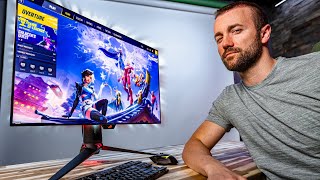
The video is a personal review of the ASUS ROG 4K 240Hz OLED gaming monitor, priced at $1,100. The creator, a filmmaker and gamer, compares it to his previous monitors, discusses the trade-offs between resolution, refresh rate, and display technology, and evaluates whether the upgrade is worth the cost. He concludes that OLED is a significant improvement, but the jump from 144Hz to 240Hz is less noticeable, and he reorders his priorities: OLED and 4K are top, with 32-inch size more important than 240Hz.
Chapters
The creator explains that everyone has different priorities for monitor specs: resolution, frame rate, and display technology. His ideal specs are 4K, 240Hz, and OLED, but budget and PC capabilities force choices.
He identifies 4K, 240Hz, and OLED as 'endgame' specs, but notes that beyond these, diminishing returns set in, and only niche users benefit.
He purchased the new ROG 4K 240Hz OLED monitor for $1,100 (not sponsored) and will test if it's worth the price.
He has two monitors: a 4K 144Hz LED 32-inch and a 1440p 240Hz OLED 27-inch. He chose the 4K one due to his preference for resolution.
The switch to OLED was the most noticeable improvement, with vibrant colors, deep blacks, and high dynamic range, making his old monitor look washed out.
He initially struggled with dark scenes in PUBG on OLED, but fixed it by boosting brightness. In vibrant games like Valorant, OLED made enemies pop, and he felt he was clicking heads more.
The difference between 144Hz and 240Hz was subtle; he felt it more than saw it, but in PUBG, flicking felt smoother with less blur, reducing micro-corrections.
The monitor has a proximity sensor (off by default) and a built-in KVM with USB ports, which he finds useful but notes minor quirks like USB-C vs USB-B.
He considers the monitor 'endgame' but feels $1,100 is steep, especially since hitting 240Hz at 4K requires a powerful GPU like a 4090 or 5090. Prices are dropping; MSI has a similar model for $800.
After testing, OLED has risen to the top of his priority list, tied with or slightly above 4K. He would sacrifice 240Hz first, as it's the least noticeable, and values 32-inch size more.
The 4K 240Hz OLED monitor is a significant upgrade, especially in visual quality, but the high price and GPU requirements make it a niche purchase. The creator's priorities shifted: OLED is now essential, while 240Hz is the first spec to sacrifice.
Mentioned in this Video
Study Flashcards (7)
What are the three key monitor specs the creator prioritizes?
easy
Click to reveal answer
What are the three key monitor specs the creator prioritizes?
Resolution, frame rate, and display technology.
00:01
What are the 'endgame' specs mentioned?
easy
Click to reveal answer
What are the 'endgame' specs mentioned?
4K resolution, 240Hz refresh rate, and OLED display.
00:15
What was the price of the new ROG monitor?
easy
Click to reveal answer
What was the price of the new ROG monitor?
$1,100.
01:23
What was the creator's initial problem with OLED in PUBG?
medium
Click to reveal answer
What was the creator's initial problem with OLED in PUBG?
Dark scenes made it hard to see enemies, but boosting brightness fixed it.
04:14
What difference did the creator notice between 144Hz and 240Hz?
medium
Click to reveal answer
What difference did the creator notice between 144Hz and 240Hz?
He felt it more than saw it; flicking felt smoother with less blur, reducing micro-corrections.
05:18
What feature is off by default on the monitor?
medium
Click to reveal answer
What feature is off by default on the monitor?
The proximity sensor that turns off the screen when you walk away.
06:28
What is the creator's final priority order for specs?
hard
Click to reveal answer
What is the creator's final priority order for specs?
OLED is top (tied with or above 4K), then 32-inch size, then 240Hz (sacrificed first).
08:41
💡 Key Takeaways
OLED Visual Impact
The creator emphasizes that OLED's color and contrast made his old monitor look washed out, highlighting the significant visual upgrade.
02:23Diminishing Returns of Refresh Rate
He notes that beyond 144Hz, the difference is felt more than seen, illustrating the law of diminishing returns.
05:18Shifted Priorities
After testing, he reorders his priorities, placing OLED above 4K and 240Hz, showing how experience changes preferences.
08:41Full Transcript
[00:01] they have to decide which specs they care about and which ones can be sacrificed like do you prioritize resolution frame rate or display technology and everyone's perfect monitor is different but for me the
[00:15] perfect specs like end all specs are 4K 240 HZ and OLED and depending on how much money you're willing to spend and the specs of your PC you get to pick one
[00:28] of these maybe two for me as a filmmaker or at least as a very mid YouTube video maker and as someone that daily drives a 5k monitor I'm big on the pixels I care
[00:40] about resolution and a couple years ago I decided to try 4K gaming and I've had a very hard time going back since then so my gaming monitors have always and the display technology in order to get that crisp 4K picture if it sounds
[00:54] like I'm complaining about gaming at 4K 144 HZ I'm not what I'm saying is that anything above the specs you get into real Niche territory where only a select handful of people with special needs with very specific needs can one benefit
[01:08] from those up specs and two even notice a difference the law of diminishing returns gets very real after this point these are endgame specs like last gaming monitor you'll ever need specs and I upgraded to one this week for $1,100 the
[01:23] upgraded to one this week for $1,100 the new Rog 4K 240 HZ OLED monitor whose name I won't read but I will link to it down below if you're interested this is not sponsored I paid for this monitor myself and after about a week of solid
[01:36] gaming sessions I would like to tell you if I think this upgrade was worth $1,100 and also after testing a monitor with my perfect specs if I still have the same priorities which specs I still think are the most important let's jump into
[01:56] two monitors I've had at my studio to choose from this one is 4K 144 HZ LED 32 choose from this one is 4K 144 HZ LED 32 in this one is 1440p 240 HZ OLED 27 in
[02:09] and I know I'm going going to get MD on because most of you would have picked this one and honestly looking at him side by side I think I probably should have two but as I mentioned before I have grown accustomed to 4K and so I
[02:23] prioritized that I had to choose what I wanted to sacrifice do I sacrifice the sacrifice the screen size and the resolution and I picked this guy so the switch to OLED was the biggest thing that I noticed especially with vibrant
[02:38] games like Marvel Rivals and valerant the saturation the color depth the dynamic range like everything is just incredible it made my old monitor look like gray like washed out like I didn't I couldn't use it again after I used
[02:52] camera but just look at the difference in the blacks here like it went from this to this I just printed this using our sponsor
[03:10] trusted printing brand so if you're looking for a printer capable of high capacity printing for your business needs the HP LaserJet Pro mfp 3101 sdw
[03:22] printer is fast and reliable and the name is a mouthful so there's just there I'll just put a link in the description for you this bad boy features the HP wolf pro security system built in so you know your Network's always secure you
[03:34] can connect to all your devices your phone your tablet your computer probably your refrigerator nowadays so that you can print scan and copy from anywhere using their super easy to use print app and you've got a handful of iio options
[03:46] connect to it however you want USB Ethernet Dual Band Wi-Fi you can connect to it whatever way you feel like connecting to it it's not picky it's managing your printers and more time growing your business with the most
[04:01] reliable printers in the industry and stay connected with Dependable Wi-Fi printer online back to the video the last time I tried to game on that 1440p OLED that I've got here I only tried one game on
[04:14] I've got here I only tried one game on it I played pubg and I don't think don't think I gave it a fair chance to go ahead roast me in the comments I I know those couple games that I played like it was beautiful don't get me wrong but the
[04:27] darks in OLED are so much darker that I had a hard time seeing enemies in the shadows and I felt like I was straining my eyes just to play the game like I think the combination of that and then also going back to 1440p like the
[04:40] trade-off just didn't feel worth it to me and I think I was wrong I mean first off the problem was very fixable I just had to boost the brightness of pubg and we were good problem solved in like 5 seconds but more importantly in more
[04:53] modern art style games that have kind of a more vibrant and minimal style that we see a lot nowadays games like valerant I found that the more vibrant display made the enemy pop off the background more and maybe it was all in my head and
[05:05] maybe the 240 HZ was helping me a lot too but I found that I was clicking heads more than I normally click heads honestly I don't think I can go back to LED after gaming on OLED for about a week but as for the jump in frames going
[05:18] from 144 to 240 HZ which the 490 in my PC is able to handle most of the time I PC is able to handle most of the time I didn't see a very noticeable difference until I jumped back into pubg a game that I've put a lot of hours into for me
[05:32] any frame rate above 144 frames it ends up being that thing where you you feel up being that thing where you you feel it more than you actually see it but I felt it in pubg O I don't know what it is about
[05:46] O I don't know what it is about pubg I the 240 is very obvious quickly turning to an enemy or flicking to an enemy you just they're less of a blur when you flick like that the middle of the flick is where you're going to be
[06:00] the fastest so the beginning and especially the end you're slowing down a little bit and it's during those slow down moments where you can actually process and see the enemy that you're trying to land the cursor onto versus
[06:14] flicking in 144 Hertz where the enemy doesn't really become perceivable until you stop moving and I just found that those little micro Corrections that I had to do in 144 Hertz didn't really exist in 240 I found myself stopping
[06:28] right on the enemy more often in 240 I also do really like a lot of the these monitors like the proximity sensor so if you walk away the screen turns off do think it's weird that they left that off by default though because the first
[06:42] night that I had this monitor I accidentally left my Marvel Rivals Lobby open all night for like 14 hours I didn't notice until the next morning the brightness was at like 10% so there's no burning but I turned on that
[06:56] feature immediately also the USB hubs in this getting better this has three USB ports and two USB Uplink ports so it has a built-in KVM meaning if you jump back you have your keyboard and mouse plugged into the the ports in the back when you
[07:11] jump over to the other PC the mouse and keyboard also jump to the other PC which is nice it's weird that one of them is USB type c and the other one is USB type B or whatever that fat printer cable is I think it'd be nice to have two USB C's
[07:24] but not a deal breaker overall though after a handful of good gaming nights I still stand by my thesis that this is an endgame gaming monitor you know what that means we're just going to game all day today means we got to play more
[07:37] pubg that's when I walk away I'd rather work than play pubg let me know if you guys agree in the comments I think any higher specs than this are just going to go completely unnoticed by someone like me who is an Enthusiast gamer but not a
[07:51] me who is an Enthusiast gamer but not a pro tier gamer the $1,000 PR the 11100 pro tier gamer the $1,000 PR the 11100 the $1,000 $1,100 price tier is is still feel like a lot to me especially since the only way to actually hit 240 frames
[08:03] at 4K is to turn down your settings quite a bit and I've got a 4090 so I a monitor like this unless you have a god tier overclocked PC or you managed
[08:15] to get a 5090 I think that by the time gpus that can handle this monitor have gpus that can handle this monitor have been widely installed into Gamers PCS I monitors with these specs at a much more palatable price range of like 500 to 7
[08:29] $0000 MSI already has an identically specked monitor I I can't vouch for the image quality or if it's got the exact same features but 4K 240 OLED 800 bucks
[08:41] prices are already going down as for those premium specs that we talked about in the beginning this experience has actually changed things for me a little bit it's open it's opened my eyes a little bit OLED has topped my list it's
[08:55] it's either tied with 4K or a tiny bit above 4K I'm not 100% sure but it's up there but I would still put having a 32-in monitor as more important than having 240 HZ for me sure 32 in is still a personal preference thing but that
[09:10] a personal preference thing but that jump from 144 Herz to 240 is still the spec that I would sacrifice first it just it's the least noticeable one to me so I hope this answered some of your questions in your own monitor search if
[09:23] feel free to jump into my live stream I'll be streaming both here on this YouTube channel and multistreaming twitch at the same time so i' be some questions hit the like button if
[09:35] liked the video subscribe if you want to see more videos on gaming gear and see more videos on gaming gear and streaming gear like this and as always I normally say happy streaming but this is more of a gaming video Happy gaming ah
[09:47] one [Music]