
AI Summary
This video provides a beginner-friendly overview of Apache Kafka, explaining its core components, architecture, and real-world use cases. It covers messages, topics, partitions, producers, consumers, brokers, and the shift from ZooKeeper to KRaft, making it a solid starting point for anyone new to Kafka.
Chapters
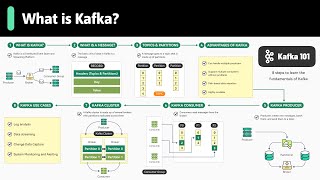
Kafka is a distributed event store and real-time streaming platform, originally developed at LinkedIn, used for large-scale data pipelines and streaming applications.
Producers send data to Kafka brokers, which store and manage it, while consumer groups process the data based on their needs.
A Kafka message has three parts: headers (metadata), key (for organization), and value (the actual payload).
Messages are organized into topics, which are divided into partitions to enable parallel processing and high throughput.
Kafka handles multiple producers and consumers efficiently, tracks consumer offsets, supports retention policies, and scales from small to large deployments.
Producers batch messages to reduce network traffic and use partitioners to route messages; keys ensure same-key messages go to the same partition.
Consumers in a group share partition processing; each partition is assigned to one consumer, and failures trigger automatic reassignment.
Kafka's group coordinator manages partition distribution and triggers rebalances when consumers join or leave.
Kafka clusters consist of brokers; partitions are replicated across brokers using a leader model to ensure data safety.
Older Kafka versions used ZooKeeper for metadata and leader election; newer versions use KRaft, a built-in consensus mechanism, removing the external dependency.
Kafka is used for log aggregation, real-time event streaming, change data capture, and system monitoring across industries like finance, healthcare, retail, and IoT.
Kafka is a powerful, scalable platform for real-time data streaming, and understanding its core concepts—messages, topics, partitions, producers, consumers, and brokers—is essential for leveraging it effectively. The shift to KRaft simplifies operations and improves scalability.
Mentioned in this Video
Study Flashcards (5)
What are the three parts of a Kafka message?
easy
Click to reveal answer
What are the three parts of a Kafka message?
Headers (metadata), key (for organization), and value (the actual payload).
00:41
How does Kafka achieve high throughput?
medium
Click to reveal answer
How does Kafka achieve high throughput?
By dividing topics into partitions, allowing parallel processing across multiple consumers.
01:21
What is the role of consumer offsets in Kafka?
medium
Click to reveal answer
What is the role of consumer offsets in Kafka?
They track what has been consumed, allowing consumers to resume from where they left off after a failure.
01:49
What happens when a consumer fails in a consumer group?
medium
Click to reveal answer
What happens when a consumer fails in a consumer group?
Another consumer automatically takes over its workload to ensure uninterrupted processing.
03:06
What is KRaft and why was it introduced?
hard
Click to reveal answer
What is KRaft and why was it introduced?
KRaft is a built-in consensus mechanism that replaces ZooKeeper, simplifying operations and improving scalability.
03:51
💡 Key Takeaways
Partitions enable scalability
Explains the core mechanism behind Kafka's high throughput, which is essential for understanding its architecture.
01:21Consumer group partition assignment
Clarifies how Kafka ensures fault tolerance and parallel processing within consumer groups.
02:48ZooKeeper to KRaft transition
Highlights a significant operational improvement in modern Kafka, relevant for anyone managing clusters.
03:51Real-world use cases
Shows practical applications across industries, making the abstract concepts concrete.
04:04Full Transcript
[00:00] Kafka powers some of the world's largest data pipelines and real-time streaming applications. But for many, getting started feels overwhelming. In the next few minutes, we'll break down the essentials into straightforward, bite-sized concepts.
[00:15] Let's start at the top. What exactly is Kafka? Think of Kafka as a distributed event store and real-time streaming platform. It was initially developed at LinkedIn and has become the foundation for data-heavy applications.
[00:29] Here's how it works. Producers, essentially the sources of our data, send data to Kafka brokers. These brokers store and manage everything. Then consumer groups come in to process this data
[00:41] based on their unique needs. Now on to messages, the heart of Kafka. Every piece of data Kafka handles is a message. A Kafka message has three parts. Heathers, which carry metadata.
[00:54] The key, which helps your organization. and the value, which is the actual deployed payload. This structured approach is what makes Kafka so efficient at handling large volumes of data.
[01:06] Now that we understand what the message is, let look at how Kafka organizes these messages using topics and partitions Messages aren just tossed into Kafka they are organized into topics categories that help structure the data streams
[01:21] Within each topic, Kafka goes a step further by dividing it into partitions. These partitions are key to Kafka's scalability because they allow messages to be processed in parallel across multiple consumers to achieve high throughput. So why do many companies
[01:37] choose Kafka. Let's talk about what makes it so powerful. First, Kafka is great at handling multiple producers sending data simultaneously without performance degradation. It also handles
[01:49] multiple consumers efficiently by allowing different consumer groups to read from the same topic independently. Kafka tracks what's been consumed using consumer offsets stored within Kafka itself. This ensures that consumers can resume processing from where they left off in
[02:06] In the case of failure. On top of that, Kafka provides disk space retention policies that allow us to store messages even after they've been consumed based on time or size limits we define.
[02:19] Nothing is lost unless we decide it time to clear it Finally Kafka scalability means we can start small and grow as the needs expand Now let look at producers the applications that create and send messages to Kafka
[02:34] Producers batch messages together to cut down on network traffic. They use partitioners to determine which partition a message should go to. If no key is provided, messages are distributed randomly across partitions.
[02:48] If a key is present, messages with the same key are sent to the same partition for better distribution. On the receiving end, we have consumers and consumer groups. Consumers within a group share responsibility for processing messages from different partitions in parallel.
[03:06] Each partition is assigned to only one consumer within a group at any given time. If one consumer fails, another automatically takes over its workload to ensure uninterrupted processing.
[03:18] Consumers in a group divide up partitions among themselves through coordination by Kafka's group coordinator. When a consumer joins or leaves the group, Kafka triggers a rebalance to redistribute partitions among the remaining consumers.
[03:32] The Kafka cluster itself is made up of multiple brokers. These are servers that store and manage our data To keep our data safe each partition is replicated across several brokers using a leader model If one broker fails another one steps in as new leader without losing any data
[03:51] In earlier versions, Capco relies on Zookeeper to manage broker metadata and leader election. However, newer versions are transitioning to Craft, a built-in consensus mechanism that simplifies operations
[04:04] by eliminating ZooKeeper as an external dependency while improving scalability. Lastly, let's quickly touch on where Kafka excels in the real world. It's widely used for log aggregation from thousands of servers.
[04:18] It's often chosen for real-time event streaming from various sources. For change data capture, it keeps database synchronized across systems and is invaluable for system monitoring
[04:30] by collecting metrics for dashboards and alerts across industries like finance, healthcare, retail, and IoT. If you like our videos, you might like our system design newsletter as well.
[04:43] It covers topics and trends in large-scale system design, trusted by a million readers.