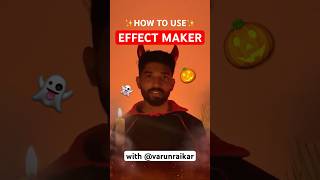

Make a Halloween AI Effect in 30 Seconds
30sThe spell and vessel metaphor turns a simple tutorial into a seasonal magic ritual that viewers will want to copy.
▶ Play Clip"Delivers a quick, precise tutorial that matches the title perfectly — no fluff, just steps."
In this short tutorial, a creator demonstrates how to make a spooky Halloween effect using YouTube Effect Maker. The process involves adding an AI image object, crafting a prompt, previewing across models, and adding a countdown timer and loading indicator for effect. The reveal swaps a simple fade for a dramatic swarm of spiders or bats.
Start by adding an AI image object to your scene. This acts as the vessel where the magic will take place.
Write a prompt ('spell') for the creation. Pro tip: experiment with different art styles, and if you don't like any, define your own.
Preview your horror effect across different AI models to choose the result that works best.
Set a countdown timer so your audience has enough time to build anticipation while the image generates.
While the image generates, add a loading indicator. This keeps the user engaged and 'trapped under your spell.'
Skip the fade — it's boring. Instead, summon a swarm of spiders or bats to cover the entire screen, then reveal the monster.
What is the first step in creating a spooky effect with YouTube Effect Maker?
Add an AI image object to your scene.
00:04
What pro tip does the creator offer for the prompt?
Experiment with different art styles, and if you don't like any, define your own.
00:19
Why should you preview a horror effect across different models?
To see how the result looks across models and choose the best one.
00:32
What role does the countdown timer play in the effect?
It gives enough time for the image to generate while building anticipation.
00:32
What should you add while the AI image is generating?
A loading indicator to trap the user's attention.
00:46
What does the creator suggest using for the reveal instead of a fade?
A swarm of spiders or bats to cover the screen, then reveal the monster.
00:46
AI image object as the vessel
Frames a technical step as creative magic, making the workflow easy to remember.
00:04Custom art styles
Encourages creators to go beyond preset options for a unique look.
00:19Countdown timer builds anticipation
Shows that timing is a storytelling device, not just a technical requirement.
00:32Swarms over fades
A simple but effective design choice that makes the reveal far more dramatic.
00:46[00:04] Welcome models. Tonight I'm possessed by the spirit of Halloween your own spooky Halloween effect with AI powers of YouTube effectmaker. Step one, add an AI image object to your scene. [music] This is your vessel where the
[00:19] magic will take place. Step two, write your spell. I mean your prompt. The creation. Pro tip, experiment with different art styles, and if you don't like any, you [music] can define your own. Step three, preview your horror
[00:32] across different models. Step four, add a countdown timer. This gives enough And while the image generates, add a loading indicator to trap the user under your spell. And finally, for the reveal, skip [music] the fade. That's boring
[00:46] peak magic. Instead, summon a swarm of spiders or bats to cover the entire screen and then reveal the monster within. Now go summon the monster within using YouTube's Effect Maker and [music] I'll see you on the other side.



⚡ Saved you 0h 01m reading this? Transcribe any YouTube video for free — no signup needed.