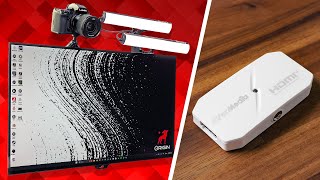

This Capture Card is Better Than Elgato?
45sOpens with a bold claim that immediately sparks curiosity and comparison.
▶ Play Clip"Title promises a showdown but delivers a solid review with a price twist; mostly delivers on the premise."
This video reviews the AVerMedia CamStream 4K capture card, comparing it to the Elgato Cam Link 4K. The reviewer highlights features like 4K60 capture, HDR support, and a quarter-inch mount, but also reveals a last-minute price correction that changes the value proposition.
The CamStream 4K is introduced as a potential competitor to the Elgato Cam Link 4K, with an initial price of $89.99 vs. the Cam Link's $99.99.
Future Harris returns to correct the price: the CamStream is actually $119, not $89, making it $20 more expensive than the Cam Link.
The CamStream has a quarter-inch mount on the bottom, includes a cold shoe mount, and uses a USB-C port instead of a USB stick design, which may be a preference.
A small LED dot indicates connection status; green means USB 2.0, which limits resolution.
The CamStream can capture 4K60 in MJPEG, tested successfully on PC but not on Mac (M4 Pro couldn't record). It also supports 1080p RGB 24 or HDR, and high frame rates like 1440p120 and 1080p240.
The reviewer identifies three use cases: price (initially), IRL streaming (due to mount and HDR), and high frame rate capture for devices like Steam Deck.
With the corrected price, the CamStream is $30 more expensive than the Cam Link, and the reviewer sees no added value for most users, expressing frustration with AVerMedia's reviewer guide omissions.
The AVerMedia CamStream 4K has some interesting features, but its higher price and lack of clear advantages over the Elgato Cam Link make it a hard sell for most streamers.
What is the initial price of the AVerMedia CamStream 4K?
$89.99
00:45
What is the corrected price of the CamStream 4K?
$119
01:00
What is the price of the Elgato Cam Link 4K?
$99.99
00:45
What is the maximum capture resolution and frame rate of the CamStream 4K?
4K60 in MJPEG
03:05
What does the green LED on the CamStream indicate?
It indicates a USB 2.0 connection, which limits resolution.
02:25
What high frame rate options does the CamStream support?
1440p120 and 1080p240
03:51
What is the main advantage of the CamStream for IRL streamers?
The quarter-inch mount and HDR capture for outdoor lighting.
05:18
Price correction
Reveals a significant price change that affects the value proposition.
01:004K60 capture tested
Demonstrates the card's capability on PC but not on Mac.
03:05IRL streaming use case
Highlights a niche but valuable application for the card.
05:18Final verdict
Concludes that the card is overpriced compared to the Cam Link.
07:09[00:02] Camstream, which seems like it's better than the Elgato Cam Link in every way except for the name. But we can't all be perfect. Let me tell you about it. But affiliate program update for all you Twitch streamers. If any of you guys
[00:17] to join, Aerrow Nutrition just opened up about a 100 spots in theirs. So, I'll of you that are interested in either that or just a healthy gamer drink. all, but they are a partner with ADOM with our sponsor alerts program we just
[00:31] get back to Aver Media. We're going to make this video a quick get in, get out information kind of video. A video about the same size as this capture card. need to talk about. First is the price difference between this and the Cam
[00:45] Link. The CamLink goes for $99.99. This is $89.99. Hey, Future Harris here. from the day this video is going live. This price we're talking about right now is not correct. I got an email late last night, the night before this device is
[01:00] being released saying the price we gave you is wrong. It's not $89, it's $119. you is wrong. It's not $89, it's $119. So, that changes a lot. And I will be back later in this video to share new thoughts, but I just wanted to let you
[01:16] thought it was $10 cheaper than the Elgato, not $20 more. So, keep that in mind. I'll see you guys in a little bit. So, $10 cheaper. Plus, I worked with Aver Media to give you guys an extra 20% off. So, there's an Amazon link down in
[01:31] available only for the next 2 weeks, then it will go down to 12%. So, anyway, now might be your chance. In terms of feature difference between these two, thing, kind of a little thing, but there's a/420 mount on the bottom of
[01:45] this. This is mainly for mounting to the top of your camera, and Aver Media was nice enough to also include a cold shoe mount in the box, so you're ready to do that day one. That could make this really great for IRL live streams. Also,
[01:57] you may have noticed that rather than the USB stick design that most of these camera capture cards use, they opted for instead a USBC port on the opposite side of the HDMI. That's going to be a personal preference change for you guys.
[02:11] but I'm pretty sure just about all of us have a cam link with a with a bent USB stick portion. And lastly, there's a little LED dot right in the middle here different indications that you need to be aware of. But, uh, and I will put all
[02:25] all the different colors and what they do. But to me, the big one is the last one where it changes to green if it notices it's only plugged in to a USB 2.0 connection, which is going to limit the different resolutions and stuff you
[02:37] to see. But most importantly, let's look at the image quality differences between the two. Now, there are a couple key differences that I will tell you about. While I'm doing that, why don't we just put the two images side by side without
[02:50] can see if you notice a difference between the two, and then in a couple one is which. Spoiler alert, I can't tell the difference between them at all. the latest Cam Link, the Cam Stream can capture up to 4K 60 in MJPEG. I tested
[03:05] this on my PC. I got 4K 60 perfect. It looked great. tested it on my Mac. They actually say in the information that they recommend an M1 or M2 Ultra and that kind of checked out cuz my M4 Pro could not handle it. It previewed in 4K
[03:20] 60 just fine could not record. So Mac users, keep that in mind if you're the Aver Media can do that the Elgato can't do is if you go down to 1080p, you can actually capture both uncompressed colors with RGB 24 or use HDR for if
[03:35] you're getting some really high dynamic range shots. I don't see that being super useful for like 95% of streamers, but if you're one of those few, it's also interesting about this is the capacity to capture in 1440p 120 frames
[03:51] or even 1080p 240 frames. though, with it being a stick style capture card, scenarios where that actually seems useful. Now, there are a couple specific use cases where I think this card actually makes a lot of sense. But
[04:04] about your one-stop shop for all your stream widget needs. And the sponsor of today's video, Own.pro. If you're new to streaming or you're looking for a revamp own.pro has been working very hard on their widget selection. They have these
[04:18] very cool, very useful, minimal looking widgets for that kind of modern, clean using four of them. One of them is the now playing widget that I use to show stream. The chat widget, which you can sign in with multiple platforms, and the
[04:32] conversation for another day. The label rotator widget, which shows your most subscriber or donator, and you can customize what you want it to show. and called hypometer which is super customizable. Very cool. So go check
[04:48] your stream look a little bit more professional. Thanks again Own for to this. So in my mind, there are three specific cases where this card makes a lot of sense. Someone might go for this one. Number one is the obvious one, the
[05:02] price. It's $10 cheaper, or I guess right now like what $30 to $28 cheaper. connect your camera, that's great. Number two, IRL streamers. I think this think the quarterinch mount on the bottom combined with HDR capture makes
[05:18] this a great option. HDR is great for outdoor stuff when you're dealing with a lot of dark things like shadows as well as bright things like the sun. And since 4K doesn't really make sense when you're going over mobile data anyway, this
[05:30] officially supports iPad OS and Android. cool with this thing. And I think that's the main distinguishment that Aver Media capture card for your camera that not only works in the gaming PC setup, but
[05:45] is also really great for using on the go. Kind of just gets everything IRL and that's cool. I'm going to be trying this out a little bit more in future stuff. the high frame rates. The fact that this can do 1440p 120 and 1080p 240. And
[06:01] while I don't think anyone's going to be plugging a PC or a PlayStation into this because there's no HDMI output coming out of this thing, I think it serves a Something like a Steam Deck. Maybe you
[06:14] just go right into this little guy or even playing on a larger screen. Maybe your iPad with you also and you want to plug this into the iPad and into your screen. I think that seems like a cool option. Though disclaimer, I don't have
[06:28] test that. If you have any feedback on that specific scenario, let me know. But short and sweet. I think this is a simple device with some cool upgrades and a lower price and and I'm here for that. All right, I'm back. Future Harris
[06:41] here again. There are two things we need to talk about. First is just this product. Until last night, I thought this was basically for 99% of you the exact same thing as the Cam Link. 4K 60, same quality and everything, but $10
[06:54] cheaper, which is great. And then also for the 0.1% of you that want to stream outside with a super high-end camera. Cool. Extra dynamic range. Great. Doesn't apply to everyone, but it's cool that it's there. But overall, the thing
[07:09] is cheaper now knowing that it's $120, $119. It's $20 more expensive than the Link right now for $90 on Amazon. So, it's $30 more expensive.
[07:22] I don't know who this is for. I don't see any added value in this. E even in the 20% discount that we're giving you guys, you're still paying less, like $6 less for the Cam Link. So, that's frustrating. But, and this this next
[07:38] any of you unless you care about this. But, I'm frustrated that this is the second time I've had to retract information about an Aver Media product because they omitted information in the reviewer guide that I needed. And look,
[07:52] Aver Media, I'm grateful that you sent me the correct price the night before this product launched. It's better than nothing. And I understand that mistakes happen. That you sent me the wrong price, the price of a different product
[08:04] isn't that. The problem is that you reviewer's guide. Every other reviewer's guide I get has the prices in it. I'm that it wasn't malicious and that you weren't hoping reviewers would talk
[08:19] about it, not realizing it was more expensive than the competition. But please just start putting all the information that we need in the reviews inside the reviewers guide. That'd be really great. That's the end of the
[08:31] video. Thanks, guys. Like, subscribe, do all the things. Check out the Aero Nutrition affiliate program. See you in the next one.
⚡ Saved you 0h 08m reading this? Transcribe any YouTube video for free — no signup needed.