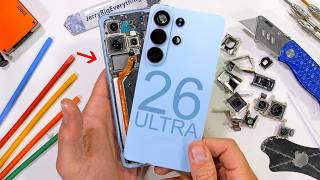

Samsung's Hidden S26 Ultra Upgrades EXPOSED
45sExposes Samsung's omission of hardware improvements at launch, creating controversy and curiosity.
▶ Play Clip"Title is slightly exaggerated but mostly accurate—the teardown does reveal hidden hardware upgrades."
This video provides a detailed teardown of the Samsung Galaxy S26 Ultra, revealing hardware upgrades that Samsung barely mentioned during its Unpacked event. The host exposes the new 50MP telephoto camera with a 37% light increase, a larger vapor chamber, and faster charging, while also critiquing the removal of the anti-glare coating and the phone's incremental improvements.
The host teardowns the S26 Ultra to expose hardware improvements Samsung omitted from its Unpacked event, focusing on AI instead.
The S26 Ultra lacks the anti-glare finish of the S25 Ultra, likely to accommodate the new privacy screen, which dims brightness significantly.
Samsung upgraded the periscope camera hardware by 37% but didn't explain how during the launch.
The phone has 7 Phillips screws at the bottom and 11 at the top holding the motherboard. The rear wireless charging coil supports 25W (up from 15W) and 4.5W reverse wireless charging.
The battery is 5,000 mAh and easily removable. Charging speed increased to 60W with dual power plugs.
The vapor chamber is 15% larger with a 21% increase in thermal performance.
The new 50MP telephoto camera has a 37% light increase (f/2.9 vs f/3.4) and is 22% shorter, achieved via an ALOP (All Lenses On Prism) design.
The S26 Ultra is a decent upgrade but not worth rushing to buy if you have a phone from the last 2-3 years.
The Samsung Galaxy S26 Ultra offers meaningful hardware improvements like a brighter telephoto camera and better cooling, but the changes are incremental. For most users, upgrading from a recent phone isn't necessary.
What is the new aperture of the S26 Ultra's telephoto camera?
f/2.9
07:39
By what percentage did Samsung increase the light intake of the periscope camera?
37%
07:20
What does ALOP stand for?
All Lenses On Prism
07:51
How much larger is the vapor chamber in the S26 Ultra compared to the S25 Ultra?
15% larger
05:26
What is the battery capacity of the S26 Ultra?
5,000 mAh
05:06
What is the maximum wired charging speed of the S26 Ultra?
60 watts
04:24
What is the reverse wireless charging speed of the S26 Ultra?
4.5 watts
03:41
How many Phillips head screws hold the motherboard?
11 at the top and 7 at the bottom
03:27
What is the aperture of the iPhone 17 Pro Max's telephoto camera?
f/2.8
09:05
What color do water damage indicator stickers turn when wet?
Pink
05:55
50MP Telephoto Camera Upgrade
Samsung barely mentioned this significant hardware improvement during the launch event.
06:50ALOP Lens Design
The All Lenses On Prism design allows 37% more light in a shorter camera module.
07:39Larger Vapor Chamber
15% larger vapor chamber with 21% better thermal performance improves sustained performance.
05:26Incremental Upgrade Verdict
The host advises against upgrading from a phone made in the last 2-3 years.
09:20Anti-Glare Coating Removed
Samsung sacrificed the anti-glare coating for the privacy screen, reducing brightness.
00:31[00:00] Spicing things up today just because I want to, the teardown is happening first. There are a few things Samsung conveniently left out of their Unpacked event when bragging about the new S26 Ultra, and these things need to be exposed to the world. They focus so much on AI that they
[00:17] forgot to mention the hardware improvements, and the improvements are substantial. I have a separate phone and will be doing the durability test tomorrow. This one is the Sky Blue variant, and it looks like the rumors are true: the S26 Ultra is not as glare-resistant
[00:31] as the S25 Ultra from last year. The anti-glare finish probably interfered with the new privacy screen, which we'll delve into more in the durability test, but as you can see by turning on the privacy mode, it reduces the brightness a whole lot.
[00:45] see the instant dimming happen when I toggle it off and on. It's even more noticeable when I zoom in with the microscope; you can see we lose like half the pixels when privacy mode is engaged. So,
[00:58] that anti-glare coating was probably the first thing eliminated to keep as much light on hand for the screen. But the exterior screen is not what we're here for. Checking the S Pen compatibility between the S25 and S26, we can see that last year's pen is a tad more girthy
[01:14] and doesn't quite fit in the new hole, which is good to know. But the pen is also not what we're here for. We're here because Samsung upgraded their Periscope camera's hardware by 37% and forgot to mention how they accomplished it during the launch event.
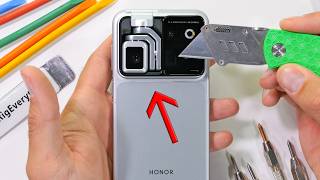
[01:29] So, we're going to have to go in and find out ourselves how it works all on our own. Getting the back panel off is pretty easy. I've got my new anti-clamp here, which should allow me to lift up on the back glass and slice away the IP68 adhesive under the panel. That way,
[01:43] I can remove it in one piece without shattering the glass. It almost feels like cheating using this new tool, but if it keeps the back glass in one piece, I'll cheat all day long, especially since Samsung is not doing a good job of selling replacement parts
[01:57] to the general public. Unfortunately, though, we do have a problem. It appears as if I have misplaced my screwdriver. Luckily for everyone, though, I remembered that my channel sponsor, Ridge, happens to include a spare screwdriver inside each of their new wallet boxes. So,
[02:12] I'll just open up one of Ridge's new iridescent front-pocket wallets so our work can continue. It's also worth noting that Ridge is having their 13th-anniversary sale today where you can get up to 40% off. Ridge is dropping a new Iridescent Forged Fetty, Green Flash, New Ryu,
[02:29] and Golden Horizon style wallets, and these designs are pretty wild. All of them come with a lifetime warranty. I've carried a Ridge wallet in my own pocket for the past 7 years, and while I personally think Ridge is the best, you don't have to take my word for it since
[02:43] they've sold more than 5 million wallets and you can try it free for 99 days. If you don't like it, just send it back. I've got the bright orange wallet so it's easier to keep track of, and every time I travel, I have a Ridge power bank in my bag as well as a 45-watt power adapter with
[02:59] two USB-C ports since I always need to charge more than one thing at a time. You can get your own at ridge.com/jerryrig to take advantage of that 13th-anniversary sale. ridge.com/jerryrig
[03:11] Why am I here again? Oh yeah, we're looking for a screwdriver. Turns out that Ridge uses a T5 screwdriver and we need a Phillips, but luckily I found what we need. The Galaxy S26 Ultra is still turned on, which we can rectify by just turning it off. There are a total of seven Phillips head
[03:27] screws holding in the bottom and 11 screws up at the top holding down the motherboard. When those are gone, I can pop off the rear wireless charging coil. This guy can charge up at 25 watts this year instead of 15, and it can reverse-wireless charge headphones and other
[03:41] phones at 4.5 watts, which is the exact same as last year. You can't do a whole lot with 4.5 watts, though. Even OnePlus, may they rest in peace, had 10-watt reverse wireless charging.
[03:55] There is another tinier coil of wires that rests over the top of the S Pen. This is to sense the location of the pen as well as to wirelessly charge the internal capacitor on the S Pen itself. What's super nifty is that the parking garage for the S Pen slot is completely sealed
[04:10] off from the rest of the phone. The dock itself can fill up with water or liquid, but none of that liquid can then enter the device. Well, now it could obviously, but before I took off the plastic cap, it could not. It's going to be really cool seeing this on the teardown skin.
[04:24] With the S Pen back in its home, I'll disconnect the battery. And I will disconnect the battery. Samsung has finally increased the charging speed to 60 watts this year and added dual power plugs to help handle that increased load and power transfer. I'll unplug the extension ribbon
[04:39] and the display ribbon just like little Legos and pop out the lower loudspeaker plastics. We can see the red rubber ring and waterproofing mesh over the loudspeaker opening, but at first glance, there do not appear to be any balls inside. No fear; if we crack the speaker open a bit,
[04:54] all of the balls are still there piled up inside. The balls help the speaker sound less tinny and more full. Since the foam balls decrease the echo of the tiny box, it's a good thing.
[05:06] Removing the rest of the extension ribbons helps us get a better look at the internal battery, all 5,000 mAh of it. The good news is that the battery itself is extremely easy to take out. Huge thumbs up for that. And apparently, dogs are in fact allowed. If you understand that reference,
[05:26] you're one of the OGs for sure. Setting the battery off to the side, we get a glimpse of Samsung's new vapor chamber. This year it is 15% larger and has a 21% increase in thermal
[05:38] performance, and I believe it. This vapor chamber takes up quite a lot of real estate inside of the phone. Down near the charging port board, this is the USB-C 3.2 port that can handle 60 watts worth of fast charging. It has the SIM card tray and green emotional support bracket. Kind of cool.
[05:55] Samsung still has a water damage indicator sticker near the SIM card tray. This will turn pink and tattle on you if steam or water gets inside of your phone. The microphone hole has its own waterproofing mesh, and the rectangular haptic vibrator
[06:07] motor is placed in the center of the phone right below the battery. Heading up to the main board so we can get access to those camera modules, we pop out the upper stereo speaker first. This doubles as the earpiece and clearly has blue balls inside. We don't
[06:21] need to break this one open. I'll unplug the front-facing camera. This guy is glued in, so don't remove it unless you absolutely have to. Then the motherboard comes free. We have the new thermal interface coup on the back, and we can unplug the Lego-style ribbon connectors
[06:35] from the cameras that we came here to see. It's absolutely wild how small this motherboard is. Yeah, it's double-stacked and double-sided, but it's just barely larger than my watch. Technology is pretty cool on the inside; I'm glad you're subscribed here with me. Speaking of which,
[06:50] the coolest update that Samsung has given us this year, besides the ultra-large vapor chamber, of course, is the 50-megapixel telephoto camera, and they barely even mentioned it during the launch event. This year's camera is not quite as long as it was last year,
[07:04] if you remember all the way back to last year. Hold on, let me just refresh your memory real quick since I do have an extra S25 Ultra periscope camera that we can compare to this year's S26 Ultra's telephoto. While I pop it out, do keep in mind that both cameras
[07:20] are still 50 megapixels and both cameras are 5x optical zooms with stabilization. The difference between the two is how much light can reach the sensor at the end of the lens, and that is where Samsung has given us a mind-blowing 37% improvement, from f/3.4 down to an f/2.9,
[07:39] while reducing the overall camera length by 22%. Samsung accomplished this new lens design with what they call an ALOP. Maybe it's "A-LOP" or "A-loop," but either way, it stands for All
[07:51] Lenses On Prism. We'll take a look at this year's S26 Ultra first, and as you can see, just like the acronym implies, all the lenses are on the prism. This allows for 37% more light into
[08:04] the camera unit, magnifying that light through the prism and onto the lens. It's also really cool to see the different colored coils of copper on every side. Just like in the LEGO Smart Brick, these coils help with the positioning and optical image stabilization of the lens.
[08:19] I can remove the camera lenses to see the prism underneath, and we still find the camera sensor is off to the side, perpendicular to the prism and lens modules. Apple uses a tetraprism telephoto design that keeps the sensor parallel with the lenses. I do have a teardown on that camera
[08:34] as well if you want to watch it later—you know, normal activities. Making our way to the outdated, 37% less light-receiving telephoto camera on last year's S25 Ultra, we see that the prism actually came first, blocking a good chunk of the light. Then the much smaller lens elements
[08:51] appear later in the food chain, right before the camera's sensor at the end of the row. More light directly correlates with better pictures, especially when there isn't much light to work with or while using Samsung's new night mode they call Nightography. And for reference,
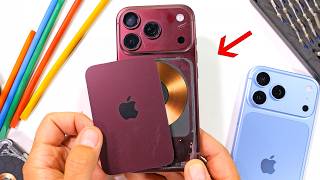
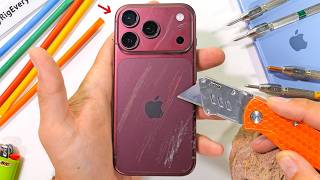
[09:05] Apple didn't even improve their aperture at all between the iPhone 16 Pro Max and the iPhone 17 Pro Max. I mean, to be fair, Apple's aperture is still larger than Samsung's, even with this new upgraded hardware—it's an f/2.8—but we don't need to worry ourselves
[09:20] about these minor details. What matters most is that Samsung almost caught up, Normally at this point, we might rip off the screen to see the rest of the vapor chamber, but I think we've seen enough destruction for one day. A vapor chamber is kind of just a vapor
[09:36] chamber. The S26 Ultra is a decent upgrade over last year, but I still wouldn't rush out to buy a new one if you have a phone that was made in the last 2 or 3 years. The changes happen slowly. I'm curious, though: do you think these upgrades are worth 1,300 bucks? Let me know down
[09:50] in the comments. And as always, I'll keep you updated on when true hardware innovation happens, so make sure you're subscribed. And look at that—everything still works except for the cameras. The discount code for Ridge's 13th-anniversary sale is down in the description,
[10:05] right next to my teardown skin, since it's always fun to see the insides of your phone from the outsides without ever taking it apart. Thanks a ton for watching. I'll see you around.
⚡ Saved you 0h 10m reading this? Transcribe any YouTube video for free — no signup needed.