
My First Video Was Terrible (And That's Okay)
51sRelatable for beginners, showing growth from a poor first video to 140 episodes later.
▶ Play Clip"The title accurately reflects the content, as the stream is a detailed behind-the-scenes look at the creator's video production process."
The video is a behind-the-scenes live stream where the creator explains his entire video production process, from idea generation to final export. He covers his unique code presentation technique, editing workflow in Adobe Premiere and After Effects, and answers community questions about tools and career advice. The stream also includes a t-shirt giveaway for viewers who commented on a previous video.
The creator gets most of his video ideas from the community Slack channel and general web development events.
He uses a unique code presentation method: pre-writes code, deletes it line by line, then uses Ctrl+V to make it reappear on screen.
The primary amount of work is writing the code for the demo, not producing the video itself.
He records code screencasts on a separate Linux machine using Simple Screen Recorder, then imports into Adobe Premiere.
He does voiceover sentence by sentence in Adobe Premiere, refining content for clarity.
He recommends using pre-built templates from VideoHive for intros and transitions.
He writes an outline for a blog post first, then does voiceover based on the video flow, rather than a full script.
He uses Adobe After Effects for one-off graphics and animations, then imports them into Premiere.
He advises being a general JavaScript developer, understanding core fundamentals, rather than specializing in one framework.
He records in 1080p but exports final videos in 4K.
He uses a unique channel ID check to ensure each person only has one chance in giveaways.
Where does the creator get most of his video inspiration?
From the community Slack channel and general web development community events.
2:20
What unique technique does the creator use to show code in his videos?
He uses a copy-paste trick: pre-writes code, deletes it line by line, then uses Ctrl+V to make it reappear on screen.
6:56
What two main Adobe programs does the creator use for video editing and graphics?
Adobe Premiere and Adobe After Effects.
7:49
How does the creator prepare his voiceover content instead of writing a full script?
He writes an outline for a blog post first, then does the voiceover in a linear way based on how he thinks the video should flow.
13:09
What screen recording software does the creator use for coding screencasts?
Simple Screen Recorder on Linux (Ubuntu 18.04).
12:35
How does the creator ensure that people who comment multiple times on a video only have one chance to win the giveaway?
He uses a unique 'by' function to check the channel ID, ensuring each Google account is counted only once.
20:55
What advice does the creator give for developers wanting to get out of their Angular comfort zone?
He recommends being a general JavaScript developer, understanding core JavaScript fundamentals, rather than specializing in just one framework.
17:01
What type of microphone does the creator currently use?
An Audio Technica USB mic.
12:17
What screen resolution does the creator use for recording and final export?
He records in 1080p but exports the final video in 4K.
18:09
How much does the creator pay for access to Adobe Creative Cloud?
He pays about $50 a month for Adobe Creative Cloud.
16:29
Unique Code Presentation Method
This copy-paste trick is a highly efficient way to present code in tutorials, saving time for both creator and viewer.
6:56Voiceover from Outline, Not Script
This approach allows for more natural and refined voiceover compared to reading a rigid script.
13:09Be a General JavaScript Developer
Advocates for understanding core JavaScript over framework-specific knowledge, which is a valuable career principle.
17:01Recording vs. Export Resolution
Recording in 1080p and exporting in 4K is a practical tip for balancing performance and final quality.
18:09Unique Comment Filtering for Giveaways
Using a unique channel ID check ensures fairness in giveaways, a practical coding solution for content creators.
20:55[00:03] hey how's it going everybody um I guess
[00:07] I'll start the stream off by just saying
[00:09] that we'll be giving away that t-shirt
[00:12] towards the end and in order to get the
[00:14] shirt you'll want to comment on the
[00:16] episode of that Penndel engine so if you
[00:18] haven't done that already there's still
[00:19] time to go over there and comment and
[00:21] then I'll pull all those via the YouTube
[00:22] API and we can pull the winner that way
[00:28] so in this live stream more than
[00:31] anything is what I want to show you is
[00:33] basically my video production process so
[00:37] there's quite a few steps involved in it
[00:39] and I think it's probably quite a bit
[00:40] different than most other content
[00:42] creators process but not a hundred
[00:45] percent sure on that um let's see before
[00:49] we get to that just add a couple things
[00:50] that I wanted to go over see yeah just
[00:56] making sure check in the chat make if
[00:57] anything's off with the audio let me
[00:58] know but it looks like we're good um see
[01:03] here so yeah but all the stickers we
[01:05] gave out on the live stream those went
[01:07] out they went out this weekend it was a
[01:10] federal holiday here on Monday so if
[01:12] you're if you're in the United States
[01:13] they should probably still get to you
[01:14] this week and then if you're
[01:16] international it kind of depends on the
[01:19] postal service but they're yeah I
[01:21] imagine you should have them probably
[01:22] sometime next week would be my guess
[01:26] let's see here and see other than that I
[01:32] think I mentioned this last time but
[01:35] when I'm working on a chat feature for
[01:36] the ionic course so that would be an
[01:39] extended module on that course so you'll
[01:41] get another it'll probably be roughly 10
[01:43] to 20 videos added with a whole nother
[01:45] whole nother feature module with a bunch
[01:48] of new stuff in it and then that's
[01:51] that's underway I would say probably
[01:53] about maybe hopefully sometime next week
[01:56] but I can't can't really say for sure at
[01:58] this point alright cool so yeah I'll
[02:03] first just get into well there's a
[02:05] couple good questions and I'll go ahead
[02:06] and answer first before I forget first
[02:09] one is from Henry and he's asking let's
[02:12] see where do you find your inspiration
[02:15] and for inspiration I generally find
[02:20] most of it from our slack channel
[02:21] because I'm constantly getting just a
[02:24] steady flow of ideas from people and you
[02:26] know people have different requirements
[02:27] different problems that they run into
[02:28] that really help me come up with ideas
[02:31] so you know I very much value those
[02:34] suggestions and try to put them into the
[02:36] end product that you see on the channel
[02:39] but aside from that like other things
[02:42] happen in the web development community
[02:43] that give me inspiration as well like
[02:45] the edge browser just recently announced
[02:48] support for web components so now what
[02:51] broad you get time to start doing some
[02:52] web component content let's see here so
[03:00] interested in how does that production
[03:03] versus post production look you'll kind
[03:05] of see that once we get into the video
[03:06] but yeah trying to go okay to your
[03:13] coffee spaces or tabs generally coffee
[03:16] in the morning and then tea tea in the
[03:17] afternoon and then when I'm writing code
[03:20] I usually use tabs because it's a little
[03:22] bit faster now I just have my BS code
[03:25] reformat it two spaces because spaces
[03:27] are generally better for sharing code
[03:29] between between people okay cool so I'm
[03:38] gonna go a flame link video yeah flame
[03:43] links a really cool product it's like a
[03:45] it's kind of like if you had a content
[03:47] full service like a content as a service
[03:50] API but instead you host the database
[03:53] through firebase which is a much more
[03:55] efficient way to go and you can almost
[03:57] you could actually build a content
[03:59] management system yourself using
[04:00] firebase you could use real time DB or
[04:02] firestore and that's actually what I'm
[04:05] doing myself for this upcoming fire ship
[04:07] product so if you guys are interested I
[04:10] can kind of show you how to build your
[04:11] own content management system using
[04:13] firebase from scratch which is and I
[04:16] think a pretty cool project but we can
[04:20] maybe talk about that one later
[04:23] let's see so I'm gonna go ahead and
[04:25] switch over to a screen share and then
[04:26] we'll start looking at the actual video
[04:28] stuff and okay so I just wanna make sure
[04:39] that looks good on your end what I'm
[04:43] actually looking at here is the very
[04:44] first video that I ever produced and I
[04:46] just I'm just kind of curious to look at
[04:49] it because that's this is going about a
[04:50] hundred and forty episodes in the past
[04:52] back in April 2017 and you can see here
[04:57] I'm not even using vsk at this point I
[04:58] was still using the atom text editor
[05:00] which I'd really liked from prior
[05:03] development when it first came out it
[05:05] was an awesome idea but BS codes like
[05:06] just completely surpassed it and
[05:08] features but the video really is kind of
[05:12] not very good I mean it's two minutes
[05:14] long and it's does some good things that
[05:17] I like but overall it's you know not a
[05:19] great video and so I think with video
[05:22] production it really is something that
[05:24] you start out not being very good at and
[05:29] then you just learn small things along
[05:30] the way and slowly make the you know the
[05:32] video content that you're making better
[05:34] with each video that you produce so
[05:37] that's you know definitely an important
[05:39] concept to keep in mind so starting with
[05:43] the process I usually the first thing I
[05:45] do is I come up with an idea and like I
[05:48] said I get those ideas maybe from slack
[05:49] or from just the web development
[05:51] community community in general this is
[05:55] so for everyone on the live stream
[05:56] there's kind of a preview of the next
[05:58] video that's coming out tomorrow and I
[06:00] have all new graphics for the for the
[06:03] video itself so you'll start seeing
[06:05] these different I kind of cover styles
[06:08] on the video so usually I you know start
[06:14] thinking about how I want to present the
[06:15] content so I might put together some
[06:16] graphics that look like this and then
[06:21] the primary amount of the work is
[06:24] actually writing the code so I spend a
[06:26] lot more time writing the actual code
[06:27] that goes into a demo than I do and
[06:29] producing the video and so we'll go
[06:33] ahead and start there
[06:35] and the one thing you'll notice in my
[06:37] videos is that I have a different style
[06:39] of showing code then you probably see on
[06:41] any other channel I've never seen it
[06:42] anywhere else but and instead of like
[06:46] typing everything keystroke by keystroke
[06:47] I do it in a faster way that's a little
[06:50] more efficient for me to produce and a
[06:52] little more efficient for me - voiceover
[06:54] the code when I'm producing the video
[06:56] and the way I do that's actually really
[06:58] simple so like imagine I have this code
[07:01] block here I can delete things just line
[07:05] by line and reverse in the way that I
[07:07] want to show it so I'll delete all this
[07:10] stuff and then from that point
[07:12] everything's copied to the clipboard so
[07:15] I can just do you controlled see and
[07:17] then have everything reappear on the
[07:19] screen I don't like magic like it's a
[07:21] really simple thing but a lot of people
[07:23] have asked me how do I do this and it's
[07:25] yeah it's really that simple
[07:28] so what I do is like right now I'm on
[07:31] Windows but I have a Linux machine
[07:33] installed side by side on the system and
[07:35] so I'll write all the code in Linux and
[07:38] I'll record all the code screencast over
[07:40] there and then I'll upload those to
[07:43] Google Drive and the next step is to
[07:47] import all that footage into Adobe
[07:49] Premiere so what you're looking at here
[07:51] is Adobe Premiere and this is kind of
[07:54] like a just a quick preview of
[07:56] tomorrow's video one thing I started
[07:59] doing is I'm trying to like make the
[08:01] intros a little more interesting instead
[08:03] of just showing the same intro every
[08:04] video I have a different background and
[08:08] then embed the the intro video content
[08:11] like somewhere in that image and so we
[08:16] can actually split these layers apart
[08:18] and you'll see that the intros right
[08:20] there and then we have the actual image
[08:24] with a mask over it so it's transparent
[08:26] transparent on the screen and then you
[08:28] can kind of layer things together to
[08:29] make the video footage a little more
[08:31] interesting
[08:34] and I'm let's see here
[08:37] so the overall process of making a video
[08:40] in my case is after I have all the
[08:44] footage shot I'm going to go in here and
[08:47] do the voiceover
[08:48] I pretty much sentence-by-sentence at
[08:53] this point in the channel like I really
[08:54] try to refine the voice-over content to
[08:56] be pretty like consistent and clear
[08:59] throughout the video and so you can see
[09:02] here I've like sliced different pieces
[09:04] of voice content and we're just kind of
[09:07] going through the video in a linear way
[09:10] um and oh and to give you another
[09:14] preview of what's coming out tomorrow is
[09:17] I have another shirt giveaway for that
[09:18] video so and that's kind of an early
[09:20] preview of what you'll see tomorrow um
[09:25] let's see another thing that I think is
[09:27] really important is having good audio so
[09:31] you like definitely want to have really
[09:33] solid audio for the intro and the outro
[09:35] but one thing I learned is you probably
[09:37] don't want the audio going through the
[09:38] whole video because it is kind of
[09:40] annoying for some people and I've
[09:42] noticed when I listen to videos that
[09:43] have constant audio it does get a little
[09:45] annoying but you should definitely spend
[09:49] a lot of time if you're making video
[09:50] content you know figuring out the best
[09:52] audio to use see I'm gonna take a break
[09:56] and just check out the chat here really
[09:58] quick to see if there's some questions I
[10:00] can grab and let's see if iris any hope
[10:04] of that will see any videos for flutter
[10:06] there is definitely hope I don't have a
[10:09] timeline for flutter yet but I've done
[10:10] quite a bit of development with flutter
[10:12] and would feel comfortable producing
[10:14] videos at this point but I've just got a
[10:16] little too much on my plate probably for
[10:18] the next month but before I can really
[10:20] focus on creating flutter content um see
[10:26] my how to connect my sequel PHP with
[10:28] angular 6 that's that's probably topic
[10:31] you'll never see is my sequel PHP on
[10:33] this channel and today come with the
[10:37] graphs myself that's a good question
[10:39] because um another thing with video
[10:42] production is like this graphic you're
[10:46] seen here on the intro is a highly
[10:49] customized version of an event template
[10:51] and so if you're looking for good
[10:54] templates for your video content that
[10:57] kind of the go-to place for pretty much
[10:58] everybody is videohive
[11:02] I actually have this pulled up right
[11:03] here because you'll find all kinds of
[11:06] like pre-built transitions and intros
[11:10] and like logo stings and stuff like that
[11:12] but you can kind of use as a starting
[11:14] place for producing your video content
[11:16] and a lot of these like the actual
[11:19] creators are people working in Hollywood
[11:20] that are doing these you know big-budget
[11:22] films that didn't go and resell their
[11:24] work to be reaped like reused in the
[11:26] secondary market like this you know in a
[11:30] lot of cases there's been thousands of
[11:31] hours of effort from real video
[11:33] professionals going into them so you
[11:36] know to spend a hundred bucks on some
[11:37] pre-built stuff is usually well worth
[11:39] the investment let's see here and let's
[11:51] see can you try something on web
[11:54] scraping web scripting is a good topic
[11:56] I've considered doing that with
[11:58] puppeteer specifically puppeteers a
[12:01] little bit slower for web scraping but a
[12:03] nice benefit of it is that you can
[12:05] scrape JavaScript sites so you can like
[12:07] scrape content on an angular app by just
[12:10] waiting for it to render all the content
[12:13] which Mike do I use I used this really
[12:17] crappy mic just an audio technica USB
[12:19] mic i've been thinking about upgrading
[12:21] for quite a while and i think i've
[12:24] started to notice some like technical
[12:25] issues with this mic so I'll probably be
[12:27] upgrading that pretty soon for OK for a
[12:35] screen capturing I use a really simple
[12:38] program called simple screen recorder on
[12:40] Linux I'm using Ubuntu version 18
[12:44] version 18 point o4 C do you write a
[12:50] script or do you just look over what
[12:53] you've done and try to explain it so
[12:55] when I first started the channel I wrote
[12:58] a script and I would write all the
[12:59] content in advance and try to just read
[13:01] over that script it turns out that in my
[13:04] opinion is not a very good way to do do
[13:06] things so what I generally do is try to
[13:09] write like an outline for an article and
[13:13] make
[13:14] make that blog post article first and
[13:16] then do the voiceover in a linear way
[13:18] like I was showing you an Adobe Premiere
[13:20] based on how I think the video should
[13:22] flow as I'm doing it so I don't I don't
[13:25] know if you can hear the sound here but
[13:32] so I'm not sure if you guys could hear
[13:34] that sound in Premiere but I basically
[13:38] go through the video step by step and
[13:40] kind of go back and re-listen the things
[13:42] and try to make it as refined as
[13:43] possible and I don't think you can
[13:45] really do that in a efficient way by
[13:47] writing a script I mean especially I
[13:49] mean it's definitely possible but you
[13:51] need a lot of work a lot of extra work
[13:53] that I think would just be an efficient
[13:55] and the other program I use is Adobe
[13:59] After Effects so After Effects is a
[14:01] program that you would use more for
[14:03] one-off one-off graphics so like say I
[14:06] want to show a logo intro I have this
[14:09] pixel storm animation and I can just
[14:12] export this single scene and then bring
[14:14] it into premiere for the you know entire
[14:16] video process so this is a super useful
[14:20] program as well these are kind of I'm
[14:22] generally going back and forth between
[14:24] the two of these depending on how many
[14:25] animations I have in a given video and
[14:33] let's see I'm trying to think of what
[14:34] else I can show you here on the video
[14:36] side of things that I don't know
[14:39] hopefully that give you a general idea
[14:40] of the overall process that I go through
[14:46] let's see yeah just going back to the
[14:49] comments here to see what I can grab out
[14:51] of here and do I actually contribute to
[14:54] angular
[14:54] I don't really contribute to angular I
[14:57] contribute to the firebase JavaScript
[14:59] SDK and also angular fire too but I
[15:05] think I've made like one commit to
[15:06] angular and that's about it and at this
[15:10] point I'd like I would like to
[15:11] contribute to open source projects more
[15:12] but I find that I just generally don't
[15:15] have the time to like go in and you know
[15:17] do bug fixes and stuff like that on on
[15:19] these huge open source projects like you
[15:22] know angular's its massive mono repo so
[15:24] you have quite a bit of setup to even
[15:26] like get started contributing
[15:30] let's see some videos about react native
[15:36] react native is something I might
[15:39] consider covering in the future I think
[15:42] it does offer some advantages over other
[15:44] like hybrid app frameworks but right now
[15:48] it's not a super high priority or
[15:49] anything like that how do you prepare
[15:54] yourself for a subject the best way to
[15:57] prepare for a subject is to already have
[15:59] built something roughly related to it
[16:03] like in a lot of cases I've already
[16:06] built certain features for clients and I
[16:08] can draw from that experience because I
[16:10] know like what problems are gonna run
[16:12] into and what issues you're gonna find
[16:14] and just try to really format that into
[16:18] something that's useful that a developer
[16:19] can use to get past these problems
[16:21] quicker and did you buy Adobe yeah so I
[16:29] pay like 50 bucks a month for access to
[16:31] Adobe Creative Cloud
[16:33] I'll get you access to pretty much
[16:35] everything you need so if you're
[16:36] producing a lot of videos that's you
[16:38] know just a minor expense okay cool so
[16:55] yeah I'm just going through the comments
[16:57] here guys how do you get out of your
[17:01] angular comfort zone I'm afraid to use
[17:03] other frameworks that's a really good
[17:05] question I think in development in
[17:07] general you should usually try to be a
[17:09] more general developer like you want to
[17:12] be a JavaScript you know call yourself a
[17:14] JavaScript developer rather than an
[17:16] angular developer and you know it's good
[17:19] to have some specialties but you
[17:22] definitely want to be like have those
[17:24] general skills under your belt so you
[17:25] should know how things work with
[17:27] JavaScript kind of at a more fundamental
[17:29] level because once you know that it
[17:31] becomes really easy to just jump from
[17:33] angular to react to view because you
[17:36] know what the underlying JavaScript is
[17:38] doing rather than like just trying to
[17:40] work with them
[17:41] constraints of a framework and typically
[17:48] also on that same note like if you're
[17:50] looking for a job they're gonna
[17:51] generally be asking you to code things
[17:52] in vanilla JavaScript like algorithms
[17:55] and basic programming stuff so if you're
[17:57] you know on the job market you're gonna
[17:59] want to be a you know well brushed up on
[18:02] that type of code and what is the screen
[18:09] resolution so screen resolution is I
[18:13] record the videos in 1080p VP so HD but
[18:17] then I export all the animations in 4k
[18:21] so I have the videos are all videos are
[18:24] all done in 4k that's the final export
[18:29] and let's see education background so I
[18:33] actually have a business degree in
[18:35] finance I had originally thought I
[18:38] wanted to be an accountant and then I
[18:40] decided that programming was a lot more
[18:43] fun and essentially just became a
[18:45] self-taught programmer at that point got
[18:47] a job doing like PHP my sequel stuff and
[18:51] then did a lot of Ruby on Rails for a
[18:54] number of years and now really focused
[18:56] on mostly full stack JavaScript all
[19:09] right so I'm gonna go ahead and I think
[19:12] that's enough questions for now I think
[19:13] now it's time we should go ahead and
[19:16] give away the t-shirt and if I wasn't
[19:19] able to get to your question leave me
[19:21] like a comment or leave the question on
[19:24] slack because a lot of these I could
[19:25] answer in a future livestream but let's
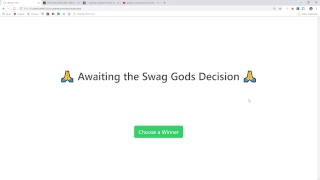
[19:30] go ahead and pull up our script and
[19:33] we'll give away this free t-shirt let's
[19:38] see here
[19:41] this is the script we've looked at it
[19:42] before it's taking this video ID pulling
[19:44] all the comments from the YouTube API
[19:46] and then it will pick a single winner
[19:49] from that group alright so all I have to
[19:59] do is click this button and then that
[20:00] will give us our t-shirt winner so here
[20:03] we go all right Samuel Camargo you were
[20:13] index 31 out of 125 comments keep up the
[20:18] good work excellent content thank you
[20:20] for the comment really appreciate it
[20:21] and congratulations on winning the
[20:23] t-shirt so you get the shirt if you're
[20:29] on slack send me a message on slack with
[20:30] your address in sighs otherwise send me
[20:33] a direct message via email or whatever
[20:34] works for you all right so I'm gonna go
[20:42] ahead and stop screen sharing here oh if
[20:48] a person comments multiple times there
[20:50] they're actually they are we check for
[20:55] uniqueness so let me see if I can get to
[20:58] this in the code yeah that's something
[21:01] that I thought of if if multiple people
[21:03] comment then they should only be only
[21:06] have had the same chance to win as
[21:08] everybody else so I use this unique bye
[21:10] function do you check their channel ID
[21:12] value and that will just make sure that
[21:15] every person that comment it has to have
[21:16] a unique Google account all right so I
[21:25] guess I'm gonna go ahead and wrap up the
[21:27] stream here like I said if you have more
[21:30] questions I'll try to get to these next
[21:32] time but this is fun and there's gonna
[21:34] be another t-shirt giveaway on the next
[21:36] video so make sure to check that out and
[21:37] leave a comment we'll do the same thing
[21:39] next week all right thanks a lot
[21:41] everybody and I'll talk to you soon see
[21:44] ya
[22:05] you

⚡ Saved you 0h 23m reading this? Transcribe any YouTube video for free — no signup needed.