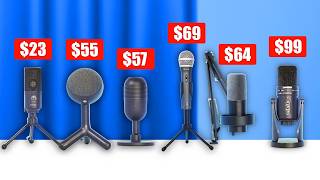

Best Budget Mics Under $100
45sImmediately hooks viewers looking for affordable gear with a clear value proposition.
▶ Play Clip"Title accurately describes the video's content: a comparison of budget microphones under $100 for gaming and streaming."
This video compares several microphones under $100 for gaming and streaming, including the Razer Siren V3 Mini, Samsung Q2U, Fifine K688, Logitech Yeti Orb, Pseudo Tech SD800, Samsung GTR Pro, and Fifine K669B. The host tests each mic on a desk and on a boom arm, evaluating sound quality, build, and value.
All microphones tested are below $100, including Razer Siren V3 Mini, Samsung Q2U, Fifine K688, Logitech Yeti Orb, Pseudo Tech SD800, Samsung GTR Pro, and Fifine K669B.
Priced at $50, super cardioid pickup pattern, requires careful positioning. Comes with a stand, can be used with a mic arm.
Priced at $70, USB-C and XLR, includes pop filter, tall stand brings mic close to mouth, no need for boom arm. Sounds professional.
Priced at $54 (kit $68), XLR and USB-C, includes shock mount, touch mute button. Sounds warm and full.
Priced at $98, comes with G Hub software for EQ effects, lightweight plastic stand, can be used with mic arm.
Priced around $45-50, includes mic arm and pop filter, pre-applied effects make voice sound deep and full but less dynamic.
Priced at $99, multiple pickup patterns (cardioid, figure-8, omni), heavy build, sounds warm and broadcasty.
Priced at $23, basic desk mic, no mute button, good sound for the price. Needs shock mount if used with boom arm.
Best budget: K669B ($23). Best under $50: Fifine K688 ($54). Best sound quality: Samsung Q2U ($79).
For under $100, the Fifine K688 offers great value with a kit, while the Samsung Q2U provides excellent pure sound quality. The Fifine K669B is unbeatable for under $30.
What is the price of the Razer Siren V3 Mini?
$50
01:16
What pickup pattern does the Razer Siren V3 Mini use?
Super cardioid
01:31
What is the price of the Samsung Q2U?
$70
04:55
What connectivity options does the Samsung Q2U offer?
USB-C and XLR
03:19
What is the price of the Fifine K688?
$54
08:22
What is the price of the Logitech Yeti Orb?
$98
04:08
What software does the Logitech Yeti Orb use for EQ effects?
Logitech G Hub
11:33
What is the price range of the Pseudo Tech SD800 kit?
$45 to $50
15:28
What pickup patterns does the Samsung GTR Pro support?
Cardioid, figure-8, and omnidirectional
17:29
What is the price of the Fifine K669B?
$23
21:12
Why does the Fifine K669B need a shock mount when used with a boom arm?
To prevent vibrations from the desk from reaching the microphone and causing humming sounds.
22:48
What is the host's top recommendation for under $30?
Fifine K669B
29:08
What is the host's top recommendation for under $50?
Fifine K688
29:22
What is the host's top recommendation for pure sound quality?
Samsung Q2U
29:38
Super cardioid pickup pattern
Explains a key technical feature that affects mic placement and sound isolation.
01:31Samsung Q2U dual connectivity
Highlights versatility with both USB-C and XLR for different setups.
03:19Logitech G Hub software effects
Demonstrates how software can alter microphone sound, relevant for users wanting customization.
11:33Processed vs high-quality sound
Important distinction between microphones that sound good out of the box vs those with pure sound quality.
14:51Shock mount necessity with boom arms
Practical advice for avoiding vibration issues when using a microphone arm.
22:48[00:00] All of these microphones are below $100.
[00:02] We're going to compare all of them and
[00:04] we'll start with the Razer Siren V3
[00:06] Mini. This one right here is the normal
[00:09] Siren. This was a great microphone and
[00:11] I'm super curious to test the new
[00:13] version of it. It's brand new classic
[00:15] Razor with a very sleek packaging. Now,
[00:18] this is not a premium microphone, by the
[00:20] way. So, let's check what it looks like
[00:22] and we'll check the price after that. At
[00:24] least the material looks very clean. I'm
[00:27] curious for the performance. Now, it
[00:29] does come with a stand. You can connect
[00:31] it to a microphone arm if you want. Some
[00:33] of the mics here are meant to use with a
[00:35] microphone arm. And I'll definitely test
[00:37] both scenarios for all microphones
[00:39] because when a microphone is on your
[00:41] desk, especially a small microphone like
[00:43] this, it is very far from your mouth.
[00:45] I've mentioned this a lot, so I'm not
[00:46] going to go too much into it, but the
[00:48] microphone being this far from your
[00:50] mouth compared to this close makes a
[00:52] really big difference for how warm and
[00:54] full your voice sounds. If the
[00:56] microphone is right here, you'll have
[00:58] less background noise. Your voice will
[00:59] sound more warm. It's just better in
[01:01] general. But of course, a microphone arm
[01:03] costs money. So, we're going to test all
[01:04] of these in both scenarios. So, I just
[01:06] looked it up on Amazon. It is definitely
[01:08] not the most popular microphone out of
[01:10] all of them, but it has a very high
[01:12] rating. And that's why it intrigued me
[01:14] so much to test this version. Right now,
[01:16] you can buy it for $50. Let's check the
[01:18] price history. There's a lot of change
[01:20] in the warehouse deals, but it seems
[01:22] like the buy box or the Amazon price is
[01:24] always about $50. So, for this video,
[01:27] we'll mark it at 50. And something worth
[01:29] mentioning with this mic is that it's a
[01:31] superc cardioid is the pickup pattern,
[01:33] which means where does it record sound
[01:36] from? Many of these microphones, if not
[01:38] all of them, are cardioid mics. And that
[01:40] means they record full sound from the
[01:42] front and then less from the sides and
[01:44] less from the back. However, this
[01:46] microphone being super cardioid means
[01:48] that it's even more extreme and that it
[01:50] really tries to cancel out pretty much
[01:52] all sound from the side and from the
[01:54] back. With this mic, you need to be very
[01:56] careful where you're talking from
[01:58] because if the mic is positioned
[02:00] sideways, even slightly, it is going to
[02:02] try to cancel out your voice. So, this
[02:04] is a test of the Razer Siren V3 Mini. I
[02:07] expect it to perform a bit less than the
[02:09] other microphones when standing on your
[02:11] desk, mainly because it's so small and
[02:13] it's so far from your mouth. But maybe
[02:15] it's fine. And I'll move it closer to my
[02:17] mouth. This is what it will kind of
[02:19] sound like when it's on a microphone arm
[02:21] close to you. And I will test this side
[02:23] to see the superc cardioid in effect.
[02:25] This is from the back, from the side,
[02:28] from the front. And on top there's also
[02:30] a mute button which you can use to mute
[02:33] your microphone. And you can also see
[02:34] the LED on the front going red whenever
[02:37] you mute the microphone. And we'll do a
[02:39] bunch of other tests with all the mics
[02:41] afterwards. Next, we have the Samsung
[02:43] Q2U. Now, I'm not going to spend too
[02:45] much time on it because I used it in my
[02:47] last video. I really like what this
[02:49] microphone stands for and what it sounds
[02:51] like. It clearly doesn't look like a
[02:53] gaming microphone. However, it is often
[02:55] recommended as a choice that you make
[02:57] when you don't really care about the
[02:59] looks and you want a studio quality
[03:01] podcasting microphone to record podcasts
[03:04] or videos. You also don't really need a
[03:06] microphone arm because, well, the
[03:08] microphone is super tall and it's the
[03:10] perfect length from my mouth. So, if you
[03:12] want a boom arm for the looks, you can
[03:14] get it. But for the sound quality, it
[03:16] won't really matter. It is both USBC and
[03:19] XLR. So, if you have an audio interface,
[03:21] you can use the XLR. They even include
[03:23] an XLR cable. And they also include a
[03:26] pop filter or windshield on the front
[03:27] here. It might help with the like the
[03:30] pop sounds. However, it doesn't look
[03:32] that good like this. I don't like it. By
[03:34] the way, you see another microphone of
[03:36] this brand right here. This is the GTR
[03:38] Pro. It's from the same brand. They are
[03:40] different microphones. It's not only the
[03:42] looks, but since I like the sound of
[03:44] this one so much, I wanted to make sure
[03:45] I had a gaming version of the same
[03:47] brand. And also, because this video is
[03:50] about microphones below $100, and
[03:52] initially, I was going to include the
[03:54] Blue Yeti because it's super popular.
[03:56] However, I really don't like this
[03:57] microphone. It's popular because it's
[03:59] super old. I remember in the past going
[04:01] to my local toy store and the microphone
[04:04] was right there, but I really don't like
[04:05] it. And the price is the same as this
[04:08] microphone right here, $98. By the way,
[04:10] the microphone next here, I'll mention
[04:12] it right now. Fifine wanted to sponsor
[04:14] the video with this microphone and then
[04:17] the kit right here. So, the kit is this
[04:19] microphone plus this microphone arm,
[04:21] which is also from them, the Fifine CS1,
[04:23] and we're also going to test those in
[04:25] this video. Lastly, this is also from
[04:28] Fifine. They didn't ask me to include
[04:30] this. We agreed on a sponsored video for
[04:32] this microphone, but I just use this
[04:34] microphone so much. If you watch my
[04:36] content, you will know. This is the
[04:38] K669B.
[04:39] It's only $23 or $24. It's one of the
[04:42] most recommended budget microphones, so
[04:44] we'll also include that today. The one
[04:46] we're checking out right now is this
[04:48] right here, Samsung Q2U. You can also
[04:50] buy it in black and that will cost $5
[04:53] more. Currently, you can get this one
[04:55] for $70. You also have a mic jack, by
[04:58] the way. So, if you want to plug your
[04:59] headset into this so you can monitor
[05:01] yourself without any lag, you can do
[05:03] that. So, this is what the mic sounds
[05:05] like. I don't even need to hold it
[05:06] closer to my mouth to show you what a
[05:08] micro will do because it's the perfect
[05:10] distance. You can use a mic if you want
[05:12] to free up your desk. Absolutely. But
[05:14] for the sound quality and performance,
[05:16] it is not needed. I'll also test it from
[05:18] the front. And then this is from the
[05:20] side. And this is the sound from the
[05:22] back. It should cancel out a lot. And
[05:25] this overall is a very clean and
[05:27] professional sounding microphone. All
[05:28] right. Next, I want to test the Fifine
[05:31] Amplitank K688. It says on the box it's
[05:34] also an XLR and USBC mic. This
[05:37] microphone is meant to be connected to a
[05:39] microphone arm. It does look very much
[05:41] like a podcasting and streaming mic. And
[05:43] so for this I will use the Fifine CS1
[05:46] since that's the mic arm that you will
[05:48] get if you buy the kit. It comes with a
[05:50] clamp and then with the arm itself. Now
[05:53] I do have kind of a problem because the
[05:55] desk I'm using is great and an extremely
[05:57] thick one. So I can't connect any
[05:59] microphone arms or clamps to this. It's
[06:01] this thick. So, I will use this stable.
[06:03] You will definitely not have a problem.
[06:05] Let's connect the mic arm and then we
[06:07] can connect the mic to that. I do see
[06:09] that it has a shock mount which is great
[06:11] because that means that vibrations
[06:13] coming from the desk will not travel
[06:14] through the arm and to the mic because
[06:16] the shock mount will stop all vibrations
[06:18] from reaching the mic. Now, I do see
[06:20] some buttons on the back or knobs. So,
[06:23] we do have a headphones monitoring jack
[06:25] as well. Then USBC or XLR to connect it
[06:28] to your PC. This is the gain knob for
[06:30] the sensitivity of the microphone. And
[06:32] then this is the headphone monitoring
[06:34] volume. Okay. Even though we are using
[06:36] that table, I'll position it like you
[06:38] would use it. Actually, you wouldn't use
[06:39] it like this. Like you would use it on
[06:41] stream or on a podcast. To the side a
[06:43] bit. Okay. And then this is how you
[06:45] would use it on stream. It is very close
[06:47] to my mouth, but I am not directly
[06:49] speaking into it. This is directly into
[06:51] the mic. But as you can see, it sounds
[06:53] the same as this. The difference is if I
[06:55] do P, it won't be too noticeable.
[06:57] However, this is very noticeable. So,
[07:00] that's the reason you speak like this.
[07:02] I'm not hearing anything in my
[07:03] headphones because Windows switched the
[07:05] sound automatically to speaker Fifine
[07:07] microphone. And so, if you have a
[07:09] headset with an audio jack, you can plug
[07:11] it into the back of the mic and then you
[07:12] will monitor your microphone sound
[07:14] without any delay. Plus, you can set a
[07:16] microphone as your speakers, which means
[07:18] that all Windows volume from games or
[07:21] music, YouTube, all that stuff will also
[07:23] be sent to the microphone and then to
[07:25] your headphones. So then you can hear
[07:26] everything plus your voice in real time.
[07:28] I'm going to change it now because it's
[07:30] not plugged in. Okay. Test test test. I
[07:32] do like the sound. So this is from the
[07:34] front. This is from the side. It cancels
[07:36] a lot. Okay. And this is from the back.
[07:38] I test the sponsors of these comparisons
[07:40] together with everything. But I do of
[07:42] course want to emphasize because I can
[07:44] make these videos because of the
[07:45] sponsor. So I'm really grateful. It's
[07:47] the Fifine K688. They also have a kit
[07:50] version which comes together with this
[07:52] microphone arm. I tested another budget
[07:54] microphone arm in my microphone arm
[07:56] comparison video. It was the Inogear one
[07:58] and this one was clearly higher quality
[08:00] than that one. You can watch the video
[08:02] if you don't believe me. So, if you like
[08:03] this microphone, then it's a great kit
[08:05] to buy. Even if you choose another mic,
[08:07] you can also buy this microphone arm
[08:09] together with it. And yeah, I will add
[08:11] links in the description. Thanks to
[08:13] Fifine for sponsoring this video. And
[08:15] onto the next mic now. Oops, let's
[08:18] return for a second. I forgot to talk
[08:20] about the price. Currently, you can get
[08:22] it for $54. It's available in black,
[08:24] pink, and white. A lot of people buy
[08:26] this microphone. It's a really popular
[08:28] one. And in between of my testing, and
[08:30] then now I listen to the results, and I
[08:32] really liked it. I do also see there's a
[08:34] button here. This is a capacitive, if
[08:37] that's how you say it, uh, mute button.
[08:38] So, it's a touchcreen mute button. Let's
[08:40] check out the price history. There are
[08:42] often drops to $51 lightning deals or
[08:45] price drops. So, $54, $51, and then for
[08:49] $14 more, you can get the kit with a
[08:51] microphone arm included. This one is
[08:53] also bought 3,000 times. So, this is a
[08:56] really popular mic. The white version of
[08:57] the kit was bought 600 times, and this
[09:00] will look really clean in a white themed
[09:02] setup. All right, the next microphone I
[09:04] want to test is the Blue Yeti Orb. I've
[09:06] never tested it, but I'm really curious
[09:08] to check it out. By the way, if you like
[09:11] this mouse pad, it is completely
[09:12] handdrawn. It is part of the TVN mouse
[09:15] pad collection that launched recently.
[09:17] We've worked really hard on mouse pad
[09:19] plus wallpaper combos. For example, this
[09:22] one right here is a wallpaper of one of
[09:24] the other mouse pads. There are several
[09:25] designs on the website right now. For
[09:27] example, this one here is the mouse pad
[09:29] that belongs to this wallpaper that I
[09:31] just showed you. Everyone in the test
[09:33] group really like the material and the
[09:35] anti-slip. This here is the listing of
[09:37] the mouse pad we just checked out. This
[09:39] was the wallpaper. It's a complete combo
[09:41] and they just launched. So, you won't
[09:43] see many reviews. Peter here already
[09:45] reviewed it. He loved it in his setup.
[09:47] This is the Red Assassin I've been using
[09:48] for my top down camera. And it's just so
[09:51] cool to me that it's a complete combo
[09:53] instead of just a mouse pad and then
[09:54] looking for a wallpaper that fits. I
[09:56] love this Red Assassin, by the way,
[09:58] especially the wallpaper for the phone.
[10:00] As a combination, it just looks so cool.
[10:02] We'll go on with testing the
[10:03] microphones, but as you can see, I'm
[10:05] very excited about them. I've worked on
[10:06] them for a long time. They are
[10:08] completely handdrawn on a tablet to the
[10:10] PC to a design to the mouse pads, the
[10:12] wallpapers as well. If you want to check
[10:14] them out, tvnshop.com. I will also link
[10:16] it in the description. tvnshop.com.
[10:20] All right, so the Blue Yeti Orb. I've
[10:22] seen this on Amazon so much. Actually, I
[10:25] said Blue Yeti Orb. It's the Logitech
[10:27] Yeti Orb. But Blue is a microphones
[10:29] company you might recognize. You might
[10:31] know products like this, the Blue
[10:32] Snowball. And as you can see right now,
[10:34] it's called Logitech for Creators Blue
[10:37] Snowball. Same for the Yeti here.
[10:38] Logitech creators Blue Yeti. So Blue was
[10:41] a famous microphone company and it got
[10:43] acquired by Logitech and then they made
[10:45] it their gaming line. And I always had
[10:47] the feeling that this microphone here
[10:49] was derived from the Blue Snowball and
[10:52] that they took it as inspiration to make
[10:54] this microphone right here because then
[10:55] they don't have to call it Logitech for
[10:57] Creators Blue Snowball. They can just
[10:59] call it the Logitech Yeti Orb. And the
[11:02] Blue Snowball was actually my first
[11:04] microphone when I started making videos.
[11:06] Hello everyone, the video nerd.
[11:08] What are those?
[11:10] It seems a bit smaller than the Blue
[11:12] Snowball. And I'm not sure about this.
[11:14] It's weird with all the cloth all
[11:15] around. It looks like something to put
[11:17] in your living room, but on the bottom
[11:19] here, it's the lightest stand I've ever
[11:21] seen. It's super bulky, but empty
[11:23] plastic. And I mean, it makes it feel a
[11:25] bit like a kid toy. You can connect it
[11:27] to a microphone arm with this if you
[11:29] want. Yeah, let's plug it in. So, I just
[11:31] installed the software. This program is
[11:33] the Logitech G Hub, by the way. So, it
[11:35] has a preset for equalizing, highp pass
[11:37] filter, voice EQ. Like, if you move the
[11:39] lows higher, you will have a really deep
[11:41] voice. You will sound like pirate
[11:43] software. This is what he's doing with
[11:45] his voice. Maybe he does this as well.
[11:47] And then this I worked at Blizzard 8
[11:50] years. Yes. Okay, back to normal
[11:52] effects. And this is how Pirate Software
[11:54] would sound on TwitchCom. Although, I
[11:56] really doubt if he'll be coming this
[11:57] year. Anyway, there's a lot of effects
[11:59] here. And this is a bass boost. I will
[12:01] turn off the effects right now because I
[12:03] quickly want to say like I installed the
[12:05] software now before I said I don't
[12:07] really like installing software. I want
[12:08] to test the basic sounds and these
[12:10] effects perfectly show why they are
[12:12] autoleing. They are changing the EQ
[12:14] curve and you can absolutely change the
[12:15] effects but you can do that with all of
[12:17] these microphones and it just depends on
[12:19] your preference. If you're very insecure
[12:21] like Pirate Software, you can increase
[12:23] the bass in your voice and sound more
[12:24] authoritative. Or you can just apply
[12:26] some minor effects like a normal person
[12:28] and just reduce the mids a bit. Increase
[12:30] the bass like a bit the highs you will
[12:33] adjust it so the S tones sound crisp but
[12:35] they're not like scratching in your
[12:37] ears. And that's exactly the kind of
[12:39] effects that I explain how to install in
[12:41] OBS Studio. I have a microphone filters
[12:43] tutorial where I go through the whole
[12:44] setup for doing these kind of things.
[12:46] And usually software even if this is
[12:48] called blue voice enable your effects. I
[12:50] will put it a bit further. I'm going to
[12:52] reduce the input gain. Okay. But even if
[12:54] you enable this it's just EQ effects.
[12:56] It's a compressor expander like all
[12:58] these kind of filters that you can also
[13:00] add in OBS Studio Voice meter banana or
[13:02] anywhere else. I want to turn off
[13:04] everything like right now. Just make
[13:06] sure it's loud enough. Test it close.
[13:08] Test it for. And then it's up to you to
[13:10] decide which of them you think sound the
[13:12] best naturally. And then when it arrives
[13:14] at your place, you can always add some
[13:16] effects. If you're in doubt how to do
[13:18] all of these effects, I will link my
[13:20] tutorial in the description. It's 20
[13:21] minutes in OBS Studio to get you through
[13:23] the whole filter setup. I really
[13:25] recommend it if you're not sure how to
[13:27] do all of these EQ settings. All right,
[13:29] the next microphone I want to test is
[13:31] the Pseudo Tech SD800.
[13:34] If you're an OG of the channel, you will
[13:36] recognize this microphone kit. And it is
[13:38] a bit of a controversial one. It makes
[13:40] me think of the principle of you think
[13:42] you do but you don't because as you will
[13:45] hear when we test this microphone it
[13:46] will sound very deep and full and that's
[13:49] what a lot of people like. That's why
[13:51] people get any microphone and then apply
[13:53] effects to make their voice sound deeper
[13:55] and to make everything sound a bit more
[13:57] crisp and full and warm. And this
[13:59] microphone does it by default on the
[14:01] inside. Whenever I add it to a video,
[14:03] people in the comments absolutely love
[14:05] this microphone because if you will hear
[14:07] it together with the other ones, there's
[14:09] a decent chance it will sound warmer and
[14:11] more full than the other ones because
[14:13] the effects are pre-applied and they are
[14:15] really boosted. So, even though you can
[14:17] get this microphone, which we will test
[14:19] later, is the cheapest one for today. I
[14:21] think it's $23 and play around in OBS
[14:24] Studio and make it sound super similar
[14:26] to this one, in which case it will
[14:28] probably sound better or more high
[14:30] quality. that will not be the case when
[14:32] we compare everything because I really
[14:34] want to test all microphones as they
[14:36] come out of the box. And so pay
[14:38] attention when you're listening to the
[14:40] test that we're now going to do with
[14:41] this microphone or later when I compare
[14:43] all of them back to back, try to
[14:46] differentiate sounding deep and full and
[14:49] process from sounding high quality. When
[14:51] a microphone like this one for example,
[14:53] which is just a pure sound quality
[14:56] powerhouse, nothing else. the low
[14:58] sounds, which is the bass of your voice,
[14:59] and then the mids, which is the biggest
[15:02] part of what you will sound like, and
[15:04] then the highs, which is how crisp your
[15:06] voice sounds. You can just hear that
[15:08] whole range when you're listening to
[15:09] this mic, and it sounds dynamic.
[15:11] Whereas, if you listen to this
[15:13] microphone, it will sound deep and full,
[15:15] but it will sound super flat, like you
[15:17] took the random sound of any microphone
[15:19] and just completely processed it into
[15:22] what it will sound like. Now, I know I'm
[15:25] being very negative about the
[15:26] microphone, and don't get me wrong, for
[15:28] the price, which is I think about $45 to
[15:30] $50, it is a decent kit for everything
[15:33] that you're getting. I realize that this
[15:35] mic alone is $70 or $80. It's more
[15:37] expensive than the whole kit. Although,
[15:39] you don't really need a mic arm with
[15:40] this. But same thing for the other
[15:42] microphones. If you add a microphone arm
[15:44] to it, it will be the same price or more
[15:46] expensive. and let me plug it in because
[15:48] if you think that it sounds good and you
[15:50] think I'm just talking nonsense and it
[15:52] sounds very high quality to you, by all
[15:54] means get the microphone. That's why I
[15:56] want to include it in this video. I just
[15:58] want to give this disclaimer because I
[16:00] don't want people to say I am pushing a
[16:02] microphone that's a crappy product or
[16:05] that's not as high quality as other
[16:06] options. I know it is, but I also know
[16:08] that a lot of people still like it. It
[16:10] seems to be too sensitive, so I'm going
[16:13] to have to search it here. It shows up
[16:15] without a name. Uh, but the levels are
[16:16] set to 100. Let's just reduce this.
[16:18] Hello. Test, test, test. It shows up as
[16:21] very loud in OBS, but I don't think it's
[16:23] peing. I will talk closer into the
[16:25] microphone. It seems like it's doing
[16:26] some autoleveling because usually it
[16:28] should be peing if I'm this close. Okay,
[16:30] so this is what it sounds like at a
[16:32] reasonable distance from my mouth. Of
[16:34] course, you can also achieve that with
[16:35] the other ones with effects, but out of
[16:37] the box, this one will probably sound
[16:39] the most warm and full, deep, and all of
[16:43] that good stuff. Then next, we have the
[16:45] Samsung GTR Pro. This is a very heavy
[16:48] microphone. It's also clearly the same
[16:50] brand as the one we've tested before,
[16:52] the Q2U. And I'm curious because I think
[16:54] in terms of pure sound quality, it's not
[16:57] going to be worth paying more for this
[16:58] one. I think it's $99, while this one is
[17:01] about $79. But of course, you should not
[17:03] see them as the same microphones. Now,
[17:05] you can connect it to a microphone arm
[17:07] using this adapter that they include,
[17:09] but since the microphone is so big and
[17:11] it comes so high, it's not really
[17:13] necessary. Now, this mic is way more
[17:16] versatile than the other one from the
[17:18] same brand. And also for streaming, I'm
[17:20] just not sure if you need the
[17:21] versatility, but your use case might be
[17:23] different. For example, by the way, I'll
[17:25] just show you the whole microphone, the
[17:27] whole front first. But this one right
[17:29] here allows you to change from figure 8
[17:31] to condenser to omni. And the basic
[17:34] setting cardioid is just like the other
[17:36] microphones. It means it records from
[17:38] the front and then very little from the
[17:40] sides and from the back. If you set it
[17:42] to figure eight, then that means it will
[17:44] record in the front, also in the back,
[17:46] and then little from the side. And the
[17:48] way you should use this is if you're
[17:50] interviewing someone, then you can put
[17:52] this microphone in the middle and the
[17:54] other side will be recorded your side.
[17:56] Or maybe if there's someone next to you,
[17:57] you're streaming with the two of you,
[17:59] you're kind of looking towards each
[18:00] other. And then you put it like this.
[18:02] Although that's a very niche use case.
[18:04] And then the third option is
[18:05] omnidirectional. And this means it will
[18:07] just record from everywhere. So you just
[18:10] put it in the middle and if you're with
[18:11] a group or something, it will record
[18:13] everyone. And if you need this
[18:15] versatility, it is 100% better than this
[18:18] one. Even if it's only for those
[18:19] features, because there is no way you're
[18:21] going to use this microphone in a group
[18:23] setting. This mic should be very close
[18:25] to your mouth. It should be spoken into
[18:27] from a single direction. And that's the
[18:29] case with a lot of these microphones.
[18:31] The other option is to change it from
[18:33] mono to two track. I'm not sure, but I
[18:35] feel like if you choose figure 8 to
[18:37] record two sides, it might record two
[18:39] different tracks and then this way you
[18:41] can cancel out one of them in the
[18:42] editing. It is also used for recording
[18:45] instruments. So, it's just in general a
[18:47] very versatile microphone, but I'm very
[18:49] curious how it will sound. I also can't
[18:52] hear it because my PC changed my audio
[18:54] output. It's because you can connect
[18:56] headphones here. And just like with some
[18:58] other microphones, you can send your PC
[18:59] sound to the mic then. So, then it will
[19:01] let you hear your game or something plus
[19:04] also your voice in real time. It also
[19:06] has a mute button. Okay, so I've tested
[19:08] the mic a bit. I really like how it
[19:10] sounds. I also noticed that if I turn
[19:12] the volume or the gain up too much like
[19:15] this, I'm not sure if you will hear it,
[19:17] but I hear something in the background
[19:18] like a signal noise. I really liked how
[19:21] it sounds like. Listen to this. It
[19:22] sounds very warm and full and broadcasty
[19:25] like. It also looks really cool on your
[19:27] desk. The other one might look like a
[19:28] singing microphone. This one looks like
[19:30] a real gaming desk studio mic. And I'm
[19:33] sure the signal noise is fixable. I'm
[19:34] going to check. Maybe it's the USB. So
[19:36] it's at cardio right now which means
[19:38] that it will push down my voice right
[19:40] now also from the back it will record
[19:42] way less than like this. But if I put it
[19:44] to figure 8 I think you will hear it
[19:46] reducing a bit from the side but then
[19:48] when I go to the back it will start
[19:50] recording fully again. So it fully
[19:52] records from two sides. And then if you
[19:54] put it to omni then it uses both but
[19:56] then it sounds lower quality. So that's
[19:58] really in a group setting but indeed if
[20:00] you check it like this it doesn't really
[20:02] make much difference where you record
[20:04] from. It just records everything around.
[20:07] This is a test on omni. This is a test
[20:09] on figure eight. This is a test on
[20:12] cardioid. Okay. Yeah. So, this is what
[20:14] you should use if you move it close to
[20:16] your mouth. If it's on your desk, then
[20:18] this is about the distance we will have
[20:19] to boost and we will start hearing the
[20:21] signal noise in the back. I fixed the
[20:24] signal noise. It was a USB hub, I think,
[20:26] because right now if I stop talking, it
[20:29] is gone. So, I plugged it straight into
[20:31] my PC and it got fixed. This is what it
[20:34] sounds like when it's on my desk and
[20:36] I've boosted the volume to be loud
[20:37] enough. And then now we'll have to
[20:39] reduce it. And this is what it sounds
[20:41] like if it's close to your mouth. I
[20:42] really like the microphone. It is beefy.
[20:45] It looks super cool. It feels and looks
[20:47] like a quality product. It's also the
[20:49] most expensive one. It's $99. And if the
[20:51] sound quality of it just being on your
[20:53] desk to stream or to do YouTube is the
[20:55] only thing that matters to you, it's
[20:57] probably not going to be the best
[20:58] purchase purely on sound quality. But if
[21:01] any of the other features are
[21:02] interesting to you, then it might be an
[21:04] interesting product. I mean, I'm looking
[21:05] at the preview, that's a beefy mic. All
[21:08] right, next we have the cheapest
[21:10] microphone of them all, the Fifine
[21:12] K669B. Now, I want to mention again, I
[21:15] know Fifine is the sponsor of this video
[21:17] with this microphone right here. I did
[21:19] not even mention this mic to them. It is
[21:21] just one of the most recommended budget
[21:23] microphones out there. I've used it in
[21:25] many setups because it's just one of the
[21:27] best options to buy if you want to pay
[21:28] the least amount of money for the best
[21:31] build quality and sound that you're
[21:33] going to get for about $23. This
[21:35] microphone gives you crazy value for
[21:38] your money. There is a volume knob here
[21:40] on the top. You cannot mute with it. You
[21:42] cannot press it. The mic simply stands
[21:44] on your desk, plugs into your PC, it
[21:46] sends some sound. That's the only thing
[21:48] it does. But it does it very well for
[21:50] the price. Okay. Now, there is something
[21:52] very important I need to mention. if
[21:54] you're even considering this mic, but
[21:56] I'll explain it while testing. Let's do
[21:57] a quick test first. So, this is what it
[22:00] sounds like on your desk when it's
[22:02] leveled pretty correctly. And then I
[22:04] will reduce the gain so we can hold it
[22:07] close to our mouth. Okay, then this is
[22:09] kind of what it sounds like. Okay, so
[22:11] when checking on Amazon, this here is
[22:13] the kit of the microphone. It's also
[22:15] from Fifine, but as you can see, it goes
[22:17] from $234 to almost 50. And that's
[22:20] really important to mention. Most other
[22:22] microphones of Fifine, including this
[22:25] one, which they sponsored the video
[22:26] with, come with a shock mount, as you
[22:28] can see. And the shock mount makes it so
[22:30] vibrations from your desk don't travel
[22:33] through to the microphone and actually
[22:35] reach it because that gives a humming
[22:37] boommy sound. And when the mic is on
[22:39] your desk, it's not really a problem.
[22:42] Like, of course, you can hear the tap,
[22:44] but it doesn't keep reverberating into
[22:46] the microphone. However, if you're using
[22:48] a microphone arm, that will be a
[22:50] different thing because the microphone
[22:51] arm will pick up the vibrations. It will
[22:53] keep reverberating and it will also keep
[22:55] sending it to the microphone. And that
[22:57] is why you can see that part of the kit
[22:59] here is a shock mount. And so that makes
[23:02] it more expensive. Even if you have a
[23:03] mic arm yourself, you can't just add
[23:05] this. Well, you can, but any sound that
[23:07] you make on your desk, any time you
[23:09] touch the microphone or will keep
[23:11] reverberating. And if you look right
[23:13] here, this is the other microphone that
[23:14] we included. I really honestly liked how
[23:17] it sounded. And this microphone costs 51
[23:19] without a microphone arm, but the mic
[23:21] arm itself I think is about $15. So
[23:24] instead of getting this kit here with a
[23:26] $23 microphone and the mic arm, if you
[23:29] pay about 1516 extra, you will have this
[23:32] microphone here on the left with a
[23:34] microphone arm. And then the mic itself
[23:36] is just straight up way better. Or also
[23:38] this one right here, the Fifine A6V.
[23:41] It's very popular. This one with a kit
[23:43] is also $50. So then you're getting a
[23:45] pop filter, you're getting RGB, and it's
[23:47] the same price as this microphone with a
[23:49] kit. So how I would see this is if you
[23:52] care just about the sound quality, it
[23:54] shows 29 or $30 right now, but it very
[23:57] often drops to 2324, you can definitely
[24:00] get it for that price. If you want the
[24:01] cheapest option possible that sounds
[24:04] good, that is very decently built, then
[24:06] this is an amazing option. If you want a
[24:08] microphone arm, then I would get the RGB
[24:11] version of this microphone, and that's
[24:12] the Fifine A6. So, it's this one right
[24:15] here. I will link everything in the
[24:17] description, but this one for barebones
[24:19] on your desk if you want a mic arm and
[24:21] still from Fifine, I would get this
[24:23] microphone right here or of course any
[24:25] of the other microphones with a
[24:27] microphone arm. I'm just comparing these
[24:29] options right now. And then if you're
[24:30] staying with Fifine, but you want to
[24:32] upgrade, then I would look into this
[24:34] microphone right here, which we tested
[24:36] before with a microphone arm. A lot of
[24:38] people bought this apparently. It's not
[24:40] as old as the other mics, I think. So,
[24:41] that's just what I really wanted to
[24:43] mention. Don't just buy a cheap mic arm
[24:45] with this right here cuz it will be the
[24:47] cheapest that you can find as a combo,
[24:49] but it will be crappy. Not because of
[24:50] the microphone, but just because you
[24:52] need a shock mount and that ups the
[24:54] price. And honestly, before I forget,
[24:56] the same counts for the Razer Siren
[24:58] Mini. So, be wary of that. you need to
[24:59] buy a shock mount together with it. And
[25:01] while I really like the microphone and
[25:03] it looks very cool, I don't think it
[25:05] will be amongst the best options in
[25:07] terms of price quality, especially if
[25:08] you need to buy a shock mount as well.
[25:10] It will probably be the same price or
[25:12] more expensive than this microphone as a
[25:14] kit. And I find it really cool that it
[25:16] looks like a streaming microphone. And
[25:18] it will be the same price as the Samsung
[25:20] Q2U. Actually, no, this is about $80.
[25:23] So, actually, with a shock mount, it
[25:24] might come very close. Just having this
[25:26] on your desk is probably going to be the
[25:28] best option for pure sound quality that
[25:30] is not low budget but medium budget
[25:33] being $79. It is time right now to
[25:35] listen to all the microphones back to
[25:37] back. I recorded tests with all of them.
[25:39] So, I'm just going to let them play and
[25:41] then I'm going to let you decide for
[25:42] yourself which one you like best. This
[25:45] is a test of the Razer Siren V3 Mini
[25:48] standing on my desk. This is a test of
[25:51] the Razer Siren V3 Mini on a microphone
[25:53] arm. This is a keyboard typing test of
[25:56] the Razer Sarin V3 Mini while it's
[25:58] standing on my desk. And this is a
[26:00] typing test of the Razer Sarin V3 Mini
[26:03] while it's on a microphone arm. This is
[26:05] a test of the Samsung Q2U standing on my
[26:08] desk. We don't have to test the
[26:10] microphone arm because it is already
[26:12] very close to my mouth. And then this is
[26:14] a keyboard typing test of the Samsung
[26:17] Q2U while it's standing on my desk.
[26:20] This is a test of the Fifine K688
[26:23] microphone together with the Fifine CS1
[26:26] microphone arm. If you buy them as a
[26:28] kit, it's called the Fifine K688CT.
[26:32] And this microphone does not come with a
[26:34] stand, so you need a microphone arm,
[26:36] which is why we only test it like that.
[26:38] And then this is a keyboard typing test
[26:40] of the Fifine K688 on a microphone arm.
[26:44] This is what the Logitech Yeti Orb will
[26:47] sound like when it's standing in front
[26:48] of you on your desk. This is what it
[26:51] will sound like when it's on a boom
[26:53] close to your mouth. This is what it
[26:55] will sound like when it's standing on
[26:56] your desk and you're typing your
[26:58] keyboard while gaming without any AI
[27:00] noise reduction effects or anything like
[27:02] that. And this is a test of keyboard
[27:04] sounds in the background while the
[27:06] microphone is on a boom arm close to
[27:08] your mouth. This is a test of the Pseudo
[27:11] Techch SD800 on a microphone arm. There
[27:14] is no point testing it without because
[27:16] it only comes as a kit. There is also a
[27:18] pop filter included in the box, but as
[27:20] long as you're not talking into the
[27:22] microphone and doing things like that,
[27:24] you're not going to have a problem and I
[27:26] just don't like the look of it hanging
[27:27] here. And then this is a test of the
[27:29] Pudo ST800 while typing on my keyboard
[27:32] on my desk. This is a sound test of the
[27:35] Samsung GTR Pro while it's standing on
[27:38] my desk in front of me. And this is what
[27:40] it sounds like close to your mouth if it
[27:43] were on a boom. This is a test of typing
[27:46] my keyboard in the background while the
[27:48] Samsung GRA Pro is standing on my desk
[27:50] in front of me. And this is a keyboard
[27:52] typing test while the microphone is
[27:54] close to my mouth with the keyboard
[27:56] further away in the background. This is
[27:59] a sound test of the Fifine K669B while
[28:03] it's standing in front of me on my desk.
[28:05] And this is a test of the microphone
[28:07] when it's close to your mouth on a boom
[28:09] arm. But keep in mind if you skipped my
[28:12] previous part, you need a shock mount
[28:14] with this if you use it with a boom arm.
[28:16] And at that point, I think it's better
[28:17] to go with a Fifine A6T, which is an RGB
[28:21] version with a boom arm and a shock
[28:24] mount and a pop filter and all that
[28:26] stuff. So, I just really wanted to
[28:27] mention this while testing this
[28:29] microphone in case you skip my previous
[28:31] part. Okay. And this is a test of the
[28:33] Fifine K669B while typing my keyboard in
[28:37] the background when it's on my desk. And
[28:39] this is a test of the Fifine K669B
[28:42] while the keyboard is being typed on in
[28:45] the back. And as a side note, the Fifine
[28:48] A6V with a microphone arm, the A6T
[28:51] sounds exactly the same as this
[28:53] microphone. So you can just know that if
[28:55] you buy that one, it will sound like
[28:57] this. It will just have RGB and a pop
[29:00] filter. Now, I kind of forgot to record
[29:02] the outro. I was already taking the
[29:04] thumbnail picture, but I'll show you my
[29:06] favorites because it's pretty clear. As
[29:08] the absolute cheapest option, I think
[29:10] the K669B is amazing. It's $23. It
[29:14] sounds really good. It's built well.
[29:16] It's a no-brainer. If you want below
[29:18] $30, then the pseudo, I really wouldn't
[29:20] recommend. And if you want to spend 50,
[29:22] I would definitely spend about 63 or
[29:25] something for the Fifine K688.
[29:28] It looks like a stereo microphone. It
[29:30] sounded really warm and full, but not in
[29:33] a bad way like the Senotech mic. And
[29:35] another mic I also really liked is the
[29:38] Samsung Q2U. It is still more expensive
[29:40] than the K688. It also doesn't look like
[29:43] a live streaming or gaming microphone,
[29:46] but I really love the pure sound quality
[29:48] performance of this. It is $79 though.
[29:51] But that's about my three favorites. I
[29:54] really think you can't go wrong with
[29:55] either of these three. I will link
[29:57] everything mentioned in the description.
[29:59] I will also link tvnshop.com for the
[30:02] mouse pads. If you buy one of them, you
[30:04] get sent a wallpapers immediately. It's
[30:06] a PC wallpaper, then an ultra wide one,
[30:08] and then also wallpaper for your phone.
[30:11] Very excited about it. Thanks a lot for
[30:13] watching. Subscribe to the channel if
[30:15] you want to see more content like this.
[30:17] And I hope that I will see you in the
[30:19] next video. Have a nice day.



⚡ Saved you 0h 30m reading this? Transcribe any YouTube video for free — no signup needed.