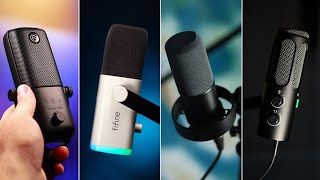

4 Budget Mics Tested: No EQ, No Music
45sViewers get raw, unfiltered audio comparisons without background music, a rare and honest approach that builds trust.
▶ Play Clip"Title promises budget mics you won't regret, and the video delivers honest comparisons with clear pros and cons."
The video compares four budget microphones: the FIFINE K688, FIFINE AM8, FIFINE Tank 3, and Elgato Wave 3. Each mic has unique strengths for different content creation needs, such as voiceovers, streaming, or podcasting. The reviewer tests them raw, then with EQ adjustments, and discusses pricing and features.
The reviewer has tested mics from FIFINE and Elgato over the past year. This video is not sponsored; mics were sent but companies have no editorial control. Affiliate links are in the description.
Aesthetically pleasing, natural tone, great sound isolation. Ideal for podcasts and streaming. Costs around $70.
Unique design, excellent noise isolation, but quiet without EQ. Requires close proximity to mic. Costs around $55.
Heavy build reduces vibration, good for energetic streamers. Least favorite overall but solid. Costs around $80.
USB-C only, no XLR. Comes with Wave Link software for EQ, compression, noise gate. Manages all audio sources. Costs around $160.
Performed plosive tests with tongue twisters and noise isolation tests with background cafe sounds and TV music.
Frequency responses: AM8/Tank 3 (50-16kHz), K688 (70-15kHz), Wave 3 (70-20kHz). All FIFINE mics have XLR and USB-C; Wave 3 is USB-only. No phantom power needed for XLR. Pricing: AM8 $55, K688 $70, Tank 3 $80, Wave 3 $160.
Applied EQ, compressor, and noise gate via Wave Link software. Each mic sounds different even with same settings. Recommends watching specific reviews for more detail.
The best microphone depends on your specific use case: the FIFINE AM8 for voiceovers, K688 for podcasts, Tank 3 for streaming, and Elgato Wave 3 as a versatile all-rounder with powerful software. The Wave 3's software is a standout feature that can replace expensive hardware mixers.
Which FIFINE microphone is best for voiceovers?
FIFINE AM8
02:16
What is the price range of the FIFINE AM8?
Around $55
10:25
Which microphone has both XLR and USB-C inputs?
All FIFINE microphones (K688, AM8, Tank 3)
04:23
What is the frequency response of the FIFINE K688?
70 to 15 kHz
09:01
Which microphone comes with Wave Link software?
Elgato Wave 3
04:56
What is the main advantage of the FIFINE Tank 3?
Heavy build provides vibration resistance, good for energetic streamers.
03:39
Do the FIFINE microphones require phantom power when using XLR?
No, they do not require phantom power.
08:46
What is the price of the Elgato Wave 3?
Around $160
10:34
Which microphone has a removable pop filter?
FIFINE AM8 and FIFINE K688
09:40
What is the frequency response of the Elgato Wave 3?
70 to 20 kHz
09:04
FIFINE K688 as best all-rounder
It combines great sound, aesthetics, and noise isolation at a budget price, making it a top recommendation for podcasts.
01:36FIFINE AM8 excels in noise isolation
Its thick filters make it ideal for recording in noisy environments, a key feature for many content creators.
02:54Wave Link software as a game-changer
The software provides professional audio management without needing expensive hardware, a significant value-add.
04:56No phantom power needed for XLR
This simplifies setup for users who want to use XLR without additional equipment.
08:46EQ adjustments transform sound
Demonstrates how post-processing can dramatically improve audio quality, encouraging viewers to learn audio tuning.
11:03[00:00] over the past year I've had the
[00:00] opportunity of working with two
[00:02] incredible companies to review their
[00:03] microphones we've had fine fine and
[00:05] Elgato what I've come to realize through
[00:07] testing a bunch of different mics is
[00:09] that they all have their own purposes
[00:10] and I've got four here that I want to
[00:12] show you today that I would consider to
[00:14] be budget microphones and all of them
[00:16] have their own strengths and weaknesses
[00:17] and of course they all have different
[00:19] budgets so let's put all of these Head
[00:22] to Head three things I quickly want to
[00:24] tell you before we jump into things just
[00:25] to avoid any weird complications number
[00:28] one this video isn't although these
[00:30] companies may have sent me the
[00:31] microphones in the past they are not
[00:33] aware of this video they don't get to
[00:35] edit or change anything they don't even
[00:36] get to watch the video before it goes
[00:38] live there are however affiliate links
[00:40] in the description if you want to buy
[00:42] any of these mics because I need to eat
[00:45] um number two is that there are no EQ
[00:47] adjustments until the final segment of
[00:49] this video so everything you're hearing
[00:50] is just raar going through USBC into my
[00:53] PC no changes modifications nothing just
[00:56] what these mics sound like when you buy
[00:58] them there are chapter down below if you
[01:00] want to skip to a certain segment but I
[01:02] do recommend that you watch the whole
[01:03] thing because there are microphones that
[01:05] are suited more towards a type of
[01:07] content that you could be creating
[01:09] microphones that are focused on
[01:10] voiceovers and streaming and podcasts it
[01:13] may just help you to get an earful of
[01:14] each microphone and then make your
[01:16] decision afterwards oh and after this
[01:18] point there's not going to be any music
[01:19] in the video because you came here to
[01:21] listen to the mic so you don't want to
[01:24] for some reason every Tech reviewer seem
[01:26] to do it it's like I'm going to show you
[01:27] the quality of this mic but you're going
[01:29] to have to listen to it with a low fire
[01:31] track in the background no fuing around
[01:34] let's dive straight into this okay so
[01:36] we're starting strong with something
[01:38] that looks similar to the shore sm7b
[01:41] which is a beautiful microphone but uh
[01:43] nope this is the first budget microphone
[01:44] this is the fine fine K 688 not only is
[01:47] this aesthetically one of the best
[01:49] microphones on the list but I think it's
[01:51] one of the best sounding it's got a
[01:52] really nice natural tone Great Sound
[01:54] isolation it's a really wonderful
[01:56] allrounder but I think the reason that I
[01:57] wanted it personally was because I
[01:59] wanted to get two short SM 7bs and that
[02:02] was going to cost me something like 700
[02:04] quid I don't have that kind of money to
[02:06] just throw at a couple of microphones so
[02:08] for all intents and purposes this does
[02:09] the job it does it well and it's a
[02:11] fraction of the cost of what it's
[02:14] emulating now we move on to the fine
[02:16] fine am8 and this is a strikingly unique
[02:19] looking microphone I mentioned this in
[02:21] my main review but it's definitely it's
[02:23] hard to make this thing look unintrusive
[02:25] particularly when you get it in white
[02:27] it's like it just dominates the scene
[02:30] it comes with a stand which is cool but
[02:31] to get the best out of this microphone
[02:33] you really need it to be close to your
[02:35] face because it's got really thick
[02:37] filters without any EQ adjustments it's
[02:39] also pretty quiet even when you just put
[02:41] it at this kind of distance as you can
[02:43] see I've dropped down to -20 DB which
[02:46] isn't that big of a deal but it's just
[02:48] it's something to bear in mind if you
[02:49] don't know how to EQ things and add
[02:52] compressors where this one excels though
[02:54] in my opinion is the quality if you need
[02:56] a microphone for voiceovers this one is
[02:58] definitely my favorite the no isolation
[03:00] is absolutely incredible as you will see
[03:02] in a minute so if you have a lot of fans
[03:04] around you Xbox PC things like that or
[03:06] maybe you're trying to record videos in
[03:07] a house that's filled with family
[03:09] members that are incredibly uncourteous
[03:12] and would just want to be as loud as
[03:13] possible when you're recording this
[03:15] microphone I think could be a great
[03:16] option for you the fine fine tank 3 is
[03:18] honestly my least favorite of the bunch
[03:21] now as you can hear it's definitely not
[03:22] a bad microphone by any means it's just
[03:25] the other two shine in their own areas
[03:27] the am8 serves as a great microphone for
[03:29] voice over
[03:30] the K 688 is a great microphone for
[03:32] podcast and it's visually appealing so
[03:34] where does the tank 3 fit in well I
[03:37] think the answer lies in its build
[03:39] quality because this thing it's named
[03:41] tank 3 for a reason it is way heavier
[03:44] than all of the other microphones which
[03:46] should mean that there's more vibration
[03:48] resistance so if you're a streamer and
[03:50] you have a bunch of energy and you're
[03:51] flying all over the screen I think the
[03:53] tank 3 could be a great option for you
[03:55] so onscreen microphone SL podcast kind
[03:58] of vibe voiceovers and script reads and
[04:00] maybe voice acting this one could be the
[04:03] perfect microphone for live streamers
[04:05] finally we have what I would consider to
[04:07] be the allrounder this is the Elgato
[04:09] Wave 3 now I think the Elgato Wave 3 is
[04:12] fundamentally the most different
[04:13] microphone than the rest of the bunch
[04:15] not only because it's made by a
[04:17] different company but also because
[04:18] there's some things that are very
[04:20] different to the others see I haven't
[04:22] mentioned it beforehand but all of these
[04:23] microphones have both an XLR input and
[04:26] USBC meaning that if you have a fancy
[04:28] setup with mixes and monitors and all
[04:30] that kind of stuff and you want to do
[04:31] XLR you can and you'll be able to get
[04:33] the most out of the microphone by doing
[04:35] so but then even if you're in a cafe you
[04:37] can just sit down with an iPad to plug
[04:39] this thing in through USB and you can do
[04:41] whatever you need to do the Wave 3
[04:43] however does not have XLR elgot to make
[04:46] XLR microphones like the DX but this one
[04:48] is just USBC it's also more expensive
[04:51] however there are a bunch of things that
[04:53] come with the Wave 3 that make it very
[04:56] different from the rest wavelink the
[04:58] software that comes with the G 3
[05:00] microphone you see while the fine fine
[05:02] microphones generally work pretty damn
[05:04] well by themselves there's no way to
[05:06] really fine-tune them unless you go
[05:08] through XLR and you change all the
[05:09] settings with a big expensive mixer the
[05:12] wave three on the other hand comes with
[05:13] this software that is a suite of tools
[05:16] and plugins that include equalizers
[05:18] compressors Noise Gate and things like
[05:21] that things that you would need to make
[05:22] your microphone sound as good as it
[05:24] possibly could and we'll look into that
[05:26] towards the end of the video but not
[05:28] only does that software manage this
[05:30] microphone but it also manages every
[05:32] other device and music source and
[05:34] browser on your computer all at once in
[05:37] one little Suite of tools the wavelink
[05:40] software has genuinely changed the way
[05:42] that I manage my audio so while the
[05:43] microphone definitely is the most
[05:45] expensive on the list today and we'll
[05:46] get into the pricing in a minute the
[05:47] money you save not having to buy mixes
[05:50] and all the other tools to be able to
[05:51] get the most out of those other
[05:53] microphones do you think it's worth
[05:55] saving that money and then getting this
[05:57] you tell me I'm not going to say yes or
[05:58] no because again it depends on how you
[06:00] do things in terms of audio quality The
[06:02] Wave 3 is like the middle ground between
[06:04] all of those things it's great and it's
[06:06] actually my daily driver on my gaming
[06:08] channel primarily because of the
[06:10] software so if you want a device that
[06:11] will just do everything for you and
[06:13] isn't dedicated to voiceovers or
[06:16] podcasts you just want a device that can
[06:18] sit at your desk do all of your calls do
[06:21] your voiceovers do your streams the wave
[06:23] three could be the one for you now we're
[06:25] going to move on to plosive tests noise
[06:27] isolation and a bunch of other elements
[06:28] that may affect your decision when
[06:30] considering these mics I'm really
[06:31] curious as to which one you think sounds
[06:33] best so far let me know what you think
[06:35] Peter Piper picked a peack of pickled
[06:37] peppers Peter Piper picked a pack of
[06:40] pickled peppers Peter Piper picked a
[06:42] pack of pickled peppers Peter Piper
[06:44] picked a pack of pickled peppers she
[06:46] sells seashells by the seash shore she
[06:49] sells seashells by the sea shore she
[06:52] sells seashells by the seashore she
[06:55] sells seashores by the seashore now we
[06:58] have the noise isolation test over the
[07:00] next 15 20 seconds I'm going to talk to
[07:02] you and ramble while there's also some
[07:04] background noise I have an ambient Cafe
[07:06] kind of sound playing from my phone
[07:07] which is around about 20 to 30 cm away
[07:10] from the mic and I've got some music
[07:12] playing on the TV over here I was
[07:14] thinking about doing a wind test for
[07:16] these examples but then I sat down and I
[07:18] was thinking like would you be taking
[07:19] these microphones into an open field and
[07:21] recording a voice over but I mean they
[07:24] are USBC so you could just take them
[07:26] with your phone plug them in and record
[07:28] whatever you want wherever you want for
[07:30] the last test I'm actually going to tap
[07:31] each microphone a couple of times just
[07:33] to see how well particularly with this
[07:35] one and the shock mount the microphones
[07:36] absorb those
[07:41] vibrations I recognize that this
[07:42] probably isn't a deal for most
[07:48] people I think for anybody interested in
[07:51] live streaming this is definitely
[07:52] something to consider you don't want to
[07:54] breathe on the microphone
[07:57] [Music]
[07:59] just for it to sound like your grandma
[08:01] creaking away About to Blow Away In The
[08:08] Wind now before we jump into the final
[08:10] segment of this video which is the EQ
[08:12] adjustments and things like that I'll
[08:13] have a whole video coming out on all of
[08:15] that soon make sure you tap subscribe to
[08:17] stay up to date with that I always feel
[08:18] like those plugs are so forced to tap
[08:20] subscribe and like the video I want to
[08:22] sh a few technical details about this
[08:24] microphones and of course discuss the
[08:26] pricing for those who care about it if
[08:28] you're not interested in all that again
[08:29] use the chapters down below to skip
[08:31] ahead but there's some things like if
[08:32] you're thinking about accessories for
[08:34] microphones do you need the shock mount
[08:35] and such like stuff that you want to
[08:37] consider let's talk about it as I
[08:38] mentioned earlier on all of the fine
[08:40] fine microphones have the XLR and the
[08:41] USBC this one doesn't it's worth noting
[08:44] however that when using XLR on any of
[08:46] these microphones you do not need
[08:48] phantom power sometimes that's something
[08:50] you realize later on and you have to go
[08:51] and buy other stuff don't worry about it
[08:53] you don't need phantom power for these
[08:55] guys the frequency response on both the
[08:57] am8 and the tank 3 is between 50 to 16
[09:01] khz whereas the K 688 is between 70 and
[09:04] 15 khz and the Wave 3 is between 70 to
[09:07] 20 khz so with my very basic
[09:10] understanding of audio engineering and
[09:11] feel free to correct me in the comments
[09:14] tell me that I'm an idiot but I'm pretty
[09:15] sure that that means when using the am8
[09:17] or the tank 3 if you have a slightly
[09:18] deeper voice like I do these microphones
[09:21] are going to favor that deeper tone
[09:23] you're going to get that real Rich Basin
[09:25] however if you're using something like
[09:26] the Wave 3 or the K 688 if you got a
[09:28] slightly more feminine tone and you're a
[09:30] little bit higher pitched those vocals
[09:32] are going to sound a little bit better
[09:34] again feel free to correct me if I'm
[09:35] wrong I'm still learning about all of
[09:37] this if you're thinking about pop
[09:38] filters and shock mounts and things like
[09:39] that it's worth noting that the am8
[09:41] actually has a removable pop filter it's
[09:43] also got a guard and then the actual
[09:45] diaphragm itself is just underneath that
[09:47] that's why the noise isolation is so
[09:49] good because this thing is it's thick
[09:51] like Kim Kardashian level thick for this
[09:54] guy and the K 688 also has the removable
[09:56] pop filter it's nowhere near as thick as
[09:58] the am8 you're not going to get that
[10:00] level of noise isolation but it is
[10:02] removable and the K 688 also comes with
[10:04] a built-in shock mount so you don't have
[10:06] to go and buy that separately and all
[10:07] the microphones come with microphone arm
[10:09] mounts and there's actually two thread
[10:11] sizes in each bit right in here so just
[10:14] make sure that if you have a microphone
[10:15] arm you're going to be using one that it
[10:17] fits what you need cuz I don't think
[10:19] you're going to even need adapters all
[10:20] of the microphones have dials that
[10:22] control both the gain of the microphone
[10:23] and the audio monitoring the pricing for
[10:25] the am8 starts at around about 55 bucks
[10:28] the k68 8 starts at around about 70 the
[10:31] tank 3 is around about 80 and the Elgato
[10:34] is the pricier one at around about 160
[10:36] if that seems a little bit too expensive
[10:38] though like I said the main appeal for
[10:40] me personally is the wavelink software
[10:42] you can go ahead and get something like
[10:43] the wave Neo which is around about 80
[10:45] bucks or the wave DX which is around
[10:47] about 110 and buying any of those will
[10:50] get you access to the wavelength
[10:52] software which again is the main appeal
[10:54] particularly if you're into streaming or
[10:55] content creation that alone is worth the
[10:58] price and you don't have to buy the
[10:59] mixer so that could be a reasonable
[11:01] trade-off for you finally to wrap up
[11:03] this video I'm going to turn on all of
[11:05] my EQ adjustments now these are you know
[11:07] tailored to my voice so I wouldn't
[11:09] entirely recommend doing what I do I'll
[11:11] have a video on how to set up yourself
[11:13] for your voice in the future that's
[11:15] probably coming in a week or two I'll be
[11:17] doing all this in the wavelink software
[11:18] not only adding EQ adjustments but also
[11:20] compressors and noise Gates again I'll
[11:23] have a full video on all that soon but
[11:24] are you ready for this 3 two one magic I
[11:29] never cared much for fine-tuning my
[11:30] audio until recently I'm still figuring
[11:32] things out but if you compare this to
[11:34] the sample a couple of seconds ago or
[11:35] even any sample of these microphones
[11:37] coming up throughout this video there's
[11:40] a big difference and I think it's
[11:41] definitely worth taking that time to
[11:43] learn about it and understand it it's
[11:45] definitely worth saying that although
[11:46] all this is being done in wavelength you
[11:47] can do this with pretty much any
[11:49] software or even Hardware Hardware is
[11:51] typically pretty pricey though to be
[11:53] able to get this level of customization
[11:55] this is just what works best for my
[11:56] workflow not only can you apply the
[11:58] filters and E EQ settings and things
[12:00] like that to the microphones themselves
[12:01] but you can also apply them to literally
[12:03] any other audio source that means you
[12:04] can add compressors directly onto your
[12:06] game playay so loud moments can be
[12:08] reduced and Quiet Moments can come up
[12:10] you can also add limiters so that you
[12:11] don't have to worry so much about
[12:13] balancing your audio when you're talking
[12:15] there's gameplay going on you got some
[12:17] music just makes life a lot easier the
[12:19] main reason I use wavelink is just for
[12:21] efficiency I feel like efficiency is
[12:23] part of my brand image now if that's a
[12:25] thing anyway you tell me how are you
[12:27] feeling about these microphones with all
[12:29] the EQ settings turned on it's the same
[12:31] settings just copy and pasted for each
[12:32] microphone but I think with the
[12:34] microphone's natural tones all being
[12:36] different you're definitely going to be
[12:37] able to hear that difference coming
[12:38] through that's all for this video I'm
[12:40] not going to go ahead and pick favorites
[12:41] like I said it is entirely down to you
[12:43] your workflow the way that you do things
[12:45] if you have any questions about the
[12:46] microphones the way that I do things or
[12:48] perhaps even the way that I made this
[12:49] video let me know down in the comments
[12:51] and I'll be more than happy to help you
[12:52] out I do definitely recommend that if
[12:54] you're interested in a specific
[12:55] microphone go and watch my review for
[12:57] that specific mic cuz I go into a lot
[12:59] more detail about how to set things up
[13:01] what makes them unique what they're good
[13:02] at and what they're bad at in those
[13:04] videos I love your faces you're amazing
[13:06] beautiful subscribe for more videos just
[13:07] like this and I will catch you in the
[13:09] next one
⚡ Saved you 0h 13m reading this? Transcribe any YouTube video for free — no signup needed.