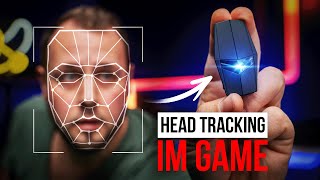

Fly helicopters with your head!
43sShowcases a futuristic gaming control that is visually impressive and sparks curiosity.
▶ Play Clip"Delivers a thorough review of a single product, but 'best head tracking in 2026?' is a slight overpromise for a product still in development."
The Cyrus Hattracker is a lightweight head-mounted device that lets gamers control in-game aiming, looking, and vehicle steering using head movements. It consists of a 20g tracker module attached to headphones and a USB adapter for connection to consoles or PC. Setup is simple via a mobile app, and it supports customizable sensitivity profiles for different games.
The Cyrus Hattracker allows head movement control in games for aiming, looking around, and vehicle control.
Two devices: a 20g tracker module (battery life 10-14 hours) and a USB adapter for pairing with console/PC.
Options include full aiming, aiming mode, or looking around. Works across games like Fortnite, Battlefield, and racing games.
PC requires a controller paired to the adapter; a trick allows using mouse/keyboard by connecting controller then setting it aside.
Connect USB adapter to console/PC, attach controller via USB cable, attach tracker to headphones, download app, pair devices, and calibrate.
Unlike VR, the head tracker doesn't block vision or change the visual experience, reducing motion sickness risk.
The Cyrus Hattracker offers a practical and immersive head tracking solution for gaming, with simple setup and broad game compatibility, avoiding the motion sickness common in VR.
What is the weight of the Cyrus Hattracker module?
20 grams.
01:04
What is the battery life of the head tracker?
10 to 14 hours, expected to improve.
01:30
How many devices make up the Cyrus Hattracker set?
Two: the head tracker module and a USB adapter.
01:04
What is required for PC use besides the tracker and adapter?
A controller connected via USB cable to the adapter.
04:06
Does the Cyrus Hattracker cause motion sickness?
No, because it doesn't block vision or change the visual experience like VR.
07:49
Lightweight Hardware Design
The 20g module on headphones provides immersion without bulk.
01:04Head Control in Battlefield Vehicles
Demonstrates versatility across different game types (infantry, vehicles).
02:55Motion Sickness Advantage Over VR
Key differentiator: eliminates a common barrier to immersive gaming.
07:49[00:01] your aiming , look around while driving, or even better control vehicles in the game, all with just your head movements. Cyrus, a young that not only offers all these features but
[00:14] is also extremely sensitive and accurate. I find the topic incredibly exciting not only introduce you to the Cyrus Hattracker, but also show you exactly what is possible and how the Hattracker works.
[00:33] when it comes to gaming. So it's not just about playing a game on a console, PC or handheld, but about immersing yourself more and more in the game and received so many things, from white-eye glasses and vests with sensors to even a
[00:49] last Gamescom. To be honest, I've always wanted to smell a horse fart while playing Red Dead Redemption. But back to the topic, the Cyrus Hatracker. What exactly is it and how does
[01:04] it work? Technically, the Xyrus Hatracker actually consists of two devices. For example, we have the Hattracker itself. It's a small module, weighing 20g, and it's attached to a pair of headphones
[01:17] . This could be a gaming headset , it could be normal headphones, it could also be over-ear headphones. The main thing is that the whole thing gets attached to the head somehow. Well, I would n't stick it directly to your head
[01:30] , although that would actually be possible . The battery life of this head tracker, because it is wireless, is approximately 10 to 14 hours, but is expected to be significantly improved in the future. Then there's the second device, which is part of the set
[01:43] . This is a small USB adapter, which is used to USB adapter, which is used to
[01:57] together with an app on the mobile phone, ensure that everything can be paired and that you can then theoretically control the game with your head. And depending on how you configure the Cyrus Hattracker, there are
[02:12] For example, if you're playing on the Playstation 5, you can simply say in Fortnite, okay, I want to use the hat tracker to control everything, including the entire aiming. This means that I can only
[02:26] turn around, look around and aim in the game by moving my head . But I can also say that I aim mode, that is, when I use the weapon's aiming device . But I can also use it in other games
[02:41] move away from Fortnite to Battlefield and then to the PlayStation 5, I could also say, okay, I want to take over the complete control here. And that's where it gets interesting, because I ca n't just use aiming in the infantry
[02:55] . So I just run around and aim with my head, but in Battlefield there are also completely different things possible. You fly an airplane, you fly a helicopter, you drive a car or a tank.
[03:08] A car is also good. And theoretically, I can control all of that with my head, and it's practically latency-free. The movements are slightly, it moves in the game too. And
[03:24] I can adjust how much it moves at any time via the app, and in some games also directly within the I can also say, I want it to be really great and delicate, or I would prefer really great and delicate, or I would prefer it to be light and graceful.
[03:37] What kind of words are these? But if we move away from shooter gaming, it also becomes relatively interesting in racing games , because there I can, for example, use looking around. I'm driving a car and I want to
[03:52] look into the curve. Instead of just steering and then having to press some button to look into turn my head slightly and look into the curve while I drive. Also super exciting. We've only talked about consoles this whole time
[04:06] , but it also works on PC, and that's where it gets even more interesting, because , I first need a controller, since the Xyrus Hetracker controller, like the one from the PlayStation 5, via USB cable (I'll get to that in a moment), to
[04:22] the USB adapter, and only then is the tracking activated via the app. It works the same way on a PC. That means if I'm playing a game that supports a controller, I can
[04:36] also use a little trick here. I connect everything and pair the controller, so theoretically I can play my game with the controller. And then I put the controller aside and use the mouse and keyboard, and
[04:49] can then play normally with the mouse and keyboard on the PC, while using the head tracker on my head to aim or to support aiming. You don't have to completely
[05:04] because of the cable connection. One has to address that point at some point. That's one thing. You need this connection from the USB adapter to the controller via cable. And that can be annoying, of course, because in times when
[05:17] not necessarily want to take a step backwards. They are we will have the wireless connection in the next few weeks. That means pairing once, removing the cable, and you can play wired games . The other topic is,
[05:32] of course, about the PC. Currently, the only workaround is to put the controller aside and play with a mouse and keyboard. But here too I have been told that the PC software is practically finished and that you
[05:45] can then configure everything on the PC and theoretically use a mouse and keyboard in general curious about that too. But these are the capabilities of the Cyrus Hatracker, and setting it up is relatively simple. And here one could also say,
[05:59] complicated, but that's not the case at all. First of all, I have linked a very detailed video below the video on the Cyrus channel. I showed how to do it step by step. All you need is the USB adapter, which
[06:12] you connect to the console. Has that been done? Then you grab the USB cable and connect the controller to the USB port on the console or PC. You attach one piece of adhesive tape to the
[06:26] head tracker, then grab your headphones and attach the other part of the adhesive tape to them as well. So that you
[06:39] you only need to download the app to your smartphone. You can also see the USB adapter and the hard tracker there. Both devices connect to the app and you are guided through a calibration process. And maybe
[06:52] you're thinking now, oh God, I'll never be able to do that. Super, super simple. As I said, the video is below in the video description. You basically just have to hold the headphones in different directions. It has a spirit level
[07:04] holding it correctly. And then you look up very slowly one more time and the [music] everything is finished. I can put the headphones aside at any time. I do just need to install the profiles for the games I
[07:21] want to use with the Cyrus head tracker and then adjust the sensitivity or the additional options, because each profile for each game can bring game-specific additional options, which then gets even more detailed.
[07:35] more detailed. . However, what remains, and what I found a little difficult in the past with VR glasses or other immersive aids,
[07:49] is motion sickness. That means, for example, if I no longer notice what's happening around me in the real world , then after a while I started to feel a bit strange. This is especially true for VR glasses,
[08:03] because they completely block out the face and you only see a virtual horizon. And that can put a bit of a strain on the body of some people . With the Cyrus
[08:15] Hadtracker, the advantage is that I place the tracker on my headset and, from a visual perspective, nothing actually changes for me . I still play games the same way as before, and I thought that was pretty cool. More
[08:27] immersion, but without motion sickness. What naturally came through in me as a content creator are a few wild ideas. What if I don't use the whole thing in the game at all, or exclusively,
[08:39] but I also have the option to, for example, press a hotkey on the controller I'm currently holding or on the keyboard, and an overlay menu opens, as you
[08:55] head [music]? While I , I could imagine that being very exciting. But these are even more possibilities. And I'd be
[09:08] interested to know what your thoughts are on the Cyrus Hatracker first impressions are? Please write that in the comments below and then I'd say, see you in the next video.




⚡ Saved you 0h 09m reading this? Transcribe any YouTube video for free — no signup needed.