
I'm Replacing My Entire Setup
45sThe hook of ditching a 3-year-old Rodecaster and 5-year-old Stream Deck for one device sparks curiosity and tech envy.
▶ Play Clip"Delivers on the promise of a perfect VTubing device with detailed features and setup, though sponsored content adds some fluff."
The video is a sponsored review of the Elgato Stream Deck Plus XL and Wave XLR Mark II, tailored for VTubers. The creator demonstrates how these devices, combined with Wave Link software, can replace traditional audio interfaces and streamline VTuber model controls, offering a comprehensive setup for content creators.
The creator introduces the video by showing their current VTubing setup, which includes a 3-year-old Rodecaster Duo and a 5-year-old OG Stream Deck, setting the stage for the new products.
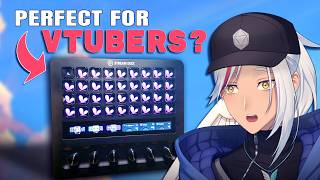
The Stream Deck Plus XL is introduced as a large device with 36 LCD keys, a touch strip, and six dials, replacing the need for multiple devices.
The Stream Deck Plus XL is shown to be significantly larger than the OG Stream Deck, addressing a previous issue of sliding by having a stable base.
The Wave XLR Mark II is introduced as an audio interface that provides professional audio processing, including Clip Guard and voice tuning, and supports VST plugins.
Wave Link is free software that allows control of all audio channels, with the ability to route audio to different mixes (personal, stream, VOD) and is compatible with any microphone.
The Stream Deck Plus XL features 36 LCD keys, a touch strip, and six dials, offering extensive customization for various controls.
The creator uses the left side of the Stream Deck for model toggles, the right side for audio controls, and the center for miscellaneous buttons like clipping and opening apps.
The touch strip can display and cycle through content, while the dials provide tactile feedback and can be pressed for additional functions.
Wave Link allows creating channels (e.g., Spotify) and routing them to different mixes, enabling features like removing copyrighted music from VODs.
With the Wave Link plugin, the Stream Deck can control all mixes and effects, effectively functioning as a full audio interface like the Rodecaster Duo or GoXLR.
The Stream Deck is used to control various VTuber model toggles (facial expressions, position, props) without needing to use keyboard shortcuts or VTub Studio directly.
The creator reveals a special button that applies a cinematic look using an app called Shust, which uses compositing techniques similar to anime studios.
The Stream Deck Plus XL is recommended as a solid investment for VTubers and content creators, offering extensive functionality and value.
The Stream Deck Plus XL, paired with Wave Link, provides a comprehensive and customizable control surface for VTubers, replacing traditional audio interfaces and simplifying model management. It is a valuable investment for content creators seeking efficiency and creative control.
How many LCD keys does the Stream Deck Plus XL have?
36
03:16
What is the name of Elgato's free audio software?
Wave Link
02:49
What is the purpose of the VOD mix in Wave Link?
It allows you to exclude certain audio channels from the archived VOD, useful for removing copyrighted music.
05:25
What is the name of the app used for cinematic post-processing effects on VTuber scenes?
Shust
08:10
What is the method called that anime studios use to make shows look stunning, mentioned in the video?
Compositing
08:10
Stream Deck as Audio Interface
Demonstrates a key feature that transforms the Stream Deck into a full audio interface, a major selling point.
05:53Compositing with Shust
Introduces a professional technique used by anime studios, applicable to VTubing for cinematic effects.
08:10Efficient VTuber Toggle Management
Shows a practical solution to a common VTuber problem of managing model toggles without disrupting workflow.
06:34[00:02] Vtubing device? Well, before we find out, let's see what it's up against. This is my current Vtubing setup, my 3-year-old Rodecaster Duo for all my audio controls, and my 5-year-old OG Stream Deck, which has been with me
[00:14] since I started Vtubing. But now I can throw it all away. I mean, gently set it aside because this bad boy is replacing all of it. But not only that, because look at this. I put in a special button that may or may not
[00:27] do exactly what you think, but I'll show you that later because we have to see what the Stream Deck even is and what it can do. This is the Stream Deck Plus XL, and oh boy, is it XL. Did you see that spin though? I was very proud of that
[00:40] spin. It took like five tries. Elgato released this along with a bunch of other new products as part of their Wave Next launch, and they were nice enough to not only send me these products, but also sponsor this video. So, let's give
[00:52] it up for Elgato, everybody, because they are the first ever sponsor on the Z ECHOS CHANNEL. YEAH, [screaming] BABY. Thank you, Elgato. Immediately inside this box is the Stream Deck Plus XL itself, wrapped
[01:06] You're also given a bag with an instruction booklet and a braided USB-C. just had to try to pull this thing out never did this yourself because it's like searching behind a waterfall. There
[01:20] might be secrets behind there. But sadly, there wasn't any in this out of the box, let me show you guys just how XL this thing really is. Here it is beside my Rodecaster Duo. And now
[01:33] here it is beside my OG Stream Deck. This thing is absolutely humongous. of the gripes I've always had with it was that it slid backwards anytime I
[01:45] pressed the buttons. And initially, I thought that the Stream Deck Plus XL had But then I realized I didn't take the plastic off.
[01:57] >> It's kind of hard to tell in the footage, but this thing was planted. In you can even see it in my shadow. But, insane grip strength aside, Elgato actually sent me another product. See, my microphone is an XLR. So, in order to
[02:10] have an XLR connection without using my old equipment, we'll pair it up with old equipment, we'll pair it up with Elgato's new Wave XLR Mark II. But, you can honestly just use whatever you want. However, what I will say is that this
[02:22] all of this pro professional audio processing that you'd find in traditional audio interfaces, and Elgato's own special editions like Clip Guard and voice tuning for a buttery smooth voice. In fact, it's what I'm
[02:35] using right now. It even includes an option to add in your own VST plugins. But, as cool as this thing is, aside from an XLR connection, we won't be But, that's only because we're using Elgato's Wave Link software to control
[02:49] all of our audio, which is free, by the way, for everyone with whatever mic you want to use. You don't actually need Elgato's hardware to use it, but I found that the Stream Deck Plus XL pairs so well with it, it's insane. And, you'll
[03:02] [music] But, before we dive into the software and other cool stuff, let's first check out the hardware. What can this thing actually do? [music] Let's start off with the obvious, the interface. It's got an insane 36 LCD
[03:16] keys, a touch strip, and six dials that you can twist, turn, and press to your heart's content. This is up from Elgato's old version of eight keys and four dials from the Stream Deck Plus. And, definitely a huge upgrade compared
[03:29] to my own basic ass Stream Deck. The keys work and feel like you'd expect, so no surprises there, except for the fact that it has a ton of buttons to play around with. More! I use this entire left side for all my
[03:41] toggle to switch to my female model, because I know that y'all are gooners. The right side controls my audio, including audio effects and reverb. And finally, at the center are all the miscellaneous buttons like a clipping
[03:55] button for streams, a button for opening up all of my 67 Vtubing apps, and oh hey it's important because it's at the center and has fancy animations. The touch strip lets you display whatever you want. You can tap on set display and
[04:08] right control and [music] visual feedback. One of my favorite uses of which lets you cycle through whatever you want. For example, here I have it cycling through my main stream screens, and this is where it cycles through all
[04:22] my various Vtuber models like this funny dog, my friend Supi's model, and of course, my female model Zana for all my gooner. And speaking of dials, and do I love these things. They have a nice tactile feel so you know exactly how
[04:36] it for additional functionality. And you've got two more on the Excel compared to its smaller counterpart. They have so much usage potential that you can get really creative with how you set it up in tandem with everything
[04:49] else. But enough of all the physical stuff, we're Vtubers, dang nab it. So let's get to the virtual and show you how my Vtuber stuff is set up. There are two key parts to my ultimate Vtuber setup, audio and the Vtuber model
[05:01] itself. Let's start off with audio, and like I mentioned earlier, we'll be using Elgato's own software, the Wave Link, that they've actually just updated to that they've actually just updated to 3.0. This behemoth of an app will handle
[05:13] everything to do with audio, from mic controls to effects to an entire mixing table for all of your apps ever. How this works is really simple. I'll create a channel, let's say Spotify, then I'll add it to my personal mix. This is what
[05:25] I'm hearing in my headphones, and stream mix, which is what my viewers are hearing on stream. However, let's not add it in the VOD mix. So now when the stream gets archived and turned into a VOD, the audio specifically from Spotify
[05:39] will be completely gone, even if it was there during the stream itself. This is super useful if you like to, say, play copyrighted music on stream, or prep your VOD to be edited later. But, tell me, chat, what's better than custom
[05:53] routing of audio channels? Why, it's custom routing of audio course. By downloading the Wave Link plugin for the Stream Deck, you can now control all of the mixes, mic effects, and even each
[06:07] individual channel directly from the Stream Deck Plus XL, making it a fully working audio interface, just like my Rode Caster Duo or the GoXLR. Let me repeat that again. This Stream Deck is now a working audio interface. It's
[06:22] now a working audio interface. It's crazy. Except, this one has a metric ton of buttons and functionality to top. God damn. >> But, as VTubers, we can't just get away with good audio controls because almost
[06:34] every VTuber model out there comes with a bunch of toggles, and we can't just keep going into VTub Studio and toggling each one on and off every time, or accidentally triggering actions in games while trying to make ourselves look
[06:47] disgusted because that is a gross workflow. Ah, I pressed the wrong HOWEVER, if you take a look at here, what I've got set up are more than just include Let's have a look. This bottom row
[07:02] contains my major facial toggles. Angry, sad, disgust, uh, that? But, the row above it controls my position on the screen. I can be far away. All right, an interface. The row above controls bigger toggles on my
[07:17] above controls bigger toggles on my model, like cat ears, bald, and even bald with cat ears. And if I want to reset this abomination, I simply go to right here. The top row also controls my wings and
[07:30] removes any props I currently have. And yes, that is the dedicated sauna toggle you saw earlier. With all this setup, you'll never have to worry about toggles taking up precious keyboard room. But, there's still one problem. I still
[07:43] haven't shown you what the button does. So, let's finally get to the part you've an app that I'm sure most of you don't even know about. It lets you customize any VTuber scene using tons of post-processing effects. It's kind of
[07:57] like adding filters, but dialed up to 100. This workflow is actually what a lot of anime studios use to make their shows and movies look absolutely stunning and beautiful. This method is called compositing, and I you can do it
[08:10] too by using an app called Shust. And here's what it can do at the press of a here's what it can do at the press of a button on the Stream Deck plus XL.
[08:28] Deck XL is, in my opinion, a solid investment, especially when you pair it up with the Wave Link software. The sheer amount of functionality you get is top-tier value, especially as a VTuber, and honestly, as any kind of content
[08:41] creator. Not only can you control your entire VTuber model, toggles, effects, and everything else, but you can also use it as a fully working and functional audio interface for all of your stream and karaoke needs. If you want to get
[08:54] the Stream Deck plus XL for yourself, it's linked in the description, along with the other products mentioned. And plus, buying it using that link also appreciate it. I for sure will be rocking this thing as my daily driver
[09:07] for many years, just like I did with my 5-year-old OG Stream Deck. So, thank you again, Elgato, for sending me all these products and for sponsoring the video. Now, if you want to learn how to make your own VTuber scene look as cinematic
[09:21] as this, I'm working on a tutorial that'll appear here once it's done. Otherwise, enjoy this video that YouTube thinks you like. Ciao.
⚡ Saved you 0h 09m reading this? Transcribe any YouTube video for free — no signup needed.