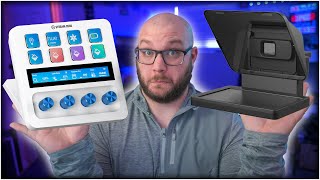

Two tools that changed my content creation
45sOpens with a bold claim about game-changing gear, hooking viewers interested in productivity and streaming.
▶ Play Clip"The title accurately reflects the content; the video explains how these tools improved the creator's workflow and content quality."
The video discusses how the Elgato Stream Deck + and Elgato Teleprompter have improved the creator's productivity and content quality. The creator shares personal experiences and setup details, highlighting the value of these tools for streamers and content creators.
The video focuses on two Elgato products that have changed the game for the creator: the Stream Deck + and the Teleprompter.
Some products were sent by brands, others bought out of pocket. The creator uses the Facecam Neo to show items without tearing down his setup.
The Stream Deck + has four knobs, a touchscreen, and eight buttons. The XLR Dock adds XLR input and headphone output, consolidating control into one device.
The creator uses it for audio control (mic gain, PC volume, headphone volumes), monitoring CPU/GPU temps, quick folder access, and scene switching for streaming.
The teleprompter connects via one USB-C cable, displays text or camera feed, and uses voice sync to auto-scroll scripts. It helps the creator maintain eye contact and improve engagement.
The Stream Deck + ($200) and XLR Dock ($119) and Teleprompter ($300) are expensive, but the creator argues they improve productivity and content quality significantly.
The Facecam Pro ($300) is considered overpriced; the Facecam Mark II is recommended as a better value webcam.
The Elgato Stream Deck + and Teleprompter are expensive but valuable tools that enhance productivity and content quality for serious creators. The creator recommends them for those who can justify the investment.
Elgato Stream Deck +
tool
Elgato XLR Dock
tool
Elgato Teleprompter
tool
Elgato Facecam Neo
tool
Elgato Facecam Pro
tool
Elgato Wave DX microphone
tool
Elgato Wave Pro Arm LP
tool
Shure SM7B microphone
tool
Sony a6700 camera
tool
Sigma 16mm lens
tool
Elgato 4K60 Pro capture card
tool
Lightstream
service
What are the two main Elgato products discussed in the video?
Stream Deck + and Elgato Teleprompter.
00:17
How much does the Elgato Teleprompter cost?
$300.
08:23
What is the price of the Stream Deck +?
$200.
12:03
What does the XLR Dock add to the Stream Deck +?
XLR input and headphone output, consolidating audio control into one device.
02:16
How does the Elgato Teleprompter connect to a computer?
Via a single USB-C cable that handles video and display.
09:57
What feature of the Teleprompter software helps with script reading?
Voice sync, which auto-scrolls the text as the user speaks.
10:48
What is the creator's opinion on the Facecam Pro?
It is overpriced at $300; the Facecam Mark II is a better value.
13:51
What are the four knobs on the Stream Deck + used for in the creator's setup?
Mic gain, PC volume, headphone volume, and stream music volume.
03:55
What is the main benefit the creator attributes to the Teleprompter?
It allows him to see his own facial expressions, improving engagement and connection with the audience.
09:30
Knobs are a game changer
The creator emphasizes that the physical knobs on the Stream Deck + are a key differentiator from cheaper alternatives.
04:44Teleprompter improves engagement
The creator explains that seeing his own face on the teleprompter helps him adjust expressions and connect better with viewers.
09:30Cost vs. value comparison
The creator compares the $600 combined cost of the Stream Deck + and Teleprompter to a $600 custom PC, highlighting the subjective value of productivity tools.
12:08Expensive microphone not necessary
The creator states that a $400 microphone does not make you a $400 better creator, emphasizing that gear should improve workflow, not just be expensive.
13:04[00:00] when we think about streaming we think
[00:01] about gear and when I think about gear
[00:03] specifically I think about what we're
[00:05] trying to do to make our lives easier
[00:07] either as streamers or creators or in a
[00:09] lot of ways just what people who use
[00:11] everyday applications uh need to use to
[00:14] simplify their process well today we're
[00:17] talking about two things that have
[00:18] literally changed the game for me and
[00:21] how they've had recent updates to make
[00:23] them even better and how you should
[00:25] probably consider picking these up if
[00:26] you're looking to boost productivity uh
[00:29] but also to make you a better Creator
[00:31] let's get into this video just as a
[00:33] heads up some of these products that
[00:34] you're about to see brands have sent me
[00:36] before or have sent me recently but some
[00:38] of them I bought and paid for out of
[00:40] pocket it's not changing anything for
[00:42] this video uh they're not seeing
[00:43] anything ahead of time and specifically
[00:45] we're talking about Elgato today we've
[00:47] got you on the creepy View
[00:49] today no I've got you on this is
[00:51] actually the face cam Neo this isn't the
[00:53] product one of the products we're
[00:54] talking about but this is a fantastic uh
[00:56] camera and honestly I've been using it
[00:59] not so much as a webcam for my stream
[01:01] which that's actually a pretty good view
[01:04] minus the like janky broken door behind
[01:06] me maybe I should just leave this up
[01:08] here for stream anyway um I'm actually
[01:10] going to use this to show you the items
[01:12] because I don't want to tear things down
[01:13] in my setup just because i' I've got
[01:14] some other work to do but I feel like I
[01:16] needed to say this because of some
[01:18] recent updates so the first one is
[01:19] actually this this is the stream deck
[01:21] plus and they also sent along with this
[01:24] one the XLR dock that goes into the back
[01:27] and honestly uh I already had a stream
[01:30] deck plus give me a second as you can
[01:31] see I already had a stream deck plus and
[01:33] I love it I actually bought this one out
[01:35] of pocket right when it released um but
[01:38] I'm glad they sent this over because I
[01:39] personally love the white aesthetic and
[01:41] I could not justify upgrading from this
[01:43] to this uh but the real thing about this
[01:45] is just how I use it and how it makes my
[01:48] day-to-day so much easier uh but I do
[01:50] want to highlight the XLR dock in the
[01:52] back so let's go ahead and highlight the
[01:54] differences between the two this is the
[01:56] stream deck plus you normally will buy
[01:59] it it just has a little Bas in the back
[02:00] nothing crazy it's got a USBC connector
[02:03] and it's all basically the same it's got
[02:05] four knobs a touchcreen here where you
[02:06] can swipe you can see this thing is well
[02:08] loved uh and it's got four buttons or
[02:10] eight buttons actually and that's kind
[02:12] of what the stream deck does well
[02:14] recently they've released um the XLR
[02:16] dock where it actually takes basically
[02:18] the wave XLR and converts it into a
[02:21] stand that just plugs into the USB port
[02:24] on the back of here you use one USBC
[02:27] cable and basically all the same other
[02:29] connectors you have an ox out for your
[02:31] headphones as well as an XLR and all of
[02:34] it controls through one device kind of
[02:37] freeing up a whole bunch of like room on
[02:39] your desk but they also have a USB hub
[02:42] which you can take a look at as well but
[02:44] that's kind of what we're talking about
[02:45] sure I use this for my XLR interface now
[02:48] to be able to control the microphone
[02:49] which by the way is the wave DX right
[02:51] now typically most of the time I'm
[02:54] running uh the shore
[02:56] sm7b but uh the wave DX is honestly I
[03:00] really love the microphone for $99 let
[03:02] me know what your thoughts are here I've
[03:03] done multiple reviews of this microphone
[03:05] and comparing it to other ones so you
[03:07] should go check those out if you're
[03:08] curious if you want this mic or not uh
[03:10] but they also sent this one out the
[03:11] white one I had a black one they sent
[03:13] out a white one love the aesthetic along
[03:15] with the Elgato wave Pro arm LP arm I
[03:18] just did a review on this also really
[03:20] awesome it's a little expensive for $180
[03:23] when I say A little I think it's a lot
[03:24] expensive but now owning it I probably
[03:27] would justify buying it as well so let's
[03:29] go and talk about the stream deck and
[03:30] how I use it specifically I'm just going
[03:32] to show it to you like this rather than
[03:34] actually going in the software and
[03:35] showing you I feel like this is probably
[03:37] real world example of how it works
[03:39] anyway looking at this you can see the
[03:40] stream deck I have eight buttons I have
[03:43] the four things right here this is
[03:44] mostly for the wave software and these
[03:46] are pinned so it doesn't matter what uh
[03:49] thing I go into they stay even if I
[03:51] swipe to the next these will stay and
[03:53] you can do that in software and you can
[03:55] see I have my mic gain right here I have
[03:57] my PC volume for and you see little
[04:00] headphone right there that's for my
[04:01] headphones and then I have stream same
[04:04] thing for voice chat headphones and
[04:06] stream music headphones and stream and
[04:09] this is how I'm able to control
[04:10] everything so easily and honestly this
[04:12] is why I love this there's a reason why
[04:16] here's my mouse right by the way this
[04:18] thing is the coolest thing ever uh seven
[04:20] bucks um anyway there's a reason why my
[04:23] mouse is here and this is so close is
[04:25] because I I touch these faders and move
[04:29] these knobs
[04:30] constantly I love being able to adjust
[04:32] my volume if I'm in a call if I jump
[04:35] into a voice chat with someone if I'm
[04:36] actually playing music uh I love being
[04:38] able to just reach up and easily adjust
[04:41] and make this happen uh this is probably
[04:44] a game Cher and why I say the stream
[04:46] deck plus is worth it is just because of
[04:48] these knobs sure there are cheaper
[04:50] options there's like PC panel and some
[04:51] other stuff but holy
[04:54] crap this is one of the best things ever
[04:58] let's talk about some of the buttons
[04:59] that have to make other things easier
[05:01] CPU GPU temps I'm as you can see I'm a
[05:04] I'm a little bit of a tech nerd and have
[05:05] a pretty nice PC whatever the case but I
[05:08] love building PCS and I love monitoring
[05:10] the PC at all times so you can see CPU
[05:12] GPU uh I've got time here just because I
[05:15] actually hide uh my taskbar here so I
[05:19] like to have it to where I can reach
[05:20] down and you can tap it to get date all
[05:23] these are things that are supported
[05:24] inside their like Marketplace which is
[05:26] really cool CU you can just go into
[05:28] Marketplace and be able to use them I
[05:29] have my recording folder as well as my
[05:31] streaming folder so I have recording and
[05:33] then I have streamlabs which is my
[05:34] streaming folder and then I also can
[05:36] swipe and on this page I have quick
[05:39] opens for specific folders like to open
[05:42] my OBS folder for videos that's going to
[05:44] be my OBS recordings my client folder
[05:46] which I do all uh like all my client
[05:48] work opens up my Nas screenshots or any
[05:50] screenshots I've taken it opens up that
[05:52] folder and then my Nas Just summons up
[05:54] the general like like home of the actual
[05:57] Nas folder then I have outputs in GOI
[05:59] outputs ISS where I want to send my
[06:00] headphone headset speaker earbuds or the
[06:03] TV uh which is really cool cuz wave just
[06:05] lets you kind of readjust where
[06:07] everything goes goie is all of my stuff
[06:09] to turn on and off when it comes to like
[06:11] my little goie plugs so my aam my key
[06:15] light as well as I can just hit blue and
[06:17] it'll turn on the blue lights in the
[06:18] room everything also have a white and a
[06:20] blue and then I have as you can see here
[06:23] I do have a key light Neo and this is
[06:25] where I was messing with key light Neo
[06:26] adjusting temperatures and stuff but
[06:28] back to the main page for recording
[06:31] literally like it's so easy for me to
[06:33] change I have aam and overhead desktop
[06:36] cam only PC Cam and desktop Cam and
[06:38] capture card I even have a start and
[06:40] stop for me to start and stop recording
[06:42] I can pause replay buffer and save all
[06:45] of this right here and if I hit one of
[06:47] these keys this actually has a timer and
[06:50] goes back if I hit it now it's going to
[06:51] mess up maybe I can turn on replay
[06:53] buffer you can see that it'll actually
[06:56] like go back to the previous folder
[06:58] which is what's really cool let me go
[07:00] back and going turn that off because I
[07:01] don't really need replay buffer right
[07:03] now and you can set up that timer on how
[07:06] long it will go back to the original
[07:07] page same thing for stream I've got like
[07:09] camera just chatting intermission Lives
[07:12] full aam as well as some other things
[07:14] that are just filters that turned on and
[07:16] off uh and this is what I use for my
[07:18] stream and in all honesty the stream
[07:20] deck plus is one of those things that if
[07:23] I were to start all over again I think a
[07:25] stream deck like here's the mark 2
[07:27] stream deck I'm testing out some stuff
[07:29] with voice mod right now but here's the
[07:30] mark 2 stream deck uh that was one of
[07:33] the first stream decks I ever bought
[07:35] love it so much uh but the moment wave
[07:38] software released and I got a wave XLR
[07:40] and being able to control everything
[07:42] just with buttons rather than the knobs
[07:44] stream deck plus not only comes with the
[07:47] wave software so you can use it with
[07:48] like USB mics uh just without having the
[07:51] XLR thing it can you can still get wave
[07:53] software and control USB mics uh but the
[07:55] the whole customization of getting
[07:57] stream deck stuff with buttons but
[08:01] actual knob adjustments is a game Cher
[08:04] especially when it comes to this next
[08:06] product so then next product is kind of
[08:08] weird for me to try to show you like
[08:09] this but I'll I'll show it to you anyway
[08:11] so this is the Elgato teleprompter and I
[08:15] personally love the Elgato teleprompter
[08:18] I think it is great Elgato did send it
[08:20] over um but even in my review I said
[08:23] that as the cost of it I think it's a
[08:25] $300 teleprompter and I believe they're
[08:28] coming out with a larger one maybe a
[08:30] 15inch they showed it at twitchcon this
[08:32] teleprompter is one of those things that
[08:34] just makes you a better Creator let me
[08:36] show you why so what you can see right
[08:38] here is you're actually looking at me
[08:39] holding up the face cam Pro uh but what
[08:42] you can see right now is it's actually
[08:43] focused on the product and what you see
[08:46] is how pretty it is right uh but that's
[08:49] actually my aam that's an that's a Sony
[08:51] a6700 with a sigma 16 mm lens uh and
[08:56] it's running out HDMI which maybe I can
[08:59] show those cables there you go it's
[09:00] running out HDMI into the computer into
[09:04] an Elgato 4K 60 Pro because I am running
[09:08] 4K 60 out of the a6700 now the reason
[09:11] why this is so cool is sure I'm able to
[09:14] monitor myself and show myself on the
[09:16] screen uh but to be honest doing scripts
[09:19] and things like that is what's really
[09:21] cool but my main use for this is to do
[09:24] just like this when I'm recording
[09:26] content I'm looking directly at my face
[09:28] on this teleprompter so I'm not just
[09:30] staring at like an empty lens or
[09:32] anything I'm actually taking the time to
[09:35] stare at my face to see my facial
[09:37] expressions to see everything I'm
[09:39] staring at that and so as a Creator I'm
[09:42] able to have more interaction more
[09:44] connection more I don't know Vibrance
[09:47] with what I'm doing because I can see am
[09:49] I smiling do I look weird uh and I think
[09:52] that's why this makes you a better
[09:54] Creator one of the coolest things is it
[09:57] all connects via one us BC cable and it
[10:01] does all of the video out everything
[10:03] does the display all of that from one
[10:05] USBC cable and it's really cool so let
[10:08] me go ahead and show you the software
[10:10] and show you why this is now one of the
[10:12] coolest things I could totally do screen
[10:14] cap but I kind of like carrying this
[10:15] thing around and looking like this so
[10:16] what you see right here is the actual uh
[10:18] camera Hub software for the Elgato
[10:20] prompter and you can see I've got some
[10:21] text right here that's preset and this
[10:23] is I was actually recording a video with
[10:25] light stream for their Channel um Love
[10:27] Light stream by the way you you go check
[10:29] them out out they have a new update
[10:30] coming they're making it free for
[10:31] console users you you you got to check
[10:34] this out anyway what you can see is I
[10:36] actually have the text over here and the
[10:39] cool thing about that is this text I can
[10:42] just scroll right we can just scroll and
[10:45] and do this sure but what's neat is now
[10:48] I can go down here and do voice sync you
[10:51] select your microphone and with the text
[10:55] it'll actually be on the screen and once
[10:56] I hit play in the software which I'll do
[10:59] right here if I look at the screen it
[11:01] says getting ready and then it says
[11:03] active you can see that if I read you'll
[11:05] see the scroll in this video tutorial
[11:07] we're going to walk through setting up
[11:08] your PS4 PS5 and PS5 Pro to stream to
[11:11] light stream where you can add overlays
[11:13] alerts Salk cast to five platforms do a
[11:15] multiplayer stream and so much more by
[11:18] the way did you see I put multipler
[11:20] multipler stream anyway what you also
[11:22] get is uh being able to do text you can
[11:25] just use it as a display which right now
[11:27] I have it like OBS sharing over to that
[11:29] then you can also just do twitch chat
[11:31] and you can see it connects to your
[11:32] Twitch chat uh right here you can have
[11:34] multiple um little twitch channels and
[11:36] go back and forth that's always really
[11:37] cool and then have it you know pass
[11:39] through stuff that's coming from the
[11:40] desktop that's why I think this piece of
[11:43] software not only for text be able to do
[11:46] ad reads and stuff like that for sponsor
[11:48] stuff uh but for me to be able to record
[11:51] and be more effective as a Creator I
[11:53] love the prompter for that and I'll be
[11:55] frank I'm it's not like like lost on me
[11:58] that these products are expensive a $300
[12:01] product $200 stream deck plus with $119
[12:04] XLR dock I mean just between those
[12:07] things we're talking about 600 bucks I
[12:08] just built a custom PC over here for 600
[12:11] bucks what's the better spend well I
[12:13] mean everything is going to be dependent
[12:15] on what you're looking for if you're a
[12:17] person who's just getting into the game
[12:19] and you don't have a lot of extra funds
[12:21] you don't want to invest a whole bunch
[12:22] of money into something getting
[12:24] something like this NE might not make
[12:25] any sense but where I am and when I'm
[12:28] looking at myself on this monitor like
[12:31] I'm looking at you hey by the way uh but
[12:33] I'm genuinely looking at myself on this
[12:36] teleprompter this makes me a better
[12:38] Creator I'm able to engage able to do
[12:40] things this makes my job easier and a
[12:44] lot of people will spend money on gear
[12:46] that they don't necessarily have to have
[12:48] that don't improve it like the sh SM
[12:49] sm7b I love this microphone I use this
[12:52] microphone I think that it is a great
[12:53] microphone but I do not think that for
[12:56] Content creation and streaming you have
[12:58] to have $400 microphone I don't think it
[13:01] makes you a
[13:02] $400 better
[13:04] Creator this
[13:06] though I mean it makes it makes me
[13:09] connect better with the content I'm
[13:12] creating and I like that and the same
[13:13] thing for the stream deck plus I love
[13:15] stream deck sure you could use other
[13:17] cheaper options there are a bunch of
[13:19] companies doing things like this uh but
[13:21] I just I love how seamless this works
[13:24] not only with wave software working well
[13:26] but it works on the stream deck plus
[13:28] they've now made the the dock to kind of
[13:30] you know cut down the stuff on the table
[13:32] to make sure it's actually just one
[13:34] piece there's just a bunch of reasons
[13:36] and I showed you how I use it and it's
[13:38] just effective for me now granted there
[13:40] are people who use a lot more elaborate
[13:43] setups for this but I use the tool to
[13:46] make my life easier and it it just it
[13:48] just works oh and special mentioned the
[13:51] face cam Pro which I used for like
[13:53] handheld content this whole time yeah I
[13:55] mean if you're looking for a 4K 60
[13:57] webcam uh it's $300 as well it's way too
[14:00] overpriced I don't think that it's worth
[14:02] the 300 bucks uh the face cam Mark 2
[14:05] though I think that that's a great
[14:07] webcam and you should go take a look at
[14:08] that you should totally go check out
[14:10] that review of the face cam Mark II and
[14:12] the other webcams right here as well as
[14:14] the review of this mic arm which you'll
[14:16] see right here thank you so much for
[14:17] trusting me with your time today I hope
[14:19] you have a great day and uh make sure
[14:20] you drop down in the comments let me
[14:21] know what your thoughts are we'll see
[14:23] you soon
⚡ Saved you 0h 14m reading this? Transcribe any YouTube video for free — no signup needed.