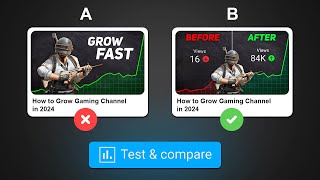

YouTube's New Thumbnail A/B Testing is HERE!
48sThe excitement of a long-awaited feature launch grabs attention, and the promise of revealing how it works and personal test results creates curiosity.
▶ Play Clip"Delivers on the promise of explaining the new feature with practical examples, though some parts are repetitive."
YouTube has launched a new 'Test and Compare' feature that allows creators to upload up to three thumbnails for a single video and run an A/B test to determine which one generates the most watch time. The video explains how to enable and use this feature, how the testing process works, and the different types of results creators can expect, along with practical insights from the creator's own tests.
YouTube has launched a feature called 'Test and Compare' that lets creators upload up to three thumbnails for a video and run a test to see which one gets the most views and engagement.
To access Test and Compare, go to YouTube Studio on desktop, open any video's details page, and click the three dots in the 'Thumbnail' section. The option to 'Test and Compare' will appear.
If the tool is not available, the channel may not have Advanced Features enabled. Go to YouTube Studio Settings > Channel > Feature Eligibility and enable Advanced Features. If still missing, wait as YouTube is rolling it out gradually.
Creators upload three thumbnails (A, B, C) and start the test. YouTube shows each thumbnail to different viewers at the same time and measures which one generates the most watch time.
The time to complete a test depends on two factors: the number of impressions (more impressions = faster test) and thumbnail diversity (more visual difference = faster conclusive results). Average completion ranges from a few days to two weeks.
Results can be: 1) Winner – one thumbnail significantly outperforms others; 2) Preferred – one performs better but not conclusively; 3) None – all thumbnails perform similarly, and the originally selected thumbnail remains default.
YouTube's tool runs tests concurrently (different viewers see different thumbnails at the same time), while third-party tools often test sequentially, which can lead to inaccurate results due to changing audience composition.
YouTube emphasizes that a good thumbnail creates correct expectations, leading to longer watch time. The tool optimizes for watch time share rather than CTR, as watch time is a stronger signal for the algorithm.
The creator tested thumbnails on their own channel. Thumbnail B won with a 36.8% watch time share, despite initial expectations that C would perform poorly. Subsequent tests also produced clear winners.
Running the same test multiple times can yield different winners because audience composition changes over time – early impressions come from subscribers, later ones from new viewers. Context matters when interpreting results.
The creator always makes multiple thumbnails per video and will now use Test and Compare to test variations, switching to the best performer to improve CTR and watch time.
The Test and Compare feature is a powerful tool for optimizing thumbnails based on watch time, not just CTR. By understanding how it works and interpreting results in context, creators can significantly improve their video performance.
What is the 'Test and Compare' feature on YouTube?
It allows creators to upload up to three thumbnails for a video and run a test to see which one gets the most watch time.
How do you access the Test and Compare tool?
Go to YouTube Studio on desktop, open the video details page, and click the three dots in the Thumbnail section.
00:36
What are the two factors that affect test completion time?
Number of impressions and thumbnail diversity.
01:37
What are the three possible result types in Test and Compare?
Winner, Preferred, and None.
02:09
How does YouTube's tool differ from third-party A/B testing tools?
YouTube runs tests concurrently (different viewers see different thumbnails at the same time), while third-party tools often test sequentially.
03:17
Why does YouTube optimize for watch time instead of CTR?
Because a good thumbnail creates correct expectations, leading to longer watch time, which is a stronger signal for the algorithm.
04:15
What was the watch time share of the winning thumbnail in the creator's test?
36.8%.
05:55
Why might running the same test multiple times give different results?
Because audience composition changes over time – early impressions come from subscribers, later ones from new viewers.
06:29
New YouTube Feature Launch
Announces a highly anticipated feature that many creators have been waiting for.
Watch Time Over CTR
Explains a key shift in how YouTube evaluates thumbnails, which is crucial for creators to understand.
04:15Audience Composition Changes
Highlights a subtle but important factor that can affect test results, helping creators interpret data correctly.
06:29[00:00] व्हाटेफ़ यूट्यूब को माल्टिपल थमनेल्स दो और वो खुद बता दे कि किस थमनेल्से आपके वीडियो पे ज्यादा व्यूज़ रहेंगे ये एक ऐसा फीचर है जिसका इंपेजार पूरे यूट्यूब कम्यूनिटी को एक स्टाल से था और अब ये फाइनली लॉन्च हो चुका है
[00:12] इसको आल्ड एस एन कमप्रेयर ये फीचर क्या है, काम कैसे करता है आप इसे अपने चानल पर टेस इनेबल कर सकते हो ये सब कुछ आज डिटेल में समझेंगे और मैंने खुद इसे अपने चानल पर भी टेस किया
[00:24] जिसका result मैं आपको show करूँगा Let's begin तो अगर बिलकुल brief में बताना हो तो Test and Compare एक ऐसा tool है जिसके आप अपने वीडियो पे अपसूर्थ 3 thumbnails लगा सकते हो और एक test run करके ये find कर सकते हो
[00:36] कि किस thumbnail से वीडियो पे सबसे ज्यादा engagement आएगा इसे एकसेस करने के लिए आपको YouTube Studio के desktop version पर जाना होगा और किसी भी वीडियो के video details page में जाके हमने उस section में three dots पर click करना होगा
[00:48] जहाँ पर you will get the option to test and compare अगर आपको यह tool नहीं मिल रहा है तो हो सकता है कि आपका channel made of this है या आपने अभी तक अपने चानल पे Advanced Features एनेबल नहीं किया है। इसके एनेबल करने के लिए YouTube Studio के Settings में जाओ
[01:01] और फिर चानल सेक्शन में Feature Eligibility टाब में जाके Advanced Features एनेबल कर दो। अगर इतना करने के बाद भी आपको ये Feature नहीं मिल रहा है, तो कुछ दिन और वेट करो क्योंकि YouTube ने ये सभी creators के लिए roll out करना शुरू कर दिया है
[01:13] अब चलो डिटेल में समझते हैं कि ये feature काम कैसे करता है लेकिन आपने एक वीडियो के लिए 3 thumbnails बनायें A, B और C जिसे आप test and compare tool में upload करते हो और test को start करते हो
[01:25] टेस्ट कार्ट होते हैं, YouTube तीनों थमनेल्स को सीन टाइम पर डिफरेंट वियोर्स के साथ टेस्ट करेगा और ये देखेगा कि किस थमनेल्स से वीडियो पर सबसे ज़ादा वाच टाइम आ रहा है एक average test को complete होने में कितना time लगेगा
[01:37] यह mainly दो factors पर depend करता है पहला है number of impressions वीडियो पे जितने ज़ादा impressions आएंगे एक test उतनी ज़वरी complete होगा because logically ही सोचो more impressions मतलब more data और जितना ज़ादा data होगा
[01:49] उतनी confidence के साथ YouTube कह सकता है कि test के results accurate है दूसरा factor है thumbnail diversity टेस्ट किए जाने वाले थम्लेज में जितना visual difference होगा complete On average complete time It can range from a few days to two weeks But of course test stop if you want
[02:09] फिर जैसे ही आपका test complete होगा, तो आपको 3 अलग-अलग तरह के results मिल सकते हैं. Result type 1, winner. Result type 2, preferred. And result type 3, none. अगर आपको पहला result type मिलता है तो YouTube सभी thumbnails में से किसी एक को winner declare करेगा
[02:25] let's say thumbnail C winner है तो it means कि thumbnail A और B के comparison में इस thumbnail से significantly ज्यादा बहुत time आया आपके वीडियो के और यह YouTube बहुत confidence के साथ कह सकता है so in this case YouTube will make this your default thumbnail
[02:39] let's say आपको result type 2 मिलता है यानि कि preferred और इस बार भी assume करते हैं कि YouTube thumbnail C को password declare करता है तो it means कि इस thumbnail ने बाकी दोनों thumbnail के comparison में
[02:52] अच्छा तो perform किया बट उतना भी नहीं किया कि हम इसे winner declare कर दें तो हो सकता है कि ये thumbnail actual में better engagement देता है बट हम ये पूरे confidence के साथ नहीं कह सकते और finally अगर आप एक test का result type 3
[03:05] यानि की ना नाता है तो इस mean की सभी thumbnail का performance almost एक जर्साई था इस case में जो thumbnail आपने सबसे पहले select किया था उससे ही वीडियो का default thumbnail बना दिया जाएगा पर of course you can always change it
[03:17] अब यहाँ notice करने वाली बात यह है कि YouTube का test and compare tool traditional AV testing tool से थोड़ा different है जो की third party sites बनाता है जहाँ test and compare कंपेरिंग basis पे test run करता है
[03:29] वही third party tools sequential basis पे test run करता है लाइक मानलो हमने दो thumbnail की हैं test करनी के लिए तो YouTube का test and compare tools same time पे different views के साथ different thumbnail को test करेगा यानि की same time पे एक viewer को thumbnail A दिख सकता है और एक को B
[03:44] वही अगर third party A B testing tools होंगे तो हो सकता है कि वो thumbnails को sequence में test करें यानि कि अगर 2 दिन लगे test run करने में तो like first day पहले thumbnail को test कर लिया और next day दूसरे thumbnail को
[03:56] और फिर जिसने अच्छा perform किया उससे winner बता दिया और यह तरीका बहुत बार गलत reserve की दे सकता है comparison test and compare is better difference test and compare tool winner declare third party A testing tool CTR basis winner choose Now you might be confused
[04:15] Because थनेल को ज़िस्ट करने का मेट्रिक तो CTR है, right? Well, YouTube का कहना है कि एक अच्छे थनेल का purpose फिर लोगों से वीडियो पर click करवाना नहीं है एक अच्छा था मेल विवियोर्स के माइंड में सही expectations create करता है about the video
[04:28] और उन्हें ये समझने में मदद करता है कि विडियो actual में है क्या और of course अगर विडियो viewers के expectations से match करेगा तो वो उसे ज़ाड़ा बेर तक देखेंगे and as a result आपको मिलेगा ज़ाड़ा watch time
[04:41] और वहीं यंट्यूब लोक्षण का दुपाद लेंगे लेंगे अगर आपको जो विश्वासते हैं, तो ज्यादा विश्वासते आने आपको बहुत फ्राई आता है और ज्यादा अफिर विवीडियो पर पहले कहाँ शुरू करेंगे तो आप यहां पर अपने प्रश्न के लिए देख सकते हैं कि टेस्ट में जो थमनेल विनर है, उसने CTR बेसिस्टे भी बाकी थमनेल से बेटर परफॉर्म किया है।
[04:58] अच्छा, चलो, थिओरी बहुत हो गई, अब थोड़ा practical करते हैं। तो पहले test के लिए मैंने अपना channel name वाला video लिया जिसके लिए मैंने 3 different thumbnails पनाया था first of all, thumbnail C अच्छा perform नहीं करेगा ये मुझे पहले नहीं लग रहा था
[05:10] क्योंकि इसमें बहुत empty spaces है and bright elements की कमी के वजह से ये dull भी लग रहा है इसके comparison में thumbnail A और B बेटर है क्योंकि इनमे ये text है जोकी empty spaces को fill कर रहा है and also इनका bright green color बहुत ही attention grabbing है
[05:25] इनमे से बेटा कॉन है तो दोनों ही अलग लग बीजन से attractive है like first वाले में recognizable elements है वहीं दूसरे वाले में bright red YouTube logo है जोकी green का complementary color है so yeah exactly दो दिन बाद मुझे test के results मिले
[05:39] और अगर आप पहले थमनेल C को सबसे कम वाच टाइम शेयर मिला अब बेस्ट रन करने से पहले I was expecting कि मुझे result में एक preferred thumbnail मिलेगा इन दोनों में से बट somehow the winner is thumbnail B जिसका watch time share है 36.8%
[05:55] तब I ran another test जिसमें मैंने दो completely different thumbnails किये और once again result में हमें clear winner मिला फिर एक और टेस्ट किया with two completely different thumbnails and we got a clear winner and winning thumbnail watch time share high but of course test I also got result type 2 preferred result type 3 none
[06:17] जब दोनों थमनेल में same perform किया अच्छा इस विरूरी बात बता दू कि sometimes it's possible कि आप same test को multiple times turn करो and आपको different results मिले example first test में थमनेल A winner हो सकता है
[06:29] और उसी test को दुबारा run करने पर thumbnail भी winner हो सकता है We know कि एक video का audience composition time के साथ change होता है Video upload करने के बाद शुरुआत में जो impressions of views आएंगे वो mostly उन लोगों के होंगे जो आपके subscribers या returning viewers हैं
[06:44] वहीं बाद के impressions of views mostly new viewers पर आता है तो मान लो अगर आप एक test वीडियो upload होने के first day पर run करते हो और दूसरा test एक हफ्ते बाद run करते हो तो ऐसा हो सकता है कि शायद आपको दोनों test में different results
[06:58] या completely opposite results भी मिलते हैं और अगर आप सोचो तो ऐसे ही कितने सारे reasons हो सकते हैं जिससे हमें conflicting test results मिल सकते हैं तो जब भी आपको एक test run करो तो ये भी ध्यान में रखो कि किन circumstances में वो test run हो रहा है
[07:12] ताकि आप उसके results को सही से judge कर पाओ I'm sure अभी तक आपने भी सोच लिया होगा कि इस feature को आप अपने चारों के लिए कैसे use करोगे अगर मैं अपनी बात बताओ तो I always make more than one thumbnail for every video
[07:24] अगर एक पहला वाला अच्छा perform नहीं करता है, तो I can switch to the other one. अगर वो भी काम नहीं करता है, तो I can switch it again, basically until I get a good CTR. अब usually इन सभी में से एक thumbnail अच्छा होता है,
[07:36] जो मुझे सबसे ज्यादा पसंद होगा, जो मैं सबसे पहले use करूँगा. लेकिन आपको भी विशेष के बीच में बहुत खुशी होता है क्योंकि वह दोनों ही इतने अप्राक्टिव होते हैं तो ऐसे में पहले तेस्ट और पंपेयर का विशेष करता है
[07:48] अगर मैं एक वीडियो के लिए बहुत बहुत बहुत बहुत बंद बनाओ तो भी एक थमनेल के multiple variation जरूर बनाता हूँ और अब से I'll always be testing these variations with this new feature to get the best possible thumbnail
[08:00] अल्लाइट, so अगर इस feature से related कोई और question है तो comments में पूछ सकते हो and I'll try my best to answer it इसके अलावा आप ये details direct देख सकते हो on how to make viral YouTube thumbnails
[08:13] and yeah, मैं आपसे वही मिलूँगा Bye

⚡ Saved you 0h 08m reading this? Transcribe any YouTube video for free — no signup needed.