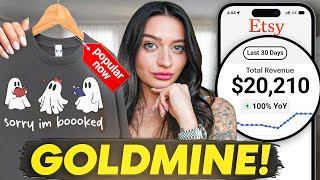

This Etsy Product Made $20K/Month
43sReveals a shocking income figure from a simple product, sparking curiosity and desire for passive income.
▶ Play Clip"Title promises a $20K/month method and delivers a solid tutorial with real data, though the income claim is anecdotal."
The video explains how to make money on Etsy by selling embroidered print-on-demand products, highlighting the high demand and profit potential. The creator demonstrates the process of designing embroidery-safe graphics using Canva and Printify, and creating realistic mockups with AI tools, emphasizing that simple text-based designs can be highly profitable.
The video introduces embroidery as a new method for print-on-demand sellers, claiming it requires less design experience and can be created faster than DTG printing.
Embroidery uses thread instead of ink, so designs don't need to be super intricate. This makes it easier for newer sellers to create products.
Embroidery products can be sold at higher prices, increasing profit margins compared to standard DTG printing.
Using EverBee Chrome extension, the creator shows that 'embroidered sweatshirt' has 3,600 monthly searches on Etsy, indicating high demand.
An example of a simple embroidered sweatshirt saying 'in my sourdough era' generates $20,000 per month in revenue, proving simple designs can sell well.
Embroidered products are perceived as higher quality, which justifies higher prices and increases sales.
Sellers should list holiday-themed products early (e.g., Christmas items before October) to capitalize on demand.
Avoid intricate images, photos, gradients, and transparency. Use simple images with limited colors and follow Printify's guidelines for thread width.
Embroidery is limited to a specific number of thread colors. Printify provides a color guide with hex codes to ensure accurate color matching.
The creator demonstrates designing an embroidery-safe graphic in Canva, using the Gilton 18,000 sweatshirt from Printify with dimensions 300x800.
Use Canva's vectorize tool to simplify images to six colors, then replace colors with Printify's thread hex codes for accurate printing.
Add simple text like 'Sorry I'm Booked' to the design, ensuring the font is not too complicated for embroidery.
Remove background, download as transparent PNG, and upload to Printify. Use the correct color codes to avoid color mismatches.
Use Canva's KD Flow feature to generate realistic embroidered mockups from the design, which can be used on Etsy without ordering samples.
Printify performs digitization to prepare files for embroidery. It's recommended to order samples to ensure quality, and be aware of color changes.
Embroidery is a lucrative opportunity for Etsy sellers, especially with simple designs and proper use of tools like Canva and Printify. By following the guidelines and leveraging AI for mockups, sellers can create professional-looking products without heavy design experience.
What does DTG stand for?
Direct to garment print.
00:54
What is the monthly search volume for 'embroidered sweatshirt' on Etsy?
3,600 searches per month.
02:26
What is the revenue example for the 'in my sourdough era' sweatshirt?
$20,000 per month.
02:53
Why are embroidered products perceived as higher value?
Because embroidery is associated with higher quality.
03:47
What are the design limitations for embroidery?
Cannot use photos, gradients, or transparency; must avoid intricate details.
05:57
What is the recommended number of colors for embroidery designs?
Six colors or fewer.
08:23
What is digitization in Printify?
The process of making your file ready for the embroidery machine.
15:14
What tool is used to get Etsy search data?
EverBee Chrome extension.
02:13
What are the artboard dimensions for the embroidery design?
300x800 pixels.
07:28
What is the purpose of using KD Flow?
To generate realistic embroidered mockups using AI.
13:25
Simple Design, Huge Revenue
Demonstrates that a simple text-based embroidered sweatshirt can generate $20,000/month, proving the potential of this method.
02:53Perceived Value of Embroidery
Explains why embroidery commands higher prices due to perceived quality, a key insight for pricing strategy.
03:47Design Guidelines
Provides actionable rules for creating embroidery-safe designs, crucial for avoiding costly mistakes.
05:06AI Mockups
Introduces a time-saving method to create realistic mockups without ordering samples, reducing upfront costs.
12:43Digitization Awareness
Highlights the importance of understanding Printify's digitization process to ensure product quality.
15:14[00:02] start making hundreds of dollars a day, especially on Etsy. And in today's you, give you all the information that you need to know, and talk about why I feel that this product has so much potential, and talk about the ways that
[00:15] I've seen it transform my store and other sellers stores. And we're going to get into some data and how to create products with this method. If you're new videos talking about e-commerce, passive income, and different ways to make money
[00:27] I'd love for you to be a part of our community here on YouTube. And I think that with this new method and what I'm referring to is embroidery, I think there's so much more opportunity, especially for newer sellers, because
[00:42] this type of technique actually takes way less designing experience, believe it or not, and is something that you can create faster than you would say your typical DTG printing. So, with print on demand, the typical way of printing,
[00:54] especially if you use a print supplier like Printify, is going to be DTG, which stands for direct to garment print, meaning that they press the ink directly into the product. But with embroidery, we're actually having the products
[01:07] embroidered for us on demand. And of course, that's using thread. And so, with that comes a different type of method in printing. But it's really nice because we don't have to get all super intricate with our colors and our
[01:19] designs. And on Etsy, the embroidery demand is huge. So many people are buying embroidered products, whether it's sweatshirts, hats, different types many products that can be embroidered,
[01:32] to spend more money. And so, I do think this gives us a bit more chance to make more in profits with print on demand as well. And if you're not familiar with print on demand because we're doing this with a print supplier, you don't need a
[01:46] crazy machine to sell embroidered products. That used to be what made nonPOD sellers stand out on Etsy, but now that we have more resources to actually sell embroidered products ourselves, like I said, these profits
[01:59] are growing and it's being really great of a thing to incorporate on your online store. So, for reference on Etsy, if I just typed the word embroidered and then started with an S for shirt, sweatshirt, you can see here that there are a lot of
[02:13] monthly searches for embroidered sweatshirt. So, this right here is my EverB Chrome extension. That is a Chrome extension that gives me data based on the description for you if you want to try it out, but it's showing us that
[02:26] three or 3,600 people are searching for that a month. So, clearly, it's something that people want, right? And as we can see, there are a few lot of them are pretty simplistic
[02:38] designs. And you'll notice with embroidery that a lot of it is actually text. So it can literally just be textbased designs that start making you that I can already see the data is insane. Okay, it is in 20 plus carts and
[02:53] they've sold a,000 of them. And if we use the analyze listing tool here and we see what's going on, they have made $20,000 a month in revenue selling this embroidered sweatshirt that says in my sourdough era. Now, not to knock this
[03:07] because clearly they're making money. But I can be the first to tell you that that design probably did not take a lot of time or effort to create. Sure, there want it, but it's just really interesting to me because simple designs
[03:20] do sell and I think sellers forget that and they try to like make these super intricate designs and really it all boils down to how you sell the product just a reminder there of that. But $20,000 a month with an embroidered
[03:33] sweatshirt. Now, I would argue that if this just said in my sourdough era in a typical flat print, I do not think it would be selling to this extent because it automatically makes people think that the product is more of value because it
[03:47] is embroidered. Embroidered things have the overall idea that they're nicer or higher quality, even if it's the same sweatshirt. We have a more intricate design over here that is a Christmas tree, which yes, are already selling in
[04:00] it's not even October, but it's in 20 plus carts. It says merry and bright really beautiful design. Take a little peek at this one. Two-month listing. definitely a reminder there too to start listing your holiday stuff soon. We
[04:14] always want to be a little bit ahead. We have one here that says make heaven crowded. Again, just those text words. They're doing about $400 a month in revenue. And you can go through and scroll this too to get a better idea of
[04:26] something that you want to check out in your niche. You want to see if products are selling and you know what the designs are, what they say. Here's one that's cursive and says over stimulated doing $2,900 a month in revenue. So
[04:40] overall here, we don't need super intricate designs. We just need to incorporate it with our actual niche or even a trend that people are buying embroidery guide because if you've never sold embroidered products, even though
[04:54] I'm saying that it is easier to create the designs for them, there are some when you're creating embroidered your mock-ups as well that it's a little bit different. And so, I'm just going to
[05:06] give you a few pointers on this so that you can be a pro and list even faster. So, when we're embroidering, we want to use images if we are going to use images that are not super intricate. So, right here's a great example. It's just a
[05:18] ramen bowl. There's not a ton of colors, right? It's pretty basic here. And then there's some text below it. So, that's a great example there of what I mean by not super intricate. Printify also does give you a guideline here of how you
[05:30] want to follow specific lines because when we're printing with thread, it is something that we can't really change how wide our actual thread is. It's one thread. So, we need to be aware of their guidelines so that things print really
[05:44] well and so we don't have to order 100 samples to make sure if we just make going to be able to have a well printed product. So, we can't do photos or gradients. As you can see here, this is something that would not be able to
[05:57] could be. So, just basically remembering that you can't do it super intricate and you'll be fine. Also want to stay away from transparency inside of something. They filled in the eyeballs rather than just having it transparent because then
[06:12] the actual product because transparent does not equal white. Okay? So, they're not going to print that with white eyes. It'll just be the fabric beneath it. Also, with embroidery, because again, we're using thread. We don't have the
[06:26] luxury of using tons of different colorways, right? When we're using thread, we have a specific amount of thread that we have to be able to give Printify the means to create for us. With embroidery, we are going to be a
[06:38] little bit more limited. But again, because our images are less intricate, it's really not that big of a deal. So, Printify does give you the full color guide of thread that they have along with your hex codes. These are going to
[06:50] come in handy later on. I will leave a link to this guide below. I'm going to show you the way that I create and I think that you will find this helpful. you do want to check it out. Now I'm on Printify and I'm just going to find a
[07:03] sweatshirt that I want to embroider so I can get the dimensions for it. I'm going to go with the Gilton 18,000. This is a best-selling sweatshirt. And what's cool about it is Printify just made it so we can print large embroidery text across
[07:15] the sweatshirt which gives us a lot more to work with. So on here I'm just going embroidery and then I'm going to select either provider. I like using Printful for this. Okay. And then we're going to get our embroidery dimensions. So 300
[07:28] by800 that is our artboard that we can design in. So I've gone right over to KD and I'm going to click on new project. And I'm going to type in those exact dimensions. Okay. Create. So this is our full artboard that we can design in and
[07:42] still have a highquality image to upload for Printify to print for us. And we our artboard, right? And I just brought in this cute ghost image here. And you can get images from lots of different places. You can find different images
[07:57] and graphics in your KD elements tab. You can use KD's new AI tools that are incredible to make images like this. And you can also source them from different designers or other sites like Creative Fabrica as long as you have a print on
[08:11] demand license or the rights to use the image. I have some design tutorials I'll with that. But I'm going to show you what to do if you have an image like this and how to make it embroidery safe. So on my image here, I'm going to go
[08:23] So on my image here, I'm going to go over to the vector option on KD and I'm going to select vectorize and I'm going to ask it to make it six colors and hit vectorize image. Okay, perfect. So now I'm able to change the colors of this
[08:35] actual image because right now if I were to put this into Printify, it would not know which colors to use for the ghosts or the books. So, I'm just going to make it a little bit larger, and I'm going to go back over to my Printify colors here,
[08:50] and I'm going to grab the exact color codes for the colors I want. So, I want white, which is FFF. And I'm going to go select the ghosts, click the color on here, go to hex code, and paste the white. Just filling in everything white.
[09:05] See there? Okay. And then select again, and then everything purple I can change to the purple color code. Okay. So now we know that that's the purple that's going to be on there. And then we do the same for orange. And no matter what your
[09:19] design is, whether you're creating it, whether you're using AI, you want to that I'm doing. So it changed the color pretty like a lot, right? But it also is grabs the correct thread color. And then the black's good, the white's good. Just
[09:34] have anything here that looks a little funky, you can just use your eraser funky, you can just use your eraser tool.
[09:47] add to this a little bit. So I'm just going to type bow. See if I can find a going to type bow. See if I can find a pretty simple bow here.
[09:59] And then I'm going to do the same again with the colors. image. I'm going to grab everything and group it. So, that way I can add some
[10:15] text. You can either add text in here or you can add it in Printify. They do have a feature to do that, so it's up to you. Okay. Okay, I'm going to put sorry I'm booked meaning like booked.
[10:36] Okay, cute. Pick our font. And again, when picking our font, we want to make sure it's not something that is going to be too complicated. Like, see how this one has different weight in the text? We're not going to choose that
[10:50] because it's a little complicated for it to be printed on the embroidery machine. kind of want to just give it a little bit of a wave.
[11:06] white so it shows up on all the colors. And then do the process of what we do normally with the design. Remove background and download as a transparent PNG. And then we can upload it directly into Printify. So this design hits the
[11:20] to be having something that's printed incorrectly. And then we'll just do the normal basic steps of being the colors that we want. And then once I have my colors picked, I'm just going to hit preview and check that the design did
[11:34] using thread again, that's why we use the specific color codes. Printify is color that you brought in to your design. So, if you don't use the color codes, it may bring them in incorrectly. I was having an issue with that before
[11:48] showed you the correct way to take it that way it'll print right. And they also are going to reduce your colors to six colors. Sometimes I've noticed that it also reduces them a bit too. So, just
[12:02] this image, it took the pink and actually made it into an orange bow, think it's cute. But if I wanted to change that, I would go back and have to just something that you'll notice when you are doing this. So sometimes the
[12:16] colors can get a bit confusing and it will simplify it. So don't think in your 15 of the colors because Printify is only allowing us to use, I believe it's just keep that in mind when you are creating this. And then also what's cool
[12:30] about this is I even could have done this with just Sorry, I'm Booked. And own. It didn't even have to be as intricate with the ghost, but obviously another important thing to consider when we are selling embroidered products on
[12:43] Etsy or wherever we're selling them is that we are going to need mock-ups. And ways to do them so that you don't have to order a ton of samples cuz with print on demand, our costs are relatively low. But I just came across a really cool new
[12:56] way to create the mockup photos for embroidered products. So once our design saved, we're going to go back to KD and we're going to hit new project and we're going to design in our artboard for our actual Etsy mockup.
[13:09] We're going to do 3000x 2025. Okay. And I'm going to bring in my image here. And I'm going to make the background black because that way we're Perfect. And then I'm going to highlight this and use KD's new KD flow feature.
[13:25] And how this works is we can create multiple designs and mockups. based off of one image using AI. And it's really cool to use. And then once my Smartboard's here, I can give this a prompt to create the actual image for
[13:38] me. So, what I'm going to do is type over here, make the design look embroidered on a black background.
[13:51] way by saying, make the design embroidered on a sweatshirt and give the color. that also will make a mockup for you, which is really cool. But I want to use just the image so I can put it on the mockups that I've already purchased
[14:03] and that I know sell well on Etsy. Okay, so now when I zoom in, you see the like a normal printed design. This one is actually embroidered looking. And that's what we need in order to have our design to like really, you know, sell
[14:17] so now what I'm going to do is hit convert to image. And now it's an image.
[14:35] embroidered image. Like how cool is this? And so now I can bring in my actual mockup photo. And then if I dragged my image over, you can see I really great. And then when we zoom in, we can see that embroidered texture that
[14:49] it actually gave the design so that it looks real and a customer can tell like, So that's how you would make your embroidered mock-ups. And then you can add them in on Printify. So I'm just going to download this and then you can
[15:02] either add them in here when you do your mockups or you can add them on Etsy as it'll overall give you that embroidered look that Printify is going to be giving those samples. And once you have your products uploaded, you can order
[15:14] samples. Just know that Printify will do something called digitization, which is where they're making your file ready to go for the embroidery machine. So, the difference in the designs, how it might switch your colors up. It may
[15:27] sometimes ask you to approve a design before they send out an order. So, just be aware when you are in your Printify dashboard, when you have orders coming you can double check them. And if you have any worries, you can always message
[15:39] Printify or order a sample just to be sure. But with all the different be good to go. Thank you so so much for watching. Let me know in the comment this out. This method will work for any of the embroidered products. Some of my
[15:52] I absolutely love them. The dad hats, I've made quite a few videos on those so far. Definitely would get into making different beanies as well for the holiday season. Sweatshirts. I'm hoping that we see stockings become something
[16:07] that we can embroider. So stay tuned for that. But we know, you know, with all definitely something with embroidery is going to be beneficial on your store, much for watching. Everything I talked about and referenced will be in the
[16:22] about and referenced will be in the description box below.
⚡ Saved you 0h 16m reading this? Transcribe any YouTube video for free — no signup needed.