
Stop Trading in Circles: Use Data
60sDirectly addresses a common trader pain point with a strong hook and actionable advice.
▶ Play Clip"Delivers a practical walkthrough of the dashboard, though it's essentially a product demo with some generic trading advice."
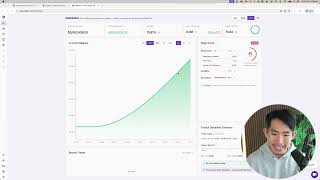
This video explains how to use the Edge Flow trading dashboard to review trading metrics and improve performance. The creator emphasizes that the purpose of reviewing statistics is to gain clarity on what is working, what is leaking, and what to fix next, rather than chasing numbers for validation.
Journaling captures events, but the dashboard reveals patterns. The goal is clarity on what works, what leaks, and the one thing to fix next.
Choose a review period: today, 7 days, 30 days, 90 days, year-to-date, or all time. Today is for end-of-day, week for recent patterns, longer for bigger picture.
Stats reflect closed positions only, not open positions or equity. Key metrics include total closed P&L, win rate, and profit factor.
Check if P&L is positive or negative. If negative, determine if it's due to rule violations or normal variance. Focus on improvement over time.
Win rate alone is meaningless without average R per trade. Low win rate (20-30%) can still be profitable if capturing 1:5 or 1:10 R trades.
Positive R means execution is not leaking; negative R signals a broken strategy or execution. This is the most important metric in the column.
Profit factor above 1 means profitable; higher indicates cleaner execution and better trade quality. Zero means no wins yet.
Edge score grades execution and discipline, not just P&L. It has three parts: performance, discipline, and consistency. Detailed breakdown in next video.
Look at the equity curve trend: smooth or choppy, up or down. Spikes or dips can indicate overtrading, revenge trading, or rule breaks.
Changing time frame affects metrics and equity curve, but not edge score (based on past 100 trades), today's discipline summary, or recent trades (based on today/24h).
Recent trades show last 24 hours; guardrails show rule violations and discipline notifications.
Spot patterns that make money or bleed you dry. If average R is negative, improve risk-reward; if win rate is low, be more selective (A+ setups). Pick one focus, execute, review.
The dashboard is a high-level trading performance snapshot. Regular review of metrics, especially average R, helps identify leaks and guide focused improvements.
Dashboard Reveals Patterns
Establishes the core philosophy: review data to gain clarity, not to chase numbers.
00:07Average R per Trade is Key
Identifies the single most important metric for spotting execution leaks.
03:38Edge Score Grades Discipline
Clarifies that the score measures execution and discipline, not just profitability.
05:16Fix Patterns Before They Become Default
Emphasizes proactive improvement over passive stat-gazing.
08:14[00:07] Journaling captures what happened, but your dashboard shows the pattern. statistics on the dashboard isn't to feel good or to chase a number, it's to get clear. Clear on what's working, clear on what's
[00:22] leaking, and clear on the one thing that you need to fix next. Because if you don't review your data, you're basically trading in circles and calling it So, in this video I'm going to walk you through how to review your metrics on
[00:36] the dashboard, how you can turn your trading into clear feedback, spot leaks early, and choose one thing to focus on to improve. So, on Edge Flow there's this feature called the dashboard, which shows you
[00:48] level. This is pretty much a reflection of your thing you want to do over here is to select the time frame that you want to review the metrics on. Today, 7 days, 30 days, the past 90 days, year to date,
[01:03] and of all time. Right, so today is obviously for end of day. Week is obviously to see the recent patterns for the past few to for the past 7 days or to see like the bigger picture performance. The stats right here, it
[01:18] reviews your closed positions, okay? Like just to set this expectation up front, this is your closed P&L. It doesn't take into account your open positions. This is also not your equity, this is your account balance, which
[01:31] takes into account all the positions that you have closed. And also your win and your profit factor. Right, the first thing you want to look at is obviously the total closed P&L, right? Is it positive or is it negative?
[01:44] If it's positive, then good. If it's negative, all right, you're down, right? Maybe you can think about how you can actually make sure that you get back up. ask yourself is, is this trending the right direction over time? Right? Are
[01:59] negative, doesn't mean you suck at trading, doesn't mean you're better trading. You are just want to make sure that you are always improving. And then whether it's negative because you keep on violating your trading rules, or is
[02:13] it just normal variance, you know, just part of the game. Next is the win rate, right? Win rate is useful, but it's not the goal itself, right? This is where you can see a lot of like people we have a low win rate, but because they capture
[02:26] right? That means they're capturing these 1:5 R, 1:10 R trades, which means they're they're winning 10 times uh of like what they are risking. This is where you can see even they have like a low win rate, like a 20% to 30% win to
[02:41] 30% win rate, and they're still wildly profitable because they are making a lot compared to um you know, like just losing a little bit of money when they trading style, right? Just understand that win rate alone means nothing
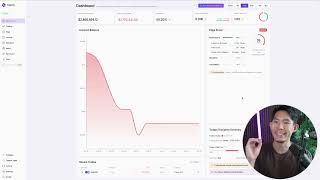
[02:55] without your average R per trade. Now, this is just an example, right? I wanted to show you a red example and also like a green example. So, when it comes to like the old design, right? So, just ignore like the the stuff the
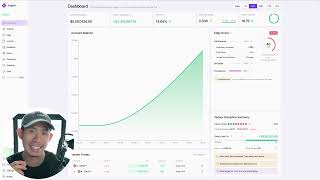
[03:09] the other dashboard. I just wanted to focus on the metrics right here. itself, the win rate is a little bit lower, right? But because of the fact that when I make money, I make a lot more money
[03:23] compared to when I lose money, this actually result in my account equity curve trending up, right? This allows me to actually have a profitable strategy. So, the most important metric, in my opinion, in this entire column is your
[03:38] average R per trade. When you have a positive R, just like this, this means execution is not leaking. If you have a negative R, just like this, this means that something is broken. Either your strategy is not
[03:53] working or your execution is not working or both. Right? So, as much as possible Because when you have a negative R, what this tells you is that you are losing more money compared to what you're actually making when you are actually
[04:07] just means that you are winning a lot more money compared to what you are Next up we've got the profit factor, right? So, anything above one simply means you are profitable, right? The higher the better.
[04:20] Higher basically means cleaner execution, better trade quality. And just means that you haven't actually won any trades yet, right? So, there's that. Now, one thing you must understand is that win rate is useless without average
[04:35] R multiple. Like I said, low win rate with a strong R multiple, right? Just like this, you can see in this case, low win rate, high R multiple, strategy. And you can also have a high win rate
[04:49] with a low R. What this means is that the strategy is good, right? You are winning a lot of trades, but you are cutting winners early you and you are letting losers hit a full stop loss, right? That means when
[05:02] you lose, you are losing big. When you are winning, you are winning small. So, doesn't mean that your strategy is profitable, right? If you are always losing more than you are winning. The best sign of a real strategy, a real
[05:16] edge, is when your average R is positive, one, and your edge score actually shows that your discipline is clean, okay? But this is something that we're going to cover
[05:30] what is edge score. For now, just understand that this edge it doesn't just grade your P&L. It doesn't just show you how much money you are are making, right? It It doesn't just say
[05:44] money, this score is going to get higher. No, it doesn't work that way. It grades your execution. It grades your discipline. Right, there are three parts to it. Performance, discipline, and consistency. Once again, I'm not going
[05:57] to cover too much about edge score in this video itself. We are going to do like a deep dive, like a breakdown of how to actually optimize your edge score next video itself. Now, I want to focus your attention on
[06:10] account balance next. Right, so when it comes to the account balance, this is where you want to be able to look at the trend of the equity curve. Is the curve smooth or choppy? Is it going up? Is it going
[06:25] down? Right, so just by looking at this curve alone, you can kind of like have a high-level overview of how you've been performing for the past few days or the past 24 hours. And then if you saw like one spike up
[06:40] you might want to ask yourself, okay, what caused the spike up? What caused over trading? Is it because you are revenge trading? Is it because you broke a rules and that resulted in you having like this big dip in your trading
[06:53] performance. So, that's how useful the equity curve is. I forgot to mention time frames over here on the top right-hand corner, it only changes the metrics on top and also the account equity curve itself.
[07:08] The edge score doesn't change because it's based on your past 100 trades, edge score doesn't change. The today's discipline summary and recent trades also doesn't change because those are based on what's happening today. Right,
[07:21] rules today and then this is based on the trades that you have taken in the past 24 hours. And like I said, this is based on your past 100 trades. So, when you adjust the time horizon, you will notice the change in the account equity
[07:35] curve and your metrics bar, your KPA bar at the top. Yeah, so that's pretty much Right, like I said, over here is quite self-explanatory, so I'm not just going to go go into it. This is like I said, it's just the trades that you have taken
[07:48] in the past 24 hours. All your recent trades will reflect over here. And then this is pretty much just your guardrails. Right, like whether you violated a guardrail today or not, and any notification just informing you on
[08:00] discipline-wise. So, that's the dashboard. Reviewing your metrics is how objective. The goal here isn't to stare stats, right? Isn't to like try to, you know, get these stats as high as possible so
[08:14] you can flex on Instagram. The goal here is to spot the pattern that's either making you money or bleeding you dry. And then fixing it before it becomes your default. Right, so if you notice your average R per
[08:28] know that, okay, I might need to actually make sure that I review the way that I'm making more money when I'm right and and losing less money when I'm wrong. Right? Or if your win rate is like down right now and you want to
[08:42] you can ask yourself, okay, can I be more selective when it comes to my trades? Right, can I make sure that I'm taking A plus setups instead of, you know, all these B and C setups which is causing me to have this low win rate?
[08:55] negative, not it can't really be negative, it can only be zero. But if it's like less than one, this is where you want to ask yourself, okay, profitable? What you want to do is to pick one
[09:08] focus, execute it, and then review it again. And later on when you learn how the edge score actually works, this is where we will give you a very structured framework that you can take to improve your trading performance, right, based
[09:20] on the stats that is reflecting on the trading dashboard itself. It's pretty much your trading performance at a glance, right? We have made it in a way where it's clean. It allows you to just look at the most
[09:34] actually matter to a trader, which is these five right here. In the future, we could add more advanced statistics and analytics for you to review, but for understand your trading performance at a high level.
⚡ Saved you 0h 09m reading this? Transcribe any YouTube video for free — no signup needed.