
AI Summary
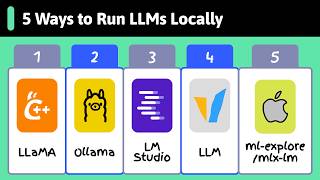
The video presents five tools for running large language models (LLMs) locally, emphasizing privacy and learning benefits. It covers llama.cpp, Ollama, LM Studio, vLLM, SGLang, and MLX LM, explaining their use cases and technical foundations.
Chapters
GLM family models are now strong enough to run locally, ensuring privacy. The video introduces five tools for running LLMs on personal hardware.
llama.cpp runs on CPUs, GPUs, and Apple silicon. It started as a side project to run llama on a MacBook and introduced the GGUF file format, which packs weights, tokenizer, and metadata, supporting quantization down to 4-bit for consumer hardware.
Ollama handles model downloads, quantization, and starts a local server. It exposes an OpenAI-compatible API, making it easy to switch from hosted APIs. It's the fastest path from model selection to calling.
LM Studio provides a graphical interface for running LLMs, wrapping llama.cpp. It shows hardware requirements, quantization options, and GPU offload settings, and allows browsing and comparing models easily.
vLLM is for production, high-throughput inference. It uses paged attention to split KV cache into blocks, freeing GPU memory, and continuous batching to increase throughput.
SGLang from Berkeley uses Radix Attention to cache shared prompt prefixes, making it fast for RAG and multi-turn chat. It's used by xAI and DeepSeek in production.
MLX LM leverages unified memory on M-series Macs, allowing large models to run efficiently. A Mac Studio with 192GB can load models that would require multiple GPUs on a PC.
For developers, use Ollama; for casual users, LM Studio; for production, vLLM; for Apple Silicon, MLX LM. llama.cpp is the underlying foundation. Running frontier models locally is now achievable in under an hour.
The video concludes that running frontier models locally is now feasible with the right tools, offering privacy and learning benefits. It recommends specific tools based on user needs and highlights the rapid progress in local LLM deployment.
Mentioned in this Video
Tutorial Checklist
Study Flashcards (6)
What file format did llama.cpp introduce for local models?
easy
Click to reveal answer
What file format did llama.cpp introduce for local models?
GGUF
00:34
What is the purpose of quantization in GGUF files?
medium
Click to reveal answer
What is the purpose of quantization in GGUF files?
It reduces model size to fit on consumer hardware, down to 4-bit and lower.
00:47
Which tool provides an OpenAI-compatible API for local LLMs?
easy
Click to reveal answer
Which tool provides an OpenAI-compatible API for local LLMs?
Ollama
01:28
What are the two techniques vLLM uses to increase throughput?
medium
Click to reveal answer
What are the two techniques vLLM uses to increase throughput?
Paged attention and continuous batching.
03:09
What is Radix Attention in SGLang?
hard
Click to reveal answer
What is Radix Attention in SGLang?
A technique that caches shared prompt prefixes using a tree structure.
04:05
Why is MLX LM efficient on Apple Silicon?
medium
Click to reveal answer
Why is MLX LM efficient on Apple Silicon?
It leverages unified memory, allowing large models to run without fitting in GPU memory alone.
04:50
💡 Key Takeaways
llama.cpp's origin
Shows how a side project became the foundation for many local LLM tools.
00:21Paged attention explained
Key technique for efficient memory usage in LLM serving.
03:09SGLang's Radix Attention
Innovative approach to caching shared prefixes, boosting performance for RAG.
04:05Tool recommendations
Clear guidance on which tool to use based on user role.
05:45Full Transcript
[00:02] GLM family are now a strong enough that you don't always need a hosted API. You can run them on your own laptop, so no one sees your conversation or data. no one sees your conversation or data. Here are five tools to run LLMs locally.
[00:21] runs on CPUs, GPUs, and Apple silicon. It started as a side project to run llama on a MacBook and grew into the foundation most other local tools are built on. llama.cpp also introduced a standard
[00:34] llama.cpp also introduced a standard file format for local models, GGUF. A GGUF file packs the weights, tokenizer, and metadata into one file, and supports quantization down to 4-bit and lower, which is what makes large
[00:47] models fit on consumer hardware. You download a GGUF from Hugging Face, run llama.cpp and provide the model and your prompt, your prompt, and you get tokens back. Use llama.cpp
[01:01] runtime, or when you are deploying to constrained hardware, like an edge device or a laptop without a dedicated GPU.
[01:14] that turns it into a developer tool. It handles model downloads, quantization choices, and starting a local server so you can chat with any LLM. You run Ollama run Gemma 4, it pulls the
[01:28] weights, it starts a local server, and gives you a chat prompt. manually. The server exposes an OpenAI compatible API, so any OpenAI client library works with a one-line base URL change.
[01:44] Pick Ollama when you want the fastest path from picking a model to calling it It's the most common starting point for engineers prototyping AI systems.
[01:59] running LLMs with a graphical interface. No terminal, no config files. Windows. Search for a model inside the app, click download, and chat. Under the hood, it wraps llama.cpp
[02:14] that shows you hardware requirements, quantization options, and GPU offload settings before you download anything. If a model is too big for your machine, it warns you upfront. LM Studio is the easiest way to browse
[02:29] and compare models. You can explore Hugging Face inside the app, see every available quantization, download a few, and switch between them without restarting anything. That's useful for figuring out which
[02:41] open model fits your hardware and task. Pick LM Studio if you are a casual user who wants a simple interface for chatting with LLMs.
[02:55] serve many users at once. Ollama is for fast prototyping. vLLM is for production, running high throughput inference across one or more GPUs. vLLM gets its speed from two main techniques.
[03:09] Paged attention is a memory-efficient version of the attention algorithm. Without paged attention, the KV cache is a stored as one memory. Paged attention splits the KV cache into
[03:23] fixed-size blocks that don't need to be contiguous in GPU This frees up GPU memory for larger batch sizes, increasing throughput and Continuous batching is a request scheduling technique for LLM serving.
[03:38] Without it, the GPU waits for every request in a batch to finish before starting the next. Continuous batching lets new requests join a running batch as soon as a slot opens up.
[03:50] Together, these two techniques can significantly raise throughput on GPUs. vLLM is the engine many companies run behind the scenes for internal chatbots, coding assistants, or batch pipelines. An alternative to vLLM is SGLang,
[04:05] a fast serving engine out of Berkeley's LMCS team. It uses a technique called Radix Attention, which relies on a tree structure to cache shared prompt prefixes across requests.
[04:17] This makes it especially fast for workloads like RAG and multi-turn chat, where prompts often share long common prefixes. SGLang is the engine XAI and many DeepSeek deployments run in production.
[04:31] Use vLLM or SGLang when you are past prototyping and need to serve a local model to real traffic, releasing a chatbot for a company, launching a coding assistant for a team, or running large-scale internal jobs.
[04:50] running LLMs on devices with M-series chips. memory. On a regular PC, the CPU and GPU have separate memory, and the model has to fit in the GPU's
[05:03] memory alone, which is usually a small. On an M-series Mac, the CPU and GPU share one big memory pool. A Mac Studio with 192 GB of memory can
[05:15] load models that would otherwise need several expensive GPUs on a PC. MLX LM is built to take full advantage of this. If you're on Apple Silicon Mac and want the best possible speed, this is the
[05:28] tool to use. So, which one do you actually use? with Ollama. As an AI user, use LM Studio. For production serving, go with vLLM. For Apple Silicon, MLX LM is a good
[05:45] option. And Llama.cpp sits underneath much of this stack if you need to go deeper or target unusual hardware. Running a frontier model on your own machine was unrealistic 2 years ago.
[05:58] Today, any of these five tools gets you there in under an hour. If you like these videos, you may like our AI engineering cohort as well. building from day one. Thousands of learners are already in.
[06:13] We cover fundamentals like reasoning LLMs and agents, and you'll build real systems like deep research workflows, rags, and web search agents with MCP. Check out the full curriculum link in the description.