
Why 99% of Traders Blow Up
50sOpens with a dramatic, relatable pain point about trading losses and promises a solution, creating high curiosity.
▶ Play Clip"Delivers exactly what the title promises: a practical, step-by-step guide to setting up guardrails in Edge Flow—no fluff, no bait."
This tutorial explains how to configure trading guardrails in Edge Flow to enforce discipline, prevent overtrading and revenge trading, and protect profits. It covers setting max trades per day, daily loss/profit limits, fixed risk per trade, and trading time windows, plus how overrides handle violations.
Most traders lose because they have no guardrails: one bad trade becomes five, and a red day spirals into a $10,000 loss in 30 minutes.
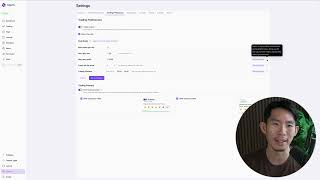
Access guardrails via Settings > Trading Preferences; keep them on and customize as needed.
Limits daily trades; recommended default is 5, but 3 for impulsive traders, 5 for systematic, 2 for the speaker (like 'two bullets').
Set at 2% of account balance; prevents compounding losses and forces a pause to re-evaluate. Example: $100 account → $2 loss cap.
Set at 5% of balance to lock in gains; optional but prevents giving profits back. Example: $1,000 account → $50 profit cap.
Use realized P&L only; triggers after positions close, not on floating losses.
Set fixed risk per trade (recommended 1%) for consistency; lot size auto-adjusts to match risk.
Optional: define a trading window (e.g., 9 AM–5 PM) to prevent trading outside optimal times.
When a guardrail is hit, trading buttons are grayed out; overrides require typing a reason, which is logged in the trading journal.
Friction increases awareness; violating guardrails repeatedly conditions the subconscious to avoid breaking rules.
Two bullets metaphor
The speaker treats trading like having only two bullets per day, forcing focus on only the best setups—a powerful mental model for restraint.
01:53Guardrails use realized P&L
Clarifies a technical detail that prevents confusion: guardrails trigger only on closed positions, not floating losses.
04:40Profit protection over maximization
Emphasizes that locking in gains is more valuable than chasing more profit, preventing give-backs from overconfidence.
03:30Override friction
Requiring a typed reason to breach a guardrail increases awareness and creates a psychological barrier against impulsive violations.
08:22Guardrails train the subconscious
Repeated violations leading to losses reprogram the mind to associate breaking rules with losing money, reinforcing discipline.
09:38[00:06] because their strategy sucks. They blow it because they have zero guardrails. One bad trade then into five. One red day turns into a spiral and suddenly you
[00:18] are down $10,000 in 30 minutes. So, in this lesson, I'm going to show you how to set your trade guard, which is also known as your trading guardrails in Edge known as your trading guardrails in Edge Flow in under 60 seconds. So, this way
[00:30] Edge Flow blocks the dumb decisions before you make them. Like it's there to prevent you from making stupid trades so you take unnecessary losses. settings and then go to trading preferences and this is where you are
[00:44] able to turn on or off your guardrails. Highly recommend to like just keep it on and this is also where you are able to fully customize your guardrails. So, these are the guardrails that is available inside Edge Flow. As time
[00:58] passes, we might introduce more guardrails. So, make sure you look out for that. So, the first guardrail is the max trades per day. This is pretty much your overtrading limiter. Whatever amount that you put in here, this is the
[01:12] number of trades that you are allowed to take on a day-to-day basis. So, the reason why we actually have this guardrail is because we want to stop you from revenge trading and overtrading. And once you hit this cap, new trades
[01:25] override, which I'm going to talk about that ability later on. Now, our recommended default is five trades per day. That's it. Why five? Because it's enough attempts to take A+ setups but low enough to
[01:38] If you are newer and you are more impulsive, I recommend you to stick to three. If you're advanced and much more systematic, five is solid. For me personally, I like to set it to two, right? I treat this as having certain
[01:53] to me, I only have two bullets out of the day, which means that once I shot those two bullets, if I miss the target, I'm done trading for the day. The next guardrail is the max daily loss. To me, this is the most important guardrail in
[02:07] the entire app because what you set in here will determine whether you go from a small loss to a big loss. Now, we recommend you to set your max daily loss at about 2% of your trading account balance. So, if your trading account
[02:21] have $100, your max daily loss will be $2. If your trading account have $1,000, your max daily loss will be $20. Now, the reason why we recommend you to set it at 2% of your account is because, once again, we don't want you to revenge
[02:34] trade and just compound your losses. So, we want you to stop after you have lost 2% of the account, re-evaluate the situation, come back to the market with a clear and focused mind so that you can continue trading and make the better
[02:47] decisions. So, 2% is just nice. It's not too much. It's not too little. It's just nice, which means that if you're risking 1% of your account on each trade itself, you only can incur two losses before you're done trading for the day. Once
[03:02] going from two loss to three loss to five loss and you blowing your entire account. Now, if you're more aggressive, you can probably use 3%, but 2% is like the sweet spot for consistency in my humble opinion.
[03:16] monetary amount. So, you need to do some calculation, okay? So, if your account have a a thousand dollars, like I said, this is where you put $20. So, whatever daily loss, you can just put it in here. And it's the exact same thing for your
[03:30] max daily profit. The reason why we have this is because we want you to lock in a good day and prevent you from giving your profits back to the market. How winning streak and you start getting overconfident, start getting euphoric,
[03:43] plan, and you think that you're invincible, and then next thing you know, you lose the next few trades, you give the profits that you have earned in the morning back to the market at night. This prevents that from happening.
[03:57] right? So, if you don't really want to have a max daily profit, you can set it to like a super duper high number that you probably will not hit. But, we recommend you to set it at 5% of your trading account balance. So, once again,
[04:10] using the $1,000 account balance as an example, this will be around $50. Now, if you feel like 5% is a little bit high, you can set it at 3%, but here is you just want to have a target, and once you hit that, you know that enough is
[04:25] day, and you come back to the market with a clearer mind tomorrow. The point here is to protect your profits, not max out the day. Now, note that both the max daily loss and the max daily profit is using your realized P&L, which means
[04:40] it's calculated based on the positions that have closed. It's not based on floating P&L, it's based on closed P&L, based on the realized P&L. So, if the based on the realized P&L. So, if the day I set my max daily loss at $20,
[04:53] and I open a trade, and I go to a drawdown of -40, The guardrail will only get triggered after I close the losing position, and now I lost $40 or $30 or $20, whatever. Whatever that exceeded this $20
[05:09] guardrail, this is where the guardrail will be triggered, right? So, this guardrail is pretty much using your realized P&L. Once again, not your floating P&L. Now, next up, you can set your fixed risk per trade. This is the
[05:22] discipline engine. So, I highly recommend you to set it to like 1% risk per trade by default, which means that you are literally just risking 1% of your total account on any given trade. This way, you have 100 bullets to play
[05:37] with. Now, having like a fixed risk per trade of just 1% per trade, just like this, keeps you consistent and stops you from randomly sizing up when you feel emotional. And also, your lot size will auto adjust to match the risk. So if you
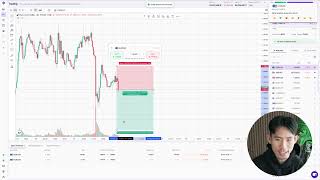
[05:49] start trading on the trading panel itself, and then this is where you whatever that I set in the settings right here, it shows up over here. Okay, so if I want to put my stop loss at 1.184, it automatically calculate the
[06:04] if you do want to change your risk per trade in here, you want to size up, you can always unlock this risk per trade module right here and turn it to like 2% size will automatically adjust to the new risk per trade. Now, the next
[06:19] restriction. This one is optional, but it's a cheat code if you struggle with impulse trades. It's a cheat code if you want to really make sure that you are which you want to be trading the markets. So this is where you can select
[06:33] a window in which you want to be trading within, right? So for example, maybe at 9:00 a.m. to around like 5:00 p.m., right? here, Edge Flow is literally just prompting you to only trade within this
[06:48] window, which means that if you try to trade outside of this window itself, the guardrail will prevent you from doing so. Like I always say to my students, just because the Forex market is open 24 hours a day, doesn't mean you should be
[07:00] trading 24 hours a day. For most traders, less screen time equal better trades, equal better decision-making, right? So you're not here to trade all day, you're here to execute your trades in the best window, right? So find out
[07:13] what's the best window for yourself, and then just put the time in here, the start time and the end time. Once you're done setting up your guardrails, press save changes, and this is where your guardrails will be updated across the
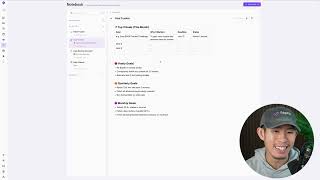
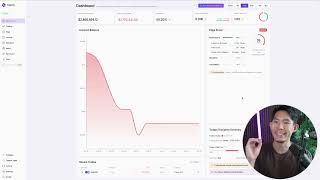
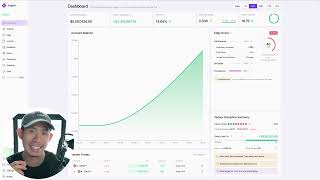
[07:25] entire app. You will see it in your dashboard, you will see it in your trading panel, you will also see it in your Edge in your trading plan right here. So in this case, let's say today I set
[07:39] my max loss at $100, and I've closed all my positions, and now I'm down $111. that at flow detected that you have already triggered your max loss rule,
[07:51] and this blocks you from trading. Okay, like we literally block you from trading like this. Notice how the one-click trading button is grayed out, the normal trading button is also grayed out as well. But then, if you click on it, you
[08:06] trading rules. You have the ability to override your guardrails. But, we will require you to type in the reason, and then whatever reason you'll type in in trading journal. Now, the trade guard function is there to force you to stick
[08:22] to your trading rules. But, at the same time, we believe in free will. We cannot just block you from trading completely, because that kind of goes against regulations. So, what we can do is to block the trade button just like what
[08:35] you've seen right here, and prompt you to write a reason. Once again, just increasing the friction for you to actually like try to violate your trade plan, and also overall just giving you more awareness, right? Because when you
[08:47] actually type a reason right here, now you're conscious. Now, you are like, "Okay, I want to revenge trade, right? This is why I'm breaching my trading guardrails." And when you do this, yes, you can continue trading, right? We open
[08:59] up the trading model for you to continue trading, but this guardrail violation, once again, gets documented into your trading journal. And when you go into your trading journal, and you click on the day that you're on right now, you
[09:12] will be able to see the guardrail violations. Everything will be documented in here. Once again, just giving you more Once again, just giving you more awareness as to, "Okay, this day I
[09:24] violated my guardrails." And then maybe this $100 loss turns into a $10,000 loss. And now you know why, right? It turned into the $10,000 loss not because of the bad trade, not because of the loss initially, but because you kept
[09:38] trading after the loss, even though the guardrails tell you not to do so, even though they were actively trying to stop you from doing it. And this sends a message to your subconscious mind which says that violating guardrails equal
[09:50] losing more money. So, the next time round when I'm trading, I'm going to stick to my trading rules. And that's there to reduce the friction it requires to be disciplined, and at the same time
[10:04] to be disciplined, and at the same time protecting you from yourself.
⚡ Saved you 0h 10m reading this? Transcribe any YouTube video for free — no signup needed.