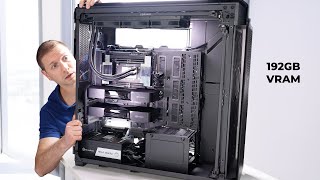

2500W PSU: Overkill or Necessary?
54sThe absurd power of a 2500W supply and the challenge of fitting it sparks curiosity and debate among PC enthusiasts.
▶ Play Clip"The video delivers on the '2500W LLM monster' but 'DESTROYS EVERYTHING' is hyperbolic since it only runs models at 68 tok/s, not literally destroying benchmarks."
The video follows Alex as he builds an ultra-high-end AI workstation with a Threadripper CPU and dual RTX Pro 6000 GPUs. He visits MicroCenter to select a case, power supplies, fans, and a UPS, then assembles the system and tests it with a massive 235-billion-parameter LLM. The build is designed to handle demanding AI workloads that no single consumer GPU can manage.
Alex's existing AI rig can't fit a second RTX Pro 6000, so he plans to expand with a new build.
Alex meets Dan at MicroCenter, bringing his 2500W power supply and explaining the specs: Threadripper TRX board, 9970X CPU, two RTX Pro 6000 GPUs.
A single 2500W unit needs a special high-voltage plug; US outlets max at 1800W, so they lean toward a dual PSU setup (CPU+one GPU on one PSU, second GPU on another).
Dan notes that dual PSUs require a full tower case; they explore options like a limited-edition Doom case and one with an OLED screen.
Dan suggests a Taichi 1650W PSU for one GPU and an ROG Loki SFXL 1000W for the second, discussing efficiency ratings from bronze to titanium (95% efficiency for titanium).
Dual PSU costs around $680 (1300W + 1200W) vs $830 for two 1650W units; they choose the cheaper option.
An $11 adapter connects the two PSUs via motherboard cables to sync them.
A massive 1500W+ UPS (about $800) is needed to protect against power blips during LLM workflows.
Noctua fans are chosen for quiet, efficient airflow; the case allows assembling fan arrays outside and sliding them in.
Alex assembles the system with two RTX Pro 6000s and runs Qwen 3 235B model (142GB on disk) using Ollama, achieving 68 tokens per second with both GPUs active.
Alex successfully builds a powerhouse AI workstation capable of running the largest open-source LLMs, proving that multiple RTX Pro 6000s are necessary for models beyond consumer GPU memory limits. The build demonstrates practical decisions around power, cooling, and component selection for extreme AI hardware.
What model was tested on the new build?
Qwen 3 235 billion parameters.
12:30
How many parameters does the Qwen 3 model have?
235 billion.
12:30
What is the size of the Qwen 3 model on disk?
142 GB.
12:39
What tool did Alex use to run the model?
Ollama (spelled 'Olama' in transcript).
12:57
What token generation speed was achieved?
68 tokens per second.
13:42
What is the efficiency rating of a titanium power supply?
Up to 95% efficiency.
5:05
Why did Alex choose a dual PSU setup instead of using the single 2500W unit?
The 2500W unit requires a special high-voltage plug, and a standard US outlet only provides up to 1800W.
1:32
Extreme hardware specs
Threadripper 9970X and dual RTX Pro 6000s set a new standard for consumer AI workstations.
0:44Dual PSU strategy
Demonstrates a practical workaround for power limits in high-wattage builds.
1:18PSU efficiency explained
Titanium 95% efficiency reduces heat and wasted power, crucial for dense builds.
5:05Sync adapter for dual PSUs
A simple $11 adapter synchronizes two PSUs, enabling safe operation.
6:34Running 235B model at speed
68 tokens/second on a 235B model proves dual RTX Pro 6000s can handle the largest open LLMs.
13:42[00:00] This little box was my all-in-one AI rig
[00:02] until I decided I needed another RTX Pro
[00:04] 6000, and there's absolutely no way this
[00:07] is fitting in here. So, today I'm
[00:08] planning to expand operations. This
[00:11] build is going to take a lot, so I'm
[00:12] going to go over here to MicroEnter, my
[00:14] favorite spot to go shopping for
[00:16] computer parts and talk to my buddy Dan.
[00:18] He'll hook us up.
[00:19] >> Hey Dan, what's up?
[00:20] >> Hey, Alex. Welcome back to Good to see
[00:22] you too.
[00:23] >> I got a gift for you. Not a gift, it's
[00:24] it's mine. I'm keeping it. But this is
[00:27] the new power supply that I have. And I
[00:29] don't think this is going to work with
[00:31] my setup. So, we're going to look at
[00:32] some power supplies, a case, and some
[00:36] fans for this Thread Ripper build.
[00:38] >> Okay. Well, like what exactly are we
[00:40] doing?
[00:40] >> I've got a Thread Ripper TRX board, a
[00:42] Monster Thread Ripper 9970X, and two RTX
[00:46] Pro 6000 GPUs waiting for a case. That
[00:49] combo can pull an absurd amount of
[00:51] power, which is why I bought this 2500 W
[00:54] power supply. Now I'm at MicroEnter so
[00:56] we can walk around and see which case
[00:58] can actually fit this brick.
[00:59] >> Feel that. Dang. It's almost as heavy as
[01:02] my graphics card. It's crazy. You do
[01:04] your push-ups today?
[01:05] >> Yeah. Well, not yet. I guess we're going
[01:06] to have to today, right?
[01:07] >> This thing is crazy.
[01:18] We basically have two options. split the
[01:20] load so one power supply can run the CPU
[01:22] plus one GPU and a second power supply
[01:25] feeds the other GPU or try to shove
[01:28] everything into this 2500 watt monster
[01:30] to use all that power the big unit needs
[01:32] a special high voltage plug and a normal
[01:34] US outlet tops out around 1,800 watts so
[01:38] before I accidentally discover the limit
[01:39] of my office wiring we're leaning
[01:41] towards the dual PSU setup right now
[01:44] >> yeah well we're doing two GPUs knowing
[01:46] you they're probably something very fun
[01:48] pro 6000s All right. Pro 6000s. Two Pro
[01:51] 6000s and me and my measly 5090.
[01:54] >> With that much hardware, small cases are
[01:56] officially cancelled. Dan tells me I'm
[01:58] stuck shopping in the skyscraper sized
[02:00] full tower section if I want dual RTX
[02:02] 6000s and giant power supplies. What is
[02:05] up with this? Oh, yeah. So, that one's
[02:07] really cool. Bethesda teamed up with uh
[02:09] Haven to create this case.
[02:11] >> Wow.
[02:12] >> So, for any Doom fans out there, these
[02:14] are limited run. There's only 1,666 of
[02:16] these in the world.
[02:17] >> Really?
[02:18] >> Oh, yeah. This is sick. And I am a Doom
[02:20] fan, by the way.
[02:21] >> We go full kid in a candy store on
[02:23] cases, limited edition Doom art, fancy
[02:26] glass, even one with a tiny panoramic
[02:28] OLED screen.
[02:29] >> I would, of course, have probably some
[02:30] kind of a GPU usage readout on there.
[02:33] Memory usage readout. I love how you
[02:35] have some of these on and just like
[02:37] showing what they're going to look like
[02:39] when they're running.
[02:40] >> For the record, if you have to do two
[02:41] power supplies, that's got to be your
[02:43] case behind our wonderful cameraman.
[02:45] Yeah.
[02:46] >> Is that the case? The That's the box for
[02:48] the case. The case itself is just a
[02:50] little bigger than than the half 700
[02:52] enforcer.
[02:53] >> What?
[02:54] >> This is the case.
[02:55] >> This might be your case.
[02:56] >> Can I lift this?
[02:58] >> Probably. Yeah, you're a strong guy. He
[03:00] can lift it. But how am I going to put
[03:01] this in my office
[03:04] with a lot of elbow grease? I'm scared.
[03:07] I'm scared. This is crazy.
[03:08] >> If people like how this looks in your
[03:10] office, I'll do one, too, just for fun.
[03:11] >> You're going to do one?
[03:12] >> If you end up going with this guy and
[03:13] the people in the video like it, I'll do
[03:15] one, too. I'm a sucker for peer
[03:16] pressure.
[03:16] >> We kick around other ideas like an open
[03:18] air test bench or just parking a second
[03:20] PSU on the floor next to the main case
[03:22] like a Cyberpunk space heater.
[03:24] >> It's doable. It's just uh you know how
[03:26] how neat do you want your office to
[03:28] look?
[03:28] >> How much office do I want to have left
[03:31] is the question after putting this case
[03:34] in there.
[03:34] >> Yeah, the huge enclosed case is starting
[03:36] to look less like overkill and more like
[03:38] the only sane option.
[03:40] >> So, this would be one of the power
[03:41] supplies we put in I was a fan of
[03:43] recommending the Taichi power supply
[03:45] here. It's a 1650 W power supply, which
[03:47] is just enough to work. It has two 16
[03:50] pin outs, so you can use that for your
[03:52] two Pro 6000s. Yep.
[03:54] >> Another cool feature about this power
[03:55] supply is for all those people who are
[03:57] still scared about melting cables, uh,
[03:59] which if you know how to plug in your
[04:01] phone at night, you shouldn't be worried
[04:03] about that. It has an extra sensor to
[04:05] detect temperature as well, so that if
[04:07] anything goes wrong, it's done. It's
[04:09] also titanium rated.
[04:10] >> Nice. Well, let's go look at the power
[04:11] supplies.
[04:12] >> Yeah, let's go look at power supplies
[04:13] while I talk about the rating.
[04:14] >> This Vertex 1200 is the one you
[04:17] suggested to me last year. And I love
[04:19] this power supply. I got like three of
[04:21] them now, and it's really good. It's
[04:22] 12,200 W, but um this is also gold. I'm
[04:26] seeing now. There's bronze, gold,
[04:28] platinum, and titanium.
[04:30] >> Like, you know, if one of you guys is
[04:31] just here to build a gaming PC and you
[04:32] want to get a titanium watt, the
[04:34] question on my mind is why? But if you
[04:36] do a workstation, then yeah, that can
[04:38] mean something for you,
[04:39] >> right? So for us, we got two GPUs in
[04:42] there. I want to keep the heat low. And
[04:44] when you don't have an efficient PSU, it
[04:46] gets rid of some of that wattage that's
[04:48] coming into it as heat so that it's
[04:51] going to go away as heat into the
[04:52] machine. We don't want that. We want as
[04:54] high as possible efficiency so that that
[04:56] power is converted into just straight
[05:00] wattage going into the system instead of
[05:02] heat. Did I explain that right?
[05:04] >> Yeah. I don't I mean I don't disagree
[05:05] with it. So titanium has about 95% up to
[05:08] 95% efficiency, which is really nice.
[05:11] And if you go with something like
[05:12] bronze, that's low. That's pretty low.
[05:14] It's like 80 to 82% efficiency. Yeah.
[05:17] And honestly, for the purposes of this
[05:19] machine, I don't think we want to go
[05:21] lower than platinum. If we're doing one
[05:23] of those dual GPU cases, while your
[05:25] Vertex might be fine for like one of the
[05:27] PSUs, the second PSU has to be SFX or
[05:30] SFXL, which are just like size standard
[05:33] power supplies. So, you could look at
[05:34] something like the ROG Loki. Um, I'd
[05:37] probably give you the 1000 watt just
[05:38] because then you have like the 600 watt
[05:40] rated cable, but it's SFXL. It's
[05:43] platinum rated and it would sit
[05:45] comfortably in that case.
[05:46] >> I have one of these in my current 6000
[05:49] build.
[05:49] >> Silver Stones is a good one, too.
[05:51] Although it's like double the price for
[05:52] an extra 200 W, which people can do what
[05:54] they want with their money. financially
[05:56] the better option is CPU GPU on one and
[06:00] other GPU on the other because uh
[06:02] talking about that Taichi that's a 550 W
[06:04] power supply if we did that for two GPUs
[06:06] and then you add um 280 for the
[06:10] extra,000 watt for the CPU and anything
[06:13] else going on there that's going to put
[06:14] you at $830 right
[06:16] >> so
[06:17] >> it's pretty quick
[06:18] >> uh I try uh you do that versus you do
[06:22] maybe you could do the 1300 watt version
[06:23] of that power supply which runs you
[06:25] about4 400 bucks and you're still going
[06:26] to want one of these obviously. So then
[06:28] that puts you at 680 bucks. So you're
[06:30] going to be aboutundred
[06:33] $150 less than the other.
[06:34] >> I also need to figure out how to connect
[06:36] the two power supplies together so
[06:37] they're synchronized. Yes,
[06:38] >> I haven't done that before.
[06:39] >> We have an adapter. So what this adapter
[06:41] lets you do is you plug in the two
[06:43] motherbolt cables into it from each of
[06:45] the uh power supplies. This adapter.
[06:47] >> Okay.
[06:48] >> So that's the easy part and the least
[06:49] expensive.
[06:50] >> Yeah, this is good. I like that. $11.
[06:54] the cheapest part but important. It's
[06:55] how we get everything firing together.
[06:57] >> That sorts out the power inside the PC,
[06:59] but now we need a UPS or a giant battery
[07:01] to survive power blips while it's
[07:03] running LLM workflows.
[07:05] >> These are about 180. The challenge for
[07:07] us though is we can get away with one of
[07:09] them being up to 900 watts if it's for
[07:10] one GPU, but we need we absolutely need
[07:13] that second one to be much higher. So, I
[07:16] think that that super expensive one is
[07:18] going to be unavoidable. And that one is
[07:21] uh
[07:22] >> 800 bucks. Yeah. 800 bucks.
[07:24] >> And that's big, too.
[07:25] >> That one is uh probably the heaviest
[07:27] thing you would carry today if you if we
[07:29] had to go with it.
[07:30] >> It's heavier than the case.
[07:31] >> Um I'd say they're about the same. That
[07:33] thing is like a brick. And it's it's
[07:35] bigger than the picture would make you
[07:36] believe.
[07:38] >> Okay. You're killing me, Dan. You're
[07:39] killing me.
[07:40] >> Oh, I mean, we both have to get our
[07:42] workout today, right?
[07:43] >> Two GPUs, man. That's all I want to
[07:44] power.
[07:46] >> Yeah. Well, not everyone has Pro 6000s
[07:48] that they're playing around with.
[07:50] >> How loud is this thing going to It's not
[07:52] going to be louder than a jet plane.
[07:54] >> Is that a microenter guarantee?
[07:59] >> Unofficial.
[08:00] >> I don't make promises.
[08:01] >> It's a Dan guarantee.
[08:02] >> It's a Yeah, it's a Dan guarantee. There
[08:03] we go. There you go.
[08:04] >> Let's do it.
[08:05] >> I guess we're going to do that big case,
[08:06] huh?
[08:06] >> We're going to do the big case. We're
[08:07] going to do the big UPS.
[08:10] >> We're going to go big. Let's do it.
[08:11] >> Good thing there's three of us, right?
[08:13] >> You know, we forgot one thing.
[08:15] >> Case fans.
[08:16] >> We don't need this thing to be a rainbow
[08:17] show, do we?
[08:18] >> I don't want any rainbow show.
[08:20] >> There we go. As far as quietness,
[08:22] there's Be Quiet and there's Nachua.
[08:24] Naka is famous for being quiet.
[08:25] >> Noctua is the quietest. They definitely
[08:27] earn their price tag with that because
[08:29] no matter how you spin it, Noctua
[08:32] >> spins.
[08:33] >> Get it?
[08:33] >> Uh, but they they do it quietly. They do
[08:36] it efficiently. They, as far as air flow
[08:39] goes, they're still the kings. So, we
[08:42] can look at that option, too. I mean,
[08:43] it's already an expensive machine. Why
[08:45] not make it quiet or better than a jet
[08:47] engine? I want to have as quiet as we
[08:50] possibly can. So, let's do that. Several
[08:52] knockup fans. Holy cow, this is a huge
[08:56] fan. The UPS is in our warehouse, which,
[08:59] as you guys remember, I have to
[09:01] disappear into and then reappear with
[09:03] the magic item.
[09:04] >> Let's see.
[09:05] >> I'll be right back.
[09:05] >> Maybe we can follow him this time. What
[09:07] do you think? We can sneak in there.
[09:08] >> I don't think it'd go too well.
[09:11] Microenter wouldn't like it. Yo. Yeah.
[09:13] There you go. The sign is just going to
[09:15] prevent all entry.
[09:16] >> All right.
[09:19] Where's Alex? I'm going to ask him if he
[09:20] wants to lift it. Wait, lost track of
[09:23] him already. Hey, there you are. You
[09:25] want to try to lift it?
[09:26] >> Are you okay, Dan?
[09:27] >> Uh, is your arm getting ripped off right
[09:30] now?
[09:30] >> Not yet. Maybe after like 30 more
[09:32] seconds. All right, let's see.
[09:36] >> Lift with your back, kids.
[09:43] >> Told him he was going to get his work
[09:44] out.
[09:44] >> I'm just kidding. It's not that heavy.
[09:45] >> No, it's not that bad. It's not too bad.
[09:47] >> It's It's only about this. The case is
[09:48] where
[09:48] >> it's not actually that big.
[09:50] >> No, no, no.
[09:51] >> So, this is rack mountable and I can put
[09:53] it on my floor.
[09:54] >> Yeah, you should be able to do it either
[09:55] way. For now, on the floor should be
[09:57] fine. Maybe like standing it up a bit.
[09:59] >> This is not a cheap UPS. Once you're
[10:01] going over 900 W, these things just
[10:04] start jumping up more and more and more
[10:06] and more. So, that's it. That's all
[10:08] we're getting.
[10:09] >> One more UPS and that's it.
[10:10] >> Oh, just one more UPS.
[10:13] This one's not so bad. So, you have to
[10:15] get to a certain point for microenter
[10:17] employees to take this to the car.
[10:19] >> If you want,
[10:20] >> what if I was like an a little old lady?
[10:22] What would it take?
[10:23] >> Just ask for carry out and they'll say,
[10:24] "Yeah, we got you. You need help getting
[10:26] something out to your car? We'll be more
[10:29] than happy to assist."
[10:30] >> What if Arnold Schwarzenegger came?
[10:31] Would you make him carry all his own
[10:33] stuff?
[10:34] >> No. And that's just because I'd probably
[10:37] take the opportunity to ask him for like
[10:38] workout tips and stuff. I feel like
[10:40] getting on his good side would be good
[10:42] because uh if anyone knows how to train,
[10:44] it's it's that guy.
[10:46] >> Definitely Arnold.
[10:47] >> Definitely Arnold. Yeah.
[10:48] >> Thanks, man.
[10:48] >> Can't wait for the peer pressure to make
[10:50] me do the same thing. I'll see you guys.
[10:58] >> Can I just put this in here and call it
[11:00] a day? I was super stoked to get this
[11:02] thing to the office and set it up, even
[11:04] though I was kind of nervous cuz this is
[11:06] my first Thread Ripper build, and it'll
[11:08] be my first time running multiple
[11:11] $10,000 GPUs in there. I also wasn't
[11:14] sure about the power requirements, but I
[11:15] wanted to start off with a huge 2500
[11:18] watt power supply before I upgrade to
[11:20] more wattage and more power, which I
[11:22] feel I'm going to need. So, I put
[11:23] everything together and threw it into
[11:25] this gigantic case, and it looked pretty
[11:28] good. This case is really smartly
[11:30] designed where fan assemblies can be
[11:32] built outside of the case and then just
[11:33] be slid in. So much easier to work in
[11:35] this case than that small factor case.
[11:37] This is a quality case. I decided to
[11:39] throw in a 50/60 in there just as a test
[11:42] if things explode. Uh it would be a sad
[11:45] but not $10,000 ad. And after everything
[11:47] turned on just fine.
[11:48] >> All right.
[11:49] >> And I installed the drivers. I went with
[11:50] one RTX Pro 6000 and finally two. And
[11:54] this is how it looks now. Oh,
[11:57] don't put your fingers on the fan. Now,
[12:00] somebody already yelled at me on Twitter
[12:01] after I posted a picture of this saying,
[12:03] "Why are they so close together?" This
[12:06] machine is still in development. Plus,
[12:08] I'm going to need some space for some
[12:10] extra boards that might also go in
[12:11] there. A package I just got in the mail.
[12:14] Yeah, I'm glad I got the big case after
[12:16] all. Stay tuned on the channel for more.
[12:18] This case will be back. Oh, you want to
[12:20] see a model running on this? Is that
[12:22] what you want to see? Now, I did throw
[12:25] VLM on there. I tried it with a couple
[12:27] of models, but here is the first larger
[12:30] model that I tried, which is called Quen
[12:33] 3 235 billion. And this model is 142 GB
[12:39] on disk. So, there's no freaking way
[12:41] that a 5090 or a 5080 or a 4090 or a
[12:46] couple of those 4090s or a couple of
[12:47] 5090s will ever be able to run that. You
[12:50] need two RTX Pro 6000s to be able to run
[12:53] that. Unless you're using a totally
[12:55] smashed quantization. And I'm going to
[12:57] do Olama here because it's easy to
[12:59] install. I made videos about all the
[13:01] whole process of installation and
[13:02] setting things up before. Lama run quen
[13:04] 235 billion. Watch NV top memory is
[13:08] getting filled up. Not all the way.
[13:10] We're about 75% on each of the GPUs, but
[13:12] it's being split up nicely because Olama
[13:15] when it detects that the model is larger
[13:17] than would fit on one GPU, it starts to
[13:19] use multiple GPUs, which is kind of
[13:21] cool. Write a story. Yeah, I know. I
[13:24] know you're going to complain. What kind
[13:25] of prompt is that? Right, Alex? More
[13:27] testing to come. Okay, have some
[13:29] patience. Oh, do you hear that? Do you
[13:31] hear that? And look how fast it's going.
[13:33] This is thinking and now it's
[13:35] generating. Wow, look at that activity
[13:38] going on over there on the two GPUs.
[13:40] Both of them being used. And we're done.
[13:42] 68 tokens per second on the generation
[13:45] side. And this is a 235 billion
[13:48] parameter model. This is freaking cool.
[13:50] I'm really happy about this. Thanks to
[13:51] MicroEnter for setting me up with a case
[13:53] and the fans and check out the new
[13:55] Phoenix store which is already open.
[13:57] Maybe I'll run into you. Stop by and say
[13:58] hi. I'll be there on the 10th of
[14:00] December. Now, if you want to see a more
[14:02] in-depth test of the RTX Pro 6000, watch
[14:04] this video right here. Thanks for
[14:06] watching and I'll see you next time.
⚡ Saved you 0h 14m reading this? Transcribe any YouTube video for free — no signup needed.