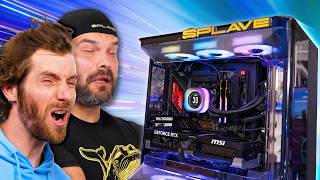

900 FPS in CS:GO?! 🤯
32sThe extreme over 900 FPS number is shocking and immediately grabs attention, driving curiosity about how it's achieved.
▶ Play Clip"The title is accurate; the video features Splave and his tuned PC, with a playful threat that matches the content."
Building a DIY PC allows for custom specs and fine-tuning, but the internet is full of bad advice. This video introduces Splave, a legendary overclocker, and his new 'Splave Pro' system, which uses hand-selected parts and expert tuning for maximum performance. The video then explores the tuning philosophy, component choices, and real-world performance gains of this optimized machine.
The Splave Pro uses hand-selected CPUs and GPUs, custom thermal paste, and super fast RAM, with every aspect tightly tuned for maximum performance.
The 9950X3D is chosen over the 9850X3D because it has better binned core zeros and overclocks better when using game mode to shut off the other CCD.
Four DIMM slots can cause signal reflection and longer trace paths, which can reduce memory performance compared to two DIMM slots.
Splave PC offers a no-questions-asked replacement warranty for all components, even with overclocking.
The custom thermal paste, T1000, contains liquid metal embedded in silicon for safer application and provides 5-10°C lower load temperatures on GPUs.
The system disables memory context restore to force a fresh memory train on every boot, which improves stability.
The gaming profile uses a fixed core clock of 5.5 GHz and disables non-X3D cores and SMT for smoother gaming.
The refresh interval (tREFI) is the most important secondary timing, and maxing it out can provide a 1-2% performance gain.
AVX 512 is disabled in the gaming profile to prevent thermal issues when the CPU is running at high voltage and frequency.
About one in four or five CPUs are not good enough for the Pro system, highlighting the binning process.
The daily driver profile uses PBO with a 275-watt power limit, providing a 10% increase in Cinebench scores.
Splave uses a fixed boost clock for the GPU instead of a VF curve, enabled by superior cooling.
In CPU-bound games like CS:GO, the tuned system showed over 200 FPS more than a stock system, with better 1% lows.
In Cyberpunk 2077, the tuned system showed a 7-12% performance improvement and ran 8-12°C cooler on both CPU and GPU.
What are the key features of the Splave Pro system?
Hand-selected CPUs and GPUs, custom thermal paste, super fast RAM, and tight tuning of every aspect.
01:03
Why does Splave choose the 9950X3D over the 9850X3D for the Pro system?
The 9950X3D is chosen because it has better binned core zeros and overclocks better than the 9850X3D when using game mode to shut off the other CCD.
03:53
What is the disadvantage of having four DIMM slots on a motherboard for overclocking?
Four DIMM slots can cause signal reflection and longer trace paths, which can reduce memory performance.
06:25
What kind of warranty does Splave PC offer on their tuned systems?
They offer a no-questions-asked replacement warranty for everything.
07:51
What is the name of Splave's custom thermal paste, and what makes it unique?
T1000, which contains liquid metal embedded in silicon for safer application.
08:47
What temperature improvement can be expected from using Splave's custom thermal paste on a GPU?
5 to 10 degrees Celsius lower load temperatures.
09:13
Why does the Splave Pro system retrain memory on every boot?
To ensure maximum stability, as a fresh memory train is more stable.
10:17
Why does Splave prefer a fixed core clock for the gaming profile?
A fixed core clock helps with 1% lows and overall smoothness because the CPU isn't constantly changing frequency.
11:03
What does 'game mode' do on the Splave Pro system?
Game mode disables the non-X3D cores and SMT (Simultaneous Multi-Threading).
11:57
What is considered the most important secondary or tertiary memory timing?
The refresh interval (tREFI).
12:51
What performance benefit does maxing out the refresh interval (tREFI) provide?
About 1-2% improvement in gaming or benchmarks.
13:02
Why does Splave disable AVX 512 in the gaming profile?
To prevent thermal issues when the CPU is running at high voltage and frequency, as it will fall back to AVX 256.
13:55
What is the binning success rate for CPUs used in the Splave Pro?
About one in four or five chips are not good enough for the Pro system.
14:31
What performance gain does the daily driver profile's 275-watt power limit provide in Cinebench?
A 10% increase in Cinebench R23 and R24 scores.
15:23
What approach does Splave use for GPU overclocking instead of a VF curve?
A fixed boost clock, not a voltage-frequency curve.
17:37
Splave Pro System Introduction
Defines the core value proposition: hand-selected parts and expert tuning for maximum performance.
01:03Memory Training for Stability
Reveals a counterintuitive tuning technique: disabling memory context restore for better stability at the cost of boot time.
10:17Fixed Core Clock for Smooth Gaming
Explains why a fixed CPU frequency can improve 1% lows and overall gaming smoothness, a key insight for competitive gamers.
11:03CPU Binning Success Rate
Provides a concrete data point on the rarity of top-tier chips: only 75-80% of CPUs meet the Pro standard.
14:31Fixed Boost for GPU Overclocking
Challenges conventional wisdom by using a fixed boost clock instead of a voltage-frequency curve, enabled by superior cooling.
17:37[00:00] The best thing about building a DIY PC
[00:02] is that you can spec it any way you want
[00:04] to get the most for your dollar. Then,
[00:07] when you're done, you can fine-tune that
[00:09] thing to your heart's content to squeeze
[00:11] even more out of it. The bad news is
[00:14] that configuring and optimizing a system
[00:16] can be tough when there is so much wrong
[00:20] information out there on the internet.
[00:22] Now, you can avoid some of that by just
[00:24] buying a pre-built PC. Any Tom, Dick, or
[00:26] Michael Dell can do that for you, but
[00:28] that's not going to help you with the
[00:30] tuning, will it?
[00:31] Well, that is where Splave comes in.
[00:34] He's
[00:35] really big. And he's also one of the
[00:38] most legendary overclockers of all time.
[00:40] He's number one on the global masters
[00:41] list on Hardware Bot, has held over 800
[00:43] overclocking world records, and just a
[00:46] few years ago he launched Splave PC, a
[00:48] system integrator that uses his
[00:50] expertise to make the fastest gaming
[00:52] hardware even [music] faster. And today,
[00:55] they're announcing something next-level.
[00:57] It's a microfiber cloth in front of my
[01:00] damn unveiling. One second.
[01:02] It's
[01:03] the Splave Pro. This thing comes with
[01:07] hand-selected CPUs and GPUs for maximum
[01:10] performance, custom thermal paste for
[01:13] enhanced cooling, and super fast RAM.
[01:16] Then, every aspect of the machine is
[01:18] tightly tuned. The result? Yes. That is
[01:22] CS: GO running at over 900 frames per
[01:26] second.
[01:27] Crazy. We're going to take you guys
[01:29] through this system, show you what sets
[01:31] it apart, and because Splave is so
[01:33] generous with his knowledge, we're going
[01:34] to show you how you can make similar
[01:36] optimizations on your own hardware at
[01:39] home. For example, watch this. By
[01:40] changing this simple setting, you can
[01:42] get about [music] going quite a good
[01:43] deal to one of the
[01:49] >> Hey, you're that man. Can I have a
[01:51] picture?
[01:52] >> Of course.
[01:54] >> I I to ask, how did you get all those
[01:56] business apps onto one easy to use
[01:57] platform?
[01:58] >> So, you want to know Odoo's secret
[02:00] sauce.
[02:13] >> Right out of the gate, obviously, the
[02:15] system is gorgeous. You're using the Air
[02:18] 5400, which has this really unique
[02:20] approach to airflow with kind of ducting
[02:23] that really gets your fresh air exactly
[02:25] where it needs to go, and then keeps the
[02:27] hot air from being recycled. Like this
[02:28] front radiator is freaking awesome. It
[02:31] just
[02:32] throws all the heat out the right side,
[02:34] rather than crapping it out over the
[02:35] rest of the system. But,
[02:38] the Air 5400 is a Corsair product, and
[02:40] for that matter, so are a lot of the
[02:42] things in here. What sets this system
[02:45] apart?
[02:45] >> Basically, the tune.
[02:47] And we take all of the best parts from
[02:50] all the different companies and jam them
[02:52] all together,
[02:53] and then make it better with our tuning.
[02:55] >> Right. So, with this specific build,
[02:57] there was a particular inspiration for
[02:59] it, right? Like there was one person who
[03:01] needed it.
[03:01] >> Yeah, we had a pro gamer ask us,
[03:05] he only cares about gaming. I want my
[03:06] fans at 100% all the time.
[03:08] >> Yeah, I noticed that.
[03:09] >> And I'm like, who else is going to want
[03:11] that?
[03:12] >> Yeah.
[03:12] >> Maybe another pro gamer.
[03:14] Not me, but
[03:15] >> Right.
[03:16] >> But, um I'm not making every computer
[03:18] for myself. So, we're all about the
[03:21] customer service, and we can tune it to
[03:23] whatever anyone wants.
[03:24] >> Right. So, you guys built this one, and
[03:26] then basically, from my understanding,
[03:28] you pretty much had a line up out the
[03:29] door of people saying, "Oh, no, I want I
[03:30] want that one just like that guy has."
[03:32] >> Correct.
[03:32] >> So, you kind of went,
[03:34] >> All right, hope we can sell it that way
[03:35] then.
[03:36] >> In matters of taste, the customer is
[03:37] always right, right? Tell us then about
[03:39] your part selection. What makes
[03:41] everything in here the absolute best?
[03:43] Like there's one that I got to kind of
[03:45] challenge you on, right? You've got a
[03:46] 9950X 3D in here.
[03:48] >> Right.
[03:49] >> No X3D II, no 9800. What made that the
[03:52] right choice?
[03:53] >> It's a gaming PC, that the right choice?
[03:56] >> have it be a daily PC. So our our Pro
[03:58] Gamers don't need to buy two computers.
[04:00] It's bad marketing for myself but the
[04:02] 9950x3d we found to be better binned
[04:06] also on the core zeros.
[04:08] We use the game mode to shut the other
[04:11] CCD off and we're we've been finding
[04:13] that the overclocking has been better on
[04:15] those than say a 9850x3d.
[04:17] >> If that sounded like double D good what
[04:19] Allen is saying was that while [music]
[04:21] there are processors out there that
[04:23] might be you know more marketed towards
[04:26] Gamers or might even be faster out of
[04:30] the box the 9950x3d
[04:32] in particular has the best balance of
[04:35] out of the box experience and also the
[04:37] ability to tweak it even higher. We
[04:40] don't care so much that the other eight
[04:42] cores do not have AMD's 3D V-Cache
[04:45] because when we're gaming we're going to
[04:47] turn them off. And for the cores that do
[04:49] have AMD's [music] 3D V-Cache they find
[04:51] that that chip tends to get the very
[04:54] best ones. As for the rest of this
[04:56] hardware it's mostly pretty obvious. I
[04:57] mean who wouldn't take an ROG 59 di
[05:01] astral if they could get their hands on
[05:02] it.
[05:03] >> [music]
[05:03] >> But there are some that I do still have
[05:05] more questions about. I mean back in the
[05:07] day when the Northbridge the memory
[05:09] controller used to be built into the
[05:10] motherboard you would see like a 5%
[05:13] performance swing from one board to the
[05:14] next. Nowadays now that it's pretty much
[05:17] all built into the CPU how do you choose
[05:19] a motherboard for like a
[05:21] to the nines tuned machine? [music]
[05:24] >> For me it's easy because the ROG
[05:26] motherboards
[05:27] are all just so biased towards
[05:30] overclocking and the extreme
[05:31] overclocking scene and I use the same
[05:34] ones on LN2 so I'm super comfortable
[05:37] with with air cooling because LN2 is
[05:40] easy then.
[05:41] >> You're saying that you're not large
[05:42] enough there's actually two of you.
[05:43] There's Allen two.
[05:44] >> Yes.
[05:45] >> [laughter]
[05:46] >> That's not what you said. He was
[05:47] referring to liquid nitrogen. I know
[05:48] that. I just thought it was funny.
[05:50] Like, can you imagine two of two of this
[05:52] machine?
[05:53] >> With that said, I do know that in the
[05:55] past, ASUS and the other big guys have
[05:58] marketed different boards for extreme
[06:01] overclocking versus like daily driver
[06:04] overclocking. In your experience, is
[06:06] [music] there anything that prevents an
[06:07] XOC board from just being used with an
[06:10] AIO liquid cooler like this? [music]
[06:11] >> On LN2, I would maybe prefer an Apex for
[06:14] the two DIMM slots only. The four on the
[06:16] Hero gives us the option to expand if
[06:19] someone needs more for for their tasks.
[06:22] >> But, what's the downside of having four?
[06:24] Do you want to explain that?
[06:25] >> Having four DIMM slots can be a
[06:27] disadvantage because there can be some
[06:29] reflection between the the channels. And
[06:32] also, the traces are physically longer
[06:36] just for path from CPU to the back of
[06:39] the motherboard.
[06:40] >> Right, okay. So, the shorter we can keep
[06:42] those and the fewer things we can have
[06:45] on each trace.
[06:46] >> Yeah.
[06:47] >> On the subject of memory, it's pretty
[06:48] expensive right now. Has that been a
[06:50] major impediment? Like, have you have
[06:52] you had to to cheap out on memory?
[06:54] >> For now, we're just raising prices like
[06:55] everyone else. Unfortunately, I don't
[06:58] really want to go the route of putting
[06:59] something worse in there or whatever I
[07:02] can find.
[07:03] >> I mean, given your branding is uh
[07:06] >> the last thing you'd want to do is
[07:07] compromise on maximum performance.
[07:10] >> That's it.
[07:11] >> Fair enough. So, what are you using?
[07:12] >> We're using 2 by 32 GB in the system for
[07:15] 64. But, we are going to give the option
[07:17] to cut it back to 32, 16 by 2, if
[07:20] someone is more price conscious.
[07:22] >> That makes sense. And 6,000 is still the
[07:25] sweet spot just with as tight latencies
[07:27] as you can get.
[07:28] >> Yeah, correct.
[07:28] >> I mean, you're not going to be running
[07:30] at the factory speeds anyway, though,
[07:31] right?
[07:31] >> No.
[07:32] Of course not.
[07:33] >> [laughter]
[07:34] >> What kind of challenges does that create
[07:36] for support? Because, unless I'm
[07:37] disclosing something I'm not, not all of
[07:40] your customers are gamers or even
[07:42] end-users. You even work with some
[07:44] government entities.
[07:45] >> Correct.
[07:46] >> So, like how do you provide a warranty
[07:47] on, "Hey, by the way, I
[07:49] cranked this up to 12."?
[07:51] >> Warranty-wise, we we we do a
[07:53] no-questions-asked replacement for
[07:55] everything.
[07:56] >> Right.
[07:56] >> It's part of our high-end experience.
[07:59] >> And if I had to guess, I would say that
[08:01] probably the guys who partner with you,
[08:03] like G.Skill, just for the privilege of
[08:05] partnering with Slave PC, they probably
[08:07] just take the damn stick back, don't
[08:09] they?
[08:09] >> Uh yeah, basically.
[08:11] >> [laughter]
[08:11] >> So, the Costco model.
[08:12] >> In most cases.
[08:14] >> Now, I could see you flexing that kind
[08:15] of muscle on G.Skill, but with a brand
[08:17] like ASUS, my understanding is you crack
[08:21] open these cards personally,
[08:23] >> Mhm.
[08:23] >> take off the cooler, you put your own
[08:25] custom thermal compound on them, then
[08:27] you seal them back up. Are they covering
[08:29] you against that?
[08:30] >> No, not currently.
[08:31] >> You got to build that into your margin,
[08:33] basically.
[08:33] >> Sure, yeah. [clears throat] Um
[08:35] and then they use PTM.
[08:36] >> Okay, I mean, that's pretty good stuff,
[08:38] available on LTT store.
[08:39] >> So, we scrape that off.
[08:40] >> Okay, ouch.
[08:42] >> And then uh we have our own paste coming
[08:44] out soon, but we use it currently.
[08:46] >> Yeah, what's it called?
[08:47] >> Uh T1000, after Terminator.
[08:49] >> Because?
[08:50] >> There's some liquid metal in it.
[08:52] >> But not all liquid metal.
[08:53] >> Correct.
[08:54] >> So, what makes it safer than a typical
[08:56] liquid metal, which can have problems
[08:58] with long-term deployments?
[08:59] >> The liquid metal is embedded in the
[09:01] silicon. Uh there's little balls of the
[09:03] gallium.
[09:04] >> Right.
[09:04] >> And it's the application is just like
[09:07] thermal paste. There's no
[09:09] faffing around like liquid metal.
[09:10] >> What kind of a result improvement can
[09:12] you expect?
[09:13] >> We see, depending on the card and how
[09:15] the PTM was applied, uh
[09:17] 5 to 10° load.
[09:19] >> My last question then is with a system
[09:21] that's so tuned,
[09:23] AIO versus custom water cooling, really.
[09:26] >> Yeah.
[09:26] >> Why that choice?
[09:27] >> We offer a warranty,
[09:29] and I'm we we just don't really want
[09:31] people to have to worry about algae and
[09:34] cleaning a loop, filling a loop, even
[09:36] shipping a loop. If we're having trouble
[09:38] with thermals, it's way easier to have
[09:41] them send it to us to put a new AIO or
[09:43] if they're one of your smart viewers,
[09:46] they can probably figure it out
[09:48] themselves, and we allow that.
[09:49] >> The cold, hard truth is that as much as
[09:52] I love custom water cooling, if you are
[09:55] the kind of person who can't build a
[09:56] custom water cooling loop, you shouldn't
[09:59] be buying a custom water cooling loop
[10:00] because you are not going to be able to
[10:02] handle the maintenance. While we sit and
[10:03] wait for the computer to boot, which is
[10:05] taking quite a while because it's
[10:07] retraining the memory, let's talk about
[10:09] a choice that I don't fully understand,
[10:11] which is that you've configured the
[10:13] system to retrain the memory all the
[10:14] freaking time. Is slower booting a
[10:16] feature?
[10:17] >> We use the run time reduction, we leave
[10:19] that disabled and the memory context
[10:21] restore disabled. Those are what make it
[10:23] take a long time to train,
[10:25] but when it does train,
[10:27] your system is more stable.
[10:29] >> And that's something that you need to
[10:30] redo frequently, even if you're not
[10:32] changing any settings?
[10:33] >> Correct. It just it's It's just more
[10:35] stable if it's always on a fresh train.
[10:38] >> Talk us through what you got set here.
[10:39] I'm sure Obviously, we're running Expo.
[10:42] >> Running Expo.
[10:43] >> But then we're also not cuz you've
[10:45] turned the frequency up a little bit,
[10:46] you're playing around with the F clock.
[10:47] Walk us through it.
[10:48] >> This system we're launching with a
[10:51] gaming profile and then a daily like
[10:54] work
[10:55] not fun profile. So, the gaming profile,
[10:59] obviously we have Expo enabled, but
[11:01] we're also going to enhance those
[11:02] timings further.
[11:03] >> Sure.
[11:03] >> For gaming, I prefer to keep it fixed
[11:06] core clock and gaming mode enabled so we
[11:09] can ramp up the frequency. I have it at
[11:11] 55, and I find that the fixed frequency
[11:15] helps with the 1% lows
[11:17] >> Mhm.
[11:17] >> and just the the overall smoothness of
[11:19] the gaming because it's not trying to
[11:22] guess where it's power limit's going to
[11:24] be and changing frequency.
[11:26] >> That's a really important detail because
[11:27] while it's tempting to look at a graph
[11:29] of average FPS and just choose whichever
[11:31] one's at the top. I think we all know
[11:34] that the times when we really feel the
[11:36] speed of our hardware are in a heavy
[11:38] firefight or when there's a whole bunch
[11:40] of visual effects on screen and you've
[11:42] got that that stutter or that dip. By
[11:45] focusing on that, you might actually,
[11:48] which is ironic, harm your benchmark
[11:51] results,
[11:52] but you deliver a more usable daily
[11:54] driving experience. And then game mode
[11:57] is just disabling eight of your cores.
[11:58] >> All right. The non-X3D ones on this X3D
[12:02] and non-X3D chip.
[12:03] >> And the SMT.
[12:04] >> Oh, we're doing away with hyper, excuse
[12:06] me,
[12:07] simultaneous multi-threading as well.
[12:09] >> The primary timings,
[12:12] like your TCL,
[12:14] uh they don't matter as much. It's all
[12:16] these juicy secondaries and tertiary
[12:19] timings in the bottom. And this has just
[12:21] been learned over time, trial and error,
[12:24] what works best. You can't just set one
[12:26] on all of them. There's a harmony
[12:28] between them that you have to
[12:30] It's a song.
[12:32] >> [laughter]
[12:33] >> The memory also we keep it synced, if
[12:37] you clock them and clock one to one
[12:40] for latency.
[12:40] >> Cuz it's nice if you can like run at
[12:42] higher frequencies on your memory, but
[12:44] if you're running at a higher frequency
[12:45] and it's costing you performance, are
[12:47] you really winning? So, tell us a little
[12:49] bit more about some of these
[12:50] sub-timings.
[12:51] >> Probably your most important one is the
[12:53] refresh interval.
[12:54] >> Sure.
[12:55] >> And
[12:56] nine times out of 10 you can just max
[12:58] that out as high as it'll go and you'll
[13:00] be fine.
[13:01] >> And that gives you what benefit?
[13:02] >> The benefit like in a benchmark or in
[13:05] gaming just from this, I would say is
[13:08] maybe like 2% 1% 1.5.
[13:12] >> Really?
[13:13] >> So, that's a huge one. And there's lots
[13:15] of great uh resources like overclock.net
[13:19] and and other websites that have entire
[13:22] dedicated pages of just
[13:25] >> [music]
[13:25] >> people who love memory tuning.
[13:27] and often times you can figure out if
[13:30] you have a similar kit with the same
[13:33] ICs. Often times you can just copy and
[13:36] paste and enjoy the extra performance
[13:38] that they found.
[13:39] >> Is there anything else in the gaming
[13:40] profile that you'd say is is worth kind
[13:43] of [music] showing?
[13:43] >> You turn like the all the global
[13:45] C-states,
[13:47] any of the fancy AI stuff would get shut
[13:50] off.
[13:51] >> Yeah, okay.
[13:51] >> Virtualization, even AVX 512 we shut
[13:54] off.
[13:55] >> And why do we disable AVX 512?
[13:57] >> Essentially if you get into a scenario
[13:59] where your CPU is at 55
[14:02] and you're running higher voltage,
[14:05] you're not going to have a thermal issue
[14:07] if it runs AVX 512. Cuz it'll just run
[14:10] AVX 256.
[14:12] >> Right, it'll fall back.
[14:13] >> Yeah.
[14:13] >> That's obviously something [music] that
[14:15] you've fine-tuned. Is this something
[14:16] where system by system you're going in
[14:18] and finding the sweet [music] spot for
[14:20] voltage, chip by chip? But these aren't
[14:22] just like any random chips and then you
[14:23] put as much voltage as it takes.
[14:25] >> No.
[14:25] >> So, how many chips do you typically go
[14:28] through to get one for a slave pro?
[14:31] >> I'd say one in four or five
[14:34] are are not good enough.
[14:36] >> Oh, okay. So, most of them are good
[14:38] enough.
[14:38] >> Most of them are good enough.
[14:40] >> We are changing a lot of settings going
[14:43] from our gaming profile to our daily
[14:45] driver profile.
[14:46] >> [music]
[14:46] >> We rely on a lot of PBO, which is the
[14:49] built-in kind of
[14:51] assisted AMD overclocking
[14:54] >> Yeah.
[14:54] >> features.
[14:56] And basically
[14:58] that's another kind of thing you can
[15:00] play with. You can let the motherboard
[15:02] handle it all.
[15:03] >> Sure.
[15:03] >> Or you can use your own custom settings.
[15:06] We use custom settings because our
[15:08] cooler is really strong, the Corsair
[15:10] [music] cooler. So, we're just limiting
[15:12] our wattage to 275 watts.
[15:15] >> Right.
[15:16] I'll even have a limit at that point.
[15:18] That's a lot of wattage for
[15:19] a modern CPU.
[15:20] >> You're getting uh
[15:23] I think it was a 10% increase in R23 and
[15:27] R24.
[15:28] >> Right. So, that's Cinebench, just kind
[15:30] of a a heavy creator-oriented
[15:33] multi-threaded workload.
[15:34] >> And it won't constantly be running as
[15:36] fast as it can to hit 95 C and throttle
[15:38] back like stock would be.
[15:40] >> Right. Which again, whether you're
[15:42] gaming or whether you're doing anything
[15:44] else,
[15:44] >> [music]
[15:44] >> is not ideal for the consistency of the
[15:47] overall experience, nor is it ideal for
[15:49] stability.
[15:50] >> [music]
[15:50] >> Can you talk us through like some of the
[15:52] changes that you have made here? You You
[15:55] told us like the the power limit, right?
[15:56] [music] But, some of this other stuff
[15:59] looks like it's been adjusted. Your
[16:01] precision boost overdrive scalar, have
[16:02] you changed that?
[16:03] >> Uh yes, we have that on 4x.
[16:06] Uh which it it'll it increases the
[16:08] maximum boost voltage used.
[16:10] >> Okay.
[16:11] >> Which we can also do because of our good
[16:13] cooling. We have the
[16:15] boost clock plus 200, and I believe
[16:18] that's the maximum that you can set.
[16:20] >> Right.
[16:21] >> And mostly our goal for the
[16:23] daily is
[16:25] stability with speed.
[16:26] >> Right.
[16:27] >> Whereas our gaming is pure gaming.
[16:31] >> Speed.
[16:31] >> Nothing else matters.
[16:32] >> But, also stability.
[16:34] >> Yeah.
[16:34] >> What's our max CPU frequency that we
[16:36] might see in our daily driver mode?
[16:38] >> Daily driver mode, I believe ramps up to
[16:41] 5.4
[16:43] on
[16:44] uh light load, and then 5.2 on Prime95
[16:48] and like R15.
[16:49] >> So, we're getting up to another 300 MHz
[16:50] when we're gaming if we flip over
[16:51] [music] to our gaming mode. Why don't we
[16:53] do gaming mode? Now that we're on
[16:54] Windows, everything we've looked at so
[16:56] far is CPU, but everybody knows that for
[16:58] modern graphically intensive games, the
[17:00] CPU is just
[17:02] it's such a small part of the story. So,
[17:04] why don't you talk through some of what
[17:06] you're doing on this Astral [music]
[17:07] 5090?
[17:07] >> Because we have the Astral 5090 and the
[17:10] cooling is so good, we pretty much set
[17:12] it to a fixed clock of
[17:15] what is too loud or or too much for you
[17:18] to handle out of three wise?
[17:20] >> Um
[17:21] >> Okay.
[17:22] >> A lot of people wanted at 100 that we've
[17:24] had.
[17:24] >> Yeah.
[17:25] >> Uh but I don't and I can't handle that.
[17:27] So, I put it at your favorite number.
[17:30] >> Nice.
[17:31] >> And
[17:32] because of our cooling
[17:34] I don't like to use curve.
[17:37] I like to set a fixed boost.
[17:39] >> Oh, really?
[17:39] >> Right.
[17:40] >> Okay, that's [music] I I gain some of
[17:42] the conventional wisdom these days. Want
[17:44] to walk us through that?
[17:45] >> People use the VF tuner. They're wanting
[17:48] to undervolt.
[17:50] >> Or they're worried about temperature
[17:52] where we aren't.
[17:52] >> We're not?
[17:53] >> Memory clock
[17:54] the Astros all have really great memory.
[17:57] So, we're we've been safe at this number
[17:59] on 99% of the cards.
[18:02] Which is a plus 7,000
[18:06] overclock. So, you can imagine if you
[18:08] didn't have any any overclock, it would
[18:10] be worse.
[18:11] >> Now, Nvidia doesn't let us play around
[18:13] with power limits anymore.
[18:14] >> Correct.
[18:15] >> Is there anything that you do on these
[18:16] systems or are we just kind of stuck
[18:18] within their constraints?
[18:19] >> Just by keeping it cool, we're keeping
[18:22] the power a little lower to get that
[18:24] extra performance. [music]
[18:25] >> Right, okay.
[18:26] >> That but that's that's it. There's no
[18:27] BIOS or anything that we're using.
[18:29] >> To give you an idea of what all of the
[18:31] optimizations that Alan has done to his
[18:33] systems add up to, we built a system
[18:36] with near identical specs, even using
[18:39] the same airflow optimized case and the
[18:41] same cooling, but without any of his
[18:44] special binning [music] or his
[18:46] optimizations. We just picked whatever
[18:49] hardware met the spec and happened to be
[18:51] compatible, and then we enabled Expo
[18:53] memory overclocking in the BIOS.
[18:55] >> [music]
[18:55] >> And
[18:56] we're going to send it. We're going to
[18:57] run these two side by side. We're firing
[18:59] up in Forza Horizon 6. We're going to
[19:01] start benchmark mode, extreme plus ray
[19:04] tracing, 4K, no holds barred. 3 2 1.
[19:09] Okay, so what does that work out to?
[19:11] That's about 3%? Well, your CPU
[19:14] simulation time is obliterating mine.
[19:18] So, all we're really learning in here is
[19:21] that Nvidia does not allow really a lot
[19:23] of tuning on their GPUs. And that we are
[19:26] heavily GPU bound in this game.
[19:28] >> Sure.
[19:29] >> That's what we learned from this game.
[19:31] Let's move on to something a little bit
[19:33] more CPU bound. Holy bananas.
[19:38] We're looking at like an extra 200 plus
[19:42] FPS here. That is flipping crazy. Okay,
[19:46] let's go let's go somewhere else. Let's
[19:48] go
[19:50] Yeah, let's head over to bomb site A.
[19:52] So, I'm at like 230 lows, 600 average.
[19:56] You're at Oh, wait. Oh, you're all over
[19:58] the place, too. Yeah, we're we're both a
[19:59] little bit all over the place. Okay, I'm
[20:00] holding still. Okay, I'm at like 230 250
[20:04] for lows. Very similar, actually. Both
[20:07] of them are all flipping over the place.
[20:10] >> See, the GPU time
[20:11] for both of us is pretty
[20:13] 37 and
[20:14] >> Yeah, our GPUs are doing like nothing
[20:16] right now. And this is pretty close, but
[20:19] I would say I don't think I ever saw it
[20:21] dip below 200 for you, though. Holy
[20:23] crap. You're cracking a thousand and I'm
[20:27] at like 700 600 here. Even with all the
[20:30] bots there and even with all the models
[20:33] there, he's still getting more FPS than
[20:36] me. Especially noticeable in the 1%
[20:38] lows. I'm at like
[20:40] 250 270 280. You're at like 290 300.
[20:46] Yeah, in a more CPU bound title, very
[20:49] clear that the optimization is giving
[20:51] you more FPS. Now, is the difference
[20:53] between 250 and 300 FPS likely to make
[20:57] you a better Counter-Strike player if
[20:58] you suck? No. But, if you're really
[21:00] good, is it going to give you every last
[21:03] edge? Yeah.
[21:05] Okay, should we try one more game?
[21:06] >> Sure.
[21:07] >> Once again in Cyberpunk, it's easier to
[21:09] run the benchmark than it is to find the
[21:10] exact same place on the map. So, 3 2 1,
[21:13] I'm getting way more FPS than you in
[21:14] this menu. [music] Got him.
[21:15] >> You win. I'm going to go.
[21:17] >> Okay.
[21:18] So, we're looking at
[21:20] around like 7% performance improvement,
[21:23] but what about our 1%? Average is 1% and
[21:27] maximum, it's just
[21:29] a little bit faster. We've already run
[21:31] this a couple of times and we're looking
[21:32] at anywhere from about 7% improvement
[21:35] for Slave's machine up to about 12%
[21:38] improvement in the most extreme
[21:39] difference that we got between them.
[21:40] But, I don't actually think the
[21:41] performance delta is even the biggest
[21:44] part of the story. I think it's the
[21:45] cooling. So, you can see right behind
[21:46] me, just like we saw before, our CPU is
[21:49] running way cooler on his machine in the
[21:51] neighborhood of around 8 or 9° right
[21:55] now. And the GPU, too, is running at
[21:56] about, man, it's like 12° cooler. Now,
[22:00] like Alan said, a lot of this you guys
[22:02] can do for yourselves using guides that
[22:04] we'll have linked below and information
[22:06] that he has freely shared. It's just a
[22:08] question of whether you feel like it.
[22:10] And I guess that's where you come in is
[22:12] if you don't feel like it, this man
[22:13] build a Yeah.
[22:15] >> He feels like it a lot.
[22:17] Thanks, Alan, for coming out and showing
[22:20] us how you build a supremely tuned
[22:22] system. And to the rest of you guys out
[22:23] there,
[22:24] uh buy one of these computers or he's
[22:26] threatened to crush me.
[22:29] Oh, wow, you really embraced that faster
[22:31] than I thought. Now, it's time for me to
[22:33] crush this segway to our sponsor.
[22:43] >> Game game, why does our business
[22:45] management software taste so much better
[22:47] than everyone else's?
[22:48] >> That's because I keep everything cooking
[22:49] in the same pot, little guy.
[22:51] >> How does that help?
[22:53] >> Oh, it's quite simple. If you want to
[22:54] track leads, get accurate forecasts,
[22:56] [music] and close more business deals,
[22:59] spice up the pot with a CRM app.
[23:01] >> Automate your replenishment strategies
[23:03] with a nice savory inventory app. And
[23:06] for a little subtle sweetness, add a
[23:08] dash of invoicing so your team can
[23:10] create and send invoices in record time.
[23:13] >> I can't wait to help so many people
[23:15] manage their entire business with one
[23:17] easy-to-use platform.
[23:18] >> Aw, that's sweet, sugar. Everything
[23:21] tastes better when brought together.
[23:22] Remember,
[23:23] all you got to do is Odoo.
[23:26] >> [laughter]
[23:28] >> Are you going to take the picture?
[23:29] >> Mhm, use our link for a free 15-day
[23:31] trial with no credit card required or
[23:33] book a demo with Gam-Gam.
[23:34] >> Huh?
[23:36] >> And if you only use one app, it's free.
[23:39] >> But
[23:39] >> But now.
[23:40] >> [laughter]
[23:41] >> But
[23:41] my photo.
[23:42] >> If you guys enjoyed this video, why not
[23:44] check out one of the previous times
[23:46] we've hung out with Spleve. We've I
[23:48] mean, we've kind of done everything.
[23:49] We've like gotten damn near world
[23:51] records before. Oh, and of course, check
[23:53] out Spleve PC down below.



⚡ Saved you 0h 23m reading this? Transcribe any YouTube video for free — no signup needed.