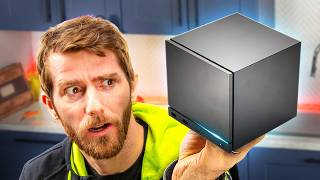

Valve's Steam Machine: Best Desktop PC?
54sChallenges common perception of Steam Machine as a gaming console, highlighting its potential as a superior desktop PC, sparking debate.
▶ Play Clip"Title accurately reflects the video's core argument: the Steam Machine is an excellent desktop PC, despite initial gaming focus."
The video argues that Valve's Steam Machine, initially seen as a living room gaming console, is actually an outstanding desktop PC. The reviewer, having daily-driven it, praises its thoughtful hardware design and seamless SteamOS integration, calling it the closest thing to a PC Mac mini. While not the fastest or most upgradeable, its software experience makes it a compelling alternative to Windows.
Everyone, including Valve, initially saw it as a living room competitor, but the reviewer believes it's better as a desktop PC or workstation.
It's not the fastest, flashiest, or most upgradeable, but the hardware design and SteamOS integration make it the best desktop PC the reviewer has ever used.
The Steam Machine is a small desktop cube with an M.2 slot, two DDR5 SODIMM slots, and repairability via iFixit partnership. It's quiet and adorable.
Ironically, gaming performance is the weak point, but for workstation use, it doesn't feel slow thanks to excellent SteamOS software.
SteamOS is based on Arch Linux, KDE Plasma desktop, and Flatpak package manager, with Valve curating and validating the experience.
A quick reboot-to-desktop button switches from Game Scope to KDE Plasma, which is friendly to Windows refugees. Setup takes 10-30 minutes.
Menus are simple and intuitive, with HDR settings not hidden and refresh rate not an advanced option. Pointer acceleration is off by default.
Window snapping works better than Windows, and freshly launched apps appear in the middle of the screen. Features like mouse wiggling to enlarge cursor and ping speakers via volume slider are thoughtful.
The USB-C port does not support display output or Thunderbolt peripherals, which is a drawback for docking. Also lacks 2.5 gig LAN.
SMB shares are easy to find and bookmark. However, iPhones cannot be accessed over USB out of the box, and KDE Connect has issues with large file transfers.
AI tools make switching to Linux easier by providing quick solutions instead of outdated forum threads.
Auto-scroll (middle-click to scroll) does not work properly on SteamOS, which is a critical issue for some users.
Printer setup took 30 seconds, and a Fuji ScanSnap scanner worked in under 3 minutes, showing significant progress in Linux hardware support.
Every Linux issue flagged over the last 10 years has been meaningfully improved, e.g., GoXLR audio interface now works well.
SteamOS is immutable, which protects users from system-destroying modifications but can cause issues with non-Flatpak utilities after reboot.
Despite annoyances like notification pile-up, SteamOS feels well-intentioned, whereas Windows feels intrusive with ads and prompts. The reviewer prefers a system that works out of the box.
Valve should add a button to default to desktop mode to avoid needing a terminal command, which was the only console use during the review.
The Steam Machine, despite its gaming performance shortcomings and some hardware limitations, offers a polished desktop experience through SteamOS that rivals and even surpasses Windows in user-friendliness. It represents a significant step forward for Linux on the desktop.
What is SteamOS based on?
Arch Linux, KDE Plasma desktop environment, and Flatpak package manager.
02:23
What are the expansion options on the Steam Machine?
One M.2 slot and two DDR5 SODIMM slots.
01:43
What is a major limitation of the Steam Machine's USB-C port?
It does not support display output or Thunderbolt peripherals.
05:34
How long does it take to set up SteamOS desktop to your liking?
10 to 30 minutes.
03:17
What feature does SteamOS lack that Windows has for scrolling?
Auto-scroll (middle-click to scroll) does not work properly.
09:29
How long did it take to set up a printer on SteamOS?
About 30 seconds.
10:35
What is a downside of SteamOS being an immutable OS?
Non-Flatpak utilities may stop working after a reboot.
12:02
What tool did the reviewer use to remotely transfer files?
Tailscale.
08:48
Best desktop PC ever used
Despite not being the fastest, the reviewer claims it's the best desktop PC they've ever used due to hardware and software integration.
00:30Simple configuration menus
Highlights how SteamOS avoids Windows' pitfalls like hiding HDR settings, making it more user-friendly.
03:29USB-C port limitation
A critical oversight that affects docking and peripheral connectivity, showing a trade-off in design.
05:34Auto-scroll issue
A missing feature that is important for productivity and RSI prevention, indicating an area for improvement.
09:29SteamOS feels well-intentioned
Contrasts the intrusive nature of Windows with the respectful user experience of SteamOS, despite both being commercial products.
13:10[00:02] everybody, including Valve, saw it primarily as a competitor to living room you ask me, everyone, including Valve, got it wrong.
[00:14] To be clear, it's perfectly okay for couch gaming. It's just that, in my opinion, as a desktop PC or as a workstation, it's [music] a way better product. Maybe the best desktop PC that I've ever used. To be clear, it's not
[00:30] the fastest. Oh, that's my Teams. Uh yeah, you might want to close that. I've been daily driving it. To be clear, it's not the fastest or the flashiest. It doesn't offer industry-leading upgradeability or
[00:42] repairability. And the price, the price is a big challenge. [screaming] But, the thoughtful hardware design and the seamless integration with Valve's SteamOS makes this the closest thing that I have ever experienced to a a PC
[00:56] Mac mini. And it's made me go from well, I'd like to like Linux to I don't know how I can go back to Windows now. Guys, the year of the Linux
[01:08] desktop is 2026 and the Steam Machine is leading the charge. And if you don't minutes and I think I can probably about our sponsor. >> UGREEN, their DX 2800 GT is a great NAS
[01:24] for backing up anything from family photos, your entire movie collection, or even security camera footage. Learn more or grab yours by clicking the link or grab yours by clicking the link below.
[01:43] everything I've already said about it remains true. What Valve designed here is an outstanding little desktop cube PC that manages to offer up some expansion in the form of an M.2 slot and two DDR5 SODIMM slots, along with reasonable
[01:57] repairability through a partnership for replacement parts with iFixit, and an unassuming design that manages to be as quiet as it is adorable. >> The one area where it falls short, ironically, is gaming performance.
[02:11] that's not really an issue when I'm using it as a workstation. And for day-to-day use, it doesn't [music] feel slow. And a big part of that comes feel slow. And a big part of that comes down to the excellent Steam OS software.
[02:23] way early. A lot of what I'm about to say about Steam OS is really about Arch Linux, the KDE Plasma desktop environment, or Flatpak, the package manager that makes browsing and installing applications on Linux very
[02:38] App Store-like. [music] But, Valve has made meaningful contributions to making these things as good as they are, including sponsoring upstream development. And, maybe more importantly, Valve is doing the work of
[02:51] curating all of the elements that make up Steam OS, and validating the experience of how they work together. Take, for instance, the switching process between the default gaming Steam OS interface and the desktop when you're
[03:03] looking at here. All it takes is a quick reboot-to-desktop mode button, and within seconds, Game Scope is gone, to be replaced by a lightly customized KDE Plasma that is made to be just so friendly to Windows refugees like
[03:17] to your liking should take no longer than, like, than, like, 10 to 30 minutes. Like, my oddball 6K by 2 and 1/2K monitor resolution was detected immediately. And, while I was
[03:29] checking that, I was struck by just how simple the configuration menus are. Like, why does Microsoft feel the need to hide HDR settings within a submenu? And for that matter, why is refresh rate an advanced option? It's 2026.
[03:45] This is more like it. Oh, and by the way, thank you for having pointer way, thank you for having pointer acceleration off by default. Like, duh, Grabbing my frequently used programs was painless. Chrome for browsing, Zap-Zap
[03:58] for WhatsApp messages, OBS Studio for screen cap, VLC, a calculator since one wasn't included for some reason, and Windows snapping works exactly like you'd expect. Actually, better than Windows in some respects. Have you guys
[04:12] ever had a window that's like stuck snapped to a virtual display somewhere Now, is it control arrow or is it Windows arrow to move it over?" close it and reopen it. A freshly launched application will pop up
[04:26] somewhere sensible, like, I don't know, maybe in the middle of the screen. Love it. The whole experience feels familiar, but better with thoughtful features like wiggling the mouse to embiggen it like on a Mac, the ability
[04:40] to ping your speakers simply by clicking the volume slider rather than dragging it. Why did you remove that functionality, Microsoft? And, barring the odd weird frame drop, well-tuned animations that look and feel modern,
[04:55] but are fast and subtle enough that they don't get obnoxious. A recent Samsung One UI update is actually the perfect example of the kind of animation bloat that Steam OS issues. Why are five tiles wiggling every time I
[05:09] swipe a notification? That's not to say that everything went perfectly. This is my desktop setup at work. Like that blissful looking mouse pad, by the way? Coming soon. lttstore.com. Anyway, I ditched having a desktop the
[05:22] better part of a year ago because I have two desks at our two offices, and it's way easier for me to carry all of my stuff around with me on a laptop. So, I'm a big fan of USBC docking in order to hook up all my peripherals and charge
[05:34] my battery. Well, the Steam Machine has a USBC port, per second, but unfortunately, it is not wired up as a display output, nor does it have USB-4 capabilities to allow it to work with
[05:49] Thunderbolt peripherals. And this is a great example of the kind of thing that can end up overlooked in the rush to get an embargo day review out, but might come up during the weeks or the months that you spend
[06:01] daily driving a device later. It's unlikely to be a huge issue for you Steam Machine back and forth to the office in your backpack, but still, I wouldn't have minded a better Type-C port or, while we're at it, a 2.5 gig
[06:15] network port. I suspect Valve knew what they were doing [music] when they focused instead on high-speed wireless networking and left off 2.5 gig LAN. I mean, they do after all run the Valve hardware survey, but on a CPU with six
[06:29] Zen 5 cores, I should be able to exceed gigabit download speeds without buying a separate 2.5 gig USB NIC. [music] On the subject of networking, you might recall that Elijah really struggled with accessing network shares in our recent
[06:42] Linux challenge series. Mounting network locations as though they are a physically attached disk is not well supported, especially on immutable OSes at this time. I'm happy to report though that the KDE team has found funding to
[06:56] chase down this issue, and I'm also happy to report that if your needs are less complicated than his, on Steam OS, SMB shares are easy to find, authenticate, and bookmark for future use. Though, I did hit a small snag when
[07:10] I was transferring files off my phone. First of all, I want to shout out the drop for whether I want to copy-paste cut-paste. I really like that, but what thumbnails? It looks like Dolphin, the default file explorer, needs to be
[07:25] configured in order to show previews for network files, and you can tell it um anything under, you know, some given size, which fixed it. But I did find it sometimes. The bigger issue when I was transferring
[07:39] files was when I plugged in my other phone from Apple. Turns out that um out of the box, iPhones can't be accessed over USB at all. And this is a real problem for ingesting video.
[07:53] KDE Connect was the most common suggested fix, and [music] it's a pretty neat piece of software that integrates with your iPhone wirelessly to provide a more seamless experience. But, when I tried to copy like 100-plus files, it
[08:07] stopped. No obvious errors, no way to pick up [music] I suspect the problem is mostly Apple, [music] hang issue when uploading third-party
[08:21] but it doesn't change the conclusion. Copying big files from an iPhone is basically unusable without jumping through silly hoops, and I ended up Since I was playing around with file transfers, I also found a comically bad
[08:35] workflow where Arc was failing to extract a Google Drive download to a >> [music] >> Like, why? Just copy it. And while I'm at it, dragging and dropping files into Google Drive doesn't work in Chrome for
[08:48] some reason. On the plus side, though, once I had the files on my NAS at home, a quick AI guide had me using Tailscale to remotely transfer those files from my Steam machine to my work NAS in less than 2 minutes. So, say what you want
[09:02] about AI, sometimes it really is a total waste of sand. It has made switching to Linux easier than ever before, because what used to be just endless wading through outdated Reddit threads or or even worse, Steam forum arguments, is
[09:16] even worse, Steam forum arguments, is now usually just a quick prompt and a >> probably helpful if over-the-top Glazy response. conversation for a second, though, there's another Linux issue, this one
[09:29] raised by Luke during our challenge, that does not appear to be addressed by SteamOS. And that's auto scrolling. Windows has this great feature that allows you to click with your middle mouse in the blank space on a scrolling
[09:43] webpage or application and then just move the mouse to start a smooth continuous scroll. The more you move, the faster it scrolls. And it even works horizontally for my spreadsheet lovers out there. If you've ever experienced
[09:56] repetitive strain symptoms in your wrist, I'm not a doctor, but you need to start using auto scroll right now. It majorly cuts down on unnecessary mouse you're reading documents
[10:09] and just plain doesn't work properly on Steam OS. And you know what, Ryblade? Responses like this aren't constructive. I'm really happy for you that middle clicking to paste text is more useful to you.
[10:22] It isn't to me. This is a critical issue for 66% of our last Linux Challenge participants and in my opinion, it needs to be addressed. Moving on. A couple of years ago, we tried to use Steam OS to
[10:35] troubleshoot a driver issue on an old printer and what I discovered was that printer support. Well, fast forward to today and it took me just about 30 seconds to go from no printer to this delightful booklet of
[10:50] test page. Progress. bit more work, I could have had my printer working and when I really tried to throw it for a loop and I threw my Fuji ScanSnap at it, I got that working
[11:05] in less than 3 minutes. [music] Okay, the free software I used got a little confused trying to save my scans as an image rather than a PDF, defaulting to bitmaps and then spitting out errors about how bitmaps are not supported, but
[11:19] >> Okay. >> And as much as I'm kind of taking the piss a little bit, I'm actually serious about that. Every Linux issue that I can think of over the last 10 years has been meaningfully improved since I found out
[11:34] about it. Like I remember flagging crappy GoXLR audio interface support during our first Linux challenge. Nowadays, it works as well on Linux as it does on Windows, maybe even better due to TC Helicon abandoning their
[11:47] software support. To be clear, SteamOS is not going to be the right choice for >> the lack of, you know, facial recognition through Windows Hello kind of sucks, and it's an immutable OS, meaning that it kind of resets every
[12:02] this won't be a problem, but to show why it could be, part of getting my GoXLR interface configured [music] involved installing utility that was not available in a flat pack. So, I did some hacky stuff and got it to work, but then
[12:18] when I rebooted my system, it caused it to stop [music] working. But, while that's a downer for me, for gamers and application users who want to be protected from system-destroying modifications, I feel this was a very
[12:31] smart choice on Valve's part. And that's what SteamOS really boils down to. It's not unique. In fact, I was sitting with Jordan pointing out how OneDrive isn't prompting me to buy a subscription, and
[12:44] Edge hasn't asked me today if I'd like to switch to it now or later, and it occurred to me that there's an easy answer to all of that. Windows can be configured to not do any of those things. And I I really do want to
[12:57] explore Windows debloating, but I got to confess, I get almost like a a PTSD type of response to those interruptions at this point. Like SteamOS has some annoyances, too. Tediously clicking away notifications
[13:10] that pile up in the bottom right, that's one of them. But, because everything about it feels well-intentioned, I have [music] so much more patience for it. Like by contrast, I feel constantly on edge.
[13:23] Pun 100% intended. When I'm using Windows, just from all the past experiences. And And besides, why should I have to debloat? Remember I told you you could probably have this set up in 10 minutes? I meant that. A product that
[13:36] I pay for should [music] feel comfortable out of the box. Do you remember when technology was made to make our lives better instead of existing only to sell us I remember. And the dumbest part of this
[13:49] is SteamOS totally does exist just to sell us And it still manages to be that much better than Windows. Okay, last thought here. Valve, um can you please add a button to default to boot up in desktop mode so that I don't need
[14:03] to use a terminal command? Uh it was the one normal thing I did on this system the entire time I was using it that required the console. And that is really required the console. And that is really high praise indeed. Just like I will
[14:16] praise our sponsor, Ugreen. Security camera footage only sticks around for so long, and this is usually result of limited storage. Or up all those important videos you made on your last family vacation. Either
[14:30] way, Ugreen's NAS DXP2800GT is a great centralized storage system for all your files, images, and videos. You can get up to 80 terabytes of storage with support for two SATA drives and two SSD slots, which is enough for
[14:44] tens of thousands of videos. If you just wanted to back up security footage, just connect ONVIF IP cameras on your network, and you get a live view, local recording, playback, all accessible from a single app. Ugreen even allows you to
[14:58] sync other aspects of your smart home to your NAS. Don't worry about setup. There's a step-by-step guide that's beginner-friendly. So, hurry up and grab your Ugreen NAS DXP2800GT using our link below.
[15:11] don't you check out the review? It was a lot less focused on the SteamOS desktop experience and a lot more focused on gaming, which gaming, which was not quite as rosy a picture.



⚡ Saved you 0h 15m reading this? Transcribe any YouTube video for free — no signup needed.