
Charging Station vs. Mini Split: Will It Survive?
60sHigh-stakes test of a portable battery powering an air conditioner, which viewers will find both surprising and relatable.
▶ Play Clip"The title promises a review and delivers exactly that, with practical tests and honest observations, though it could be more concise."
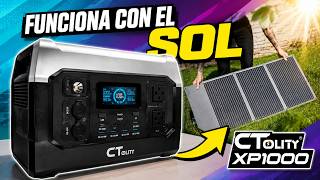
This video is a comprehensive review of the CTOLITY XP1000 portable power station, tested with a solar panel. The reviewer explores its design, features, and real-world performance, including powering a mini-split air conditioner and a streaming setup, to determine if it's worth the investment.
The reviewer introduces the CTOLITY XP1000 as a large portable power station, emphasizing its size and the plan to test it in various scenarios to provide an informed opinion.
The unit is smaller than expected, similar to a small ITX case, weighs 13.3 kg, and feels solid with good handles. The build quality is described as automotive-grade plastic.
The left side has a wall input, DC input, and an overload protector. There's a switch for fast (900W) or slow (500W) charging, which affects input power draw.
The front has two grounded AC outlets, four USB-A ports (18W each), and two USB-C ports (24W and 100W). The side includes a car lighter outlet for accessories like compressors.
The display shows remaining battery percentage and estimated time left based on current load, which is useful for planning usage.
The reviewer connects a mini-split AC, which draws about 700W, and the battery indicates 40 minutes of runtime at 40% charge. This demonstrates the station's capability for powering appliances.
The CTOLITY 100W solar panels are foldable and easy to set up. In testing, they only produced 70W in strong sunlight, so adding more panels in series is recommended for faster charging.
Testing economy mode on the mini-split reduced consumption to 10W, extending battery life to over 8 hours. This shows the importance of understanding appliance energy modes.
The reviewer estimates his streaming setup consumes 820-900W, giving 40-45 minutes of runtime, which is enough to finish critical work during a power outage.
The XP1000 is a charging station, not a voltage regulator, and is ideal for powering devices during outages. It's available on MercadoLibre with an affiliate link and discount code.
The CTOLITY XP1000 is a reliable portable power station that can power essential appliances and setups during outages, with solar charging as a bonus. It's a worthwhile investment for those who need backup power, though solar efficiency should be considered.
What is the weight of the CTOLITY XP1000?
13.3 kg
01:39
What are the two charging speeds for the XP1000?
Fast (900W) and slow (500W)
02:53
How many USB-A ports does the XP1000 have and what is their output?
Four USB-A ports with 18W fast charging each
04:32
What is the output of the two USB-C ports?
One is 24W and the other is 100W
04:32
What is the maximum power draw of the mini-split air conditioner in the test?
700W
07:26
How long did the XP1000 last when powering the mini-split at 40% battery?
40 minutes
07:39
What was the actual charging power from the 100W solar panels in strong sunlight?
70W
09:44
What is the estimated power consumption of the reviewer's streaming setup?
820-900W
11:45
Is the XP1000 a voltage regulator?
No, it is a charging station, not a voltage regulator.
12:12
Build Quality and Size
Provides a clear physical description, helping potential buyers understand the product's footprint and durability.
01:39Mini-Split Power Test
Demonstrates real-world capability to power a common appliance, which is a key selling point for the station.
06:12Solar Panel Efficiency Reality
Reveals the gap between advertised and actual solar output, an important consideration for off-grid use.
09:44Energy Mode Impact
Shows how using economy mode can drastically extend battery life, a practical tip for users.
10:23Clarification on Function
Corrects a common misconception about the device's role, ensuring users have accurate expectations.
12:12[00:04] being metaphorical, it's literally something huge, and we're going to be reviewing it in this video. But this video isn't just going to be in also going to try to use this power station, this
[00:20] great battery, for a while so that the opinion I have at the end sense. Because right now I can tell you, yes, of course, it's an incredible battery, but since I'm going to test it in just 20 minutes, we're going to be using this
[00:32] battery in different situations, in different environments, with different use cases, obviously, and we're going to see how beneficial it can be, especially for you if you're looking for a power station, a portable power station—
[00:46] well, portable, you know, you can take it everywhere, but uh-huh. But if you, like me, work from home and the power goes out frequently due to the weather, you need to carry power to places when
[00:58] have a place where you can charge your things comfortably, well, things comfortably, well, the Sealy XP 1000 is probably for you. So, let's get started with the review.
[01:12] started with the review. [music]
[01:39] The truth is that, judging by the box, I thought it was going to be much bigger. The truth is that it will be, I think, maybe the size of one of the smallest ITX computer cases . Obviously the weight is 13.3 kg, okay? 13.3 kg in
[01:56] weight. It's solid, that's for sure, and at first glance I really like the handles. I like that it can be charged this way. It feels very solid, that is, if you don't feel like it's , which I think is pretty good. And since I'm new to
[02:09] this type of charging station or power station, let's take a quick look at what it has to offer. On the left side we can find entrances, okay? We can see that we have a wall-mounted input for
[02:23] charging, a DC input, which is obviously also used for charging in a certain way, and an overload protector. Okay? The inputs the unit. And something I did notice that's quite obvious is
[02:36] that we have an indicator here for whether we want to charge energy quickly or slowly, okay? This way would be slow, and this way would be fast. So we can choose the unit's charging speed , right? Well, we
[02:53] the XP 1000 charging station directly to the wall, and as you can see, at fast speed it's using more than 900W, almost 1000W of input power, and now with the speed reduced and obviously the increased charging time it
[03:07] drops to 500W of input power. On the left side we don't have much more than markings, obviously for the Seat Tality XP 1000. There is absolutely nothing on the back. That said , most, if not all, of the
[03:22] internal components, right? But it 's all made of plastic. It feels like automotive plastic, it feels like automotive quality plastic. The truth is, it's pretty good. And on the front, probably the
[03:35] most obvious thing we can find, are the outlets, which would be two grounded power sockets , obviously, like the typical wall outlets, which would sound quite useful to me for
[03:47] obviously, I don't know, charging a device like a laptop. If you happen to be some reason, you could perfectly well power it with this. Computer monitor. Speaking of streamers, you know what I mean? If the
[04:01] this to finish your work. Very important note, this is not a charging station. So, if you absolutely have no electricity, this will work to get many use cases that can actually be implemented, which we will see throughout
[04:15] a rough idea of what you could do with this. We never really think support our work, and this, believe me, can be a great solution. Down here we have four USB C 3.0 ports with 18W
[04:32] fast charging, quick charge. Then it's cool. And we have two USBC outputs here that are obviously also for charging. This one is 24W and this one is 100W. Uh, for example, my cell phone, the Honor 200, uses a 100W cube,
[04:46] which is fast charging and the phone will charge to 100% in 25 minutes from 5%. So, pretty good on that front. And on this side we have car lighter-type inlets. If you have compressors, for example, of this
[05:00] input or output style, you can use, you know. In other words, this is what intros are for. And that's it. We have a power button, a USB button, and an charge. Let's turn it on. Hosamos bicicleta. Ah, yes,
[05:16] we can clearly see the remaining battery percentage, and it also gives you an indication of time, that is, it has 99 hours left, obviously with this heavy use. And what I love is that we have an indicator in percentage
[05:30] of remaining battery, but not only that, but depending on the load or rather the [music] USBC output or the traditional power output, it tells us how much time this battery has left, which would be 42%, equivalent to
[05:44] those hours, but with those devices. I'm going to do a super-fast test you can see roughly how much battery it would have left with a normal charge and a fast charge. And, for example, right now my cell phone is at 66%.
[05:57] connect it with its cable. And, for example, when I connect my phone, when I connect my phone, the supercharge legend appears here. obviously, using it on a daily basis with my mini split, okay? In
[06:12] the advertising for this battery I saw that it can perfectly be used to like to see how much a mini split, which I think is a ton, would demand from this thing and how much longer it would last when connected to a
[06:27] mini split, so let's do it. Okay, here we have the control for my mini split, which is a Mirah brand. I think it's one of the most normal ones there is , just cold. This one doesn't heat up. Who wants to be hot in
[06:41] ? But, yeah, I'm usually a little scared because I know that, uh, maybe it's not made for that, but let's try it. In other words, it should work. It 's already connected. This is the extension of the mini split. I'm going to activate charging mode here
[06:56] and turn it on. Okay, here it is for you to see. On. 18 gr. It's working. I'm going to record that with my phone so you can And it 's working, it
[07:13] powerful, but maybe that's because I'm hot right now. Uh, obviously the red extinction is connected and charging station. Now, as we can see, the percentage has already decreased a little, but it
[07:26] is indicating here how much output power it is using, which in this case would be 700 W, if I'm not mistaken. And at the bottom, it would show us how much time would be left, [music] which would be a mere 40 minutes.
[07:39] Okay, we're talking about a 700W output, which apparently is the power the mini needs, so at 40% it would represent exactly 40 minutes of [music] use. And here we can already draw some conclusions that it could
[07:54] work perfectly with 500-600W computer power supplies that don't all depends on what you're doing on the computer. It could also be very useful for powering air conditioning units or something
[08:07] see throughout this video, it's also compatible with solar panels. So, you can charge this cell with solar panels so you obviously don't maybe save yourself a lot of money on air conditioning, which, believe me,
[08:22] is expensive to have. Now, regarding the solar panels, well, I ordered Seality brand. The truth is that they come very well packaged, but I do think they are geared more towards another type of use. These are generally 100W and are
[08:36] very easy to use. Obviously they'll work better when the sun is at more focused on you going on . It comes with its manual, and it comes with these different
[08:48] outputs that you can use with any type of charging station, which is incredible. And this would be, let's say, the energy concentrator, and or you can put solar panels in series to send it
[09:01] like the backpack-like format and the fact that it's completely foldable, so it does think they're highly recommended, especially if you're going on a trip or something like that, like on camping, a picnic, or something like that where we won't have
[09:17] this can work perfectly well with sunlight so you can charge your XP000. I tried them in my backyard. The installation is extremely Simply connect the yellow cable to
[09:30] . It has small supports to keep them tilted so they can receive all the energy from the sun. However, even though the sun was quite strong, I didn't get more than 70W of charging power out of the 100W that
[09:44] the panels claim to have, so you have to take that into account. If we're directly to the wall taking around an hour to charge at 900W, then we'd have to do the math to see
[09:56] how long it would take charging at only 70W. So, just so you know the best recommendation if you do want to invest in a solar charging station would be to add more solar panels in series to
[10:08] much greater efficiency and speed when charging your Cuality XP1000 station. Returning to the consumption with more demanding appliances, you can also try other modes with the mini-split, for example, here testing the economy mode
[10:23] and the turbo mode. That could also mark a turning point in how we understand how our appliances consume energy . For example, in the case of the mini, if I put it in economy mode, it only consumes 10W and in real time
[10:36] it calculates how long it would take to discharge that 30%. For example, if you look here at 10W, in economy mode, it has already gone up to 6.3 hours of duration, with only 31%. There it goes up a little more to 8 hours. So, in
[10:51] theory, in economy mode, this battery can last you up to a full day with a could easily calculate how long it might last if you use it in turbo mode or if you want to save electricity. Now, this is my setup working exactly as is
[11:06] for streaming or recording videos or whatever. Obviously I'm not going to use this on a daily basis, but let's say I'm doing something important, some commitment, some tournament, some activity that simply
[11:18] has to be done because it has to be done. Or not necessarily talking about streaming, video and maybe I need to record a voiceover like the one you're hearing and perfectly set up. I need my monitors so I can be recording,
[11:31] editing my lighting in [music] in case I need to record myself. All of this consumes a lot of energy, and this could be solved by the XP Chat GPT, for example, an average of how much my setup would be using, and we
[11:45] would be talking about between 820 and 900 W of consumption, which would probably give me a maximum performance of 40 to 45 minutes at energy, which is very unlikely, but I could finish my work without any
[12:00] problem. So, those are the use cases that would work quite well for me, at least . In broad terms, that's what the Cuality XP1000 can deliver. There wasn't much science in explaining how a battery works, but there were
[12:12] the use cases you could give it. While it's not a voltage regulator, which I've clarified quite a few times, it's a charging station that can power you can finish your work without any
[12:25] . Now, if you're interested in acquiring this charging station, there are two ways to do so. The first would be at the official Seality store on MercadoLibre. You will obviously be able to find the 1024W XP 1000
[12:37] , exactly like the one you saw in this video, at this price. I'll leave the affiliate link, which helps me a lot if you use it, and included the link below in the description, along with a
[12:52] discount code that's valid from August 8th, the day this video is published. So don't waste any time and get your Colity XP 1000 at this great price. Thanks to the people at Colority for sending us both the
[13:05] solar panels. [music] I want to delve a little deeper into that, electricity, because believe me, I consume a lot of electricity. But I definitely feel that the charging station is going to lower my cortisol levels considerably
[13:19] many times when I can't finish recording my videos simply because there's no light in the house. It's not so much that I use the 10 minutes my regulator gives me, but I need an hour or so to be able to
[13:31] render, finish a pending video, and so on. Do you understand me? If you from home, you'll know what I mean. Anyway, from my end I just this video and found it entertaining. I insist, thanks to the people at Cality. I'll leave all the
[13:43] information below in the description, and I'll see you in the next video. Hope the stream goes well, uh, on my laptop with the Sitoliti XP 1000 . And that's all for now, see you in the next video. Take good care of yourselves,
[13:56] the next video. Take good care of yourselves, see you later. Bye.




⚡ Saved you 0h 14m reading this? Transcribe any YouTube video for free — no signup needed.