Made $250K Posting AI Shorts
44sImmediate revenue proof and specific income numbers create curiosity and credibility.
▶ Play Clip
"Delivers a solid, actionable framework, but the $10,000 promise is speculative and the title oversells the certainty of results."
This video presents a step-by-step framework for beginners to earn their first $10,000 by posting AI-generated YouTube Shorts, focusing on the 'ranking' niche. The creator shares personal strategies, tools, and algorithm insights to help viewers scale a channel to high view counts and revenue.
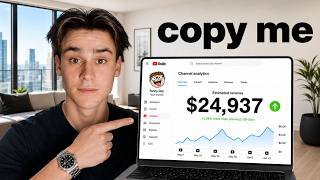
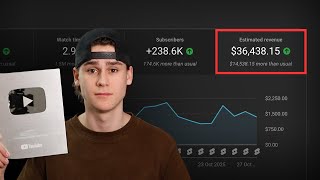
The creator claims to have made over $250,000 posting AI YouTube Shorts, with days as high as $2,000, and outlines a method to make the first $10,000 using brand new channels within 90 days.
The recommended niche is the 'ranking' niche, where creators compile and rank clips (e.g., funniest moments). This niche has high view potential, with examples of channels reaching billions of views and videos hitting 15-42 million views.
A specific prompt is provided to ChatGPT to generate ranking video ideas. The creator advises tailoring topics based on proven viral subjects, like trampoline moments, to maximize view potential.
Viblo.ai is introduced as a tool with a 7-day free trial and a 'video ranking' feature that automates the editing process, allowing videos to be made in about 5 minutes.
Titles should be bold and colorful, with key keywords highlighted (e.g., 'funniest dog') in a contrasting color like red, and a pure black background for better readability and appeal.
TikTok's search engine is recommended for finding viral clips. Only use clips with high view counts (e.g., 11 million views) to ensure quality and engagement.
Rank between five and six clips per video. Fewer than five makes the video too short, and more than six makes it too long, both hurting viewer retention.
Enabling 'random playback order' shuffles the ranking sequence, keeping viewers guessing and increasing engagement, as seen in videos with 168 million views.
Use an aged YouTube channel if possible, as it's pre-warmed. For new channels, spend 30 minutes daily for two days scrolling, liking, and commenting to mimic real user behavior.
Verify your phone number to enable 'intermediate features' in the channel settings, which builds trust with YouTube and reduces the risk of shadow bans.
Good branding includes a clean channel name (no numbers/symbols), a profile picture with a human face (even a Snapchat-filtered one), and a simple banner made with Canva.
YouTube distributes new Shorts to 20-30,000 viewers (subscribers and new viewers) and analyzes two key metrics: average view duration (AVD) and swipe rate (stay-to-watch).
A video with a 23-second AVD on a 23-second video indicates full watch-through. A stay-to-watch rate of 80-90% is ideal; below 80% typically prevents virality.
Post once per day in week one, twice per day in weeks two and three, three times per day in week four, and up to five times per day after hitting a million real-time views. Spread posts throughout the day.
The video provides a comprehensive, actionable guide to earning $10,000 through YouTube Shorts by leveraging the ranking niche, using AI tools, and understanding the algorithm's key metrics. Success hinges on consistent posting, high-quality clip selection, and optimizing for viewer retention.
High Earning Potential
Establishes credibility and hooks viewers with a concrete, impressive income figure.
00:01Ranking Niche as High Leverage
Identifies a niche with proven massive view potential, a key strategic insight for beginners.
00:42Algorithm's Key Metrics
Demystifies the YouTube algorithm by focusing on two actionable metrics, AVD and swipe rate.
16:01Swipe Rate Sweet Spot
Provides a specific, measurable target (80-90%) for creators to optimize their content.
17:49Posting Schedule Framework
Offers a clear, progressive posting cadence that balances growth with algorithm trust.
19:22[00:01] over $250,000 posting AI YouTube shorts. You can see I've hit days as high as $2,000 in a single day. I literally made $700 be showing you exactly how a beginner can make their first $10,000 posting AI
[00:16] be showing you in this video are methods that I've personally used on brand new shorts channels that I've started within the last 90 days and I'm going to be showing you literally everything you need to know start to finish how to set
[00:29] kind of content to post literally everything about making videos and scaling your YouTube shorts channel to $10,000 a month. So enough talking, let's get straight into it. Now step one is you need to choose a high leverage
[00:42] all know this the the niche that you choose for your YouTube shorts channel choose a bad niche to begin with you're literally making it almost impossible lot of videos you'll see out there on YouTube that are like, oh here's the top
[00:55] five niches and they make it unnecessarily complicated. They show you just going to show you the exact niche that I would start myself if I was channel today. And that niche is the ranking niche. This is still to this day
[01:09] one of the best niches on YouTube shorts. It has been for over a year. channel I showed you earlier that's done over $250,000 in profit. You can see almost 2 million subscribers with only 200 videos posted and every video they
[01:25] post gets millions of views. This one right here 15 million views ranking funniest chicken screaming moments and this got 15 million views in 10 days. basically where you choose a video topic. So for example ranking funniest
[01:38] angry reactions is what this guy did and then you rank a series of clips from which one is the most funny. So you just compile these clips that you steal from Instagram into this compilation and by doing this you are transforming the
[01:51] you're adding all this additional editing and it's a totally new video post this onto your own channel. The reason I say the ranking niche is a high leverage niche is because it has more view potential than any other niche on
[02:05] confidently because channels like this have literally done 5 billion views. They have videos hitting 15 million, 42 million in 3 weeks. This video right here, 14 million in 1 month. You can see if we filter this by most popular,
[02:20] they've got videos on this channel 250 million views, 340 million views. There are almost no niches on YouTube Shorts that can even reach that many people. The most viral videos in some niches cap out at like 2 or 3 million. So, that is
[02:34] why this is a high leverage niche because it has way more potential to go on YouTube Shorts. So, I'm going to show you step-by-step how to quickly make then we'll get into setting up the channel and all the rest of the stuff.
[02:47] you're going to put this prompt right here into ChatGPT. So, I'll leave it up screenshot this, write it down, copy it, whatever you want to do. And you can even swap out some of the examples that I'm giving ChatGPT as what I would
[03:00] of your own. You're going to send this prompt, and this is going to get ChatGPT video ideas. You can see it's gone and found a ton of good ideas. There's great stuff in here like ranking biggest NPC moments, you know, ranking most painful
[03:14] fails ever, like ranking most awkward first dates. These are great video ranking topics. And again, the reason ranking videos go viral is primarily because you choose really good topics that have very high view potential. So,
[03:27] park moments. You kind of want to pick topics that you've seen before do really this channel right here, Rank Zilla, and you could look at like, "Okay, every time they do a trampoline video, those get hundreds of millions of views." So,
[03:41] we know that that's a good topic. So, you can work with ChatGPT to kind of tailor the responses to be more focused on, you know, trampoline moments or things similar to that. Now, once you have a good video topic picked out, you
[03:53] do that, you're going to go over to viblo.ai. This is a super powerful tool that's going to make it really easy to just edit up these ranking videos in like 5 minutes because there's a full automated system for it within this
[04:06] this tool is that there's also a 7-day free trial, so you get a bunch of free credits and you can use the tool for 7 days first to make a bunch of videos, started with YouTube Shorts without actually having to pay for this tool
[04:20] get signed up. Now, once you're logged in, you're going to see this option right here for video ranking. So, you're just going to click start ranking, and video editor. You're going to add your video title right up here. So, for me, I
[04:33] but this is where you have to be really careful. You can see right here, it looks terrible. This does not look anywhere near as good as these guys' titles. Their titles look fantastic, really bold, colorful, easy to read, and
[04:46] you're going to do is you're going to bring this down a line, so just hit second line. And then what you're going to want to do is highlight two or three of the most keywords in this title. So, for me, I've got ranking funniest dog
[05:02] moments. Now, the two keywords in here that are the most important for the viewer to be able to understand what our video is are probably funniest dog cuz about the funniest dogs. So, I'm going to highlight both these keywords here
[05:15] and then just change the color and make them like, let's go with red. We'll make them bright red. You just want them to stand out so that they can really understand exactly what your video is
[05:27] to change the background color and just make it pure black. I just find that looks a lot better. Again, this is just what all the big ranking channels do is background. It looks much better. And now, you're actually ready to go find
[05:40] ranking within your ranking video. And the best way to do that by far is with TikTok because TikTok has a really good clip search engine. So, I can look up my video topic, for example, funniest dog moments,
[05:52] right? And it's going to find me a bunch of viral videos of dogs that have found a perfect video, and I know this is a perfect video because it has over 11 million views. You only want to use clips in your ranking videos that are
[06:07] people because that's how we get to ourselves. So, once you find a clip that you like, just copy the link of that clip and then head back into Viblo and go to your first ranking slot. So, we'll
[06:21] just go to video rank one, paste in that URL, and then just hit send. And just like that, you can see it downloaded the video into my ranking video editor like it doesn't have the TikTok watermark on it or anything, and it
[06:33] looks super clean and high quality in my video. Then, from here, you also need to add the title of this specific clip cuz you'll see all the ranking videos, they all have which rank it is. So, for example, this one is like rank number
[06:45] Smith or whatever, right? So, they'll they'll name each clip and rank them. example, this one is of a pug, so I'll call it like cute pug or whatever. You this, but you want to make it kind of like short, funny, one to two words is
[07:01] I'll turn up the title stroke a little bit so that it gives it this nice black it's kind of hard to see, so you turn that up, and it makes the text stand out literally just repeat this until you have five clips ranked. So, you can just
[07:16] keep adding more clips. You can see now I can rank, you know, I have five in videos for each of those and give them their own titles and things like that. Now, I will say you typically only ever want to rank up to five or six clips.
[07:29] the video's just too long, and people won't watch it. You also don't want to rank less than five clips. Anytime you rank less than five clips, they it's really important that you rank anywhere from five to six clips. That's
[07:45] the best for you. And one last trick you can do to really increase the engagement of your ranking videos is turn on this setting right here, custom playback right now what happens is is as you play the clips, it ranks them in descending
[07:59] order. So, it will start by ranking, you know, clip number five first. It will pay it'll play the fifth video first and it will rank down. So, it'll start with five, then rank down to four, then down to three, etc. But, what you can do is
[08:12] you can go random playback order. You can just shuffle this and now it'll rank them in a random order. So, they're kind of like left guessing. They don't even next. That's what videos like this do that got 168 million views. You can see
[08:25] down to seven down to six. He starts with ranking number three, then he does kind of just ranks them randomly. So, you can use this shuffle feature here to once you're done, you've added all your different clips, you just hit generate
[08:40] post. Now you have a process that can allow you to make videos in five minutes. So, now what you need is a channel that is fully set up, fully warmed, and branded properly. Now, before you do anything, one of the best
[08:52] tips I can give you here is try to use a YouTube channel that's aged. So, what an aged channel is is a YouTube channel that you created, you know, three, four a long time and you've never really posted any videos on. You just have this
[09:05] that you created when you were a kid. So, go check see if you have a YouTube you're going to want to use that. Because it's existed for a really long time, it's already pre-warmed up for you. It's ready to post. You can just
[09:19] post on it right away and you're going to get views like normal without running that. However, if you don't have an old YouTube channel, you can still just But, I'm going to show you specifically what you need to do to make sure it's
[09:32] warmed up properly so that when you post, you don't get stuck at zero views. create your brand new channel is you're just going to go straight to the YouTube feed and watch a bunch of the videos
[09:44] some comments, like some videos, go subscribe to a few people. It doesn't even matter if it's really within your niche. Just scroll and go through a bunch of the stuff that you see on your YouTube Shorts feed because this is
[09:57] real person. Usually, you're going to want to do this for about 30 minutes on your new channel, you're just going to scroll and like some videos and use YouTube like a regular person for about 30 minutes. Then, on day two, you're
[10:11] just going to scroll again for 30 minutes, but then you're going to do your YouTube dashboard and you're just going to click down here in the bottom left corner where it says settings, and then you're going to click channel, and
[10:24] then go over to feature eligibility right here. Now, what this does is it basically shows you if your channel has the necessary features to be able to shadow bans. First thing is you need to make sure you have standard features
[10:36] enabled. So, this is only ever going to be disabled if you've posted a video and point. So, this would only ever really apply to someone with like an aged channel that's reusing an old YouTube channel where they had violated
[10:49] YouTube's guidelines in some way. So, for 99.9% of people, this will already anything. But, intermediate features, you are going to have to do something to enable it because this isn't enabled by default. You have to A, have standard
[11:02] features enabled, and B, you have to actually verify your phone number. Now, I recommend that you do this because by verifying your phone number, you just YouTube again that you are a real person. You're not a robot. You're
[11:15] legitimately taking the time to do a phone number verification and set up recommend setting up intermediate features. You technically don't need to do this, but if you set up intermediate features, it does go a long way to show
[11:28] you're person and build trust with YouTube before you make your first post. technically set these up as well if you want to, but you don't really need to. warmed up channel that is also completely set up and ready to post on
[11:43] and will have the least amount of odds of, you know, getting shadow banned. branding because you can't just post on a channel that looks super ugly because videos, the more YouTube sees that as a really good sign and they'll actually
[11:57] out to more people. So, you need make sure that your, you know, channel page converts well so that when people land on it, they, you know, from watching subscribe to you. This is an example, this channel doesn't actually exist, but
[12:09] this is what good branding looks like. So, there's there's three main things going on here. There's the channel name, which just have ChatGPT generate something. It doesn't matter. Don't overthink this. Just ask ChatGPT for a
[12:21] funny name. I just came up with like, "My name is Bob." Stupid name, doesn't make sure you don't have a bunch of like numbers or symbols or underscores in your name. Try to just pick something that's just letters. But, again, do not
[12:35] spending the next 20 minutes picking a name. Go on ChatGPT, come up with a name because it's a waste of your time to spend any more time than that on picking to do a profile picture. And again, there is actually a really important
[12:50] reason behind this. If you just generate some AI slop profile picture, a lot of times that can hurt your trust score with YouTube. It shows YouTube that you mass producing content, that you're not going to be putting effort in. You don't
[13:04] look like a legitimate channel. And also, people don't typically want to subscribe to channels with AI profile pictures. They typically convert worse. So, even though a lot of people tell you just go generate some profile picture
[13:16] with AI, you're actually going to put your own face on this, but you can use a your own face on this, but you can use a Snapchat filter to make it look not like you. That That me in this photo here. I put a Snapchat filter on myself that
[13:28] made my face look super weird and have like googly eyes, and I use that as my profile picture. No one would ever know that this is, you know, me by just looking at the channel, but it actually is. This is still fully faceless. This
[13:40] trust, and this is just a little trick that I picked up. I've done it on a lot of my channels, and it's really helped with just making sure my channels look really authentic, and YouTube sees this as a human face. So, it just looks a lot
[13:52] more legit. You need to set up a banner. A banner also really does not matter. Don't overcomplicate this. Use Canva. Canva is a really great free way to make graphics and do graphic design. You can cook something up like this in literally
[14:04] says "Subscribe for a cookie." I just put one line of text and an arrow. You can make this in Canva for free in 3 minutes. Do not overcomplicate this. Now, what you need to do is you need to scale the channel fast because there is
[14:17] a very specific framework you need to follow if you want the channel to grow quickly and reach millions of views as fast as possible. Now, in order to understand how to go viral, you need to understand what makes a video go viral
[14:29] and how the YouTube Shorts algorithm works so that you can beat the game because the way I always look at it is you can't beat the game of YouTube if game you're playing. Here's how the algorithm works in super simple terms
[14:42] explain. First, you post a YouTube Short, and immediately after you post, within like a couple minutes or couple hours, it's going to get distributed to two groups of people. It's going to get distributed to a couple people that
[14:55] to get some subscribers that already know who you are watching your videos. never seen your videos before, completely new viewers. And this is most to remember. Like, the majority of people that see your videos early on are
[15:10] usually not your subscribers. They're normally just random new viewers who are scrolling on their Shorts feed and came across your video. That is usually 20 to 30,000 views. So, that might feel like a lot if you're a new person to YouTube
[15:22] shorts, but trust me, 20 to 30,000 views is a bad video. That's like the bare minimum. Almost every video will get 20 to 30,000 views within the first day or testing phase. This is where YouTube is
[15:35] testing your video to see how it performs with those first 20 or 30,000 views. I'm going to show you exactly what stats they're looking at to decide basically just two things that matter more than everything else. And I'm going
[15:48] to show you this on one of my own video that got 14.8 views and made me $2,400 in profit. Now, what happened to this video that made it go viral was YouTube saw two stats that were really good. Those stats were the average view
[16:01] duration and the how viewers engaged, which is I like to call this the swipe rate. These are the two stats that YouTube really cares about. So, every feedback on how these stats did. So, we'll start with the average view
[16:14] duration. This is basically exactly what it sounds like. It's the average amount average viewer, how long do they watch for? Now, the reason this video went viral and got, you know, millions of views is because it has a 23-second
[16:28] average view duration, meaning the average person watched this video for 23 seconds, and the video is 23 seconds long. That means the average person, not the best people, but the average watched the entire video all the way to the end,
[16:42] which is why this video did well. So, if you're posting ranking videos and you're terrible. Like, people are leaving halfway through my video on average." You have a problem with the clips you're using. That shows you that like going
[16:55] to use in your video because you are losing people. They are not retained. the clips that you're using to make them more tight together and faster paced. So, this really gives you an indicator of like how good your content actually
[17:09] is. But then, there's a second metric that also has to be really good. You can't just have one of these to good, you need both. You need a good AVD, and then you also need a good swipe rate. And what the swipe rate tells you is how
[17:21] video in the first 5 seconds. This video right here has an 85% stay to watch. people that were scrolling on their shorts feed stopped on my video, and they stayed for at least 4 seconds. You want the lowest swiped away ratio as
[17:37] possible. You want the highest stay to watch and the lowest swiped away. Now, to give you a sense of what would pretty typically be good is on average, you typically be good is on average, you want about 80 to 90% stay to watch.
[17:49] That's the sweet spot. If you're below that, if you if you're in the 70s for of people staying to watch, those videos typically don't go viral. You need typically don't go viral. You need generally a 85% swipe rate to go viral,
[18:02] or at the bare minimum like an 80%. If this stat isn't good for you, that just using at the start of your ranking video is bad. And that's really easy to fix. Just pick better clips. Pick clips super
[18:15] viral, and make sure you're using the exact same hook as that clip did. Don't because it worked for them. They got millions of views with it, so you want it, too. Those are the two metrics that they're looking at in this analyzing
[18:29] stage. They either see, okay, you know, the swipe rate and the AVD were bad. And It's simple as that. If they think those stats weren't up to their standards, if YouTube decides that your video performed bad by those two metrics, they
[18:42] video. If they see, oh, you know what? Those stats were good. You got a great They are going to push your video to more people. You're going to start getting views again. So, you're in that flatline stage for a couple days, but
[18:54] get a few thousand more views. You might go up to like 40 or 50,000 views. And flatline again, and it's going to go back to that analyzing stage. And this process right here literally is the YouTube algorithm. This repeats on a
[19:09] cycle. Every couple thousand views, your video is going to get reanalyzed and to keep pushing your video out to more people. Now, this brings me to the next thing, which is when you're posting videos, you need to follow a very clear
[19:22] posting schedule to make sure you're giving the videos the best chance at going viral possible. Big myth is that when you post videos on YouTube for them like an optimal time. Like you need to
[19:34] your audience. That's not true, okay? Because like I explained to you earlier, in that first testing stage are people that don't even subscribe to you. They're not even in your audience. So, the posting time of day that you post at
[19:47] matter is that the videos you're posting are evenly distributed. If you're posting two or three videos in a day, don't post them all at the same time or like all within an hour. You should spread them out so that they're spread
[19:59] posting three videos in a day, you would post one in the morning, one in the one in the evening. Doesn't matter exactly what time, just matters that you're spreading them out throughout the day to give each video more of a chance
[20:12] However, when you start your brand new channel and you're just getting going here, you will not be posting three times a day. You will be posting once per day. So, for the whole first week, you will only be posting one video per
[20:24] a week, you can move up to posting twice per day. You're good to move up to You should not still be posting once per day by week two. Now, for all of week two and all of week three, you're going to keep posting twice per day because
[20:39] You're still winning the trust of YouTube's algorithm. You don't want to taken down or you could run into restrictions. So, usually all of week one, two, and three, you're posting a maximum of twice per day. By the end of
[20:54] week three, you're still posting twice per day. But, it's at this point that you can kind of move up. So, by week four, all of week four, you're going to you're going to post one in the morning, one in the middle of the day, and one in
[21:06] the evening. You will stay at three times a day until your real-time graph hits a million views. Real-time basically shows you the number of views your channel has gotten in the last 48 hours. You can find this metric
[21:18] your YouTube dashboard. And this just again, it tells you how your channel is doing. Are you trending upwards? Are you getting more views now than you were 48 hours ago? It gives you a sense of how your channel is doing. This is super
[21:32] three times a day until my channel passes a million real-time views. Now, as soon as you hit a million, boom, you could technically post five times a day. But, what I will say is that this is the
[21:45] maximum. I don't have a single YouTube channel that I've ever posted more than absolute max. And I will also say it's not a requirement, either. You can get by by just posting three times a day forever. But, for people who really want
[21:59] results even faster and you're hungry and you want millions and millions of five times a day, but you just stick here. Once you hit that million real-time, stick at five posts a day, and just don't really go beyond that.
[22:12] Just keep doing that consistently, and you will see insane growth on your literally my full A-to-Z process to get to your first $10,000 in profit with YouTube Shorts. If you do what I showed you in this video and you actually take
[22:25] next couple weeks and you're consistent, there is no reason you couldn't have a channel getting millions of views a day and maybe already generating some some videos, and I will see you in the next one.
The creator immediately leads with a concrete, high-value outcome ($250,000, $2,000 days) and promises to show exactly how to replicate it, creating urgency and a clear reward for watching.
Want to [ACHIEVE SPECIFIC RESULT]? I've [PROVEN METHOD] and I'm showing you exactly how to [REPLICATE] — step by step, from [STARTING POINT] to [END GOAL].
AI-generated clip ideas for Shorts based on the transcript
Immediate revenue proof and specific income numbers create curiosity and credibility.
▶ Play ClipReveals a specific, high-performing niche with massive view examples, offering actionable insight.
▶ Play ClipBreaks down the exact algorithm metrics (AVD and swipe rate) that determine viral success, a highly sought-after knowledge.
▶ Play ClipDemystifies the algorithm's testing and promotion cycle, empowering viewers with a clear growth strategy.
▶ Play ClipProvides a concrete, week-by-week posting schedule to maximize reach, directly actionable for aspiring creators.
▶ Play ClipSnapshot 2026-11-17
Every observation TubeSum recorded, plotted as measured.
The vertical axis starts at 42.5K, not zero, so later observations stay readable.
Based on 9 observations · last observed Nov 17, 2026 · solid lines connect consecutive measurements (≤2 days apart); dashed lines span days TubeSum did not measure. · vertical axis focused on the observed range (starts at 42.5K)
Based on 9 observations · last observed Nov 17, 2026 · solid lines connect consecutive measurements (≤2 days apart); dashed lines span days TubeSum did not measure. · vertical axis from zero
Exact daily observations; gaps mean no observation was taken that day.
| Date | Views | Avg views / hour | Channel median |
|---|---|---|---|
| 2026-11-17 | 43,043 | 9.9 | — |
| 2026-11-16 | 43,016 | 9.9 | — |
| 2026-11-15 | 42,946 | 9.9 | — |
| 2026-11-14 | 42,913 | 10.0 | — |
| 2026-11-13 | 42,821 | 10.0 | — |
| 2026-11-12 | 42,777 | 10.1 | — |
| 2026-11-10 | 42,649 | 10.1 | — |
| 2026-11-09 | 42,607 | 10.2 | — |
| 2026-11-08 | 42,539 | 10.2 | — |
Audience reaction — separate from the performance metrics above.