
Run Python OCR in Laravel with FastAPI
45sShows a practical integration of Python with Laravel, a trending topic for developers.
▶ Play Clip"Delivers exactly what the title promises: a clear demo of Laravel + Python FastAPI for OCR, with solid technical depth."
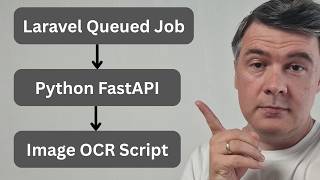
This video demonstrates how to integrate a Python FastAPI microservice with a Laravel application for image OCR analysis, addressing the limitations of using Laravel's Process facade in production. The presenter shows a working demo, explains the architecture using queues and HTTP requests, and covers error handling and retry scenarios.
Follow-up to a previous video on running Python in Laravel for OCR, addressing feedback about better production approaches.
Uploading an image in Filament triggers a pending status, then displays detected text and colors from the image, powered by Python FastAPI.
Shows a running FastAPI service with endpoints for health and analyze, including OpenAPI documentation and example responses.
Python API can run on the same server as Laravel, e.g., via SSH on Forge, though Forge doesn't natively support Python projects.
Laravel dispatches an 'AnalyzeImage' job to the queue, which processes the image in about half a second.
The job updates status to processing, attempts analysis, and updates to completed or catches exceptions, with three tries and a 60-second timeout.
Uses an interface with two implementations: one using Process (previous approach) and one using HTTP to call the FastAPI endpoint.
Filament uses Livewire polling every 3 seconds to refresh the status and results, though web sockets are suggested for efficiency.
Simulates stopping the Python server; the queue job fails after three retries, and the UI shows a failed status with an error message.
A 'rerun' button in Filament resets the status to pending and dispatches the job again, allowing recovery after the Python service is back online.
If the Laravel queue is stopped, jobs remain in the database until the queue worker restarts, then they are processed and status updates.
Taylor Otwell mentioned writing a Forge monitoring service in Go, hinting at more multi-language architectures with Laravel as the web layer.
The video provides a practical pattern for integrating Python microservices with Laravel, emphasizing queue-based processing, robust error handling, and manual retry mechanisms. It highlights a growing trend of using multiple languages where each excels, with Laravel orchestrating the web layer.
What is the main advantage of using FastAPI over Laravel's Process facade for OCR?
FastAPI is a separate service that can be scaled independently and is more suitable for production environments.
00:13
How does Laravel communicate with the Python FastAPI service?
Laravel dispatches a queue job that makes an HTTP request to the FastAPI endpoint.
03:49
What is the default polling interval used in Filament to refresh the image analysis status?
Every 3 seconds.
04:52
How many retries does the AnalyzeImage job have and what is the timeout?
Three tries with a 60-second timeout.
03:07
What happens when the Python service is down?
The queue job fails after retries, and the UI shows a failed status with an error message.
05:50
How can a failed analysis be retried manually?
A 'rerun' button in Filament resets the status to pending and dispatches the job again.
07:44
What happens if the Laravel queue is down?
Jobs remain in the database until the queue worker restarts, then they are processed.
08:40
Production-Ready Approach
Addresses a common criticism of using Process facade, offering a scalable alternative.
00:13Interface-Based Design
Shows a clean way to switch between different analyzer implementations via config.
03:34Failure Handling Demo
Provides a concrete example of handling service outages gracefully.
05:06Industry Trend
Highlights Taylor Otwell's move to Go for Forge monitoring, signaling multi-language architectures.
09:40[00:01] channel I posted this video about running Python in Laravel to perform OCR of image. And in that video I used Laravel process facade to run Python
[00:13] rightfully pointed out that there are better ways for like production environments. So this video is a follow-up to showcase the same thing of image analysis, but with Python fast API in the background. So first let me show
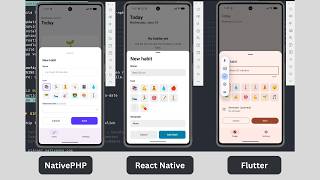
[00:29] you how it works and then I will explain the mechanism and we will dive into the code. So imagine you upload the image. This is in filament and this is the screenshot thumbnail from my other native PHP daily channel, which you
[00:43] should subscribe to if you are into native PHP. Then I create the image and then the status is pending, which should be refreshed in yeah, a second or so. And this is the text that was detected from the image. So not only this app is
[00:57] from the image. So not only this app is built with PHP, but also other texts in the mobile screenshot itself, although it is pretty small, but it was also detected and also the colors. So typical OCR stuff. I'm not talking about
[01:10] accuracy in this case, but this was provided by Python, not Laravel. So the question is how to call that Python script in a good way from Laravel. Now let me show you the mechanism. So I will show you two terminals. First terminal
[01:25] show you two terminals. First terminal is with running fast API kind of a service. You can call it microservice and these are the post requests to that service. This is my local URL for that and there's also documentation for that
[01:39] API. This is the documentation. There's general health and there's analyze, which I exactly use in this case. So these are example responses 200 or 422. Also schemas here. So this is all Python
[01:54] with API with the docs, which is open API standard, so this is all in the background on the backend. So, you should run your Python API on the same server, which you can do in the same Laravel Forge, for example, remotely.
[02:09] So, on Forge you cannot create a Python project from repository, but you can totally SSH to the machine and run that manually. And by the way, you see at the bottom it also logged my docs and open API JSON requests. So, that's Python.
[02:25] Then, on the Laravel level, we have queue. So, these were my previous testings. Ignore that, but this is at the bottom is analyze image job, which the bottom is analyze image job, which was fired automatically by Laravel. And
[02:38] as you can see, it analyzes the image in roughly half a second. But how does that actually work in the code? So, this is Filament admin panel, but you don't really need to know Filament that much. Basically, you need to understand this.
[02:52] After creating the record, the job is dispatched to the queue with the record of the new image. And that analyze image job looks like this. So, we update the image to the status of processing, then we try to analyze the image, and then
[03:07] update the record to completed or catch an exception. If any kind of exception an exception. If any kind of exception happens, and also there are three tries with timeout 60, so you can manage what happens if Python script is failing for
[03:22] whatever reason, you may retry later. Now, what is that analyzer analyze? And this is I asked Claude code to build two-in-one option. So, image analyzer is
[03:34] an interface where I can have two analyzers at the same time. In the app service provider, I bind image analyzer interface to separate image analyzer depending on the config. So, the previous video calling Python with
[03:49] process became Python image analyzer, which inside in the analyze method has this process run. And then this new version, the follow-up became HTTP image version, the follow-up became HTTP image analyzer, which calls the API like this.
[04:04] API URL, API token needed by that API, and then HTTP request to analyze, which you saw already in the API docs on the Python level. And then of course, a lot of things may go wrong here, so exceptions here and there, so try
[04:22] failed then something in the result decoded unexpectedly. So of course, we need to cover those. And then in the config services, I added Python to basically switch between API Python or process from Laravel. And then the final
[04:37] part of the puzzle on filament level is refreshing this page. So this comes in image analysis info list. This is in filament with polling interval. It's just wire pull with livewire. Of course, you can use something like web sockets
[04:52] for that, but this was the simple implementation. So every 3 seconds by default, it is refreshed and shows the results. But of course, it's not necessarily only shiny and happy path scenario. What if something doesn't work
[05:06] along the way? What if for example, Python service fails for whatever reason? Let me simulate and demonstrate that. So I'm uploading another image, another thumbnail from my another YouTube channel AI Coding Daily where I
[05:18] YouTube channel AI Coding Daily where I tested Kimi Kat 3. And before hitting create, let's stop the Python server. So I just hit control C and it's shut down now, so it doesn't work at all. Meanwhile, Q work is still active. I've
[05:34] restarted that. I had to restart my computer. So this is a fresh queue and now I hit create and now it is pending. And look at the terminal, it is running and well, failing. Failing again and then failing should be the third time
[05:50] then failing should be the third time final fail. Yep, it is failed and now look what happens on the website. First, it has failed status and error message below, and this is how it is handled in the Laravel queue job. So, in that
[06:04] analyze image job queue, you saw three retries and then down below there's backoff how many seconds to wait. So, you saw the third retry was slower 10 seconds after that. And then in case of failed, this is what happens. There's a
[06:19] private function mark as failed, which is also called if something goes wrong is also called if something goes wrong with the script itself on try catch. So, mark as failed just updates the database data. Then what happens in the info list
[06:32] in filament, it is refreshed as you saw every 3 seconds, and then it is refreshed only if the status is pending. If the status changes to failed, it's
[06:44] not refreshing anymore. And then in the info list, that's how filament works. info list, that's how filament works. Text entries, we have failed status powered by enum and then we show the badge of danger styled with fail
[06:58] message. And then at the bottom, we have error message which is visible only if the record error message is filled in the database. So, this is one way to handle the failed scenario if Python is down for whatever reason on the same
[07:13] server or separately, then queue job should fail and update the status of example, and then your front end, whether it's filament or something else, should take the data from that database and then inform the user that, well,
[07:28] something went wrong. Of course, this is just one way to handle that scenario. It depends on your queue job parameters and more details of your project. But then also, we may retry the the So, in the filament table, I've built this rerun
[07:44] button link, which works like this. So, let's restart the Python script, the let's restart the Python script, the Python API. It's running again, back online. Then, the queue work doesn't automatically retry because, well, it
[07:57] failed. This is in the color differently, meaning that it's like totally failed. But, then in the image analysis table in filament, we have action rerun, which updates the record to pending and then dispatches the job
[08:12] again. And now, look what happens. I hit rerun, confirm, and now running and done successfully. It's just it didn't refresh here, but if we go to
[08:24] view page, we have the data here successfully filled in from the Python server. And we can take a look that this post analyze was successfully called. So, this is how you can handle retries. Now, another scenario, what if Laravel
[08:40] queue is down? So, this is another image, and let's stop the queue in Laravel for whatever reason it may be not running while Python server is still online and waiting for queue work to call it. But, now if we create the
[08:55] call it. But, now if we create the record, it is pending, and it's not even refreshing because it's not even calling that queue job. It is in the queue, in my case in database. So, in the database table jobs, there's default queue
[09:09] attempts zero, available and created at, but it is not executed until we restart the queue, so queue work again. And now, it will be taken from the queue, and if we refresh, the database table should be empty. And then on the page, it gets
[09:25] completed because again, every 3 seconds it was waiting for the status to be changed in the database. Again, probably this is not the most efficient way to refresh every 3 seconds and probably you would use something like web sockets for
[09:40] that, but this is just for the demo. And actually the whole topic of calling external service or different programming language tool from Laravel is on Twitter by Taylor Otwell. So, they wrote a Forge monitoring service in Go
[09:55] and I'm excited that they will talk more about this topic more at Laracon. So, I'm excited what will they release or announce or talk about because it seems like there will be more of such cases where Laravel is the web layer, but then
[10:10] something like Python or Go or other languages will perform the jobs that they are better at and Laravel will call them and monitor and manage. So, that's all about the Laravel side of this project, but I shot a separate premium
[10:26] video 22 minutes about Python side of this video for Laravel developers who want to understand the Python side. So, this is on Laravel daily 22 minutes, same but you should watch start watching from like 10 minutes. So,
[10:40] this is 12 minutes longer than this one also including the repository of the full code where I experiment with one interesting thing. So, I'm thinking to interesting thing. So, I'm thinking to release demos with learning mode. What
[10:53] does that mean? So, this is filament and this is learning mode off, but if you put it on, you will see some question marks, hints with explanations. So, you will be able to see the code or my explanation at the button at the place
[11:07] where it's actually relevant. So, how that thing works? You click and then you get the file and some explanation and you can close this or for example in the new image analysis the question mark is here. What happens when create is
[11:21] clicked? So, this is the explanation with specific files relevant to that. So, I will do more experiment like this one and the link to that repository will be for premium members with that longer video and by purchasing premium
[11:35] membership you're supporting me to continue with those experiments with Laravel but also around Laravel and I expect to be more around Laravel in the near future. So if you want to expand your knowledge, subscribe to the channel
[11:48] and to premium membership but that's it for this time and see you guys in other for this time and see you guys in other videos.
⚡ Saved you 0h 11m reading this? Transcribe any YouTube video for free — no signup needed.