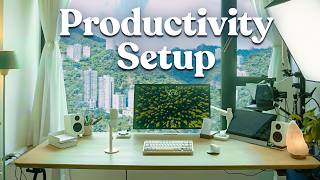

Why I keep my monitor below eye level
40sUnique take on monitor placement that improves posture and maintains a view, sparking debate among ergonomics enthusiasts.
▶ Play Clip"Delivers exactly what the title promises: a thorough home office tour with genuine details."
In this video, Ali Abdaal gives a detailed tour of his productivity desk setup and home office studio. He covers everything from the desk and chair to cameras, lighting, and analog tools, explaining his choices and how they enhance his workflow as a YouTuber and creator.
The desk is a solid oak standing desk from Okiwood, custom dimensions to fit the room and filming setup. Ali wishes it were deeper.
Uses an Anthros chair for posture support, originally wanted Herman Miller but couldn't get it in Hong Kong. Chair has many adjustment knobs.
Powered by M2 Pro Mac Mini connected to Apple Studio Display on an Ergotron arm. Monitor is placed lower to maintain a view outside.
Uses an Espresso Display as a secondary monitor, touchscreen but rarely used as touch. Placed under teleprompter to hide cables.
Riverside is an all-in-one recording and editing platform used for remote interviews. Records locally for high quality, has AI co-creator feature to clip content.
Kanto YU2 speakers, Logitech MX Master 3S mouse (may switch to Logitech Lift due to wrist pain), NuPhy Halo 75 keyboard, Elgato Stream Deck for live sessions.
Uses an Ugg Monk analog to-do list and note cards for daily planning, preferring physical over digital for certain tasks.
Elgato teleprompter acts as secondary display for talking points and self-monitoring while filming. Allows eye contact with camera.
When switching to standing mode, teleprompter must be removed to avoid damaging the camera. Prefers standing for workshops and Zoom calls.
Has a treadmill for walking during standing desk use, but rarely uses it due to size.
Main camera is Sony A7S3 with XLR adapter, connected via HDMI to Mac Mini. Uses a generic HDMI capture card instead of Elgato Cam Link due to reliability.
Sony A7C mounted on Manfrotto autopole for overhead shots. Used for drawing diagrams during Zoom calls and YouTube videos.
Key light is Amaran F22X, foldable and portable. Also uses Amaran PT4C tube light for nighttime filming.
Background includes IKEA drawer units, a Story bookshelf from Herman Miller brands, books, Harry Potter notebooks, and a Ravenclaw poster from Displate.
A large dry-erase calendar showing 12 months, used for planning trips and events with wife.
Ali's desk setup is a blend of high-quality tech and analog tools tailored for content creation. Despite some compromises for filming, it reflects his focus on productivity and aesthetics.
Okiwood Desk
tool
Anthros Chair
tool
Apple Studio Display
tool
Mac Mini M2 Pro
tool
Espresso Display
tool
Logitech MX Master 3S
tool
NuPhy Halo 75 Keyboard
tool
Elgato Stream Deck
tool
Kanto YU2 Speakers
tool
CalDigit TS4 Dock
tool
Elgato Wave Neo Mic
tool
Sony WH-1000XM5
tool
Elgato Teleprompter
tool
Manfrotto Autopole
tool
Sony A7S3
tool
Sony A7C
tool
Amaran F22X Light
tool
Amaran PT4C Tube Light
tool
Ugg Monk To-Do List
tool
Riverside
tool
Feel-Good Productivity
book
Poor Charlie's Almanack
book
The Dream Machine
book
Meditations for Mortals
book
Peter McKinnon
person
What brand is the solid oak standing desk Ali uses?
Okiwood
00:35
Why did Ali choose the Anthros chair over Herman Miller?
Herman Miller chairs were difficult to ship to Hong Kong.
01:49
What is the main computer powering the setup?
M2 Pro Mac Mini
02:01
What feature does Riverside's co-creator provide?
It acts like a content assistant, pulling out best clips instantly after recording while keeping tone and message on brand.
04:57
What mouse is Ali currently using?
Logitech MX Master 3S for Mac
06:17
Why does Ali place his monitor lower than typical eye level?
To obstruct the view of a large window as little as possible.
02:29
What is the purpose of the Elgato teleprompter in filming?
It acts as a secondary display for talking points and allows Ali to see himself while maintaining eye contact with the camera lens.
12:04
What issue does Ali face when using the standing desk with the teleprompter?
The teleprompter is attached to the camera and would be decapitated if the desk rises, so he must unplug and remove it.
14:47
What camera does Ali use for overhead shots?
Sony A7C
18:15
What brand is the key light Ali uses?
Amaran F22X
21:21
Low Monitor Placement
Ali intentionally places his monitor lower to preserve the view outside, showing a design trade-off for aesthetics and comfort.
02:29Teleprompter as Monitor
Using the Elgato teleprompter as a self-monitor while filming allows eye contact with the camera, a clever productivity hack for creators.
12:04Standing Desk Limitation
The need to disconnect the teleprompter when standing highlights the compromises in a multi-purpose setup.
14:47Overhead Rig for Teaching
Ali uses an overhead camera rig to draw diagrams live, adding value to Zoom calls and YouTube videos—a unique teaching tool.
20:03[00:01] today. So, this is a tour of my latest productivity desk setup. productivity desk setup. [Music]
[00:22] just going to talk you through everything that is going on here. We're tech that's powering all this. We're going to talk about this whole situation we've got with like camera A, camera B, light A, light B, and all of this stuff.
[00:35] And I'll give you a little bit of a tour of what's in my little box studio office kind of thing as well. Okay, so let's kick things off with the desk. Now, the kick things off with the desk. Now, the desk is a lovely solid oak from Okiwood.
[00:50] year ago, and I've been absolutely loving it. It's like solid oak. It's going to show you the standing desk functionality a little bit later because standing desk to work. But this is really nice. Um I really like a very
[01:04] very wide desk. I do wish it was a little deeper, but I did a custom dimensions based on the dimensions of this room and like the filming setup cuz and so at some point I want to move into a bigger space and have like a way
[01:18] deeper desk. But this is Okiwood desk so far. The chair is one that I bought from Anthros. We have like a partnership with Herman Miller, but unfortunately it was in Hong Kong. And so I watched a bunch of reviews and they said that the Anthro
[01:34] chair was apparently very good for your posture and stuff. So it's got all of these like adjustmenty knobs and all that jazz to apparently improve like posture and you do this sort of thing and this like honestly t uh I actually
[01:49] Herman Miller embody and the Herman Miller sale which were the chairs that I nightmare to get them shipped to Hong Kong. So Herman Miller if you're watching this I love a chair. Um so yeah this is the Anthros chair which is
[02:01] about the tech. So the tech powering this entire setup is the M2 Pro Mac Mini from a few years ago and the Mac Mini is connected to this which is the Apple Studio display that is currently on this uh what's it called? Erggo body. Not oo
[02:16] So, I now have like all these baby Ergotron monitor stand. And what I've done is that the height of this monitor is unusual. Uh, normally you would have a monitor at eye level, but with this
[02:29] monitor, it's more like sort of down here. So, the reason I wanted to do that is because I have a very nice view and there's a big ass window. And I wanted to obstruct the view as little as possible with the monitor. And I've
[02:43] actually started to really like this kind of monitor configuration because I can set up straight. My eyes naturally kind of look down rather than previously I'd have been sort of looking up at the monitor and it would have taken up my
[02:55] whole like um field of vision. Now it's sort of further down and that means I can feel the vibes of like the nice view and stuff. So this is the Apple Studio connected as well. It's the Espresso display. So that's actually this is like
[03:08] a portable. It's also touchscreen. Weirdly, I never use the touchcreen monitor. Plugs in via a Thunderbolt cable. You can like put it stick it in a bag. This the stand for it is detachable, so it's like a insanely thin
[03:23] like just a portable display. I was traveling around with this when I was always nice having an external display for your laptop. But now I have just shoved it on my desk and normally it just goes here underneath my
[03:37] teleprompter setup and it sort of masks the sort of tech and the wires and stuff. And the reason I like this is because as part of my various online academy and our YouTuber academy, I do a lot of like live online workshops and so
[03:51] monitors. One where I can see like the Zoom chat, one where I can see like my this video, one of the most important uses for my own desk setup is to have it Whether I'm recording YouTube videos like this one or whether I'm
[04:05] who can add massive value, and then we can turn those into content for the is absolutely incredible, and they are partnering with us on this video. I've years. Riverside is an all-in-one recording and editing platform that lets
[04:18] you capture studio quality content from literally anywhere. And actually, every on this channel, or if you watch the podcast that I do with my brother, 100% hopefully what it looks like is that we've hired a professional studio, but
[04:31] talking to the person over Riverside. Riverside records locally on each get uncompressed 4K video and crystal clear audio, and then everything uploads recent interview with Joe Hudson that we featured on the channel, my Wi-Fi
[04:45] middle of the conversation. And if we were doing this over Zoom or something, episode. But with Riverside, because it uploads locally and it can figure out like the final video looks absolutely flawless. They've also just launched a
[04:57] really cool co-creator feature, which feels like having a content assistant much immediately after recording, I can just ask it to pull out the best clips posts. And it does this instantly while keeping the tone and message on brand.
[05:10] Riverside already has polished clips and Tik Tok. And it really does feel like cheating because it saves us hours stuff that we used to have to do manually and by hand. And this is the
[05:22] Riverside can give you because recording the content is only half the battle. But that one conversation into a week's worth of content because one long form channel YouTube video, multiple YouTube shorts, an Instagram reels, even
[05:35] much more. So, if you want to try this yourself, especially if you're serious more efficient fashion, then you can get Riverside for 1 month completely for the link in the video description and use the code Ali Riverside, which is
[05:49] you Riverside for partnering with us on this segment of the video. And let's get can show you what the tech actually looks like. So, over here we have the Kanto U2 speakers that I've been using for absolutely ages. We have a random
[06:02] salt lamp cuz why not? Salt lamps are good vibes. The Mac Mini is connected to the Cal Digit TS4 Thunderbolt dock. And so that is basically an extra dock. It gives me a ton more USBC and USBA ports. In terms of peripherals, we are using
[06:17] various different things. So this is the Logitech MXM 3S mouse for the Mac. It's great. I love it. Fantastic stuff. I am getting a little bit of like I think wrist though. So I might have to switch to the Logitech Lift, which is what I
[06:30] The keyboard I'm using these days is the Nufi Nufi Halo 75. I've been testing different keyboards just to get a feel of different keyboards and how they feel
[06:42] and switches and stuff like that. This is the Elgato Stream Deck, uh, which I use basically when I'm doing live sessions and I have stuff on OBS. In screens, although for some reason it's buggy and not working right now, but
[06:54] like that's that's the theory behind that. I got this mostly because it looks good. I don't even know what this is. This is like a work louder little big shortcuts. It's sort of like Figma themed and so it's got these like cute
[07:06] colors, but really I got it because um I think it looks nice in an overhead shot. So if I have an overhead shot where I'm like showing or I'm doing some drawings cute little colors in the background just sort of looks nice. So that's
[07:19] mostly for show. Although you can like set macros and program the keys and doing that just yet. It is admittedly mostly for show. On the desk, we have a couple of analog accessories as well. So, for example, this is the analog
[07:33] So, for example, this is the analog to-do list thing. Whoops. From a brand called Ugg Monk that I've been a fan of for many, many years. I pay for all did not send this to me for free. Although, Jeff, if you're watching this,
[07:45] I'd love I'd love some free stuff. This is basically like an analog to-do list. So, I mean, essentially it's just a expensive block of wood that you stick a to-do list, which is actually just quite nice. And then it's got this section at
[08:01] the back where you can store like past to-do lists and you can then retrieve a new to-do list and then it goes on the thing. So, this is actually what I what
[08:13] I use as my daily to-do list. Um, I use the app Things 3 to keep track of to the stuff that I I'm actually going to do, I tend to stick it on the to-do list because there's something very nice about just sort of like manually
[08:26] stuff like that. We also have another product from Ugg Monk. Again, they did not send this to me. I paid for it myself. Basically, they've got these myself. Basically, they've got these pieces of card and I use them for a lot
[08:38] bobs. Hopefully, there's nothing confidential on here. There probably isn't. Um, but this is nice because in the bottom of it, it's my used cards fresh cards. I'll be sitting over here. I'll be doing some stuff and I'm like,
[08:52] "Oh, I want something to write on and I can just reach across and I can just like grab the thing, grab a pen, do my writing and my drawing and like draw my boxes and do whatever I need to do. Blah blah blah blah blah. Turn it over, do
[09:05] do, whatever I need to do. And then I can just store it away in this little nice. Again, these things are very what they are, but I like them because they're really nicely designed. They're
[09:18] really sturdy. And in my drawers, I have like a whole stack of other like paper can see I've just been taking notes and stuff over the, you know, often I I plan videos like this or plan lessons for our
[09:31] be able to then like move this sort of these little pieces of paper around. On my desk, mostly for show for this shot, I have a copy of my book, Feelgood and Sunday Times bestseller. So, if you haven't checked it out yet, you might
[09:45] are sold. What else? What else is on here that we can talk about? I have these like this little cup. My wife got me this little cup. It's got a little seal on it, which I think is quite cute. I just have random pens and markers and
[09:58] even a screwdriver for some reason. I'm not entirely sure why, but that goes over there. And that's the second copy of the Kanto U2 speaker, of course, in always ask me about this mic. I love this mic. This is the Elgato Wave Neo
[10:13] microphone. It's not as good as a fancier microphone like the SH SM7B or like, you know, the microphones that you see the podcast bros use, but I just whole aesthetic that I like to go for is kind of white and blue and I like to go
[10:26] sort of light mode rather than dark mode. That's why a failed keyboard brand mode. Uh but that didn't really work out. Uh but I really like the vibes of this particular microphone. I just think it's very cute. And so often I buy
[10:41] things for my desk setup given that I'm a YouTuber just cuz they look cute. Um, even if you're not a YouTuber, to have stuff on your desk that you think looks cute. Because I'd honestly I'd rather take 10% reduction in audio quality for
[10:54] the sake of like a microphone that looks cute and nice rather than a microphone that's sort of big black thing that's in my face. That sounds weird. Anyway, um, okay. So, we now get to the tech. Oh, we have a actually before we do that, we
[11:08] have a little headphone stand. This is the Sony WHXM5s. I hate the naming of the the Sony headphones. I just Why not call them the Sony headphones, but no, they call them the Sony WHHX100
[11:22] M5 or whatever. My main use case with these is that if I'm on a Zoom call and I want to listen to background music or if we've got like drilling in the apartment and I want to like concentrate, I'll just whack these on.
[11:34] like to have like Lord of the Rings Shire music on in the background when other person can't hear it, but I can hear it. And so it just makes every Zoom call sound way more epic and way more vibe, way more adventurous when the
[11:48] thing that you're saying is overlaid onto a background of like gentle, shy, Rings type music. So that's really the the main use case of the headphones. Okay. So I want to talk you through like what is going on over here. So unless
[12:04] you do a lot of like video filming and stuff, you probably don't need any of this sort of stuff, but this sort of stuff is very nice. Basically, what we have here is an Elgato teleprompter. And the main function of the Elgato
[12:16] teleprompter is that it acts as a secondary display. So, it's really, teleprompterss in the past, I used to hate it because you'd have to shove an get the teleprompter software to go on the iPad and then it would mirror up and
[12:30] would never use a teleprompter. But with the Elgato teleprompter, again, not bought multiple copies of this cuz it's that good. You can basically I I'll just take a random notion page like my business journal page and I can just
[12:45] business journal page and I can just like drag it across to the teleprompter. And now currently I'm looking at this from the teleprompter. But hopefully you through the teleprompter. So this is like absolutely gamechanging if I'm
[12:59] doing a video. I've got my talking points on the teleprompter. But the other thing I like about it is when I am filming videos, you know. Okay. Okay, so this is what my camera angle currently looks like because my camera is
[13:11] connected via HDMI to my to my Mac Mini. But obviously I need to speak to the camera, right? And so I can't monitor myself. And if I look at that screen on monitor, it looks like this. And then that looks weird, right? Because it
[13:24] with you through the lens. But if I make eye contact with you through the lens, I annoying. So, what you do is you use a teleprompter and you open up like a preview window and then you sort of drag yourself onto the teleprompter. So, now
[13:39] I can talk to you through the camera lens, but I can see myself. And this is lens, but I can see myself. And this is this is remarkably useful. It's so nice. trying to film videos on your phone, it's just way more comfortable using the
[13:54] yourself and there's something nice about being able to see yourself as you're recording content. Whereas, if you were to, you know, really the back proper one. But if you were like to speak to your phone like this and you
[14:08] of weird, right? Like you're speaking to your phone like this, you can't see like. You don't know if you've got like weird going on. You don't know what really vibe being able to see yourself. And the Elgato teleprompter is my main I
[14:21] I mostly use it as a monitor to be able to see myself while I'm talking to the way way more nice and way more comfortable. And sometimes I'll record on this microphone, sometimes I'll record on this microphone up here if I
[14:33] what's going on. But I freaking love the Elgato Teleprompter. Now, the Elgato Teleprompter is attached to my camera. The only downside actually before we do that of the teleprompter is that if I want to use my standing desk, we run
[14:47] into a bit of a problem because this is going to decapitate the camera and I do not want to decapitate the camera or the teleprompter. So, annoyingly, when I switch to standing desk mode, I have to unplug the teleprompter,
[14:59] take it off the thing, and now I usually just put it aside and like somewhere out of the way or whatever. Let's just stick it over here on the floor for now. Oh, by the way, quick announcement. On Saturday the 20th of September, 2025,
[15:13] completely free quarterly reflection workshop. The idea is that this is a down below to register if you'd like. And I will be hosting it and me and people from all around the world. We're going to get together on a Zoom workshop
[15:25] reflecting on how 2025 has gone so far and we're going to be setting some goals fun. It's going to be vibe. There's more details linked down below if you would you on Saturday the 20th of September 2025. And then this microphone is the
[15:41] 2025. And then this microphone is the Sennheiser MKH416 or something which is connected to the Rode PSA boom arm which means if I'm switching to standing desk mode I can just do that and then I can switch to standing desk mode and
[15:54] switch to standing desk mode and generally when I'm doing like hang on generally when I'm doing like hang on this is what it looks like. man cable management situation. Generally, if I'm doing like a workshop
[16:09] lifestyle business academy or our YouTuber academy, I much prefer to be standing up and talking. And even though I don't have the fancy camera and I just use my sort of studio display webcam, I just find myself so much more energized
[16:22] when I've got like my little microphone here. I've got and I'm able to do this sort of thing and it just feels nicer to be to sort of do teaching sessions when desk. I use the standing desk for Zoom calls and stuff. I also have a treadmill
[16:36] standing desk. It's really annoyingly large and heavy, so I don't use it very often, but I really should use it more often. Anyway, this is the standing desk. I love standing desks. I've been using standing desks since like 2018 or
[16:49] something, and it's just so nice to be able to with a press of a button just be standing mode. Anyway, we were going to talk about the camera. So, the camera is the Sony A7S3 that is filming this right now. This microphone is attached via the
[17:05] Sony XLRK3M, I think is the gizmo, which is basically this XLR recorder thing that sits on top of the camera and an XLR microphone can plug into that, which is very cool. The Sony A7S3 is connected to my laptop via
[17:20] an HDMI cable. And I used to use the Elgato Cam Link, but every time I use months. So, I've gone through like maybe five or six Elgato Cam links that cable into a USB port on your computer
[17:34] camera feed onto onto your computer and use it for like videos or Zoom calls or streaming or whatever. These days, I just use some generic thing that I got off Amazon that's like another HDMI capture card, capture cable, whatever it
[17:47] is. But anyway, the camera is plugged into my Mac Mini using HDMI. And the into my Mac Mini using HDMI. And the camera is held up by the Manfrotto auto Now, this is amazing because this is basically a pole that extends from like
[18:02] my window sill or from like the floor to the ceiling, and it like stays in place anything cuz this is a rental property and I don't want to like hammer stuff into the walls. By the laws of physics, somehow this thing stays up. And then at
[18:15] the top here, we have another Manfrotto autopole that goes all the way across the room. And that is what my overhead camera rig is connected to. The overhead camera is the Sony A7C that I got many, many, many years ago. And again, that is
[18:29] also connected via a long HDMI cable that sort of snakes down here into the Mac Mini. So that if I want, I can switch between the overhead camera and the primary camera or my studio display camera. And in fact, I'll show you what
[18:41] that looks like. If I open up OBS, this is kind of my studio display camera Anthony in the background over here doing our videography for the day. I can would I don't know why that went weird, which is that camera over there. And I
[18:55] can switch to my overhead camera, which is currently I don't usually have it in this kind of configuration. Usually, I'll zoom it all the way in, twizzle it a bit to get it. Okay, it's it's a bit wonky, but who cares? And so when I'm
[19:08] doing like a video or something, I can then do that and I can do that. I can do that. I can grab my little pad over here. And then I can do some drawing and writing. And you know, I was drawing this stuff the other day about like how
[19:22] to make $100,000. You can make $100,000 by selling something for $100,000 to one person or $10,000 to 10 people or $100,000 to 100 people or $1 to 100,000 people. and sort of just sort of talking through uh the pros and cons of each
[19:35] are more difficult and more easy ways to make $100,000 depending on where you are on this graph. Anyway, so this is a kind of sketch pad that I use and this is the If I'm like doing a Zoom session and maybe I'm using this camera and someone
[19:50] in in our audience for our courses asks a question. Just being able to do Oh, Let me just uh draw you a little diagram. and being able to just do that, people's minds are blown because usually people don't have a fancy overhead rig
[20:03] connected to a Zoom call. So, it's like a fun little way of adding vibes and doing a teaching session. And also, I like using the overhead rig when it comes to a YouTube video so that I can then monitor on OBS exactly what's going
[20:15] on as I'm like writing stuff and drawing stuff. And this is like a little Jcurve diagram. This is this other price value thing. This was something about email thing. This was something about email marketing. This was impact effort. This
[20:28] when it comes to their lifestyle business. This was the road map to the other day. This was helping someone with Instagram strategy. This was some figure out their niche for their lifestyle business. This was a video
[20:42] works with like post-it notes and stuff. This was sort of the difference between risk asymmetrical riskreward. This is this new thing that we're doing where we lifestyle business in under 12 months guaranteed. This is sort of like
[20:56] agricultural age, industrial age, digital age. And yeah, so this is the sort of stuff that I like to draw diagrams about and things when I'm I'm doing YouTube videos. And that is based on based on this random pad that Becky,
[21:09] one of my team members, got me from a local shop here in Hong Kong. Anyway, so we've got the camera A, we've got camera B. They're all connected to the Manfrotto autopole. And then we come to this light. This light is kind of
[21:21] annoying because the problem is like when you're a YouTuber, you kind of need a key light. And I have yet to find a light that does not look like an absolute eyesore. So this is nice. It's the Amaran F22X.
[21:34] It's a very good light. It's foldable. So when I'm traveling and stuff, this is I literally take this down, fold it up, put it in the suitcase so that I can then film videos. But it just makes such a difference having a key light. Like I
[21:46] personally don't like the fact that all of this random is I'm having to look at it when I'm on my desk cuz I would in my dream world my desk setup would be clean and minimalistic and you wouldn't see any wires and you certainly
[21:58] wouldn't have these big ass black poles going all the way across the floor and there and the camera there and the light there and the microphone. I would like to ideally not have any of that kind of stuff, but the career that I've chosen
[22:10] is to be a YouTuber and to film videos. And it just comes as part of the job description that you have to have an annoyingly kind of desk setup that has all this random on it. In my dream world, once we get an office, um me and
[22:23] called Sparkle Studios where we build apps together. Uh we've got two apps Momentum. I'll put links down below, but we are in the process of trying to find my dream world is that in my office I have a really viby desk setup that
[22:37] have a separate filming desk setup that does have all of this crap and I only filming videos. That would be amazing. This is like the first world problems, out your tiny violin for that like you know once you're once you're a YouTuber
[22:53] and you're like how do I get some more excitement in my life? The solution is like let me have two different desk setups. That's how I can make my life that's all a bit of a digression. So, yeah, we've got all of this stuff. F22X
[23:06] thing. That's also attached to the autopull, which is great, which means I don't need tripods and stuff taking up floor space cuz this is a tiny ass room and I don't have much floor space. Underneath this, we have this IKEA
[23:18] drawer unit, which is just like a random IKEA drawer unit, chest of drawers. This IKEA drawer unit, chest of drawers. This is a Amaran tube PT4C light that I sometimes use if I'm filming at nighttime. I use this as a
[23:31] up the bookshelves and stuff, but I very rarely film at nighttime. This is a random plant. I like having random plants around. And I think that basically covers what is on the desk. Let's now cover what is in the rest of
[23:45] the room. So, what is in the rest of the room? I put a lot of thought into what's in the background and what is on camera versus what is not on camera. And I have link down below where I show the process of setting up the studio from completely
[23:59] YouTuber first of all problems you really have to think about what looks what what does your main shot look like. So quite a lot of the stuff in the studio is designed primarily to show up in the main camera shot and the storage
[24:12] to not show up in the main camera shot. So that's kind of like the the thinking behind it. We've got this over here is this IKEA drawer thing unit. I don't like I mean, everyone's got this. It's in every IKEA showroom imaginable. I
[24:27] stick a plant on top of it cuz it looks nice. I just have some camera lenses. nice. I just have some camera lenses. And this is the Peter McKinnon camera multi-tool, which I use for a lot of things. This is like, you know, a phone
[24:39] tripod that I sometimes use. This is like a little massage ball. I actually because I'm trying to trying to like improve my posture and stuff. So, like just like, you know, do this sort of thing and then I'm like, "Oh, there we
[24:55] go." This is This is kind of kind of I feel I feel weird about doing that, but that's okay. That's okay. We have this bookshelf. This is the I think this is called the story bookshelf, and it's from one of the Homeman Miller brands.
[25:08] So, we've got a white one here, and we have a nice little baby blue one on the other side of the studio. And I quite like this because this is like I think it looks nice in the background. It doesn't feel as intense as like a big
[25:21] ass kind of bookcase from IKEA. It looks kind of minimalistic. Looks kind of nice. We just have a bunch of books here. Little bookshelf tour in case Productivity. My book. This is the Mistborn series by Brandon Sanderson.
[25:33] One of my favorite series of all time. I've I'm just reading this book by David White. Crossing the Unknown Sea: Work as a Pilgrimage of Identity. Annoyingly not it's old school. So, I had to get it physical copy. We've got Poor Charlie's
[25:47] Almanac, which is Charlie Monger's book. The Dream Machine, which is about the invention of the computer, and The Making of Prince of Persia Journals 1985 to 1993, which I thought was kind of interesting. We have uh Horizon
[25:59] Meditations for Mortals by Oliver Burkeman, very, very good book. You can see I've done a lot of like highlighting in this. The Longhaul Leader by Chris how to build a sustainable business without burning out. and outlive the
[26:13] science and art of longevity by Peter Ratia. I haven't actually read that. it's kind of annoying to read because it's very big, but it's very easy to more books. Oh, this is interesting. These are This is one of my favorite
[26:26] things. These are like three separate Moleskin/ uh Harry Potter limited editiony type notebook things. So, this is the one that I use when I'm planning my YouTube videos. So like if it's a YouTube video,
[26:40] this is like how I plan YouTube videos and stuff. So you can see focus like I'll often just go to a coffee shop and like you know plan the videos like that. Then I have this patronum one which is for our courses and products and stuff.
[26:54] Sometimes it's sort of like designs for the apps that we are building. Sometimes the apps that we are building. Sometimes it's like flowcharts and stuff for our courses and our lifestyle business academy. And I'm I sort of when I'm when
[27:06] different frameworks, I'll often sort of noodle them on this particular notebook. sort of here on my desk. So, it's nice having that. And then I have my Lumos former team members of mine instantly, which I just use as a general kind of
[27:21] to show you what's in there cuz there might be some confidential stuff, but it's nice having like different Harry Potter themed notebooks for different aspects of my work and life. Speaking of Harry Potter themed stuff, uh we have a
[27:33] Ravenclaw poster over here. This is from Displate. Displate is this company that does metallic posters that stick onto your wall. You basically stick a magnet poster onto the magnet, which is quite nice if you're in rental property and
[27:47] you don't want to hammer things into the wall. So, it's matte, which means it nice because if you had like a glossy poster, it would show the key light in a vibe. So, nice little Ravenclaw poster there. Rest of the stuff on the
[28:00] maybe we'll do a what's on my bookshelf at some point. Not sure if anyone actually is interested. And then we have this drawer unit here from Muji where I've got like cables, HDMI cables and USBC cables and my glasses and like more
[28:14] cables and more cables and camera chargers and stuff and cable management tools and stuff. And so I'm just trying to keep things relatively organized. I have a storage section over here. We've got Alex's lit book 100 million $100
[28:28] read. We've got Alex's first book, $100 million Offers, or his second book or don't really fit nicely on a bookshelf, so I just shove them on the side over so I just shove them on the side over here. Uh, we have a snake plant with my
[28:42] background that at some point I want to put up on the wall, but it's a rental things into the walls. And then we have storage of a bunch of random stuff. Spare camera here. This is the Fujifilm X1006, uh, which I take out and about
[28:55] when I'm going places. We have a spare camera here, which is a Sony FX3, which I use if I'm doing a podcast, cuz then we need multiple camera angles. So, that just goes over here because I have no other place to store it. We have a
[29:08] I haven't yet opened from a company called Me Time. We had someone I don't know when this video is coming out, but there was someone called Daniela who company. And so, we did a bit of bit of a business coaching session and she sent
[29:21] to start actually using that. Got my little guitar over here. Sort of just about as visible in the background. But if I'm procrastinating from filming the guitar and that will help energize me. This is one of my favorite things.
[29:36] me. This is one of my favorite things. This is a rug, a Blue Eyes White Dragon birthday present like 2 years ago. And so that has a nice prime spot in the office um alongside the yoga mat. And it's nice because like there's quite a
[29:50] ceilings are quite high which is nice. And you know, in theory, rugs and soft furnishings help to reduce echo. So that's why we have this big ass fake plant from IKEA that's been here forever. And we have another story
[30:05] bookshelf from one of the Herman Miller brands. More plants, more and again, all primarily designed to look reasonable in that main camera shot over there. And do a what's in my bookshelf tour at some point. And now if we move around, this
[30:21] door is annoying. I hate the color of this door. And so I do whatever I can to not have this door in the shot. Which is why like this camera angle is like so specifically pointed because I just hate this door. And given that it's a rental
[30:35] excessive to be like changing up the doors just for the aesthetic. So we just this thing, this is interesting. This is this thing called the big ass calendar,
[30:47] which is run, I think it's created by a guy called Jesse Ller, whose content I like. I have a Google sheet where I do my year at a glance calendar. Again, interested. But I discovered this the other day and so I installed it earlier
[31:00] floor otherwise. I was like, might as well install it. And this basically shows you 12 months of your life on a calendar format. It's like a dry erase me and my wife at some point are going to get round to going around the
[31:14] we going on holiday, when are we doing our team off sites, when are we doing visit Australia, when when do we want to stuff. And then in theory, being able to see it all at a glance, planning your
[31:26] to do. We also happen to have another just purely for the vibes in the background. But that pretty much wraps up this productivity desk setup and studio tour. If you enjoyed this video
[31:40] and you would like to actually see how this whole studio came about from completely a completely empty blank room to now looking like this, uh then you here where I go through that entire process. But otherwise, thank you very
[31:53] much for watching. Have a great day and I'll see you next time. Tight.
⚡ Saved you 0h 31m reading this? Transcribe any YouTube video for free — no signup needed.