
AI Summary
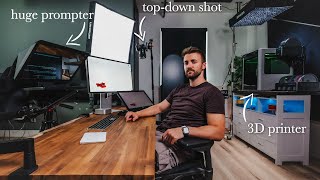
The video is a tour of the creator's home YouTube studio, highlighting the customizations and optimizations that have made it a productive and creative space. The creator discusses their 3D printer, desk setup, camera gear, and the philosophy of removing friction and distractions, especially after an ADHD diagnosis.
Chapters
The studio has evolved from an unfinished basement to a polished, optimized space, with walls knocked down and custom liquid cooling PCs built.
The creator's Bambu Lab H2D laser edition 3D printer is a major tool, used for projects like modifying a camera and designing custom golf tees. It features dual extrusion for hard plastic and TPU, and a laser module.
Artlist is highlighted as a sponsor, offering templates, footage, sound effects, music, plugins, and AI voiceover to help creators streamline production.
The desk is a butcher block on motorized legs with wheels, allowing for easy angle changes. The creator uses an M4 Pro Mac Mini, which handles Final Cut, Blender, and Plasticity, with a PC with a 4090 for heavy tasks.
A Thunderbolt dock with card slots is essential for dumping footage to a NAS for editing. Custom 3D printed docks with a satisfying locking click were designed.
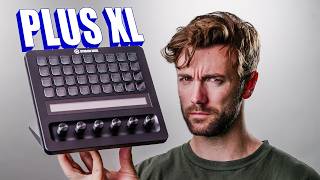
The Elgato Prompter XL, a prototype, functions as a third monitor and teleprompter, though the mirrored screen is a minor issue.
The creator switched from Sony to Lumix two years ago, praising their video features. They now shoot on the Lumix S1R Mark II in 6.4K open gate, with the S1 Mark II as a dream camera for its full-frame open gate 60fps capability.
After an ADHD diagnosis, the room's goal became removing friction and distractions, creating a streamlined creative space. The creator feels they've achieved this, though it's a never-ending project.
The creator has built a nearly perfect home studio by focusing on custom solutions and removing friction, making it a productive and enjoyable space for content creation.
Mentioned in this Video
Study Flashcards (5)
What 3D printer does the creator use?
easy
Click to reveal answer
What 3D printer does the creator use?
Bambu Lab H2D laser edition
01:00
What is the dual extruder capability of the H2D?
medium
Click to reveal answer
What is the dual extruder capability of the H2D?
It can print hard plastic and rubbery soft TPU at the same time.
01:51
What is the creator's dream camera and why?
medium
Click to reveal answer
What is the creator's dream camera and why?
The Lumix S1 Mark II, because it's the only mirrorless camera that shoots full-frame open gate at 60fps.
07:01
What is the main goal for the studio after the ADHD diagnosis?
easy
Click to reveal answer
What is the main goal for the studio after the ADHD diagnosis?
To remove friction and distractions, creating a streamlined place of creativity and video production.
08:09
What is the resolution and format the creator shoots in?
medium
Click to reveal answer
What is the resolution and format the creator shoots in?
6.4K open gate
06:48
💡 Key Takeaways
3D Printer as Swiss Army Tool
Illustrates how a versatile tool can solve many creative problems, from camera mods to custom golf tees.
01:00Open Gate 60fps Advantage
Highlights a key camera feature that reduces decision fatigue and allows flexible framing and slow-mo in post.
07:01ADHD-Informed Design
Shows how personal challenges can drive practical design choices to improve focus and productivity.
08:09Full Transcript
[00:02] transformation of this place from, you know, we knocked down this wall with a sledgehammer to turn two small rooms into one larger office. We've custom built the liquid cooling PCs in here. And even back to
[00:15] shooting in this place when it was just an unfinished basement, the way there. And it feels like we're in the game of just optimization and
[00:28] in the game of just optimization and polish, which in my opinion is the most figuring out how to make sure every angle of this room looks good on camera while still maintaining a relaxing and a creative, productive space. So, along
[00:43] those are going to be some of the things I want to tell you about the the little optimizations that have made a dramatic quality of life improvement on working here in a home studio. Let's start with the big one.
[01:00] This is my 3D printer. It's the Bamboo Lab H2D laser edition. 3D printing has been kind of my latest obsession. And when I say obsession, I I mean I mean it with the very definition of the word obsession. I've started some massive
[01:13] projects like heavily modifying my camera and then also a bunch of everyday projects like designing a short golf tea specifically for using at a golf with him, he was breaking all of his golf te's in half just so they'd be the
[01:26] right height to fit in the inch of astroturf on top of the concrete. And I was like, I got something better for you. The H2D is definitely an overkill printer, especially since I updated directly from an A1 Mini. But I picked
[01:38] module inside sounded like something I really wanted to experiment with. I'll be laser cutting some leather for that camera modification project I mentioned, show you in the next month or two. But also the dual extruder on this thing
[01:51] means that I can print both regular hard plastic and rubbery soft TPU material at the same time. So I can do something like design a part that has a rubber gasket like a seal built into it and print it at the same time. In fact, that
[02:06] hard plastic on the bottom to push into the turf and then the top half is that the turf and then the top half is that rubbery TPU so it doesn't just explode weird. It's like that phrase, you know, that it's like if you have a hammer,
[02:20] that it's like if you have a hammer, every problem looks like a nail. Except this is like the Swiss Army tool that can actually solve almost any problem. when it comes to making YouTube videos and that whole process, you need a
[02:33] different Swiss Army tool. Like today's sponsor, Art List. When you're a new creator, being an entire YouTube production team of one can be daunting, intimidating, anxietyinducing. Yeah, those things. Which is why tools
[02:47] from our sponsor, Art List, can be such a huge help. Because Art List has tools like templates, story-driven footage, sound effects, royaltyfree music, editing plugins, and even AI voiceover like the one you've been listening to.
[03:01] hearing was actually my own voice recorded. Daunting, intimidating, anxietyinducing, but transformed into a totally different voice. But you can also just type in words and have it generate that instead. And now you can
[03:14] pretend you have friends. Thanks. They have a bonkerssized library of sound tracks that are super easy to search through and find what you need quickly. No more listening to a hundred tracks just to find the one that you need. And
[03:28] you need to shoot a bunch of really cool B-roll, you can use Art List's AI image gaps. You can even upload your own photos and have their AI turn it into a spend a full day playing around with that. So, if you've been looking for
[03:43] some tools to help you progress in your content creation journey, check out Art everything a creator needs. So, I'll put a link in the description down below. out. Let's get back to this. Pretty much everything about this desk is custom in
[03:58] some way. It's just a butcher block put on top of Flex Spot motorized legs, which of course are then put on wheels, which make it way easier for me to shoot different angles. I recently switched to the M4 Pro Mac Mini, and this thing is
[04:10] picked up a Mac Studio like a lot of YouTubers use, but this thing runs Final Cut with no problems. It runs Blender and Plasticity, 3D CAD programs with no Vinci Resolve if there's a lot of plugins on the footage, but I've got my
[04:25] PC with a 4090 in it at the other side of this room. So, if I need to really just jump onto that thing. Also, the headphone jack being on the front is actually a huge quality of life update for switching to headphones when I jump
[04:39] week. Other than that, I think this tiny little thing is just a great statement piece. Like, they're just beautiful little powerful machines, which is why I anything. A Thunderbolt dock with a ton of extra card slots is an absolute must
[04:54] for dumping lots of footage onto our NAS that we edit directly off of. And of custom 3D printed docks that I designed, and they have a very satisfying locking and they have a very satisfying locking click.
[05:09] some stuff. And then I also wanted the back of it covered for angles like this pretty proud of the design I came up with. I just wish I'd realized it was a different wood finish before I put it together. Oh, I just I guess it's got
[05:25] character. I also like working off of a single monitor, but I also kind of have tablet that I've been learning to animate on kind of functions as a second monitor if I need one. And also, this Elgato Prompter XL is big enough to
[05:38] function as a third monitor. This thing actually isn't released yet, but they and they told me they have two prototypes, and this is one of them. hardware at the desk. I take three Japanese lessons a week, and it's like
[05:52] teacher. The only issue with it is that the screen is mirrored in reverse for brain when I try to use the cursor and click around on the screen. But I've workaround for now. It's worth it to have a camera mounted behind what's
[06:08] speaking of the camera, let's talk about the gear that we use to shoot these videos. I switched from Sony to Lumix about 2 years ago, and I've had zero regrets since. The video features they put into their cameras are just bar
[06:21] none. switching from shooting in 4K 16x9 on my $3900 $4,000 Sony FX3 to shooting on my $3900 $4,000 Sony FX3 to shooting 6K opengate on a what $1,700
[06:34] Lumix S52. Once you start shooting on OpenGate, it is almost impossible to go their new flagship cameras, which I'm shooting on right now. That's what we switched to. So, for the last uh 2 months or so, I've been shooting on the
[06:48] Lumix S1R Mark II, shooting everything in 6.4K open gate, usually with one of their f1.8 primes on it. This is their 18 mm lens, but I do have the new S1 Mark II coming in next week, and that thing is legitimately my dream camera
[07:01] got Dustin's right here that he's had for about a month or so. Lumix loves giving him little gifts. This guy paid full price for both of these cameras and 100% worth it. The reason the S1 Mark II is my dream camera is because it's the
[07:16] only mirrorless camera you can buy right now that shoots in full-frame open gate at 60 frames per second. This means that when I'm out shooting, I don't have to decide before hitting the record button, do I want this horizontal? Do I want it
[07:29] vertical? Do I want it slow-mo? Do I want it regular speed? I just have to shoot it in this mode, the open gate 60 fps, and then I can decide later while have to think about so many things while you're shooting, like how is the story
[07:42] flowing? How is my delivery on camera? Is this a good angle? Having to also vertical? Do I want it slow-mo or regular speed? Adds decision fatigue and distracts from the more important
[07:55] questions. Now, one shot gives me all those things and I can focus on the fan of Lumix cameras. They're absolutely underrated and anyone looking to start should 100% consider Lumix first. There's just so much value for the
[08:09] price. After being diagnosed with ADHD about two years ago, the goal for this room, the main goal became to remove friction and distractions and have this be just a streamlined place of creativity and video production. And I
[08:24] feel like I'm pretty much there. It's It's finally at a place where I enjoy It's finally at a place where I enjoy being here and working is insanely easy, but it's still a fun, never- ending project to make this place exactly what
[08:37] mile high of things to improve here, especially with that printing setup over intro, the uh printer was on a different desk than the rest of the video because I literally built this halfway through the the production of this video. That's
[08:51] didn't talk much about my gaming setup because I feel like not enough has that setup looks like right now, I'll link to the video to that down below. gaming setups, your streaming setups, your YouTube setups, uh, join the
[09:05] checking them out. link to the Discord in the description down below. And as happy streaming. Oh yeah, hit the like button if you're still here. Subscribe, leave a comment, favorite emoji, random emoji for engagement, doesn't matter.
[09:18] All the things. Thanks, guys. Later. [Music]