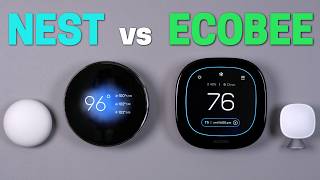

Nest vs Ecobee: Which Costs More?
44sDirect price comparison with a relatable fear of buyer's remorse creates immediate engagement.
▶ Play Clip"Delivers a thorough comparison with a clear winner, though the title's suspense is slightly overhyped."
This video compares the Nest 4th Gen and Ecobee Premium smart thermostats, evaluating design, app usability, smart home integration, and unique features to determine which is the better investment. The reviewer concludes that while the Nest has some appealing design elements and learning suggestions, the Ecobee Premium wins overall due to its superior display visibility, touchscreen controls, occupancy detection, and smarter integration.
Nest costs $280, Ecobee Premium normally $250 but was $30 off during the video, making them close in price.
Nest has curved glass that picks up reflections, making it hard to see; Ecobee has a flat display with fewer reflection issues and adjustable brightness.
Ecobee uses a touchscreen with intuitive controls; Nest uses a physical ring, which is slower for menu navigation but quick for temperature changes.
Both apps are easy to use, but Nest requires 60-minute intervals between schedule changes, while Ecobee allows 30-minute intervals. Nest offers learning suggestions, Ecobee has more precise scheduling and data.
Nest supports Matter but requires Google Home app for setup and has limited controls in Apple Home/Home Assistant; Ecobee integrates better with HomeKit and Home Assistant, offering more data and local control.
Both come with a remote sensor, but Ecobee's sensors have occupancy detection, enabling 'Follow Me' mode that only uses occupied rooms. Nest lacks this feature.
Nest does not require a C-wire (uses rechargeable battery), while Ecobee does. This makes Nest the only option for homes without a C-wire.
Ecobee allows adjusting temperature swing (e.g., 2°F) to reduce cycling; Nest is fixed at 1°F. Nest has Farsight display, but Ecobee offers always-on display, doorbell integration, and voice assistant.
The reviewer declares Ecobee Premium the winner due to better visibility, touchscreen, occupancy sensors, and smart home integration, though Nest is recommended for those without a C-wire or wanting learning suggestions.
The Ecobee Premium is the superior smart thermostat for most users, offering better display, controls, and smart home integration, while the Nest 4th Gen is a solid choice for specific needs like no C-wire or learning suggestions.
What is the price difference between Nest 4th Gen and Ecobee Premium?
Nest costs $280, Ecobee Premium normally $250 but was $30 off during the video.
00:01
Which thermostat has a touchscreen?
Ecobee Premium has a touchscreen; Nest uses a physical ring.
03:00
What is the minimum interval for schedule changes on Nest?
Nest requires temperature changes to be at least 60 minutes apart.
04:58
What is the minimum interval for schedule changes on Ecobee?
Ecobee allows schedule changes 30 minutes apart.
05:11
Which thermostat supports Matter out of the box?
Nest 4th Gen supports Matter out of the box.
07:06
What is the main advantage of Ecobee's remote sensors?
Ecobee's remote sensors have occupancy detection, enabling 'Follow Me' mode.
09:08
Which thermostat does not require a C-wire?
Nest does not require a C-wire because it has a rechargeable battery.
09:35
What is the temperature swing setting on Nest?
Nest is set to 1 degree and cannot be changed.
10:14
What is the temperature swing setting on Ecobee?
Ecobee allows adjusting the temperature swing; the reviewer set it to 2 degrees.
10:14
Which thermostat has Farsight feature?
Nest has Farsight, which shows a clock or temperature when approaching.
10:28
Nest screen reflections
Highlights a practical usability issue that affects daily use.
02:30Nest learning suggestions
Introduces a new feature that balances automation and user control.
05:37Matter setup disappointment
Shows a real-world limitation of Matter adoption.
07:34Ecobee occupancy detection
Demonstrates a key differentiator that enhances energy savings.
09:08Overall winner declared
Provides a clear recommendation based on comprehensive testing.
11:35[00:01] thermostat against the ecobe premium let's see which of these thermostats let's see which of these thermostats comes out on purposes of a smart thermostat is to help you save money so which of these
[00:15] are going to cost you more right out of the gate well the nest cost $280 right now on Amazon and the ecobe premium normally cost $250 so they're pretty close but as I was making this video the ecobe premium was $30 off so definitely
[00:29] check out the links in the description but I don't know if I would just buy could have this thermostat on your wall for the next 10 years you know what if you hate it what if your family hates it what if your spouse never speaks to you
[00:44] again all right all right that's take it a little too far the point is you want to love it for years to come that's why you have to watch the entire video with all that said let's compare the design of these thermostats how it
[00:57] interacting with it starting first with the new Nest fourth gen it's available in three different styles Gold Silver and obsidian which is kind of black I one the best but I bought the Silver version and the reason for that is to
[01:12] get the closest look to the ecobe premium for this comparison which the EOB premium only comes in one color to choose from and the metal is more of a brushed nickel versus the silver on the nest how a thermostat looks on the wall
[01:24] is ultimately going to come down to personal taste like I'm not going to judge if you want the gold thermost stat to match your toilets maybe you're salt Goodman when I saw the nest fourth gen in New York a few weeks ago I was
[01:36] initially liking the design over the ecoe it's not just an ugly box on the watch on the wall but after using both thermostats in my home I now like the look of the ecobe premium now so much
[01:50] more here's why the nest thermostat has a really cool curved glass screen but it a really cool curved glass screen but it picks up tons of Reflections seriously it's horrible there are certain spots where I can't even see the screen at all
[02:02] and I could easily see the EOB from the same spot I would have to move around to the perfect angle to see the screen clearly also if I'm standing close to the nest thermostat it doesn't help since I'm kind of looking down on it and
[02:14] again tons of Reflections which are just so ugly wait is that reflections of me oh great the ecobe has a flat display and it makes the reflections less of a big deal it's much more rare for me to walk by the thermostat and not be able
[02:30] there isn't a way to change the brightness on the nest thermostat so if it's in a bright room like mine is it will be washed out and with ecobe gives I didn't even have to have it full brightness and it was fine so I made it
[02:45] dark in the room to see if I can view the nest screen better but it made it worse the screen dimmed automatically and made it even more difficult to see made some firmware updates in the future to fix this issue because right now it's
[03:00] deal is how these thermostats are designed for you to control them they're very different and with ecobe it's a touchscreen and the controls are intuitive to change the temperature you tap on the temperature use the arrows to
[03:13] change it and then tap on the screen to select it ecobe used to have this slider and it was terrible and a couple of years ago ecobe updated to this new design and it's so much better and going into the settings and making changes is
[03:26] also very easy to do on the touchcreen the new Nest fourth gen is is not touchscreen instead it uses the ring on the outside to make changes by rotating and pressing it this is the classic Nest design that you might have seen over the
[03:38] like that the nest thermostat is less but it definitely takes longer to make changes in the menu this isn't a huge deal since 99% of the time I interact with the thermostat I'm just adjusting
[03:52] the temperature and the nest thermostat is just as fast as the ecob for a quick temperature change both thermostats come with the trim plate to cover drywall damage from the previous thermostat and I've been too lazy to patch the drywall
[04:04] since it's a massive hole my builder left thanks guys so I'm using the trim all right on the surface level both thermostats look great on the wall and they're easy to make a quick temperature change but for me the slight Edge on
[04:19] design goes to ecoe because it's way easier to see on the wall and it's touchcreen but if your spouse wants the nest because it looks pretty well it sounds like your decision is made design isn't everything though
[04:33] because these are smart thermostats after all so most of your interactions will be with the app or with automations which brings up the question how good are the apps and are they easy to use well the EOB premium uses the
[04:46] ecobe app and the nest fourth gen uses the nest app nope it uses the Google home app you cannot add this to the nest app anyways using the apps is pretty
[04:58] can adjust the temperature add presets and schedules and both are easy to navigate and use there are a few key differences though when making a schedule Nest requires temperature changes to be at least 60 minutes apart
[05:11] but with ecobe they can be 30 minutes apart so say you wanted your heater to turn on at 7:00 a.m. to help you get out of bed and then turn off at 7:30 well you could do that with ecobe but with Nest you have to wait till 8 a.m. to
[05:24] turn off this might seem nitpicky but little things like this with Nest can add up another difference is the learning capabilities both nest and ecobe can learn your schedule and automatically make changes but Nest took
[05:37] us up a notch you see Nest used to have two options for their learning mode on or off but with this new Nest fourth gen there's a third option suggestions so changed in the morning because it's too cold I can get a notification on my
[05:53] phone to add this to my schedule or ignore it to me this is the best of both worlds for a learning thermost it can help me improve my schedule without giving full control to the thermostat to make decisions and I've accepted the
[06:07] fact that AI is taking over but I wanted to ask politely first with ecobe the want my thermostat making all the decisions so I keep this off the other when the system was running or not Nest has an energy dashboard and it's okay
[06:24] not tons of details since it just shows how many minutes in the hour it ran ecoe dashboard it shows when the system is running more precisely the temperature as a line graph and the weather all
[06:38] right there okay if I had to say which app is better I would say it's a tie the learning suggestions on the new Nest Thermostat are pretty sweet but the ecoe does have more precise schedules and more data so it kind of evens out but
[06:52] what really makes a difference is how the thermostat integrates into your smart home and for this one they're not the same one of the headline features of the NES 4th gen is that it works with matter
[07:06] out of the box you know right there on the back of the box it says matter so just like other matter devices there's going to be a QR code in the box or like a sticker attach to the back of the device but nope you have to use the
[07:19] Google home app to set it up I was shocked when I saw this I thought at using the controls on the actual thermostat nope I had to use the Google home app this is super disappointing because the whole point of matter is
[07:34] that I don't have to use a company specific app to use the device what's specific app to use the device what's the matter with you Google this matters that's not a matter pun it literally does use matter once it was set up I was
[07:46] able to add an S4 gen to the Apple home app and home assistant using matter but only controls available were to change the temperature or the modes of cool heat or off no temperature preset set fan or even see the remote temperature
[08:01] those were not available but if I was using the remote temperature sensor the average between the two would show up in the matter connection but still not great compare this with ecobe and it's so much better using the homekit device
[08:14] integration in a home assistant I have access to way more info like motion and occupancy from the thermostat the default temperature presets the fan and I can see the remote temperature sensor the homekit device integration into home
[08:28] assistant is completely local and I can set up the ecobe thermostat without an app I can just use the onscreen controls with the touchscreen it's so much better so I think it's clear who wins for smart integration ecobe by a
[08:43] mile both the new Nest forth gen and ecobe premium come with a remote temperature sensor in the Box Google has made a lot of updates to make the remote temperature more usable like being able to average out the temperature between
[08:55] multiple sensors in the thermostat also the option to choose which sensors to use with each temperature preset for the schedule great to see ecoe is like so what I've been doing that for years and my remote sensors have occupancy
[09:08] detection which The Nest remote sensors do not have and here's why that matters because of the occupancy detection in the EOB sensors I can enable follow me mode this will not only average out the sensors but can only use the rooms that
[09:21] are currently being occupied I really wish NES would have added this feature so again the winner in this category is ecoe each of the thermostats have that you might need to know first is a c-wire
[09:35] some homes don't have a c-wire installed so if that's the case the nest is the only option since it does not need one The Nest thermostat has a rechargeable battery inside that it can recharge off your system and that's how it's able to
[09:47] your system to have a C wire if you're using a smart thermostat and if you're not sure if you have one just pop off your thermostat and check the next feature is the temperature swing this is the threshold of when the thermostat
[10:00] will turn on the cooling or heating say you set your AC to 74° if you have a 2° temperature swing it'll wait till it's 76° before it turns on the AC and cools 76° before it turns on the AC and cools it back down to 74° and having a larger
[10:14] conditioning turn on and off less frequently which can extend the life of your system Nest is set to one degree and this cannot be changed but ecub lets you change the temperature swing and I have mine set to 2° and it works well
[10:28] for my house next does have a feature ecobe doesn't though and that's farsight when walking up to the nest thermostat it can show things like a clock or the standing right in front of it the display will change again to show more
[10:42] thermostat and it's nice to have this option feels like a smart premium displays on here with different animations here's the problem though if even though I might still be standing right there the screen can turn off and
[10:57] I can't see the thermostat anymore and I can't find a way to disable this with ecobe it just shows the temperature from a distance and when walking up to it more info shows it's not as flashy but that's all I really need and the display
[11:09] never turns off unless I want it to like in the middle of the night this is what I like so I can always see the temperature no matter what EOB can also show the ecob doorbell on the screen and has voice assistance built in I don't
[11:21] use the ecobe doorbell so that feature is pointless to me and I've never ever wanted to use my thermostat as a voice assistant but hey it's there ecobe definitely wins for the extra features so who wins overall and which
[11:35] the nest fourth gen if you want something that looks different want suggestions for setting up a schedule or don't have a seawire but in my opinion the clear winner is the ecobe premium it's way easier to see I love the
[11:49] touchcreen I can dial in the settings better the remote temperature sensors can detect occupancy and integrates better into my smart home systems it just feels like the smarter option KU also has some less expensive versions
[12:01] occupancy detection so you would just have to use the remote sensors for that and hopefully you found this comparison helpful thanks for helpful thanks for watching Reed what are you doing oh hey
[12:15] it's my new pixel watch oh no that's a nest thermostat well they said it looks nest thermostat well they said it looks like a pixel watch so I made it happen like a pixel watch so I made it happen [Music]
[12:28] [Applause] oh


⚡ Saved you 0h 12m reading this? Transcribe any YouTube video for free — no signup needed.