
3 New Landing Page Templates in ConvertKit
45sQuick overview of new features that creators are curious about.
▶ Play Clip"The title promises a demo of new landing pages and delivers exactly that—a straightforward walkthrough, though it's a bit light on advanced tips."
This video demonstrates how to create and customize landing pages within ConvertKit, a marketing platform for creators. The presenter walks through the process of setting up a new landing page, choosing from three available layouts, and customizing colors, text, and opt-in forms to match branding.
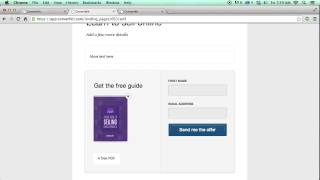
In ConvertKit, navigate to 'Forms' and create a new form. Name it (e.g., 'Brief Guide to Selling Digital Products') and switch the form type to 'Landing Page'.
ConvertKit currently offers three landing page layouts: single column, sidebar, and sliding. The presenter selects the single column layout for this example.
The landing page opens in a visual editor where you can upload graphics (like a book cover), add text, and customize all elements. The editor allows for extensive content additions.
The call-to-action button text can be changed. For a guide giveaway, use 'Send me the guide'; other options include 'Subscribe to the email course' or any custom message.
All styles and colors are customizable, including background, title text color, and button color. The presenter demonstrates changing to a tan palette and adjusting the button to a purple to match the book cover.
After saving, you can view the landing page to see the result. The presenter notes that colors may need fixing but the overall idea is clear.
The sidebar layout allows for more content and details about the giveaway on the side. Header colors and text remain customizable.
The sliding layout features a button that, when clicked, slides up to reveal a second opt-in form. This allows for two different calls-to-action. A background image can be uploaded to fill the entire area.
ConvertKit's new landing pages offer three customizable layouts—single column, sidebar, and sliding—with full control over colors, text, and opt-in forms, making it easy to create branded pages for lead generation.
How do you create a new landing page in ConvertKit?
Go to Forms, create a new form, name it, and switch the form type to 'Landing Page'.
00:01
What are the three landing page layouts available in ConvertKit?
Single column, sidebar, and sliding.
00:14
What is unique about the sliding layout?
It includes a button that slides up to reveal a second opt-in form, allowing for two calls-to-action.
03:24
Can you customize colors and text on ConvertKit landing pages?
Yes, all styles and colors are customizable, including background, title text, and button color.
01:39
Three Layout Options
Highlights the key feature of the new landing pages—multiple layout choices to suit different marketing needs.
00:14Customizable Opt-In Text
Shows how to tailor the call-to-action to match the specific offer, a crucial conversion element.
01:26Dual Opt-In Capability
The sliding layout's second opt-in is a unique feature that can capture leads at different engagement points.
03:24[00:01] I want to show you the new landing pages in ConvertKit. So first of all you can create under forms, you can create a new form. Then you can just name it and we're going to call this a brief guide to selling digital
[00:14] products and I'm going to switch it to a landing page. And we'll name that. And then you can choose between three different layouts that we have for landing pages currently. I'm going to go with our single column layout and then hit create.
[00:30] and then come into a visual editor so say to selling digital products macadam
[00:42] uh... well as a this makes the thing up can upload a graphic cd that uploaded Obviously you want to change all of this
[01:07] You can add a lot more text here. And then everything here is customizable as well. So I'm going to add that same book cover in right there.
[01:26] All that can be added. And then in here you can change it, you know, in this case we're giving away a guide, so I'm going to say send me the guide, but you can also change it to subscribe to the email
[01:39] course or whatever else you want. And also you can come up here and change all of the styles and colors. So let's find something maybe more in the tan palette. Obviously you can go for any
[01:59] colors and if you were to go with something dark you know then you can also change the title text color I'm going to undo that because I want to go with a nice light tan.
[02:19] And then this button color can change as well. You know, the same way. We'll just brighten up that blue. It's a different blue.
[02:31] You'd want to set it to something more of a purple to match the Brief Guide to Selling Digital Products cover. Maybe I'll pick something out.
[02:43] Anyway, let me save that, view the page, and here we go. There's our landing page. so we should fix that color, but you get the idea.
[02:56] We got three different landing page templates so I run you through those really quickly Let say later on we decided we want to try out the sidebar layout save that and go back to our content view it carried over that header color that we can
[03:10] change all our text can change as well and yes you can have a lot more content in here and more details on your giveaway over here and then the last
[03:24] option here under the styles is our sliding layout I'll just demo this one this one has another option so you can fill out all this content and then click
[03:39] you know subscribe or join the course or sign up for the webinar and then it slides up and here's that other opt-in so you can have two opt-ins there and you can also upload a background image to fill this entire area so those are
[03:54] the three new landing pages in ConvertKit and it's all the colors are customizable and I think you're really going to like




⚡ Saved you 0h 04m reading this? Transcribe any YouTube video for free — no signup needed.