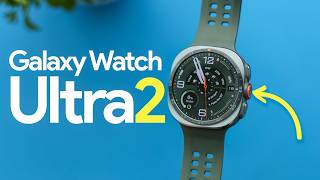

Galaxy Watch Ultra 2: 35% Bigger Battery Tested!
60sThe significant battery life improvement and the surprising charging drawback create a compelling and informative hook for tech enthusiasts.
▶ Play Clip"Delivers a thorough review with real testing data, but the title oversells slightly as it's not just 'best' but has notable flaws."
The video is an early hands-on review of the Samsung Galaxy Watch Ultra 2, focusing on its design, battery, display, fitness, health, and smartwatch features. The reviewer tests its accuracy against reference devices and provides a verdict on whether it's worth the $699 price tag compared to previous models.
The reviewer has been wearing the Galaxy Watch Ultra 2 for almost a week and aims to determine if it's worth $699 or if saving money on the Galaxy Watch 9 or Ultra is better.
The watch has an IP69K rating, 10 ATM water resistance, is 12% slimmer, has a 47mm titanium body, a 360° guard around the action button, and a new strap design with lug adapters for third-party straps.
The battery is 35% larger at 800mAh, lasting about 2.5 days with heavy usage. However, charging is slow; a quick 10-15 minute charge doesn't provide much boost.
The display is 5,000 nits, claimed to be the brightest in any smartwatch, with a 1.52-inch screen. Available in gray and silver titanium.
New features include trail running with route mapping, elevation maps, nutrition alerts, and sweat loss prediction. Diving features include decompression alerts, depth tracking, and water temperature, developed with Mayers.
Compared to an H10 ECG strap, the watch showed an R value of 99 and R-squared of 98, indicating near-perfect heart rate tracking during steady-state and interval runs.
Early tests show very positive GPS accuracy, with dual-band GPS beneficial in canyons or mountains.
Buttons don't perform workout functions during workouts; they open wallet or Gemini instead. No option to rest between laps, and screen is locked during swimming, making it hard to change workout screens.
The app has customizable tabs, advanced metrics, and connects to Strava. It provides detailed workout data, including maps, charts, and heart rate zones.
Includes vitals (HRV, heart rate, temperature, respiratory rate, blood oxygen), energy score, fitness index, and body composition. Sleep tracking compared to Muse EEG headband showed 18% error in deep sleep and 31% error in REM.
Excellent smartwatch features: Snapdragon Wear Elite chip, fast performance, LTE, music streaming, hearing protection, and Gemini integration for voice commands.
Pros: most capable Galaxy watch, solid battery, great display, jack of all trades. Cons: buttons not optimized for workouts, body composition accuracy questionable, sleep tracking errors.
If you have an older watch like Galaxy Watch 5 Pro, it's a massive upgrade. If you have last year's Ultra, you can skip. If price difference is over $100, previous Ultra is still a great buy.
The Galaxy Watch Ultra 2 is Samsung's best and most capable smartwatch, excelling as a smartwatch and offering solid fitness tracking, but it has some flaws in workout UX and sleep accuracy. It's a worthwhile upgrade for older Galaxy Watch users, but not necessary for last-gen Ultra owners.
What is the IP rating of the Galaxy Watch Ultra 2?
IP69K
00:42
What is the battery capacity of the Galaxy Watch Ultra 2?
800 mAh
01:51
How long does the battery last under heavy usage?
About 2.5 days
02:06
What is the peak brightness of the display?
5,000 nits
02:34
What is the R value for heart rate accuracy compared to H10 ECG strap?
99
05:18
What is the error percentage for deep sleep tracking compared to Muse EEG headband?
18%
12:06
What is the error percentage for REM sleep tracking?
31%
12:34
What chip does the Galaxy Watch Ultra 2 use?
Snapdragon Wear Elite
16:04
What is the price of the Galaxy Watch Ultra 2?
$699
03:31
Near-perfect heart rate accuracy
Demonstrates the watch's excellent optical heart rate sensor performance, matching a chest strap.
05:18Sleep tracking errors
Reveals significant inaccuracies in sleep stage tracking, which is critical for health-focused buyers.
12:06Excellent smartwatch capabilities
Highlights the watch's strength as a smartwatch, which is a key differentiator from fitness-focused competitors.
15:38Upgrade advice
Provides practical guidance on whether to upgrade, helping viewers make informed purchase decisions.
19:37[00:02] tons of new features, hidden design changes, a significantly larger battery, Galaxy Watch to buy. I've been wearing this for almost a week now. And this is want to give you an early look into my testing to see how accurate the heart
[00:16] even a lot of the health and wellness of changes in this watch, and I have no doubt this is Samsung's best and most capable watch right now, but it's not cheap. So, in this video, my goal is to
[00:29] answer the question, should you buy the $699 Galaxy Watch Ultra 2, or is it worth it to save some money on the Galaxy Watch 9 or Galaxy Watch Ultra in look at them side by side, the
[00:42] And speaking of that, let's start off with the design in general. One of the see, and it's the IP rating on here. This is now IP69K rated and of course 10 atmospheres of water which will be useful later on when I talk about the
[00:57] diving feature. It's also 12% slimmer, but otherwise it is a 47mm body, very much like the previous generation. You'll see the bezel now has numbers on the outside, but still the same three
[01:10] different configuration there, a little bit less color, and now we have a 360 guard around that center right action button. So, that should help to prevent experience, it actually does a pretty good job of that. We've got microphones
[01:24] left side, of course, that's useful for voice assistant, for phone calls. This is the same strap design as the previous watch, which means you just press the actually really like this. And if you want to buy third party straps on
[01:38] some that fit this now, but they also sell little lug adapters, so you could fit other, you know, basic 20 or 22 mm straps on here. The battery on the inside, as I said, is now 35% larger at
[01:51] 800 milliamp hours. Two thoughts on that. One, I did a battery test where I, watch very, very heavily. So, I charged it at 10:00 a.m. and 2 days later, it died at about 300 p.m. So, you're looking at about 2 and 1/2 days of very
[02:06] heavy usage. Considering this is an 800 milliamp hour battery, I was hoping it more efficient chip on here, and I think you could stretch it to 3 days pretty heavily, but I didn't actually have always on display on. I was just doing a
[02:21] lot with the watch. And a downside of having that larger battery without new charging technology, this takes a really long time to charge. Plugging in for like a quick little 10 or 15 minutes doesn't give you that much of a boost.
[02:34] The display on here is 5,000 nits, so incredibly bright. It's a 1.52 in display, and according to Samsung, that makes it the brightest display in any smartwatch. The build on here, very much like last year, comes in two colors,
[02:48] gray and silver. Both are titanium, 47 millimeter body, 12% slimmer in this profile, so less likely to get caught on long sleeves. And this now has three can see right here, this green one. I actually really like this. It's thinner.
[03:03] big fan of this one. Compared to last year's like really thick, bulky band that honestly collected a lot of dust, this one's much better. They also have peak form which is like a silicone hybrid and trail which is a fabric band.
[03:16] bands are out there. So, that's the outside design of this watch. There's got a new chip as I'll talk about later on with a speed test. This also does with LTE. And that's why the price for this is just set at $699. There's no
[03:31] variations in size or LTE or anything like that. And I will have links down this. Uh you could save some money. I think Samsung has some like early pre-order bonuses. Um, I'll have those links in the description and also
[03:43] products. So, depending on if you're watching like mobile, TV, desktop, the screen here or just check out the description for those links. I'll also have links to the best sale prices on the previous generation. And of course,
[03:57] later in the video, I'll talk about if I think you should save the money and buy get this new one. Now, I think people are going to use this for three main things. Fitness and workouts, health tracking, and just as an everyday kind
[04:10] smartwatch. So, I want to break this video into those three chapters. workouts. There is some new stuff on here. For example, trail running, which allows route mapping on there. You get an elevation map, nutrition alerts.
[04:24] file to the watch, and it'll kind of going to predict sweat loss and helps you plan when you're running through the mountains. And kind of the opposite of that, this also has diving on here. So,
[04:36] Samsung partnered with Mayers. They made a new app for Samsung. I'm not a scuba it, but at least from what I understand right now, this has like compression decompress, speed alerts, depth tracking, water temperature, and things
[04:50] like that. And much like the Apple Watch Ultra, this will just automatically open meter of depth. So, there are a couple new things. Those as of right now are not rolling out to the previous generation. Although I highly suspect a
[05:03] lot of these features will work their way to other Samsung watches. As far as about like just a regular workout people do every day. I went for a run with this and I have to say this is a very big positive compared to an H10 ECG strap
[05:18] which is our reference device. I was on a treadmill and this did an incredible job. The R value is 99 and an R squar of 98. For reference, closer to 1.0 is better, which means that these are nearly perfect. And I was steady state
[05:32] for most of the run, but I did two heavy intervals at the end and it tracked those very well. Also, now optical heart rate sensors very often lag when you intervals can be very difficult. And you'll see there is a little bit of lag
[05:45] I did this on a treadmill, not outside, so it is a little bit easier. But I did that because I mean the wildfire smoke here has it looking like Star Wars with this in the future. And by the way, if you guys want to see the future test
[05:59] results, I'm going to be wearing this for an entire month testing it very extensively. Be sure to subscribe to the channel so you don't miss that video. So as far as GPS accuracy goes, early tests on this show very positive results.
[06:11] Unsurprisingly, it was good last year as well. And this has dualband GPS which should be beneficial if you're in uh you know canyons or big mountains around you don't have like a really big clear view of the sky. Dualband can be very very
[06:24] helpful as far as the workout experience goes. So I've talked a lot about and it does a really good job. It's very very accurate. But I have a little bit of a a complaint about the workout experience. So when you're wearing this
[06:37] watch the buttons don't do workout things. The buttons keep doing buttons are going to like open up Samsung wallet or open up Gemini or open are just not related to what I want. So, there's no option, for example, to rest
[06:51] between laps. I know it automatically does that and it does actually a really pause and see how long I'm resting, how long my immediate intervals were on the watch. You also can't change the workout screen because when you're swimming,
[07:05] everything is, you know, touch and swipe on here, but swimming locks the screen So, what you do, let's say, for example, if you accidentally push this big orange button on the side, and it opens up a stopwatch, then stop the stopwatch,
[07:17] switch back to your workout app, pause it, and restart it. So, that then you that is so annoying and useless. I really wish the buttons would just do only workout things when you're in a workout. I don't need my wallet during
[07:30] literally no way to switch your workout screens during a swim unless you turn swipe. Like if you have multiple displays, like you want to show your lap on different screens. That's annoying. And swimming is not the only offender
[07:45] uh your hands are very likely sweaty and wet hands and touchcreens just don't complaint. But of course, positives, it was still great at detecting what stroke
[07:57] swimming, uh even heart rate was surprisingly good in this in the pool. Um overall, great display to read. I like working out with this. just awful user experience with those buttons. Especially because unlike, you know,
[08:10] many Garmin devices or even the Pixel Watch and Apple Watch, this has no rotating bezel or rotating crown and relies purely on the buttons which do touchcreen which is off when you're swimming. Okay, so I'll get off my soap
[08:23] this watch. feels like it's really catered towards working out, but at the same time, it feels like the people who designed it like didn't do swim workouts with it and compare it to other good fitness watches. Now, getting into the
[08:36] that I really like here. So, there are two apps with this watch. You're going all of the analytics you're getting. And you've got all these tabs across the dashboard, and you can customize everything this is showing you. Mostly,
[08:49] I have it set up to show me like health stuff, but you've got activity here. So, example, activities this week. I can go down and check out this run I did yesterday. And within that, you've got a lot of details, uh, you know, pace,
[09:02] expect, but you've got maps and charts down there if you want to see your heart rate zones. And what I really like is the advanced metric. So, it feels like it really is collecting a lot of data and giving you useful information for
[09:15] have been doing this for a little while, but again, I just wanted to point it out that I like it. Like for example, I need to improve my my stiffness while I run. well and it does connect to Strava, so you'll automatically have your workout
[09:27] synced over there. So in summary, workouts are very capable, very triathlons, trail running, and of course the basics like running and swimming. buttons. Now the next thing is going to be health and wellness. Now we have a
[09:41] be wearing this watch would be health and wellness. Think about tracking sleep There's a lot here. Samsung really loads this with a lot of features. So, looking at the app again, you've got those six tabs. Going back to my dashboard, one is
[09:55] called vitals. So, vitals, it takes like six or seven days, it looks like seven day, seven nights to actually get this calibrated, but it's using five metrics. Your heart rate variability, heart rate, temperature, respiratory rate, and blood
[10:07] oxygen. After seven nights, you get your baseline. I think Apple Watch does just cool that you can see, you know, this all in one nice clean metric. At tabs there. Activity, sleep, vitals, mindfulness, and nutrition, which by the
[10:21] way, for nutrition, you are able to like scan labels and stuff. Pretty useful. score. So, if I scroll down, heart health right here is based on four activity, and your estimated blood pressure. Interestingly, none of those
[10:34] but it makes sense these factors would be your general heart health. And uh because it's still waiting to calibrate on the blood pressure. Samsung also added daily cardio load which helps you understand when to push or rest. And one
[10:47] of my favorite ones is if I go over to activity, I can scroll down and we have a fitness index. Now, this is a little pentagon chart. So, five things here. obviously have to measure that on the watch. Uh cardio, endurance, strength,
[11:00] and the interesting one is flexibility. I'm not sure exactly how it's estimating flexibility. It tells you it's doing it based on your body composition, and it your body comp shows. Um, but again, it's not like asking you like, "Can you
[11:13] So, that one's a little bit interesting, but it's nice that based on this, it can give you personalized training recommendations and workout programs. Overall, I think this is actually a pretty useful page to have just as like
[11:25] a general goal. I personally really like how, you know, some devices gify things and have like fitness age or whatever. Like a fitness index makes sense to me. tracking features on a watch is going to be sleep, which is why it has this whole
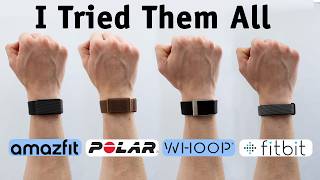
[11:38] tab here. I compared this to the Muse EEG headband. So, I really wanted to REM. So, if you're tracking your sleep stages, then those are the two that are going to be most restorative. So, I wore the Aura Ring, the Fitbit Air, the
[11:52] headband. So, the headband is our 1 hour and 12 minutes of deep sleep, and the Aura Ring 5 gave me 1 hour 15 minutes, so about 3 minutes off. The Fitbit was exactly right at 112, and the
[12:06] Galaxy Watch had 59 minutes. So that gives you a 4% error on Aura, 0% on Fitbit, and 18% on Galaxy Watch Ultra 2, which is not a strong start. Then for the REM sleep, I had 1 hour and 14 minutes of REM. The Aura gave me 1 hour
[12:20] 23, the Fitbit hour 21, and the Galaxy Watch 1 hour 37. So it underestimated deep sleep, overestimated REM. Maybe some transition in there it just didn't quite get right. But that gives you 12% error on the Aura, 9 12% on the Fitbit,
[12:34] and 31% error on the Galaxy Watch. Now, it's generally not the strongest start for sleep tracking. However, I still think that while those are very important, generally tracking one night
[12:47] versus the next matters a lot more. So, if Galaxy's always estimating low on consistent, that makes sense. As I wear this for a month, I'll see if that is the case. And of course, heart rate variability, resting heart rate, motion,
[12:59] temperature, blood oxygen, all of those things play a huge role in how well you are recovered the next day. And Galaxy, as you saw before, does an excellent job confidence there. Heart rate variability, I was tracking 82 last
[13:13] night, 70 on Fitbit, 77 with Aura. Without a reference device, I can't say which one is actually correct, but I have a lot of confidence in the Galaxy the sleep tracking, I have a lot of confidence in many of the metrics, just
[13:26] sleep stages right now. But as I continue to wear this, I will record the anecdotes of like how do I actually feel and what is the sleep score and I'll put that in the one month later video. Much like last year, Samsung has antioxidant
[13:39] the back of the watch. Basically tells you how many carrots you eat. The energy score is basically like a recovery score. So it's going to be based on a lot of the big metrics like how long did you sleep, was it consistent sleep, uh
[13:51] your heart rate variability. I think that's a really big one right here. And that it doesn't just give you the score. It goes into detail into what you can actually improve, which apparently I don't have anything to improve there. I
[14:04] really well last night, but I will be flying a lot, so I'm going to see how it update continuously throughout the day. It's not like Garmin body battery. It's score in the morning to let you know how much you should really push today. As
[14:18] far as body composition goes, this is something that is really foundational in a lot of like for example fitness index. And I don't have the highest confidence in the accuracy here. Now, I didn't do a DEXA scan, but just looking at general
[14:31] next. I've been using the Wings body scan 2 for about 2 weeks now, and that measures between like upper tens and upper 12% body fat, which I'm not I
[14:43] but having that range makes a lot of sense to me. Like that's going to be a reasonable inaccuracy. About a 7% change dayto-day. Not great, but in the 3 weeks I've used it, it's always been within that window. The Galaxy Watch, however,
[14:57] yesterday was 15 1.5%, today was 18% body fat. So, not only is it offset a lot higher, but a 16% change between the two of those is pretty dramatic in my I know I could talk about this all day, but very, very extensive. I expect most
[15:12] priorities with this watch based on your goals, but I appreciate how many options there are here. And Samsung does a really good job of giving you like one index, energy score, fitness index, something like that. And then you can
[15:25] dive deeper into see what variables actually change it. They're not opaque third category in this video, probably the main one I think people would be buying this smartwatch for, even though it's obviously marketed to be, you know,
[15:38] I mean, if you only cared about fitness watches give you like a 30-day battery life, and they do fantastic jobs tracking your fitness and your health. So, the main reason you would get this
[15:51] watch in the first place over a Garmin or a Sundto or or a Mazefitit is going to be the smartwatch abilities. And this thing is an excellent smartwatch. This the Snapdragon Wear Elite. So, let's do a little speed test here comparing this
[16:04] to the previous generation Galaxy Watch Ultra. I mean, honestly, based on this, definitely faster. The previous watch was already pretty quick, though. So, opening apps, opening, you know, Google Play or whatever, even asking Gemini,
[16:16] difference. So, yeah, it's a little efficient. But, as far as speed goes, I don't know if that's going to be enough to justify upgrading over the previous generation or even choosing the newest
[16:29] Obviously, longevity is something to factor in, and I'll talk about that in a second, but other things to consider. This is in the Samsung ecosystem. So, if they'll connect to your watch very easily. But you can also connect other
[16:42] on your watch. It'll automatically sync with your phone if you have downloaded files on your phone. But you can also set up, you know, Spotify or SoundCloud or a number of other music streaming services. And you can usually, you know,
[16:54] example, you can download the songs to your watch and go for a run without your phone. If you pay for an LTE plan, then you don't need to download the songs. obviously has LTE. This also has a hearing protection feature and I think
[17:08] because it's just always listening for loud sounds. I found it was quite nice. there's a nice reminder where it says, "Hey, you're over 90 dB. Uh 30 minutes damage. Maybe try some earplugs." And the biggest feature, let me put my watch
[17:24] last year. I've been using it so much. biggest complaint about smart watches like this that don't have the rotating like swipe up and finding the apps is so annoying. Like on the Apple Watch, it's
[17:38] something. And I mean eventually you get used to the icons, but it's just so much easier and faster to just lift your watch up and ask Gemini to, you know, do obviously Gemini related like answering questions, but it can also do stuff on
[17:53] the watch. It doesn't usually interpret data, but it'll redirect you. For this week?" It opens Samsung Health and it shows me, you know, I can dig into different activities I've done. Start a run workout that burns 150
[18:08] Start a run workout that burns 150 calories. or example, if I say open Strava, it just opens the Strava app. It's really
[18:20] nice. And as far as smartwatches go, I think this is very, very well done. As I speaker and microphone on board. So, you can field phone calls with this. You can [clears throat] number of different things, also alerts or like coaching
[18:33] you know, different cues. But, let's get into the pros and the cons of this watch. So, pros, this is definitely the most capable Galaxy watch. Solid battery life, great display, great features, overall really good at pretty much
[18:46] everything. Really a jack of all trades, but not everything is perfect. So, like I said, if you care about this as a smartwatch, definitely solid smartwatch. If you care about it mostly for fitness and health, it's kind of a little
[18:59] tougher competition because you've got the Garmins and the Sundtos out there example, a flashlight on your watch, which if you've never used it, you're flashlight on your watch right now, you're going to know how incredible that
[19:11] feature actually is. The buttons not doing workout things makes it feel a little bit less optimized for working out and things like that. And even through a pretty decent length triathlon, it feels like it's not quite
[19:24] all the way there. But for a smartwatch, like I said, this is a fantastic smartwatch, no doubt. So, is it worth it? Well, let's go through who might be buying this watch. If you have a much older watch like the Galaxy Watch 5 Pro,
[19:37] this is a massive upgrade. You should absolutely get this one. If you have last generation Galaxy Watch Ultra, I think you can skip this one. Like, the lot of them are feature-based and I have a feeling that many of the features will
[19:51] buy and just get into the Samsung ecosystem, do you want this, the Galaxy Watch 9, the Galaxy Watch 8 Classic, or Ultra? I will have links to all of them down below. What I recommend you do is
[20:05] go down and check out what the prices and benefits actually are. Sometimes Samsung has a lot of promos on this and it might really be worth it just to get futurep proof then. This is going to last a longer time, more updates, the
[20:19] larger battery does have a big advantage. But if you see a difference of more than, I would say, $100, yeah, the previous Galaxy Watch Ultra is still a great buy. It's still an excellent device, and I was wearing it just
[20:32] earlier this week before I switched over to the Ultra 2. So, that's my take on comment down below with any questions you have, any tests I should do before the 1 month later update, and any comparisons you would like to see. Like,
[20:45] Ultra? Should I compare this to a Garmin? Or should I compare it to like the Pixel Watch or just other Galaxy Watch devices? Thanks for watching. Watch devices? Thanks for watching. Subscribe and I'll see you in the next
⚡ Saved you 0h 20m reading this? Transcribe any YouTube video for free — no signup needed.